
CoinCap MCP Server
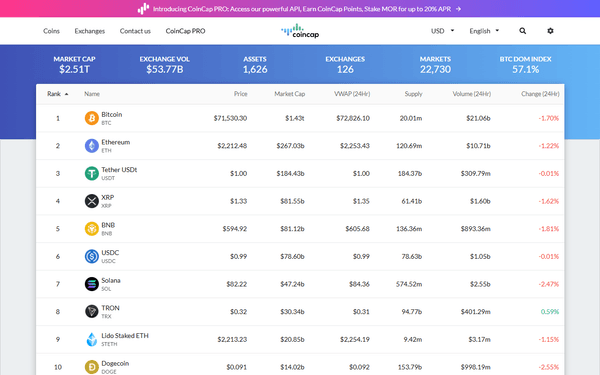
Get real-time cryptocurrency prices, market data, exchange rankings and OHLCV candles — no API key required.
Ask AI about this MCP Server
Vinkius AI Gateway supports streamable HTTP and SSE.
Works with every AI agent you already use
…and any MCP-compatible client









What is the CoinCap MCP Server?
The CoinCap MCP Server gives AI agents like Claude, ChatGPT, and Cursor direct access to CoinCap. Get real-time cryptocurrency prices, market data, exchange rankings and OHLCV candles — no API key required. Powered by the Vinkius AI Gateway — no API keys, no infrastructure, connect in under 2 minutes.
CoinCap MCP Server: see your AI Agent in action
Built-in capabilities (9)
get_asset
Returns the current price in USD, market cap, 24h trading volume, price change percentages (1h, 24h, 7d), circulating supply, total supply, max supply and rank. Asset IDs are lowercase with hyphens (e.g. "bitcoin", "ethereum", "solana"). Get detailed info for a specific cryptocurrency
get_asset_history
Returns daily or interval-based price snapshots. Use interval to specify the data granularity: "m1" (1 minute), "m5" (5 min), "m15" (15 min), "m30" (30 min), "h1" (1 hour), "h2" (2 hours), "h6" (6 hours), "h12" (12 hours), "d1" (1 day). Get historical price data for a cryptocurrency
get_candles
Each candle includes the open, high, low, close prices and volume for the time interval. Supports intervals: "m1", "m5", "m15", "m30", "h1", "h2", "h6", "h12", "d1". Optionally set start/end timestamps (milliseconds since epoch) for historical data. Get OHLCV candlestick data for technical analysis
get_exchange
Returns the exchange name, website, 24h volume, number of markets, rank, verification status and supported assets. Exchange IDs are lowercase (e.g. "binance", "coinbase-pro", "kraken"). Get detailed info for a specific cryptocurrency exchange
get_markets
Each market includes the exchange ID, base asset ID, quote asset ID, trading pair symbol, current price, 24h volume in USD and volume percentage. Optionally filter by asset ID or exchange ID. Get trading markets/pairs for assets or exchanges
get_rate
Returns the current rate for converting the asset to its corresponding fiat currency. Base IDs are typically asset IDs like "bitcoin", "ethereum" or fiat codes like "USD". Get a specific exchange rate
get_rates
). Returns the rate ID, symbol, currency symbol and current rate. Optionally filter by base currency. Get exchange rates for cryptocurrencies to fiat currencies
list_assets
Optionally search by name, filter by specific IDs, and paginate with limit/offset. Returns assets sorted by market cap by default. List cryptocurrency assets with prices and market data
list_exchanges
Each exchange includes its ID, name, website, 24h volume in USD, number of markets, rank and whether it's verified. List cryptocurrency exchanges with rankings
What this connector unlocks
Connect to CoinCap APIs and access real-time cryptocurrency market data through natural conversation — no API key needed.
What you can do
- Asset Prices — Get current prices, market caps, 24h volume and supply info for any cryptocurrency
- Asset Search — Search for crypto by name or symbol (Bitcoin, Ethereum, Solana, etc.)
- Historical Prices — Retrieve price history with configurable intervals (1m to 1d)
- Markets — See which exchanges list specific trading pairs and their 24h volumes
- Exchange Rankings — Browse exchanges ranked by 24h volume with verification status
- OHLCV Candles — Get candlestick data for technical analysis with multiple timeframes
- Exchange Rates — View crypto-to-fiat conversion rates
How it works
1. Subscribe to this server
2. No API key needed — start querying immediately
3. Get crypto data from Claude, Cursor, or any MCP-compatible client
No API key required — completely free with 30 requests/second.
Who is this for?
- Traders — check real-time prices, compare exchange listings and review trading pair volumes
- Developers — access crypto market data without authentication for dashboards and bots
- Researchers — explore historical price data, exchange rankings and market trends
Frequently asked questions
Give your AI agents the power of CoinCap
Access CoinCap and 2,500+ MCP servers — ready for your agents to use, right now. No glue code. No custom integrations. Just plug Vinkius AI Gateway and let your agents work.