
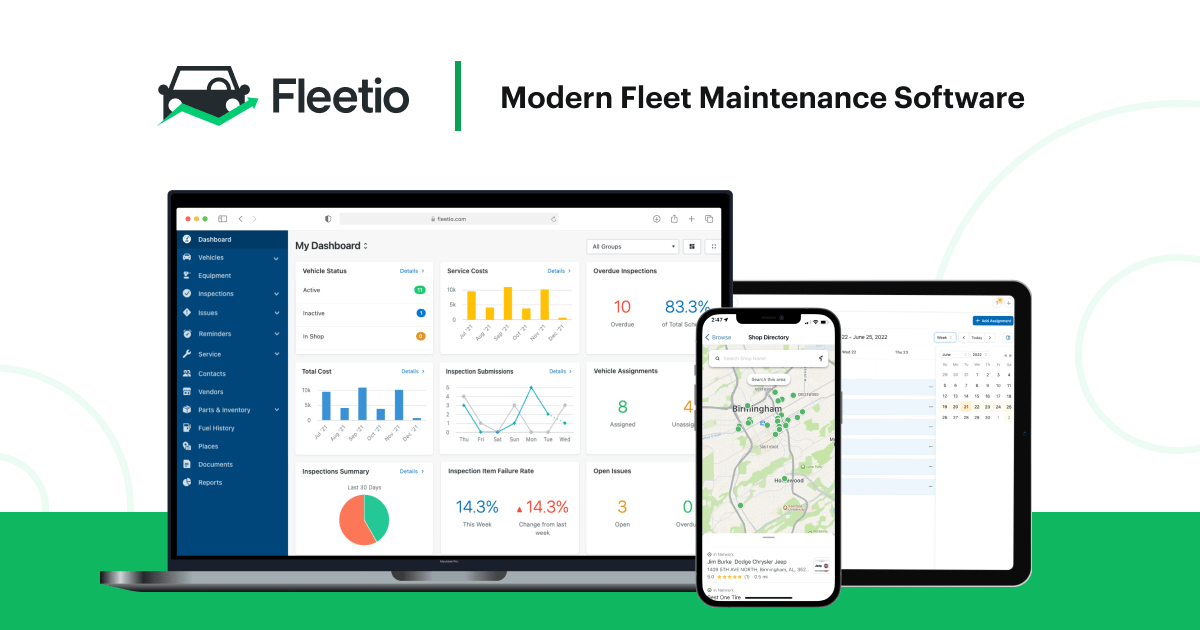
Fleetio MCP Server
Manage vehicles, track maintenance, and monitor fuel entries via AI agents with Fleetio.
Vinkius AI Gateway supports streamable HTTP and SSE.
Works with every AI agent you already use
…and any MCP-compatible client









Fleetio MCP Server: see your AI Agent in action
Built-in capabilities (12)
create_issue
Report a new issue
create_meter_entry
Add vehicle meter reading
get_issue
Get issue details
get_service_reminder
Get reminder details
get_vehicle
Get vehicle details
list_contacts
List fleet contacts
list_fuel_entries
List fuel entries
list_issues
List vehicle issues
list_service_reminders
List service reminders
list_vehicles
List all vehicles
list_vendors
List fleet vendors
list_work_orders
List work orders
What this connector unlocks
Connect your Fleetio account to any AI agent and automate your fleet management workflows through the Model Context Protocol (MCP). Fleetio provides a centralized platform for tracking vehicle data, maintenance schedules, fuel consumption, and compliance. Now, you can monitor your fleet operations directly through natural conversation.
What you can do
- Vehicle Management — List all vehicles in your fleet, fetch detailed metadata including VIN and license plates, and retrieve specific vehicle profiles.
- Maintenance Tracking — Monitor reported issues, list active work orders, and fetch upcoming service reminders to keep your fleet in top shape.
- Meter & Data Entry — Record new odometer or hour meter readings and report new vehicle issues directly from the agent.
- Fuel Monitoring — Retrieve historical fuel entries to track consumption and costs across your operations.
- Directory Access — List organization contacts (drivers, managers) and vendors/service providers for better team and supplier context.
- Real-time Monitoring — Fetch specific maintenance reminders or issue details to ensure operational safety and compliance.
How it works
1. Subscribe to this server through the Vinkius Marketplace
2. Enter your Fleetio API Key and Account Token (found in Settings > Manage API Keys)
3. Start managing your fleet operations from Claude, Cursor, or any MCP client
Who is this for?
- Fleet Managers — quickly check vehicle statuses or upcoming maintenance while planning operations.
- Operations Supervisors — get a real-time overview of reported issues and work orders through simple AI commands.
- Logistics Coordinators — automate the retrieval of driver contact information and vendor details for faster coordination.
Frequently asked questions
Give your AI agents the power of Fleetio
Access Fleetio and 2,000+ MCP servers — ready for your agents to use, right now. No glue code. No custom integrations. Just plug Vinkius AI Gateway and let your agents work.
More in this category
Axle
12 toolsFleet management and logistics automation — track vehicles, manage drivers, and monitor loads via AI.

John Deere
7 toolsMonitor farm operations via John Deere APIs — track machines, map fields, review planting and harvest data from any AI agent.

Omnitracs Fleet Intelligence
10 toolsManage your fleet and logistics via Omnitracs — track vehicles, drivers, and shipments directly from your AI agent.
You might also like
Internet Archive Metadata
10 toolsGet detailed metadata, files, reviews, and stats for any Internet Archive item.
Birdeye
10 toolsManage reputation and customer experience via Birdeye — list reviews, manage contacts, and trigger surveys directly from any AI agent.
CoderPad
8 toolsManage technical interviews and assessments via CoderPad — create pads, track interview events, and audit the question bank directly from any AI agent.