
AirLabs MCP. Track real-time flights & analyze global aviation data.
 Gemini
 Works with every AI agent you already use
…and any MCP-compatible client









Just plug in your AI agents and start using Vinkius.
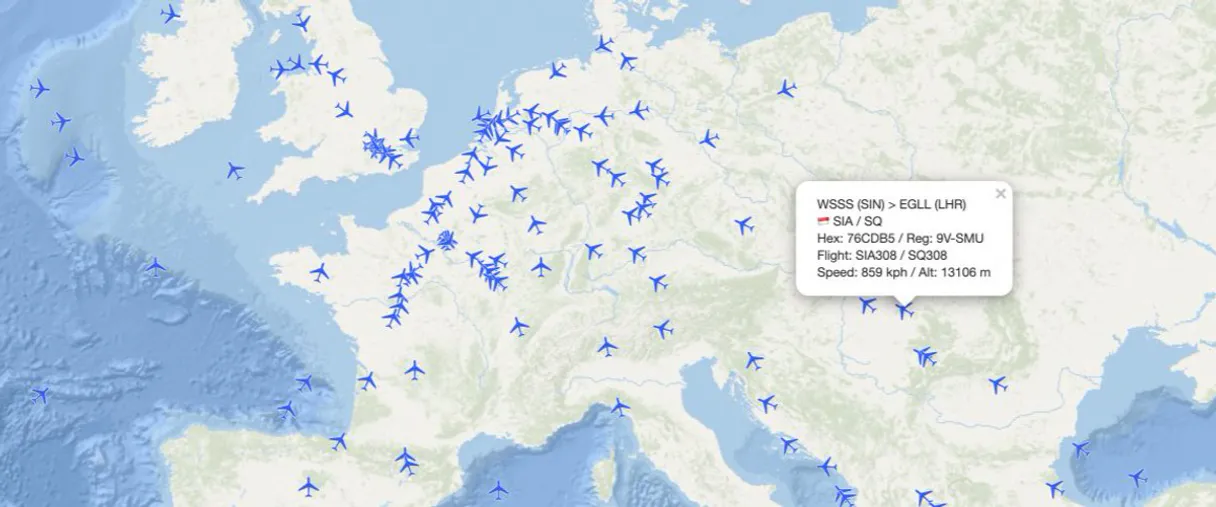
AirLabs connects your AI agent directly to global aviation data. Track real-time flights by flight number or hex code, search 50,000+ airports worldwide, and analyze airline fleets and routes instantly.
Check airport delays, monitor live departures, or research aircraft specs—all from a natural conversation.
What your AI agents can do
Autocomplete airport
Suggests matching airports instantly when you type partial names or codes, providing IATA and ICAO details.
Get aircraft
Looks up full specifications for a specific aircraft using its unique transponder hex code.
Get airline fleet
Retrieves the complete list of aircraft belonging to an airline, including model and age.
Search for live flights worldwide by airline, route, hex code, or geographic bounding box to get real-time status updates.
Query airport databases for detailed location info (coordinates, time zone) and check current operational metrics like delay statistics.
Retrieve a complete list of an airline's aircraft fleet details, including model, age, and status.
Get comprehensive lists of all arrivals or departures at any specific airport terminal.
Find the closest airports (large, regional, or general aviation) to a given geographic coordinate.
Ask AI about this MCP
Supported MCP Clients
Gemini Waiting for input…
AirLabs MCP Server: 12 Tools for Aviation Data
Use these tools to query flight status, airport metadata, airline fleets, and global route networks with real-time data.
019d754aautocomplete airport
Suggests matching airports instantly when you type partial names or codes, providing IATA and ICAO details.
019d754aget aircraft
Looks up full specifications for a specific aircraft using its unique transponder hex code.
019d754aget airline fleet
Retrieves the complete list of aircraft belonging to an airline, including model and age.
019d754aget airline routes
Shows all route pairs operated by a specific airline, along with service frequency and days of operation.
019d754aget airlines
Searches the global database to retrieve metadata for any airline, like its fleet size or hub airports.
019d754aget airport delays
Checks current average departure and arrival delay statistics for a specific airport location.
019d754aget airports
Retrieves detailed information on any airport, including its coordinates and operational status.
019d754aget flight info
Gets comprehensive details for a single flight number, including gates, terminals, and estimated arrival times.
019d754aget flights
Searches for all active flights worldwide based on filters like airline code, altitude, or geographic box.
019d754aget flights by airport
Lists all arriving or departing flights at a specific airport, including terminal and gate information.
019d754aget nearby airports
Finds and lists all airports within a search radius of provided geographic coordinates.
019d754aget schedules
Returns full flight timetables for specific routes or airport pairs, including service frequency and operating days.
Choose How to Get Started
Build a custom MCP for your own tools, or connect a ready-made integration from our catalog.
Build Your Own
Turn any API into an MCP. Import a spec, define Agent Skills, or deploy with MCPFusion.
- Import from OpenAPI, Swagger, or YAML specs
- Create Agent Skills with progressive disclosure
- Deploy to edge with MCPFusion framework
- Built in DLP, auth, and compliance on every call
- Real time usage dashboard and cost metering
- Publish to catalog or keep private
Make Your AI Do More
Start with AirLabs, then connect any of our 4,700+ other servers whenever your AI needs more. One click, no limits.
- Use this MCP plus 4,700+ others, all in one place
- Add new capabilities to your AI anytime you want
- Every connection is secured and compliant automatically
- Track usage and costs across all your servers
- Works with Claude, ChatGPT, Cursor, and more
- New servers added to the catalog every week
What you can do with this MCP connector
Your AI agent connects directly to the global AirLabs aviation data feed. You'll get full control over tracking everything from live flights to complex airline logistics. It’s like having an FAA operations analyst sitting right next to your desk.
Tracking Active Flights
To search for active flights worldwide, use get_flights. You can filter the entire global database by airline code, altitude level, or even a geographic bounding box. For live status updates on a specific flight number, call get_flight_info. That tool pulls comprehensive details—you'll get the gate number, terminal assignment, and estimated arrival time for that single journey.
If you need to know every flight arriving or leaving one location, use get_flights_by_airport to list all arrivals or departures at a specific airport terminal and gate.
Analyzing Airport Data
When you're dealing with airports, first run autocomplete_airport. This suggests matching airports instantly as you type partial names or codes, giving you the IATA and ICAO details right away. To get detailed location info for any field, use get_airports; this returns coordinates and operational status. For delay stats, check current average departure and arrival delays at a specific spot with get_airport_delays.
If you need to find airports near your coordinates, run get_nearby_airports, which lists every airport within a specified search radius.
Researching Airline Fleets & Routes
To start researching carriers, use get_airlines to pull metadata for any airline. This gives you basic facts like its fleet size or primary hub airports. For deep dives into an airline’s equipment, run get_airline_fleet. This retrieves a complete list of the carrier’s aircraft, telling you the model and how old it is.
Want to know where they fly? Use get_airline_routes to show every route pair that specific airline operates. That tool details service frequency and which days of the week they run. You can also use get_schedules, which pulls full flight timetables for major airport pairs or specific routes, detailing operating frequency and service dates.
Specific Aircraft Lookup
Need to check a plane's specs? Use get_aircraft with its unique transponder hex code. This looks up the full specifications for that particular aircraft type.
How AirLabs MCP Works
- 1 Subscribe to this server and enter your unique AirLabs API key.
- 2 Pass the API key into your preferred MCP-compatible AI client (Claude, Cursor, etc.).
- 3 Ask your agent a question, like: 'Show me all delayed flights at JFK today.' The agent runs the necessary tool calls using the API key.
The bottom line is you get aviation data analysis directly in conversation, without leaving your AI client.
Who Is AirLabs MCP For?
This is for operational roles that live and breathe global movement. It's the airline analyst who needs to compare competitor route networks; it’s the travel planner checking JFK delays before booking a trip; and it’s the airport operations manager monitoring terminal load factors in real-time.
Compares rival carriers' fleet sizes or maps out competitor route networks for market intelligence.
Checks specific flight schedules and airport delay trends before finalizing travel itineraries.
Monitors real-time arrival/departure boards or checks for unexpected operational delays at a hub.
What Changes When You Connect
- Get instant operational metrics. Use
get_airport_delaysto check current departure and arrival delay stats for any airport, letting you predict delays before they happen. - Analyze competition with ease. Call
get_airline_routesto map out an entire rival airline's route network or hub/spoke structure in one query. - Handle live tracking efficiently. Use
get_flightsto search for active flights globally by criteria like altitude range or geographic bounding box, not just flight number. - Build better travel plans. Combine
autocomplete_airportwithget_airportsto find the exact location data needed when a user only provides a city name. - Know your aircraft. Use
get_aircraftwith a hex code to pull specific registration details, model type, and manufacturer specs for any transponder in flight.
Real-World Use Cases
The Trip Planner's Dilemma
A traveler needs to know if their connecting flight is risky. They ask the agent: 'What are the current delays at ORD, and what flights are departing in the next hour?' The agent runs get_airport_delays first, then uses get_flights_by_airport to pull a live departure board list, solving the problem instantly.
The Competitor Analyst
An analyst needs to compare Delta and United's coverage in Europe. They ask: 'What are all the routes operated by both airlines between London and Frankfurt?' The agent calls get_airline_routes for both carriers, compiling a direct comparison of their respective networks.
The Ops Manager on Duty
An airport manager needs to know what services are available near an emergency landing zone. They ask: 'What airports are within 50 miles of these coordinates?' The agent uses get_nearby_airports, providing a list of operational options and their distance.
The Aircraft Enthusiast
A hobbyist spots an unknown aircraft transponder code during flight tracking. They ask: 'What is this hex code?' The agent runs get_aircraft using the hex code, immediately returning the full registration and model details.
The Tradeoffs
Searching for a single airport.
Trying to find Heathrow's ICAO code by guessing or cross-referencing old PDFs. It’s slow, inaccurate, and requires multiple searches.
→
Always start with autocomplete_airport using the partial name 'Heath'. This gives you instant suggestions for codes, types, and full names.
Finding all flights in a region.
Asking the agent to just 'show me air traffic over New York.' The agent fails because it needs specific coordinates or flight filters.
→
Use get_flights and provide a precise geographic bounding box (latitude/longitude) for your search. This focuses the real-time data accurately.
Checking future schedules.
Asking 'What's the schedule from JFK to LHR next Tuesday?' without specifying the date or scope, leading to ambiguous results.
→
Run get_schedules and specify both the departure IATA (JFK) and arrival IATA (LHR), plus a desired date range for accurate timetables.
When It Fits, When It Doesn't
Use this MCP Server if your problem involves movement, location, or time: tracking flights in real-time, mapping airline routes, calculating delay metrics, or identifying airport coordinates. It’s the core toolset for aviation intelligence.
Don't use it if you are simply trying to manage calendar invites or read general business news—that data doesn't live here. If your need is purely qualitative (e.g., 'Write a report about global air travel'), use this to gather facts, but another tool should write the narrative. Always cross-reference flight status with both get_flights and get_flight_info for maximum detail.
Independent Platform Disclaimer: Vinkius is an independent platform and is not affiliated with, endorsed by, sponsored by, verified by, or otherwise authorized by AirLabs. All third-party trademarks, logos, and brand names are the property of their respective owners. Their use on this website is strictly for informational purposes to identify service compatibility and interoperability.
VINKIUS INFRASTRUCTURE
Cloud Hosted
Managed infra
V8 Isolated
Sandboxed per request
Zero-Trust Proxy
No stored credentials
DLP Enforced
Policy on every call
GDPR Compliant
EU data residency
Token Compression
~60% cost reduction
Works with Claude, ChatGPT, Cursor, and more
The Model Context Protocol standardizes how applications expose capabilities to LLMs. Instead of operating in isolation, your AI gains direct access to external platforms, live data, and real-world actions through secure, standardized connections.
This server provides 12 capabilities that interface natively with Claude, ChatGPT, Cursor, and any MCP client. No middleware. No custom integration required.
Available Capabilities
Manually checking airport statuses is a nightmare of tabs and phone calls.
Today, figuring out if JFK is running late means opening the airline's website, then switching to FlightAware, maybe checking Google Maps for weather delays. You end up clicking through multiple dashboards just to compile one status report, wasting twenty minutes of your day.
With AirLabs MCP Server, you ask your agent directly: 'What are the average departure and arrival delays at JFK?' The agent runs `get_airport_delays` and gives you a single number with historical context. Done.
Get Flight Status Details with get_flight_info
Before, if you only had the flight number (e.g., UA123), you'd have to guess what airport it left from or arrive at, and then manually check separate pages for gate numbers, terminal assignments, and actual status vs. scheduled time.
Now, calling `get_flight_info` provides all that data in one structured output: the airline, the aircraft type, both terminals/gates, and the precise difference between estimated and actual times.
Common Questions About AirLabs MCP
How do I find out what planes a specific airline flies? +
Use get_airline_fleet. This tool pulls the complete list of aircraft for any given carrier, detailing their model, age, and operational status.
Can I search for flights that are currently in the air right now? +
Yes, use get_flights. You can filter active global movements by airline code, altitude range, or a specific geographic bounding box to track live activity.
What is the best way to find an airport's coordinates and type? +
Use get_airports and provide the city name or IATA code. This tool returns detailed location data, including latitude, longitude, elevation, and if it’s a large or small field.
I want to know all potential routes between two cities. +
Run get_schedules. Specify the origin IATA code, the destination IATA code, and the date range. This gives you full timetables, frequency counts, and operating days.
How do I check for delays at an airport? +
Use get_airport_delays. Simply provide the airport's IATA code (e.g., 'JFK'), and it returns current average delay minutes, on-time percentage, and cancellation rates.
How do I authenticate the AirLabs Data API key for my AI agent? +
You must enter your unique API key in the server's settings dashboard. This process links the MCP Server to your specific account, which manages usage limits and ensures all data calls are authenticated.
What is the required input format when using the get_aircraft tool? +
The get_aircraft tool requires a unique 6-character Hex code. This transponder ID must be pulled from real-time flight tracking data to accurately retrieve the aircraft's registration and full specifications.
How does the get_flights_by_airport tool distinguish between arrivals and departures? +
You specify a 'departure' or 'arrival' parameter in your query. This filters the results, providing you with a complete list of only inbound or outbound flights for that airport.
Can my AI search for all active flights operated by a specific airline like United or Delta? +
Yes! Use the get_flights tool with the airline IATA code parameter (e.g., "UA" for United, "DL" for Delta, "BA" for British Airways). Your AI agent will return all currently active flights with flight numbers, aircraft types, departure and arrival airports, current positions, altitudes, speeds, and flight statuses. For a complete list of all routes that an airline operates, use get_airline_routes with the same airline IATA code. This gives you both real-time operational data and the full route network.
How do I check flight schedules between two specific airports for travel planning? +
Use the get_schedules tool with the airline IATA code, and optionally the departure airport IATA (dep_iata) and arrival airport IATA (arr_iata) parameters. For example, to see all schedules from JFK to LAX, you would specify dep_iata="JFK" and arr_iata="LAX". The API will return all scheduled flights with airlines, flight numbers, aircraft types, departure and arrival times, and days of operation. You can also filter by a specific date to see schedules for your exact travel day.
Can I look up the complete fleet composition and aircraft details for an airline? +
Absolutely! Use the get_airline_fleet tool with the airline IATA code (e.g., "UA" for United, "EK" for Emirates). Your AI will return the complete fleet with all aircraft registrations, types (Boeing 737, Airbus A380, etc.), ages, delivery dates, and operational status. This is perfect for fleet analysis, understanding airline strategy, comparing competitor fleets, or researching aircraft utilization patterns.
Use it with your favorite AI tools
Connect this server to Cursor, Claude, VS Code, and more.
More in this category

Semantic Scholar
Search 200M+ academic papers with AI-powered TLDR summaries, influential citation tracking, and researcher profiles from the Allen Institute for AI.

OpenWeather Agro
Access agricultural weather and satellite data via OpenWeather — monitor NDVI, soil temperature, evapotranspiration, frost risk, and GDD from any AI agent.

World Bank Climate & Energy
Track CO2 emissions, renewable energy usage, deforestation, and electrification rates using official World Bank data.
You might also like

Gradient AI (LLM API & Finetuning)
Access powerful LLMs, fine-tune models on your own data, and generate embeddings directly through your AI agent.

Spocket
Automate dropshipping via Spocket — browse catalogs, check real-time inventory, and manage customer orders directly from any AI agent.

Aspose.Words
Generate, convert, and manipulate Word documents programmatically with enterprise-grade document processing capabilities.