
Apache Superset MCP. Run SQL and audit BI dashboards from your chat.
 Gemini
 Works with every AI agent you already use
…and any MCP-compatible client









Just plug in your AI agents and start using Vinkius.
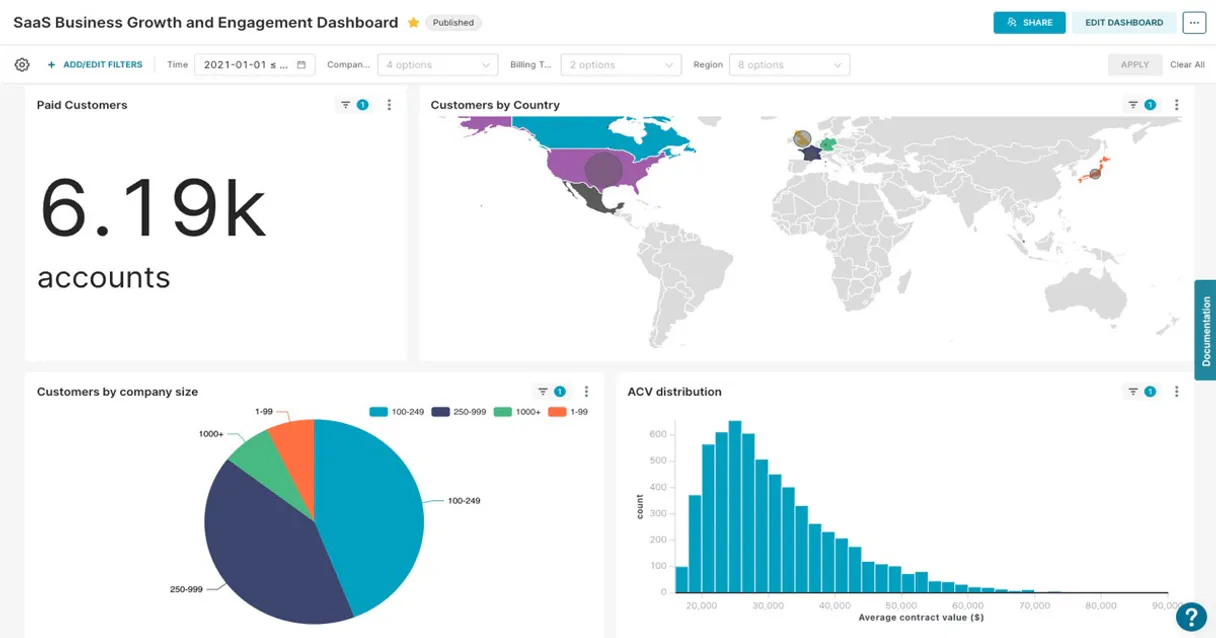
Apache Superset connects your AI agent directly to your BI infrastructure. It lets you list dashboards, check chart details, and run live SQL queries against any connected database.
Get deep data insights without leaving your chat interface.
What your AI agents can do
Execute sql query
Runs a specific SQL query against a database ID via SQL Lab.
Get chart details
Retrieves the full configuration details for a specific chart visualization.
Get dashboard details
Retrieves the metadata and structure for a specific dashboard.
Retrieves a list of every dashboard in the Superset portal.
Fetches the full metadata and configuration for a single, named dashboard.
Retrieves a list of all chart visualizations available in Superset.
Fetches the specific definition and configuration of a chart.
Retrieves a list of all data sources and datasets indexed by Superset.
Lists the connected database sources that Superset can query.
Runs a custom SQL query against a specified database connection ID.
Ask AI about this MCP
Supported MCP Clients
Gemini Waiting for input…
Apache Superset MCP Server: 7 Tools for Data BI
These tools let your AI client list dashboards, get chart metadata, map databases, and run custom SQL queries directly from the Apache Superset environment.
019d760fexecute sql query
Runs a specific SQL query against a database ID via SQL Lab.
019d760fget chart details
Retrieves the full configuration details for a specific chart visualization.
019d760fget dashboard details
Retrieves the metadata and structure for a specific dashboard.
019d760flist charts
Lists all chart types (slices) available across the entire Superset instance.
019d760flist dashboards
Lists every dashboard available in Apache Superset.
019d760flist databases
Lists all connected data source connections (databases).
019d760flist datasets
Lists all datasets that can be analyzed within Superset.
Choose How to Get Started
Build a custom MCP for your own tools, or connect a ready-made integration from our catalog.
Build Your Own
Turn any API into an MCP. Import a spec, define Agent Skills, or deploy with MCPFusion.
- Import from OpenAPI, Swagger, or YAML specs
- Create Agent Skills with progressive disclosure
- Deploy to edge with MCPFusion framework
- Built in DLP, auth, and compliance on every call
- Real time usage dashboard and cost metering
- Publish to catalog or keep private
Make Your AI Do More
Start with Apache Superset, then connect any of our 4,700+ other servers whenever your AI needs more. One click, no limits.
- Use this MCP plus 4,700+ others, all in one place
- Add new capabilities to your AI anytime you want
- Every connection is secured and compliant automatically
- Track usage and costs across all your servers
- Works with Claude, ChatGPT, Cursor, and more
- New servers added to the catalog every week
What you can do with this MCP connector
Apache Superset connects your AI agent straight to your BI setup. It lets your agent list dashboards, check chart details, and run live SQL queries against any connected database. You get deep data insights without ever leaving your chat interface.
List Available Dashboards: You can use list_dashboards to get a list of every dashboard in the Superset portal. You then call get_dashboard_details to pull the full metadata and configuration for any single dashboard.
List Available Charts: You can use list_charts to get a list of all chart visualizations available in Superset. You can then call get_chart_details to pull the specific definition and configuration for a chart.
List Available Datasets: You can use list_datasets to get a list of all data sources and datasets indexed by Superset.
List Backend Databases: You can use list_databases to get a list of all connected database sources that Superset can query.
Execute Raw SQL Queries: You can use execute_sql_query to run a custom SQL query against a specified database connection ID via SQL Lab. This lets your agent pull specific, ad-hoc data results that dashboards might not cover.
Your agent uses these tools to query the metadata, then runs the necessary SQL to get the raw result. You get the answer, not a link to a dashboard.
How Apache Superset MCP Works
- 1 Add the Apache Superset MCP module to your agent's integrations panel.
- 2 Configure the agent with your
SUPERSET_BASE_URLandSUPERSET_ACCESS_TOKEN. - 3 Prompt your agent with a data request. It will sequence the calls: first using
list_datasetsto find the source, then callingexecute_sql_queryto get the data.
The bottom line is that your agent treats the entire Superset environment—metadata and data—as a single, queryable API layer.
Who Is Apache Superset MCP For?
Data Analysts, BI Engineers, and Product Managers need this. These roles spend too much time clicking through dashboards, jumping between tools, and manually writing SQL to validate numbers. You get direct, structured access to the metadata and the underlying data, letting your agent do the heavy lifting.
Uses the agent to audit data lineage. They call list_datasets and then use get_chart_details to verify if a dashboard's underlying metric calculation is correct.
Tests data connectivity and schema changes. They call list_databases to check connection status or run ad-hoc tests using execute_sql_query without needing a dedicated SQL client.
Checks key performance metrics. They ask the agent to 'Show me the latest conversion rate for Q3' and get a clean data output, bypassing the need to learn the BI tool's navigation.
What Changes When You Connect
- Deep Data Auditing: You don't just see numbers; you see how they're calculated. Use
get_dashboard_detailsto pull the exact metric configuration for any dashboard, letting you audit the source logic instantly. - Ad-Hoc Data Extraction: Need a dataset that doesn't have a pre-built dashboard? Use
list_datasetsto find the source, and then runexecute_sql_queryto pull raw, filtered data directly into your agent's output. - Full Infrastructure Map: Stop guessing where data lives. Run
list_databasesto see every connected data source. Then uselist_datasetsto map exactly what data is available for analysis. - Visualization Inventory: Understand your entire BI estate at a glance.
list_dashboardsgives you a manifest of every dashboard, andlist_chartslets you inventory every chart type built on top of your data. - Contextual Data Retrieval: If you know the chart name,
get_chart_detailspulls its entire definition. This is faster and more precise than trying to manually interpret a screenshot or a documentation page. - Workflow Independence: You never have to leave your development environment. Your agent handles the multi-step process—it calls
list_dashboards, finds the ID, callsget_dashboard_details, and then runsexecute_sql_query—all without you touching the UI.
Real-World Use Cases
Validating a Dashboard Metric
A Product Manager sees a conversion rate on the 'Sales Overview' dashboard but suspects the calculation is wrong. Instead of emailing the BI team, they ask their agent to use get_dashboard_details and get_chart_details. The agent returns the underlying SQL logic, letting the PM verify the calculation themselves and flag the issue immediately.
Checking Database Health
A BI Engineer needs to know if the staging Postgres connection is up before a deployment. They use the agent to call list_databases. If the connection status is reported, they proceed. If it fails, they know immediately and don't waste time running manual pings.
Sourcing Data for a New Report
A Data Analyst needs to build a report on inventory levels but isn't sure which dataset is correct. They run list_datasets to see all options. Once they narrow it down, they use execute_sql_query to pull a sample of the data, confirming the schema before starting the build.
Finding the Right Report Quickly
A stakeholder needs to see the 'North America Q3 Performance' data, but they don't know which dashboard it's saved in. They ask the agent to run list_dashboards. The agent presents the list, and the user can then specify which dashboard to inspect using get_dashboard_details.
The Tradeoffs
Manual UI Navigation
Opening Superset, clicking through the dashboards list, finding the correct dashboard, clicking into the chart tab, and finally copying the SQL query. This takes several minutes and is error-prone.
→
Let your agent handle the flow. First, use list_dashboards to confirm the dashboard name. Then, ask the agent to call get_dashboard_details and get_chart_details. Finally, if needed, pass the required filters to execute_sql_query for the raw data.
Guessing the Data Source
Writing a complex SQL query like SELECT * FROM sales WHERE date = '2023-01-01' without knowing if the sales table is the correct, current schema, leading to a query failure.
→
Always start by calling list_datasets. This provides a clean list of available tables and schemas, ensuring you build your query against a validated data source.
Over-reliance on Visuals
Accepting the data shown in a dashboard chart without verifying the underlying data points or filters. You assume the chart is right.
→
Always follow up with a data extraction step. Use get_chart_details to see the metrics, and if the data is critical, use execute_sql_query to pull the raw records for verification.
When It Fits, When It Doesn't
Use this connector if your workflow requires verifying data logic or running custom queries against an existing BI setup. You need to know why the dashboard shows what it shows. Use it when you need to sequence tool calls—e.g., list_datasets -> get_dashboard_details -> execute_sql_query.
Don't use this if you are simply building a dashboard from scratch or if you need to integrate with a completely different data source that isn't connected to Superset. For those cases, you need a different data ingestion or ETL tool. If all you need is a simple list of available dashboards, list_dashboards is sufficient, but remember that the real power comes from chaining tools together.
Independent Platform Disclaimer: Vinkius is an independent platform and is not affiliated with, endorsed by, sponsored by, verified by, or otherwise authorized by Apache Superset. All third-party trademarks, logos, and brand names are the property of their respective owners. Their use on this website is strictly for informational purposes to identify service compatibility and interoperability.
VINKIUS INFRASTRUCTURE
Cloud Hosted
Managed infra
V8 Isolated
Sandboxed per request
Zero-Trust Proxy
No stored credentials
DLP Enforced
Policy on every call
GDPR Compliant
EU data residency
Token Compression
~60% cost reduction
Works with Claude, ChatGPT, Cursor, and more
The Model Context Protocol standardizes how applications expose capabilities to LLMs. Instead of operating in isolation, your AI gains direct access to external platforms, live data, and real-world actions through secure, standardized connections.
This server provides 7 capabilities that interface natively with Claude, ChatGPT, Cursor, and any MCP client. No middleware. No custom integration required.
Available Capabilities
Sifting through dozens of dashboards to find one metric.
Today, checking a single metric requires a painful click-through process. You open Superset, navigate the dashboard selector, find the relevant dashboard, drill down to the chart, and then, if the data is wrong, you have to manually write a new SQL query in the dedicated SQL Lab tab. It’s a loop of clicking, finding the right tab, and copy-pasting.
With the Apache Superset MCP Connector, you skip the clicks. You tell your agent: "Show me the conversion rate for Q3." The agent uses `list_dashboards` to find the 'Sales Performance' dashboard, calls `get_dashboard_details` to understand its scope, and then runs `execute_sql_query` to pull the exact numbers you need. You get the data, not a link to the tool.
Apache Superset MCP Server: Audit data logic with `get_dashboard_details`
Normally, if a metric seems off, you have no way to check the source logic. You can't just ask, 'What SQL did this use?' You have to guess, or wait for a data steward to check the metadata manually.
Now, you ask your agent to use `get_dashboard_details`. The agent returns the full metadata, including the underlying logic, allowing you to see exactly which tables and metrics contributed to the number. You know the truth, instantly.
Common Questions About Apache Superset MCP
How do I use the `execute_sql_query` tool with Apache Superset? +
You must provide the database ID and the full SQL text. Your agent handles this by first using list_databases to get the correct connection ID, and then running the query via execute_sql_query.
Can the `list_datasets` tool show me all the columns in a table? +
No, list_datasets only shows the available datasets. To check the schema or columns, you need to run a query using execute_sql_query against that specific dataset's connection.
Which tool should I use to check if a dashboard exists? +
Use list_dashboards. This tool queries the portal's index and gives you a clean list of all dashboard titles available for inspection.
Does `get_chart_details` give me the raw data? +
No. get_chart_details only retrieves the configuration and metadata for the chart (e.g., chart type, columns used, filters). To get raw numbers, you must use execute_sql_query.
How do I find out what data a dashboard uses? +
Start by running get_dashboard_details. This tool provides the high-level structure and can point you to the underlying datasets and metrics used on that dashboard.
How do I check which data sources are connected using `list_databases`? +
The list_databases tool shows all connected data sources. It returns the unique ID and name of the database, letting you know exactly where the data lives.
What if my SQL query fails when I use `execute_sql_query`? +
If the query fails, the tool returns a specific error message. This message includes the database ID and the exact SQL syntax error, so you know what needs fixing.
Can I list all available charts using `list_charts`? +
Yes, list_charts retrieves a list of every chart (slice) in Superset. Each entry provides the chart's unique ID and the name of the dataset it uses.
Can the AI query databases connected to Superset, such as Presto or Redshift? +
Yes. The execute_sql_query tool runs queries through Superset's SQL Lab API, which routes them to whichever database engine you have configured — Presto, Redshift, PostgreSQL, and others.
Are dashboard access permissions enforced when using the MCP server? +
Yes. All requests are authenticated with your SUPERSET_ACCESS_TOKEN, so only the dashboards, charts, and datasets your token has access to will be visible to the AI.
Can the AI run write queries (INSERT, UPDATE, DELETE) via SQL Lab? +
It depends on your Superset database connection settings. By default, SQL Lab connections are read-only. Write access must be explicitly enabled per database in the Superset admin panel.
Use it with your favorite AI tools
Connect this server to Cursor, Claude, VS Code, and more.
More in this category

Hightouch (Reverse ETL)
Synchronize data via Hightouch — list syncs, monitor runs, and manage data models.

Cube.dev
Access your Cube semantic layer — execute queries, inspect generated SQL, manage pre-aggregations, and explore data metadata directly.

Amazon Marketing Cloud
Advanced advertising analytics — execute SQL queries and monitor workflows via AI.
You might also like

CoinMarketCal
Enable your AI agent to browse upcoming crypto events, listings, and forks via the CoinMarketCal API.

SMS Masivo
Send bulk SMS campaigns across Latin America with delivery tracking, contact segmentation, and competitive local pricing.

Dastra
Stay GDPR compliant with privacy management tools for data mapping, consent records, and breach notification workflows.