4,500+ servers built on MCP Fusion
Vinkius

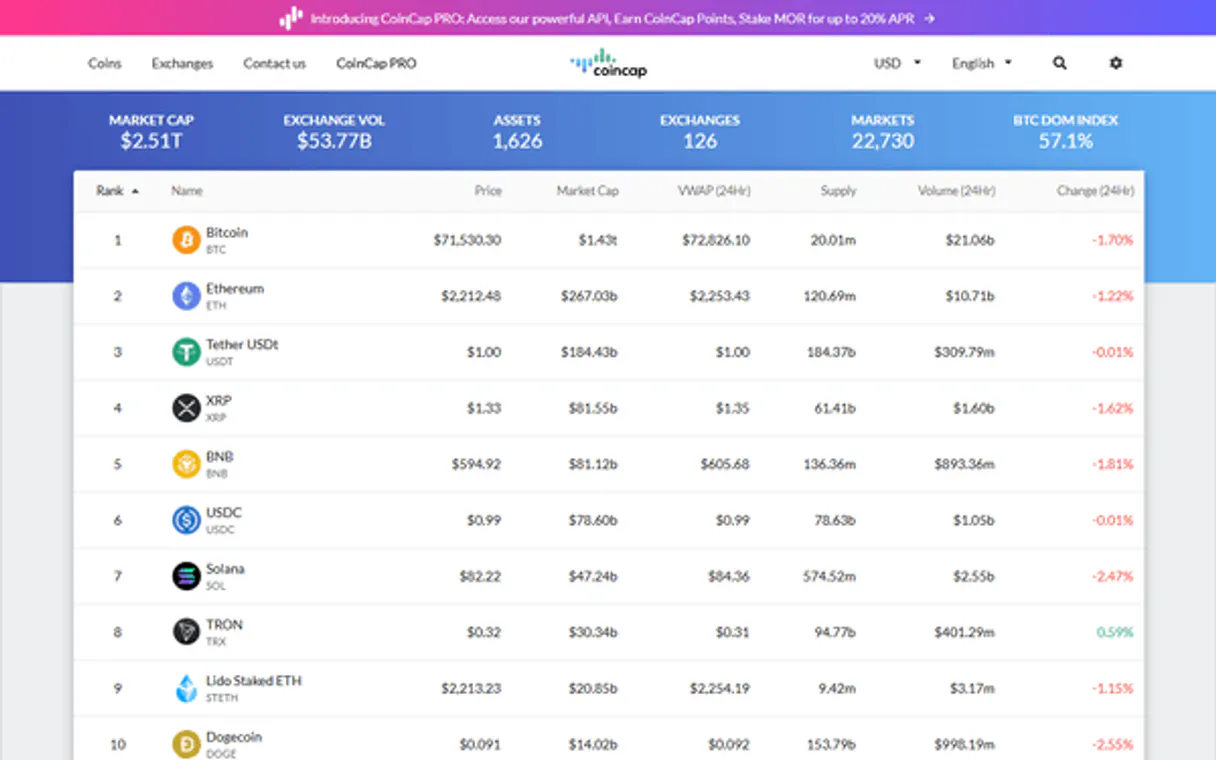
CoinCap MCP. Compare exchange volumes and price history for crypto assets.

Claude Claude
ChatGPT ChatGPT
Cursor Cursor
Gemini Gemini
Windsurf Windsurf
VS Code VS Code
JetBrains JetBrains
Vercel Vercel
See Vinkius in Action

Works with every AI agent you already use

…and any MCP-compatible client

CoinCap MCP on Cursor AI Code Editor MCP Client CoinCap MCP on Claude Desktop App MCP Integration CoinCap MCP on OpenAI Agents SDK MCP Compatible CoinCap MCP on Visual Studio Code MCP Extension Client CoinCap MCP on GitHub Copilot AI Agent MCP Integration CoinCap MCP on Google Gemini AI MCP Integration CoinCap MCP on Lovable AI Development MCP Client CoinCap MCP on Mistral AI Agents MCP Compatible CoinCap MCP on Amazon AWS Bedrock MCP Support

Just plug in your AI agents and start using Vinkius.

CoinCap delivers real-time cryptocurrency pricing, historical OHLCV candles, and global exchange metrics directly to your agent—no API key needed. Use this server to pull current prices, track asset volume changes across major exchanges, or run historical trend comparisons for any coin (Bitcoin, Ethereum, Solana, etc.).

What your AI agents can do

Get asset

Gets the current USD price, market cap, 24h volume, and supply details for a specific crypto asset ID.

Get asset history

Retrieves historical price data in defined intervals (e.g., 1 hour or 1 day) for any cryptocurrency.

Get candles

Fetches OHLCV candlestick data for technical analysis, supporting multiple timeframes and optional date ranges.

+ 6 more capabilities included
Get Current Asset Metrics

Pull the live price, market cap, 24h trading volume, and supply data for a specific cryptocurrency.

Retrieve Historical Price Data

Fetch daily or interval-based price snapshots (e.g., last hour's average) for deep trend analysis using get_asset_history.

Generate Candlestick Charts

Get detailed OHLCV data, including open, high, low, and close prices, across multiple timeframes suitable for technical charting with get_candles.

Map Trading Pairs and Volume

List active markets and trading pairs on specific exchanges, showing the current price and 24h volume in USD using get_markets.

Compare Exchange Details

Pull ranking info and operational data for major crypto exchanges (like Binance or Coinbase) with get_exchange.

Calculate Fiat Conversions

Determine the current exchange rate between a cryptocurrency and a fiat currency like USD using get_rate.

Supported MCP Clients

Claude Claude
ChatGPT ChatGPT
Cursor Cursor
Gemini Gemini
Windsurf Windsurf
VS Code VS Code
JetBrains JetBrains
Vercel Vercel
+ other MCP clients
Free for Subscribers

Waiting for input…

AI Agent

CoinCap MCP Server: 9 Tools for Crypto Market Data

Use these nine tools to pull real-time asset metrics, historical charts, and cross-exchange volume data from the crypto market.

get019d8428

get asset

Gets the current USD price, market cap, 24h volume, and supply details for a specific crypto asset ID.

get019d8428

get asset history

Retrieves historical price data in defined intervals (e.g., 1 hour or 1 day) for any cryptocurrency.

get019d8428

get candles

Fetches OHLCV candlestick data for technical analysis, supporting multiple timeframes and optional date ranges.

get019d8428

get exchange

Gets detailed info on a specific crypto exchange's volume, ranking, and supported assets.

get019d8428

get markets

Lists trading markets/pairs for an asset or exchange, including the current price and 24h USD volume.

get019d8428

get rate

Returns the current conversion rate between a specific crypto asset and its corresponding fiat currency (e.g., BTC to USD).

get019d8428

get rates

Retrieves exchange rates for multiple cryptocurrencies to various fiat currencies.

list019d8428

list assets

Lists available crypto assets, sorted by market cap, including their current price and key market data.

list019d8428

list exchanges

Provides a list of all tracked cryptocurrency exchanges with their ID, 24h volume, and verification status.

Choose How to Get Started

Build a custom MCP for your own tools, or connect a ready-made integration from our catalog.

Build Your Own

Turn any API into an MCP. Import a spec, define Agent Skills, or deploy with MCPFusion.

  • Import from OpenAPI, Swagger, or YAML specs
  • Create Agent Skills with progressive disclosure
  • Deploy to edge with MCPFusion framework
  • Built in DLP, auth, and compliance on every call
  • Real time usage dashboard and cost metering
  • Publish to catalog or keep private
Start building

Make Your AI Do More

Start with CoinCap, then connect any of our 4,700+ other servers whenever your AI needs more. One click, no limits.

  • Use this MCP plus 4,700+ others, all in one place
  • Add new capabilities to your AI anytime you want
  • Every connection is secured and compliant automatically
  • Track usage and costs across all your servers
  • Works with Claude, ChatGPT, Cursor, and more
  • New servers added to the catalog every week

What you can do with this MCP connector

You connect CoinCap directly to your AI client; you don't need an API key or any setup wizard. Your agent uses this server to pull real-time crypto market metrics and historical price action for coins like Bitcoin, Ethereum, and Solana. You can use the list_assets tool to get a full list of available crypto assets, sorted by their current market cap, which includes their live price and key data points.

To dive into specific asset details, you'll run get_asset, pulling the current USD price, the total market cap, the 24-hour trading volume, and the coin’s supply for any given ID.

For serious technical analysis, CoinCap gives you multiple views of price data. You can use get_candles to fetch detailed OHLCV candlestick data—that means open, high, low, and close prices—across various timeframes, letting your agent build charts with specific date ranges. If you need simpler trend tracking, the get_asset_history tool pulls historical price snapshots over defined intervals, like an hour or a full day.

Furthermore, if you want to map out exactly where assets are trading, get_markets lists active pairs and trading markets for both specific coins and entire exchanges, showing the current price and 24-hour USD volume for those pairs.

When comparing different exchange platforms, you'll start with list_exchanges, which provides a clean roster of all tracked crypto exchanges. Each listing gives its ID, total 24-hour volume, and verification status. To get deeper operational details on a specific platform—like getting ranking info or seeing exactly which assets it supports—you run get_exchange.

The mechanism lets you pull detailed data about the exchange's overall volume and standing in the market.

When dealing with fiat currency conversions, the tools handle both single-coin rates and bulk requests. You use get_rate to return the current conversion rate between one specific crypto asset and a fiat currency like USD. If you need to check several coins against multiple currencies at once, you run get_rates, which retrieves those exchange rates for a whole group of cryptocurrencies.

Finally, when you need granular data about trading activity across the board, CoinCap handles it. You'll use get_asset for single-coin metrics, and if you want to see which pairs are available on an exchange, get_markets is what you call. The whole system keeps your agent updated on volume changes across major platforms without needing any keys.

How CoinCap MCP Works

  1. 1 Subscribe to the CoinCap server. Your AI client handles authentication automatically.
  2. 2 Ask your agent for data (e.g., 'What was ETH's price 4 hours ago?').
  3. 3 The client executes the necessary tool calls (get_asset_history, get_candles, etc.) and returns the structured, actionable data.

The bottom line is: you talk to your agent like talking to a friend, and it handles pulling complex, real-time financial data from multiple sources.

Who Is CoinCap MCP For?

Anyone who needs verifiable crypto numbers—from casual investors doing homework to quant developers building bots. It's for the person stuck staring at a dashboard, manually cross-referencing prices across three different sites just to build a single report.

Quantitative Trader

Needs to compare current price action (get_asset) with historical candle data (get_candles) and volume metrics (get_markets) immediately.

DevOps Engineer / Bot Builder

Needs reliable, authentication-free endpoints to pull market listings or asset rates into a Python backend without managing API keys.

Financial Researcher

Must gather long-term historical price data (get_asset_history) and compare exchange rankings (list_exchanges) for academic reports.

What Changes When You Connect

  • Pinpoint asset performance instantly. Instead of opening multiple tabs, run get_asset to get the current price, market cap, 24h volume, and supply stats all in one query.
  • Build technical reports easily. Use get_candles or get_asset_history to pull specific OHLCV data over timeframes—perfect for charting without leaving your chat interface.
  • Cross-reference market activity. Running list_exchanges and then get_markets lets you see exactly which pairs are trading on which exchange right now, maximizing volume insight.
  • Never worry about API keys again. The server handles authentication; you just ask for the data via your agent, making it simple for developers building bots or dashboards.
  • Handle currency conversions instantly. Use get_rates to get a list of fiat conversion rates, then use get_rate on a specific coin if needed.

Real-World Use Cases

01

Evaluating an Investment Thesis

A researcher needs to know if Bitcoin's recent price spike is sustainable. They ask their agent to run list_assets first, then pull the current stats using get_asset, and finally fetch 7 days of historical data with get_asset_history. This sequence gives them a full context: where it stands now vs. how it moved previously.

02

Checking Competitive Volume

A trader wants to see if Binance or Coinbase is seeing more trading activity for Ethereum today. They use get_markets and filter by the ETH pair ID across both exchanges. This instantly tells them where the highest current volume is, without manually checking each exchange's site.

03

Building a Data Dashboard

A developer needs to populate a dashboard with all major coin rates against USD. Instead of calling individual APIs, they run get_rates once. This single call returns the rate ID, symbol, and current exchange rate for multiple assets simultaneously.

04

Verifying Technical Chart Data

A quant needs to check if a specific 1-hour candle was correct. They use get_candles with an exact start/end timestamp and specify the 'h1' interval. This retrieves the precise open, high, low, and close prices for that narrow window.

The Tradeoffs

Only checking current price

Asking only, 'What is Bitcoin's price?' — You get one number, but you don't know if the volume was high or if it spiked last week. That number means nothing without context.

You gotta run get_asset for current stats, and then follow up with get_candles to see the OHLCV data for the past 24 hours. Get both pieces of info.

Listing assets inefficiently

Calling list_assets, scrolling through hundreds of results, and manually picking out Ethereum's market cap.

If you know the symbol, just use get_asset directly. If you need a list, use list_assets but be prepared to filter the output by your agent.

Missing exchange context

Getting a price for ETH/USD without knowing which exchange reported it.

Always check volumes. Use get_markets and specify both the asset ID (ETH) and the desired exchange ID to nail down the source of the data.

When It Fits, When It Doesn't

Use CoinCap if your work requires verifiable, real-time, or historical crypto market metrics: comparing volumes across exchanges, analyzing candlestick patterns, or getting fiat conversion rates. For example, if you need a comprehensive picture, start with list_assets to see what’s available, then use get_markets to check volume density, and finish by running get_asset_history for the deep dive. DON'T use this server if you just want general crypto news or an opinion on whether Bitcoin will go up next week—it only gives data points. For simple definitions of crypto terms, search Google instead.

Independent Platform Disclaimer: Vinkius is an independent platform and is not affiliated with, endorsed by, sponsored by, verified by, or otherwise authorized by CoinCap. All third-party trademarks, logos, and brand names are the property of their respective owners. Their use on this website is strictly for informational purposes to identify service compatibility and interoperability.

VINKIUS INFRASTRUCTURE

Cloud Hosted

Managed infra

V8 Isolated

Sandboxed per request

Zero-Trust Proxy

No stored credentials

DLP Enforced

Policy on every call

GDPR Compliant

EU data residency

Token Compression

~60% cost reduction

How we secure it →

Works with Claude, ChatGPT, Cursor, and more

The Model Context Protocol standardizes how applications expose capabilities to LLMs. Instead of operating in isolation, your AI gains direct access to external platforms, live data, and real-world actions through secure, standardized connections.

This server provides 9 capabilities that interface natively with Claude, ChatGPT, Cursor, and any MCP client. No middleware. No custom integration required.

Available Capabilities

get_asset get_asset_history get_candles get_exchange get_markets get_rate get_rates list_assets list_exchanges

Crypto market analysis shouldn't require jumping between 5 different websites.

Today, to get a full picture of an asset—say, Solana—you have to check CoinGecko for the price, TradingView for the candles, and then maybe Coinbase’s API documentation just to see which pairs are active. You spend time copy-pasting numbers and cross-referencing timestamps.

With this MCP server, you ask your agent one question: 'Give me Solana's 12-hour price trend.' The agent runs the right tools (`get_asset` + `get_candles`), pulls the data from multiple sources, and gives you a clean, structured report. It just works.

CoinCap MCP Server: Pulling live market metrics.

Before this server, getting current volume meant calling `get_markets` for one exchange ID; checking history required a separate call to `get_asset_history`; and converting the price needed another tool. It was always a multi-step process with high friction.

Now, your agent handles the sequence. You tell it the goal—'Compare BTC volume across Binance and Coinbase.' The server executes multiple tools in sequence and delivers a single, consolidated answer.

Common Questions About CoinCap MCP

Do I need an API key? +

No! CoinCap's API is completely free and requires no authentication. Just subscribe and start querying. Rate limit is 30 requests/second on the free tier.

What cryptocurrencies are supported? +

CoinCap tracks thousands of cryptocurrencies including Bitcoin, Ethereum, Solana, XRP, Cardano, Dogecoin, Avalanche, Polkadot and many more. Use list_assets with the search parameter to find any coin by name or symbol.

Can I get OHLCV data for technical analysis? +

Yes! Use get_candles with the asset ID and interval (m1, m5, m15, m30, h1, h2, h6, h12, d1). Returns open, high, low, close and volume for each candle period.

Can I see which exchanges list a specific crypto? +

Yes! Use get_markets with asset_id to see all exchanges that list a specific cryptocurrency. Results include the exchange name, trading pair, current price, 24h volume and volume percentage.

How do I use `get_rates` to check conversion rates between crypto and fiat? +

It returns the current rate needed for currency conversion. You specify the base asset ID (like 'bitcoin') or a standard fiat code (like 'USD'). The tool provides the rate ID, symbol, and the live exchange rate you need.

What specific time intervals are supported when I use `get_asset_history`? +

The system supports many granular intervals. You can request data from 1 minute ('m1') up to a full day ('d1'). This lets you track price movements at various levels of detail.

How do I use `get_markets` to find specific trading pairs and their volumes? +

It provides the exchange ID, base asset ID, quote asset ID, and the pair symbol. You can filter by a specific asset or exchange to see which pairs are active and what their 24h volume percentage is.

Can I use `list_exchanges` to get a comprehensive list of crypto exchanges? +

Yes, this tool lists all available exchanges. Each entry includes the exchange ID, name, website link, 24h volume in USD, and its ranking number for easy comparison.

More in this category

You might also like

Built & Managed by Vinkius 30s setup 9 tools

We've already built the connector for CoinCap. Just plug in your AI agents and start using Vinkius.

No hosting. No infrastructure. No complex setup.
All 9 tools are live and waiting. You're up and running in seconds.

Claude Claude
ChatGPT ChatGPT
Cursor Cursor
Gemini Gemini
Windsurf Windsurf
VS Code VS Code
JetBrains JetBrains
Vercel Vercel
+ other MCP clients

Vinkius gives your AI agents access to the full catalog of app connectors, all fully managed, secure, and enterprise-ready. One subscription, every tool you need.

Zero hosting required Full MCP catalog included Enterprise-grade security Auto-updated by Vinkius

Built, hosted, and secured by Vinkius. You just connect and go.