
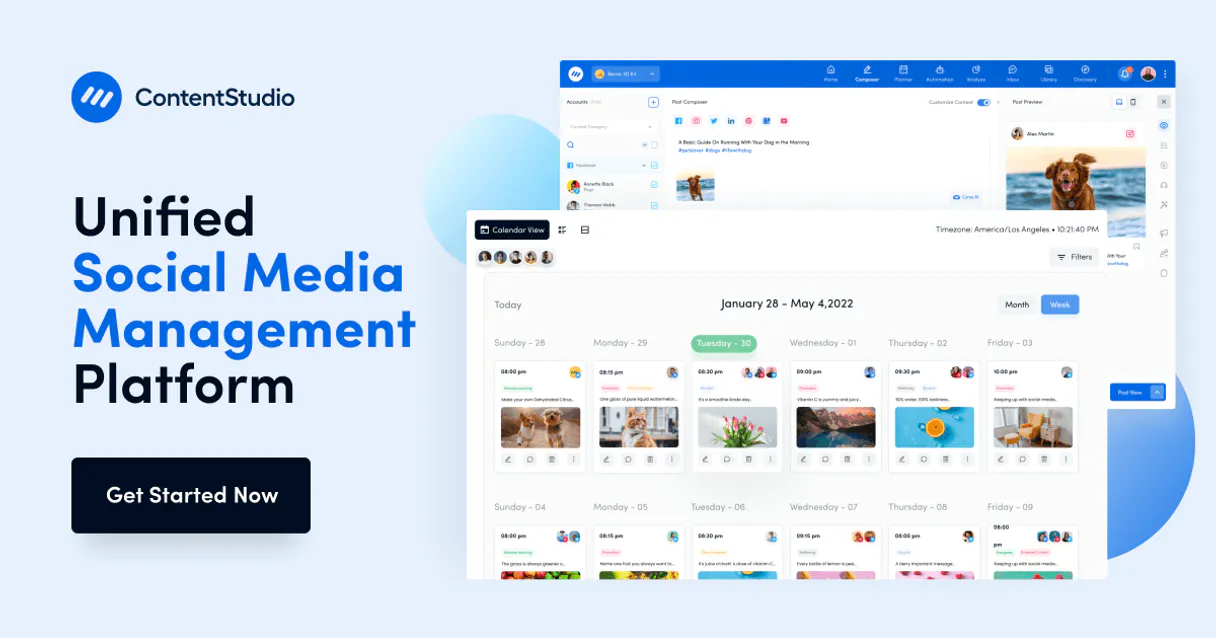
ContentStudio MCP Server with 13 Tools Ready for AI Agents
 GDPR Free for Subscribers
Plan, create, and schedule social media content across all channels with AI writing assistance and performance analytics. Unlock 13 tools ready out of the box. Connect this App Connector to instantly empower AI agents like Claude Code, Cursor, or any MCP-compatible client with advanced capabilities.
Ask AI about this App Connector
Vinkius delivers Streamable HTTP and SSE to any MCP client
* Every MCP server runs on Vinkius-managed infrastructure inside AWS - a purpose-built runtime with per-request V8 isolates, Ed25519 signed audit chains, and sub-40ms cold starts optimized for native MCP execution. See our infrastructure
What is the ContentStudio MCP Server?
The ContentStudio MCP Server gives AI agents like Claude, ChatGPT, and Cursor direct access to ContentStudio via 13 tools. Plan, create, and schedule social media content across all channels with AI writing assistance and performance analytics. Powered by the Vinkius - no API keys, no infrastructure, connect in under 2 minutes.
Built-in capabilities (13)
Tools for your AI Agents to operate ContentStudio
Ask your AI agent "Create a LinkedIn and Twitter post about our new product launch for tomorrow at 9am EST." and get the answer without opening a single dashboard. With 13 tools connected to real ContentStudio data, your agents reason over live information, cross-reference it with other MCP servers, and deliver insights you would spend hours assembling manually.
Works with Claude, ChatGPT, Cursor, and any MCP-compatible client. Powered by the Vinkius - your credentials never touch the AI model, every request is auditable. Connect in under two minutes.
Why teams choose Vinkius
One subscription gives you access to thousands of MCP servers - and you can deploy your own to the Vinkius Edge. Your AI agents only access the data you authorize, with DLP that blocks sensitive information from ever reaching the model, kill switch for instant shutdown, and up to 60% token savings. Enterprise-grade infrastructure and security, zero maintenance.
Build your own MCP Server with our secure development framework →The ContentStudio App Connector works with every AI agent you already use
…and any MCP-compatible client









Use all 13 ContentStudio tools with your AI agents right now
Empower your AI agents to connect to ContentStudio and securely perform advanced actions on Vinkius infrastructure. Beyond a simple connection, you gain an advanced AI Gateway that provides complete visibility into agent activity, ensuring maximum governance and optimized token usage.
Verify connectivity
Create a post
Delete a post
Get account analytics
Get post details
Get post analytics
Get social account details
List categories
List media library
List posts
List posts by status
List social accounts
List workspaces
What the ContentStudio MCP Server unlocks
Connect your ContentStudio account to any AI agent and take full control of your social media content workflows through natural conversation.
What you can do
- Post Management — Create, schedule, list, and delete social media posts across multiple platforms simultaneously
- Status Filtering — Filter posts by status: draft, scheduled, published, or failed — to focus on what needs attention
- Social Accounts — View all connected social media profiles with platform type, follower counts, and connection status
- Content Analytics — Retrieve engagement metrics, follower growth, and per-post performance data (likes, shares, comments, reach)
- Content Organization — Browse categories for structured content planning
- Media Library — Access all uploaded images, videos, and files for reuse in future posts
How it works
1. Subscribe to this server
2. Enter your ContentStudio API Key from your profile dropdown > API Key
3. Start managing your social content from Claude, Cursor, or any MCP-compatible client
Who is this for?
- Social Media Managers — schedule posts across Instagram, Twitter, LinkedIn, and Facebook without opening ContentStudio
- Marketing Teams — track content performance and engagement metrics through conversational AI
- Content Creators — draft and queue posts using natural language while focusing on creative work
Frequently asked questions about the ContentStudio MCP Server
Can I create and schedule posts to multiple social accounts at once?
Yes! The create_post action accepts a JSON payload with content, media attachments, schedule date, and target account IDs. You can publish to Instagram, Twitter, LinkedIn, and Facebook simultaneously in a single command.
Can I track how individual posts are performing?
Yes. Use get_post_analytics with a specific Post ID to retrieve likes, shares, comments, impressions, and reach for that post. For account-wide metrics, use get_analytics with the Social Account ID to see follower growth, engagement rates, and top-performing content.
Can I filter posts by their publishing status?
Yes. The list_posts_by_status tool accepts a status parameter — 'draft', 'scheduled', 'published', or 'failed'. This lets you quickly find posts that need review (drafts), are queued for delivery (scheduled), or encountered errors during publishing (failed).
More in this category
RSS / Atom Reader
2 toolsConnect your AI assistant to any RSS or Atom feed worldwide to fetch news, updates, and articles instantly within your chat interface.
Ironclad
10 toolsManage contracts, workflows, approvals, and counterparties via Ironclad CLM — launch, track, and search agreements directly from any AI agent.
SimplyBook.me
10 toolsEnable your AI agent to manage appointments, browse staff calendars, and handle client records via the SimplyBook.me scheduling platform.
You might also like

ScreenshotAPI
12 toolsCapture full-page website screenshots programmatically with custom viewport sizes, delays, and rendering options via a simple API.

Airtable
7 toolsQuery databases, manage records, and orchestrate workflows across your connected Airtable bases with full flexibility.

TollGuru Alternative
6 toolsGlobal toll intelligence — calculate costs by address, coordinates, polyline, or GPS tracks with fuel estimates and multi-vehicle support.