
Datadog Cloud SIEM MCP. Search signals, audit rules, and hunt raw logs instantly.
 Gemini
 Works with every AI agent you already use
…and any MCP-compatible client









Just plug in your AI agents and start using Vinkius.
Datadog Cloud SIEM MCP Server lets you manage cloud security and hunt threats using natural language. Search security signals, audit detection rules, and query raw logs across AWS, GCP, and Kubernetes environments directly through any AI agent.
What your AI agents can do
Create detection rule
Builds and activates a new Cloud SIEM detection rule using specific queries and severity levels.
Delete detection rule
Permanently removes a user-defined Datadog Security Detection Rule.
Get detection rule
Retrieves the exact query logic and parameters for a specific existing detection rule.
Run targeted searches for critical security signals and threats, mapping them to known attack vectors.
Change the lifecycle state of an alert, archiving it and logging the official reason for the change.
Define, deploy, and modify Cloud SIEM detection rules using structured queries and severity bindings.
Directly query raw log data, capturing surrounding events to build a full context around a suspicious IP or event.
List all active security rules and global filters to verify the coverage and exclusions of your SIEM setup.
Ask AI about this MCP
Supported MCP Clients
Gemini Waiting for input…
019d7581create detection rule
Builds and activates a new Cloud SIEM detection rule using specific queries and severity levels.
019d7581delete detection rule
Permanently removes a user-defined Datadog Security Detection Rule.
019d7581get detection rule
Retrieves the exact query logic and parameters for a specific existing detection rule.
019d7581get raw log context
Extracts a small block of raw logs surrounding a specific event for deeper threat hunting.
019d7581list detection rules
Lists all configured security detection rules, checking for coverage gaps across different cloud services.
019d7581list security filters
Displays the global exclusion policies that determine what logs are kept out of the SIEM evaluation engine.
019d7581search raw logs
Directly queries raw log data over a specified time period for deep, contextual threat hunting.
019d7581search signals
Searches all high-severity security signals (alerts) over the last 24 hours using advanced query filters.
019d7581security system ping
Tests the connection and authentication status between your AI client and the Datadog security module.
019d7581triage signal
Changes the status of a security signal from open to archived, requiring a documented reason for the change.
Choose How to Get Started
Build a custom MCP for your own tools, or connect a ready-made integration from our catalog.
Build Your Own
Turn any API into an MCP. Import a spec, define Agent Skills, or deploy with MCPFusion.
- Import from OpenAPI, Swagger, or YAML specs
- Create Agent Skills with progressive disclosure
- Deploy to edge with MCPFusion framework
- Built in DLP, auth, and compliance on every call
- Real time usage dashboard and cost metering
- Publish to catalog or keep private
Make Your AI Do More
Start with Datadog Cloud SIEM, then connect any of our 4,700+ other servers whenever your AI needs more. One click, no limits.
- Use this MCP plus 4,700+ others, all in one place
- Add new capabilities to your AI anytime you want
- Every connection is secured and compliant automatically
- Track usage and costs across all your servers
- Works with Claude, ChatGPT, Cursor, and more
- New servers added to the catalog every week
What you can do with this MCP connector
You can manage your cloud security and hunt threats using natural language, connecting your Datadog security module to any AI client. You don't just manage alerts; you stop threats.
Querying Security Alerts
search_signals: Search all high-severity security signals over the last 24 hours using advanced query filters.search_raw_logs: Query raw log data over a specified time period for deep, contextual threat hunting.get_raw_log_context: Extract a small block of raw logs surrounding a specific event, which helps you build full context around a suspicious IP or event.
Managing Alert Status
triage_signal: Changes a security signal's status from open to archived, requiring you to document the reason for the change.
Building and Deploying Rules
list_detection_rules: Lists all configured security detection rules, letting you check for coverage gaps across different cloud services.get_detection_rule: Retrieves the exact query logic and parameters for a specific existing detection rule.create_detection_rule: Builds and activates a new Cloud SIEM detection rule using specific queries and severity levels.delete_detection_rule: Permanently removes a user-defined Datadog Security Detection Rule.
Viewing Security Configurations
list_security_filters: Displays the global exclusion policies that determine what logs are kept out of the SIEM evaluation engine.security_system_ping: Tests the connection and authentication status between your AI client and the Datadog security module.
How Datadog Cloud SIEM MCP Works
- 1 Subscribe to the Datadog Cloud SIEM MCP Server and provide your required Datadog API and App Keys.
- 2 Use your AI client (Claude, Cursor, etc.) to issue a natural language command, like 'List all critical signals from the last 24 hours.'
- 3 The server executes the appropriate tool (e.g.,
search_signals) and returns the structured, actionable data directly to your AI client for analysis.
The bottom line is: you tell your AI client what to look for, and the server gets the answer from Datadog's core security data.
Who Is Datadog Cloud SIEM MCP For?
This is for the Security Analyst or Incident Responder who gets tired of clicking through endless dashboards at 2 am. You need to pivot from viewing data to executing actions. You need to audit rules, triage signals, and hunt logs—all without leaving your chat window.
Uses search_signals to find high-severity alerts and triage_signal to officially mark false positives.
Runs search_raw_logs after a breach is suspected to collect full context around malicious IPs, then uses get_raw_log_context to deepen the investigation.
Writes and tests new detection rules using create_detection_rule and list_detection_rules without touching the web UI.
Uses list_security_filters and list_detection_rules to prove that necessary security controls are in place and nothing is being missed.
What Changes When You Connect
- Stop guessing about rule coverage. Use
list_detection_rulesandlist_security_filtersto confirm exactly which AWS CloudTrail or GCP IAM deviations are currently monitored. - Move faster on incident response. Instead of opening 15 tabs, run
search_raw_logsto pull contextual VPC Flow Logs and application stack traces related to an active breach. - Manage alerts without leaving your chat. Use
triage_signalto change a signal's status—mark it 'false_positive' and log the reason, all via a simple command. - Build complex detection logic on the fly. Use
create_detection_ruleto push new Cloud SIEM rules based on raw fields and specific Lucene queries, which auto-activate immediately. - Pinpoint attackers immediately.
search_raw_logslets you query logs with a 10s lookbehind, giving you the full context for malicious source IPs, not just the initial alert. - Validate your setup instantly. Use
security_system_pingto confirm the API connection is active and authenticated before starting a major investigation.
Real-World Use Cases
Investigating a potential data leak
A security analyst spots a high-severity alert signal. Instead of manually jumping to the raw logs, they ask their agent to run search_raw_logs for the signal's IP range. They then use get_raw_log_context on a specific log entry to confirm if the leak attempt was contained to one service. This provides the full, actionable narrative for the incident report.
Auditing compliance before an audit
A compliance officer needs to prove that the system blocks low-value noise. They ask the agent to run list_security_filters. The system returns the exact global exclusion policies, proving to auditors that irrelevant, high-volume logs never hit the SIEM engine. This saves time and validates policy adherence.
Tuning a noisy detection rule
A security engineer notices a rule fires too often for benign reasons. They use get_detection_rule to pull the exact logic and query bindings. They then use create_detection_rule to modify the rule's query logic and set a new severity, all in one conversational step.
Hunting for a specific attacker footprint
An incident responder knows the malicious source IP but not the exact time. They run search_raw_logs for that IP over the last 15 minutes. This returns raw logs, allowing them to manually check for related activity like credential stuffing attempts, which is much richer than an automated signal alert.
The Tradeoffs
Running generic searches
Just running 'Show me logs from the last hour' via a dashboard. This floods you with unrelated, high-volume data and requires you to manually filter for the suspicious IP or service, wasting critical time.
→
Instead, use search_raw_logs and include specific parameters, like filtering by a known malicious IP range or a specific service name. Or, start with search_signals to narrow down the scope to only high-priority alerts.
Assuming rule coverage
Thinking that because you have a rule for 'AWS CloudTrail deviations', you're safe. You forget to check for Kubernetes root escalation or GCP IAM usage, leaving blind spots.
→
Use list_detection_rules to verify the existence of proactive detections across all required environments (AWS, GCP, K8s). Then use list_security_filters to confirm what data is being intentionally excluded.
Manual rule modification
Logging into the SIEM console to manually change a rule's query or severity. This process is slow, prone to human error, and requires navigating complex menus.
→
Use get_detection_rule to copy the existing logic, modify it in your agent's prompt, and then run create_detection_rule to deploy the updated, validated version instantly.
When It Fits, When It Doesn't
Use this if you need to perform deep, actionable security operations on structured cloud logs and signals. Specifically, if your workflow involves querying raw data, triaging alerts, or managing detection rules without leaving your chat interface, this server is built for you. Don't use it if you just need a simple dashboard view of metrics (use a standard SIEM dashboard instead). If you only need to check one specific metric, use security_system_ping first to validate the connection, then proceed with search_signals for an overview. Never assume a rule exists; always run list_detection_rules first.
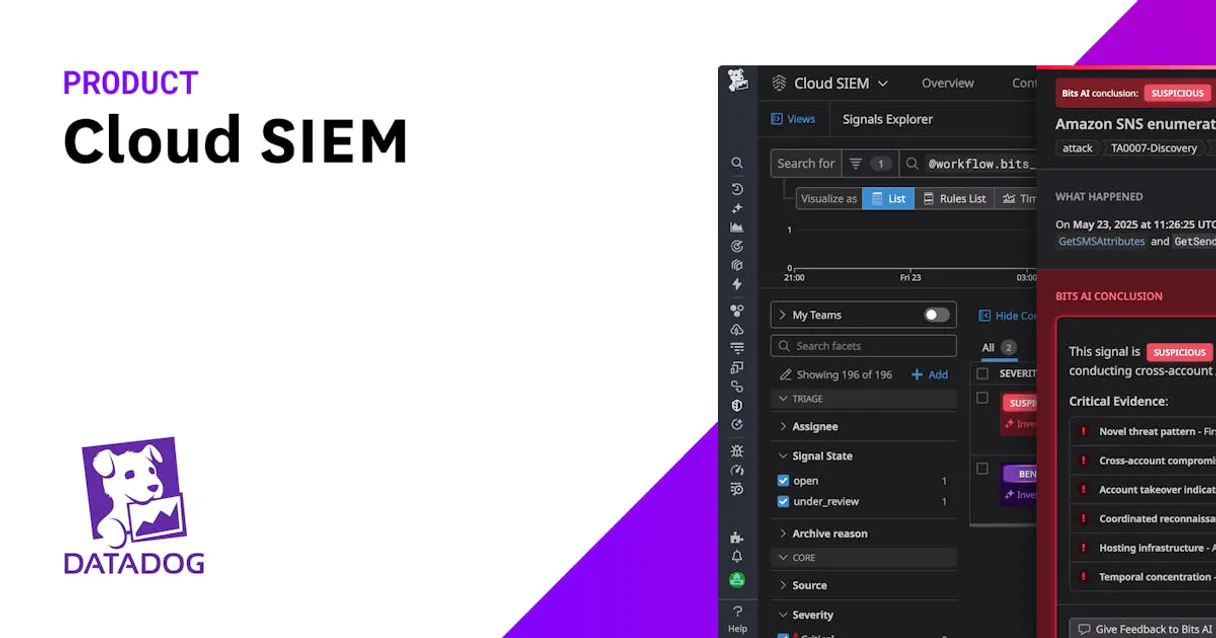
Independent Platform Disclaimer: Vinkius is an independent platform and is not affiliated with, endorsed by, sponsored by, verified by, or otherwise authorized by Datadog Security. All third-party trademarks, logos, and brand names are the property of their respective owners. Their use on this website is strictly for informational purposes to identify service compatibility and interoperability.
VINKIUS INFRASTRUCTURE
Cloud Hosted
Managed infra
V8 Isolated
Sandboxed per request
Zero-Trust Proxy
No stored credentials
DLP Enforced
Policy on every call
GDPR Compliant
EU data residency
Token Compression
~60% cost reduction
Works with Claude, ChatGPT, Cursor, and more
The Model Context Protocol standardizes how applications expose capabilities to LLMs. Instead of operating in isolation, your AI gains direct access to external platforms, live data, and real-world actions through secure, standardized connections.
This server provides 10 capabilities that interface natively with Claude, ChatGPT, Cursor, and any MCP client. No middleware. No custom integration required.
Available Capabilities
The Problem: Security investigations require context, not just alerts.
Right now, you find an alert. It says 'Suspicious Login.' You click it. That takes you to Dashboard A. You see the IP. You copy the IP. You open a new tab to the raw logs. You paste the IP and run a query. Then you find the raw log ID and copy that, opening a third tab. You are juggling 3-4 tabs and 5-6 copy/paste actions just to build a basic narrative.
With this MCP server, you just tell your agent: 'Check this IP.' The agent runs `search_raw_logs` and `get_raw_log_context` and returns the full, contextual story in the chat. You cut the tabs. You cut the copy/paste. You just get the answer.
Datadog Cloud SIEM MCP Server: Audit and Manage Rules
Previously, modifying a detection rule meant navigating the SIEM UI, finding the rule, opening its editor, and carefully updating the Lucene query and severity binding. This was slow, high-friction, and risked accidentally disabling a critical rule.
Now, you tell your agent: 'Update rule X to look for Y and make it critical.' The agent uses `get_detection_rule` to pull the old logic, lets you refine it, and then runs `create_detection_rule` to deploy the fix. It's direct, auditable, and happens in the chat.
Common Questions About Datadog Cloud SIEM MCP
How do I use `search_signals` to find critical alerts? +
You run search_signals and pass a query like status:critical OR @usr.id:admin. This filters alerts over the last 24 hours, giving you a targeted list of high-priority indicators based on MITRE ATT&CK vectors.
Can I use `search_raw_logs` for threat hunting? +
Yes. search_raw_logs lets you query raw data over the last 15 minutes. This is ideal for threat hunting because it provides the full, unparsed context, which is much richer than a simple alert summary.
What is the purpose of the `triage_signal` tool? +
The triage_signal tool changes an alert's state. You run it to move a signal from 'open' to 'archived' and must provide a reason (like 'false_positive'). This action is fully logged for compliance.
Do I need `list_detection_rules` to know what's covered? +
Yes. Running list_detection_rules lists all configured detection rules, verifying coverage for things like AWS CloudTrail deviations or GCP IAM issues. It's your starting point for knowing what the system is watching.
What does `create_detection_rule` require for a new Cloud SIEM Log Detection Rule? +
It requires raw name/message fields, specific Lucene query bindings, and a severity level. You must provide these parameters to build the rule, and it activates immediately upon creation.
How do I check if the server is connected using `security_system_ping`? +
This tool verifies your Datadog API authentication against the Security Module. A successful response confirms the connection and allows you to start managing cloud security.
Can I use `list_security_filters` to manage log data volume? +
Yes, this tool lists the global exclusion policies. It shows which low-value logging vectors are blocked, helping you manage compute budgets by keeping irrelevant data out of the SIEM.
When should I use `get_raw_log_context` versus `search_raw_logs`? +
Use search_raw_logs for broad, proactive threat hunting over a time window. Use get_raw_log_context immediately after confirming an attacker's footprint to extract highly localized log bounds.
Can my agent help me triage security alerts in Datadog? +
Yes. Use the 'triage_signal' tool. You can update active threats from 'open' to 'archived', providing a required justification like 'false_positive'. The agent will push the status update directly to the Datadog SIEM platform.
How do I search for malicious activities matching specific IP addresses? +
Use the 'get_raw_log_context' tool. Provide the suspicious IP address, and the agent will perform a threat-hunting search with a 10s lookbehind to capture highly localized context matching that source, helping you verify attacker footprints.
Can I see all active security detection rules through the agent? +
Absolutely. The 'list_detection_rules' tool returns all custom and prepackaged Datadog Cloud SIEM rules. Your agent can then inspect specific rule schemas to verify evaluation windows, trigger cases, and notification hooks.
Use it with your favorite AI tools
Connect this server to Cursor, Claude, VS Code, and more.
More in this category

Permit.io
Orchestrate full-stack authorization, manage RBAC/ReBAC policies, and evaluate permissions in real-time via Permit.io.
IBM QRadar
Connect IBM QRadar to any AI agent via MCP.

Amazon S3 Bucket
Single-bucket object storage for AI agents — scoped access to one S3 bucket for secure, focused data operations.
You might also like

Dotloop
Manage real estate transactions via Dotloop — list loops, manage participants, and oversee documents.

Mailtrap
Test, debug, and preview emails in a sandbox before sending to production with analytics that catch rendering issues early.
Cocktail API
Search cocktail recipes — audit ingredients and instructions via AI.