
Durianpay MCP. Manage payments, orders, and settlements via chat.
 Gemini
 Works with every AI agent you already use
…and any MCP-compatible client









Just plug in your AI agents and start using Vinkius.
Durianpay manages your entire payment lifecycle via API. Your AI agent uses this server to track inbound payments, monitor checkout orders, and review payment settlements.
It lets you list all transactions, identify failed payments, and pull customer history and revenue summaries instantly.
What your AI agents can do
Get durianpay account metadata
Retrieves your account's usage limits and metadata.
Get payment details
Gets detailed information and the lifecycle status for a specific payment ID.
Get payment order details
Gets detailed information for a specific checkout order ID.
Retrieves full information and the current processing status for any specific payment.
Lists all customer profiles registered in the system and tracks their lifetime transaction count.
Retrieves detailed information on specific orders, including line items and link expiration dates.
Retrieves comprehensive lists of all received payments, failed transactions, and the most recent transactions.
Calculates and returns a summary of payment success rates and total payment activity.
Ask AI about this MCP
Supported MCP Clients
Gemini Waiting for input…
Durianpay MCP Server: 10 Tools for Payments
Use these tools to list, search, and retrieve detailed data across all your financial transactions, orders, and customer records.
019d758aget durianpay account metadata
Retrieves your account's usage limits and metadata.
019d758aget payment details
Gets detailed information and the lifecycle status for a specific payment ID.
019d758aget payment order details
Gets detailed information for a specific checkout order ID.
019d758alist durianpay payments
Lists all payments that have been received in your account.
019d758alist failed transactions
Identifies payments that were declined or failed.
019d758alist latest transactions
Identifies the most recently received payments in the account.
019d758alist payment orders
Lists all checkout orders created in your account.
019d758alist registered customers
Lists every customer registered in your organization.
019d758aquick revenue health audit
Gets a high-level summary of payment activity and success rates.
019d758asearch payment orders
Searches for checkout orders using an order ID or customer name.
Choose How to Get Started
Build a custom MCP for your own tools, or connect a ready-made integration from our catalog.
Build Your Own
Turn any API into an MCP. Import a spec, define Agent Skills, or deploy with MCPFusion.
- Import from OpenAPI, Swagger, or YAML specs
- Create Agent Skills with progressive disclosure
- Deploy to edge with MCPFusion framework
- Built in DLP, auth, and compliance on every call
- Real time usage dashboard and cost metering
- Publish to catalog or keep private
Make Your AI Do More
Start with Durianpay, then connect any of our 4,700+ other servers whenever your AI needs more. One click, no limits.
- Use this MCP plus 4,700+ others, all in one place
- Add new capabilities to your AI anytime you want
- Every connection is secured and compliant automatically
- Track usage and costs across all your servers
- Works with Claude, ChatGPT, Cursor, and more
- New servers added to the catalog every week
What you can do with this MCP connector
Durianpay MCP Server - Track Payments & Orders
Your AI agent talks straight to Durianpay, letting you track every payment and order without logging into a dashboard. You'll get instant data on transactions, customer profiles, and revenue summaries.
Checking Payment Status and Details
- You can get full details and the current processing status for any specific payment using
get_payment_details. - You'll see the most recent payments that hit your account by calling
list_latest_transactions. - You can pull a list of every payment that's ever been received in your account with
list_durianpay_payments. - You'll also identify any payments that were declined or failed using
list_failed_transactions. - You can get a high-level summary of how payments are doing and what the success rates are with
quick_revenue_health_audit.
Tracking Checkout Orders
- You can get detailed info for a specific order using
get_payment_order_details. - You'll find specific orders by searching with an order ID or a customer name using
search_payment_orders. - You can get a list of every checkout order created in your account with
list_payment_orders.
Auditing Customer Records
- You'll see a list of every customer registered in your organization using
list_registered_customers. - That list tracks their total transaction count, too.
Getting High-Level Revenue Summaries
- You can get a summary of your payment activity and success rates with
quick_revenue_health_audit. - You can also check your account's usage limits and metadata by running
get_durianpay_account_metadata.
How Durianpay MCP Works
- 1 Connect the Durianpay integration to your AI client and authorize it with your Secret API Key.
- 2 Direct your AI client to the necessary action, like 'List all payments received.'
- 3 The agent executes the tool calls (e.g.,
list_durianpay_payments) and synthesizes the results into a plain language summary.
The bottom line is, your AI agent handles the complex API calls, so you just talk to it.
Who Is Durianpay MCP For?
Finance managers and e-commerce operations staff need this. It lets them run deep financial audits and check order statuses without jumping between dashboards. It's for anyone who needs to know the financial truth, fast.
Monitors checkout order statuses and investigates customer payments directly via chat to resolve sales issues.
Quickly checks daily transaction volumes, success rates, and historical payment data for reconciliation.
Researches a customer's specific payment history and transaction details to solve billing inquiries immediately.
What Changes When You Connect
- See real-time payment status using
get_payment_details. Instead of finding status across multiple tabs, your agent gives you the exact lifecycle status for any ID. - Audit revenue health instantly with
quick_revenue_health_audit. You get a single summary of success rates and activity without running separate reports. - Track every customer's history with
list_registered_customers. You pull contact details and lifetime transaction counts in one go, perfect for support agents. - Monitor ongoing sales with
list_payment_ordersandget_payment_order_details. You see line items and expiration dates immediately, helping close out pending sales. - Review all financial activity by using
list_durianpay_paymentsorlist_latest_transactions. You don't have to sift through massive CSV exports to find what you need. - Pinpoint payment issues by running
list_failed_transactions. You identify declined payments or expired links immediately, which is faster than manually checking error logs.
Real-World Use Cases
A support agent needs to check a customer's billing issue.
A customer calls in about a billing error. The agent asks their AI client to run list_registered_customers to find the ID, then uses get_payment_details with that ID. The agent gets the full payment history and status, solving the issue in seconds instead of minutes of internal searching.
An e-commerce manager needs to check on pending sales.
The manager notices a few orders are stuck. They ask the agent to run list_payment_orders and then search_payment_orders using the order ID. The agent reports the order status, item count, and how long the checkout link is valid for, letting the manager follow up immediately.
A finance analyst needs a quick revenue report.
Instead of running a dashboard report, the analyst just asks, 'What's the revenue health today?' The agent executes quick_revenue_health_audit, providing a summary of success rates and identifying the volume of failed transactions instantly.
A developer needs to audit payment flow for a new feature.
The developer asks the agent to list all payments using list_durianpay_payments and then use list_failed_transactions to isolate specific failure types. This allows them to test the system's error handling and data flow without manual database queries.
The Tradeoffs
Copying data into spreadsheets
Exporting all payments from the dashboard and manually cross-referencing customer IDs with order IDs in a spreadsheet. This takes hours and you often miss context.
→
Use your agent to run list_durianpay_payments to get the raw data list, then use get_payment_order_details to pull specific context for any suspicious transaction. Keep the data in the conversation.
Checking status via multiple dashboards
Opening the 'Orders' dashboard, then switching to the 'Payments' dashboard, and finally looking at the 'Customers' tab. This context switching kills productivity.
→
Your agent handles all the context. Start by asking for list_payment_orders, then ask the agent to look up the customer details using list_registered_customers for any specific order.
Guessing payment failure reasons
Seeing a failed transaction on the main dashboard and having to guess if it was an expired card or a bank decline. You'll spend time guessing the real cause.
→
Run list_failed_transactions. The agent pulls the specific error codes and decline reasons for you, giving you the exact root cause right away.
When It Fits, When It Doesn't
Use this server if your primary need is to audit financial records or manage payment states. You need to know what happened, when it happened, and why it failed. You must track specific customer IDs, order IDs, and payment IDs. Don't use this if you just need to see a general list of marketing campaigns or general user behavior outside of transactions. For those, look at general user analytics tools. If you only need a single, simple metric (like total gross revenue), check if a simpler reporting tool exists, as calling quick_revenue_health_audit is best used for a deep dive, not a quick glance.
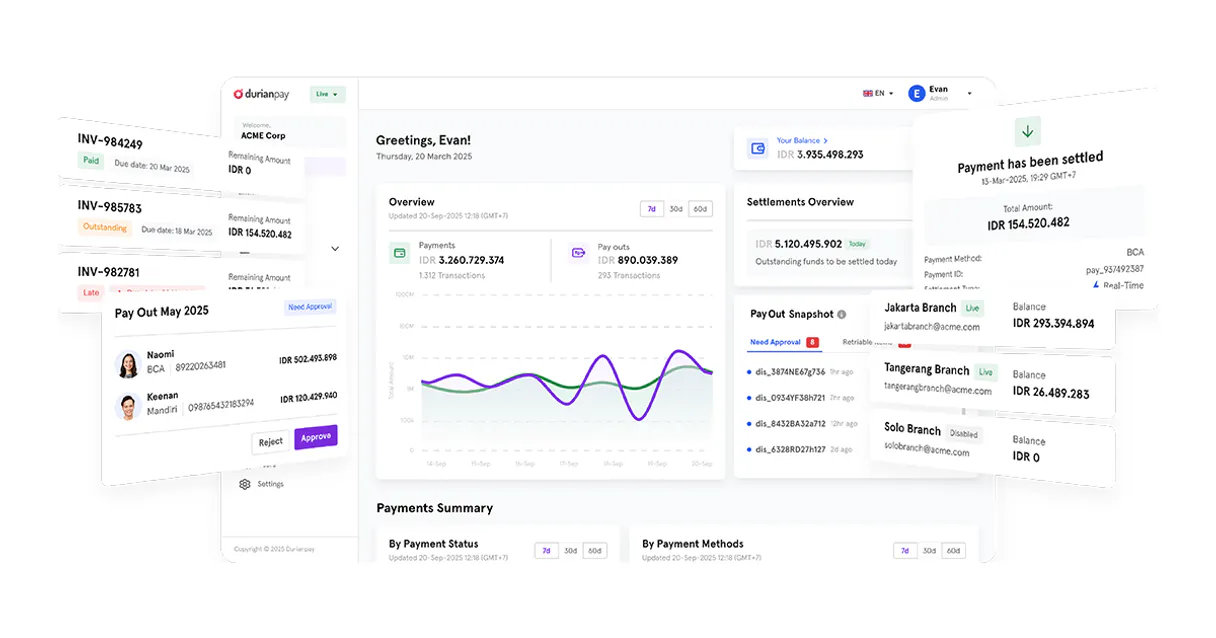
Independent Platform Disclaimer: Vinkius is an independent platform and is not affiliated with, endorsed by, sponsored by, verified by, or otherwise authorized by Durianpay. All third-party trademarks, logos, and brand names are the property of their respective owners. Their use on this website is strictly for informational purposes to identify service compatibility and interoperability.
VINKIUS INFRASTRUCTURE
Cloud Hosted
Managed infra
V8 Isolated
Sandboxed per request
Zero-Trust Proxy
No stored credentials
DLP Enforced
Policy on every call
GDPR Compliant
EU data residency
Token Compression
~60% cost reduction
Works with Claude, ChatGPT, Cursor, and more
The Model Context Protocol standardizes how applications expose capabilities to LLMs. Instead of operating in isolation, your AI gains direct access to external platforms, live data, and real-world actions through secure, standardized connections.
This server provides 10 capabilities that interface natively with Claude, ChatGPT, Cursor, and any MCP client. No middleware. No custom integration required.
Available Capabilities
Checking payment status shouldn't require three different tabs.
Today, checking a payment's status is a multi-step process. You start on the Orders dashboard, find the order ID, then copy that ID. You switch to the Payments ledger and paste it in. Then you might have to switch to the Customer Profile section just to see if the payment matches the customer record. It's a nightmare of copy-pasting and jumping between views.
With Durianpay, your agent handles the whole flow. You just ask, "What's the status of order ORD-123?" The agent runs `get_payment_order_details` and `get_payment_details` in the background, giving you the complete, verified status and all related data in one chat response.
Durianpay MCP Server: Track transactions and orders.
You no longer need to manually list payments, then separately search for the order, and then cross-reference the customer details. The agent coordinates this using tools like `list_durianpay_payments`, `list_payment_orders`, and `list_registered_customers` to build the full picture.
The difference is that you get the answer immediately, with the data source cited. No more manual reconciliation. It's instant, structured financial intelligence.
Common Questions About Durianpay MCP
How do I use the `list_latest_transactions` tool? +
The list_latest_transactions tool pulls the most recently received payments. This is useful when you just want a quick look at the last few items without getting the entire payment history.
What is the difference between `list_durianpay_payments` and `list_latest_transactions`? +
list_durianpay_payments gives you a comprehensive list of everything received. list_latest_transactions only shows the most recent payments, so use the former if you need completeness.
Can I check a customer's full history using `list_registered_customers`? +
Yes, list_registered_customers lists all customer profiles. You then follow up by asking the agent to run get_payment_details to pull the specific transaction history for that customer ID.
Does `quick_revenue_health_audit` cover failed payments? +
It provides a high-level summary of payment activity and success rates. If you need a detailed list of only failed payments, you must use the dedicated list_failed_transactions tool.
How do I find a specific order by name? +
Use the search_payment_orders tool. You can search for orders by providing either the order ID or a customer name keyword.
How do I find out my account's limits using `get_durianpay_account_metadata`? +
This tool retrieves the usage limits and metadata for your Durianpay account. It tells you what you can process and if you're approaching any usage caps.
Which tool should I use to find payments that failed? +
Use list_failed_transactions to identify payments that were declined or failed. This tool helps you track down the source of payment issues.
How do I get details for a specific checkout order using `get_payment_order_details`? +
You call get_payment_order_details and provide the order ID to pull all associated data. You'll see line items, expiration settings, and the total amount.
How do I get a Durianpay API Key? +
Log in to your Durianpay dashboard, navigate to Settings > API Keys, and you can find your unique Secret API Key there. Ensure you use the live key for production data.
Can the agent initiate refunds? +
This integration currently focuses on listing and auditing payments and orders. Processing refunds should be managed via the Durianpay dashboard or specific refund API endpoints.
Which payment methods are tracked? +
Durianpay tracks various methods including Virtual Accounts, E-wallets, Credit Cards, and Retail outlets. The agent can retrieve the specific method used for each transaction.
Use it with your favorite AI tools
Connect this server to Cursor, Claude, VS Code, and more.
More in this category
Getpaid
Manage billing, track payments, and initiate checkouts via AI agents with Getpaid.io.

Anaplan
Manage Anaplan workspaces, models, and data actions (imports, exports, processes) directly via AI.

Adyen
Global payment processing — manage payments, refunds, and merchant accounts via AI.
You might also like

Attio
Manage your CRM data with Attio — track objects, records, and relationships via AI.

Bloom Credit
Unified access to credit data and reporting via Bloom Credit — manage consumers, order reports, and monitor scores directly from any AI agent.

BugHerd
Manage visual feedback and bug reports via BugHerd — track projects, tasks, and users directly from any AI agent.