
EasyPractice MCP. Manage client records and clinic finances via conversation.
 Gemini
 Works with every AI agent you already use
…and any MCP-compatible client









Just plug in your AI agents and start using Vinkius.
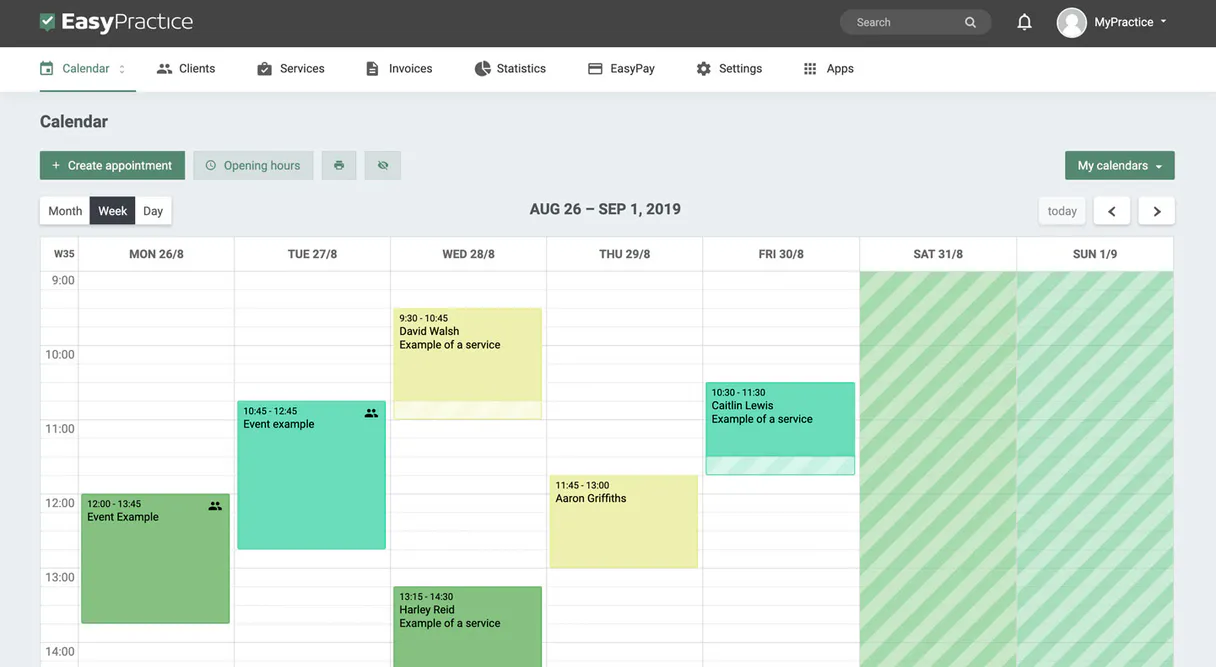
EasyPractice manages clinic operations by letting your AI agent handle appointments, client files, and billing records. It connects your AI client to the EasyPractice platform, giving you tools to list all scheduled appointments, check a client's full history, or audit outstanding invoices.
You can track client profiles, monitor payment statuses, and view service pricing—all through natural conversation.
What your AI agents can do
Get appointment details
Retrieves all detailed information for one specific appointment.
Get client details
Gets a client's full profile and their entire appointment history.
Get easypractice account metadata
Retrieves usage limits and structural metadata for your EasyPractice account.
Get a high-level summary of current client and appointment activity across the practice.
Retrieve a client's full profile, contact details, and complete appointment history.
List all scheduled clinic appointments or get deep details on a single, specific session.
List all issued clinic invoices and check their payment status and total amounts.
Find specific client profiles using a keyword in their name or email.
List all services and session types available at the clinic, along with their pricing.
Ask AI about this MCP
Supported MCP Clients
Gemini Waiting for input…
EasyPractice MCP Server: 10 Tools for Clinic Operations
These tools let your AI client interact with EasyPractice to handle everything from scheduling and client lookups to financial reporting.
019d758bget appointment details
Retrieves all detailed information for one specific appointment.
019d758bget client details
Gets a client's full profile and their entire appointment history.
019d758bget easypractice account metadata
Retrieves usage limits and structural metadata for your EasyPractice account.
019d758blist clinic appointments
Lists every scheduled appointment currently in your clinic.
019d758blist clinic clients
Lists every client registered in your EasyPractice clinic.
019d758blist clinic invoices
Lists every invoice issued by your clinic and their payment status.
019d758blist clinic services
Lists all service types and session categories offered by your clinic.
019d758blist latest appointments
Identifies appointments that were recently updated or scheduled.
019d758bquick clinic volume audit
Gets a quick summary of client and appointment activity across the whole practice.
019d758bsearch clinic clients
Finds specific clients using a name or email keyword.
Choose How to Get Started
Build a custom MCP for your own tools, or connect a ready-made integration from our catalog.
Build Your Own
Turn any API into an MCP. Import a spec, define Agent Skills, or deploy with MCPFusion.
- Import from OpenAPI, Swagger, or YAML specs
- Create Agent Skills with progressive disclosure
- Deploy to edge with MCPFusion framework
- Built in DLP, auth, and compliance on every call
- Real time usage dashboard and cost metering
- Publish to catalog or keep private
Make Your AI Do More
Start with EasyPractice, then connect any of our 4,700+ other servers whenever your AI needs more. One click, no limits.
- Use this MCP plus 4,700+ others, all in one place
- Add new capabilities to your AI anytime you want
- Every connection is secured and compliant automatically
- Track usage and costs across all your servers
- Works with Claude, ChatGPT, Cursor, and more
- New servers added to the catalog every week
What you can do with this MCP connector
Your AI client uses this server to manage everything in the clinic—appointments, client files, and billing. You'll get tools to list every scheduled appointment, check a client's full history, or audit outstanding invoices, all through natural conversation.
Audit Clinic Status
You can run quick_clinic_volume_audit to get a quick summary of client and appointment activity across the whole practice. You'll also use get_easypractice_account_metadata to see your usage limits and structural metadata.
Manage Appointments
You can list every scheduled appointment with list_clinic_appointments. To get the deep details on a single session, use get_appointment_details. You can also see appointments that were recently updated or scheduled by running list_latest_appointments.
Check Client History
Need to find someone? You can search for specific clients using a name or email keyword with search_clinic_clients. To pull a client's full profile, contact details, and complete appointment history, run get_client_details. You can also view every client registered in the clinic using list_clinic_clients.
Review Finances
To see all issued clinic invoices and check their payment status and total amounts, use list_clinic_invoices.
Understand Services
Run list_clinic_services to see all service types and session categories offered at the clinic, along with their pricing. You'll also see what services are available by using list_clinic_services.
How EasyPractice MCP Works
- 1 First, connect the EasyPractice integration to your AI agent and provide the necessary API key for authorization.
- 2 Next, you prompt your agent with a goal (e.g., 'What are the unpaid invoices?'). The agent decides which tool to run (e.g.,
list_clinic_invoices). - 3 Finally, the server executes the tool, retrieves the structured data, and passes the actionable results back to your agent for a human-readable answer.
The bottom line is, your agent talks to EasyPractice, gets the data, and tells you what it means.
Who Is EasyPractice MCP For?
Anyone running a professional clinical practice or private therapy group. This is for the Clinic Manager who spends hours clicking between booking, billing, and client files. It's for the Practitioner who needs fast client data during a session. It's for the Operations Team that has to wrangle billing reports at the end of the month.
Checks daily appointment volumes, audits billing statuses, and monitors overall client activity without logging into a web dashboard.
Pulls up a client's full history and upcoming schedule via chat during a session, so they don't have to switch screens.
Quickly verifies outstanding invoices, checks payment due dates, and confirms service metadata for accurate billing.
What Changes When You Connect
- See a client's full history instantly. The
get_client_detailstool pulls all contact info and every past appointment, so you don't have to manually cross-reference records. - Stop chasing invoices. Use
list_clinic_invoicesto see all outstanding bills, who owes what, and if they are past due. This is fast billing oversight. - Quickly check the day's schedule.
list_clinic_appointmentslists every booked slot, andlist_latest_appointmentsshows anything that changed since morning. - Find staff quickly. Instead of scrolling through a list, run
search_clinic_clientsto find a specific person by name or email, getting their details right away. - Audit the whole operation. The
quick_clinic_volume_audittool gives a high-level summary of client and appointment activity in one shot, saving time. - Verify service pricing. Use
list_clinic_servicesto confirm the correct session type and fee before booking or billing.
Real-World Use Cases
Client needs history check
A practitioner needs to review John Doe’s history before a session. They ask their agent to run get_client_details and get a summary of his last 12 appointments, finding out he has no outstanding invoices. This lets them start the session prepared.
Billing reconciliation at month-end
The ops specialist needs to know which clients haven't paid. They run list_clinic_invoices and see three unpaid invoices. They then ask the agent to cross-reference these invoice IDs with list_clinic_clients to pull the client names for follow-up.
Daily schedule audit
The clinic manager needs to check tomorrow’s schedule and make sure nothing changed. They ask the agent to use list_latest_appointments and quickly see all sessions that were updated or added overnight.
New client intake setup
A new client calls and needs to know the service structure. The agent runs list_clinic_services to get the official catalog, allowing the manager to quote the right service type and fee immediately.
The Tradeoffs
Searching by partial name
Typing 'John Doe' into the general search bar and hoping to find all his appointments, then manually opening his profile to check invoices.
→
Use search_clinic_clients to pull up the profile. Then, ask the agent to run get_client_details to pull up his full appointment history and check his invoice status in one go.
Listing everything first
Running list_clinic_appointments (100 results), then running list_clinic_clients (200 results), and having to manually match up which client belongs to which appointment.
→
If you know the client, use get_client_details directly. If you only know the date, use list_clinic_appointments and then ask for the client name from the returned details.
Ignoring payment status
Scheduling a service for a client without knowing if they owe money. You book the slot, but the billing team finds out later that the invoice was never generated.
→
Always check the finances first. Run list_clinic_invoices to see if there are any outstanding payments before confirming a service or booking.
When It Fits, When It Doesn't
Use this server if your workflow involves coordinating three or more pieces of clinic data—like client history, upcoming appointments, and billing status. It's perfect for audit trails and complex intake processes. Don't use it if you just need to know the phone number for one client; in that case, a simple client search tool is enough. If you are building a system that only manages service catalogs, list_clinic_services handles that, but you'll still need the client and appointment tools to make it actionable.
Independent Platform Disclaimer: Vinkius is an independent platform and is not affiliated with, endorsed by, sponsored by, verified by, or otherwise authorized by EasyPractice. All third-party trademarks, logos, and brand names are the property of their respective owners. Their use on this website is strictly for informational purposes to identify service compatibility and interoperability.
VINKIUS INFRASTRUCTURE
Cloud Hosted
Managed infra
V8 Isolated
Sandboxed per request
Zero-Trust Proxy
No stored credentials
DLP Enforced
Policy on every call
GDPR Compliant
EU data residency
Token Compression
~60% cost reduction
Works with Claude, ChatGPT, Cursor, and more
The Model Context Protocol standardizes how applications expose capabilities to LLMs. Instead of operating in isolation, your AI gains direct access to external platforms, live data, and real-world actions through secure, standardized connections.
This server provides 10 capabilities that interface natively with Claude, ChatGPT, Cursor, and any MCP client. No middleware. No custom integration required.
Available Capabilities
Manually compiling a client's record shouldn't take 15 minutes of clicking tabs.
Today, checking a client's file means navigating five different tabs: the main profile, the appointment log, the invoice tab, the service catalog, and the billing history. You copy the client's name, paste it into the booking system, then open the separate billing dashboard, and finally run a separate query just to see if the last payment cleared.
With this MCP server, you ask your agent for the client's full profile. It runs `get_client_details` and pulls everything—history, contact info, and even links to their invoices—into one clean response. You get the full picture, instantly.
EasyPractice MCP Server: Audit client activity and billing in one step.
Instead of logging into the booking system, then logging into the finance portal, and finally running a separate report for services, you talk to your agent. You ask, 'Show me the status of John Doe.' The agent runs `get_client_details` and `list_clinic_invoices` and combines the results for you.
The difference is context. You don't just get data; you get an operational status report. It tells you who was seen, what services were used, and if the money is owed. That's a massive workflow upgrade.
Common Questions About EasyPractice MCP
How do I use the `list_clinic_appointments` tool? +
The list_clinic_appointments tool lists every scheduled appointment in the clinic. You just ask your agent to run it, and it returns a list of all upcoming and past sessions.
What does `get_client_details` do? +
get_client_details pulls a client's full profile and their entire appointment history. It's the go-to tool for getting a complete picture of one person.
Can I check unpaid invoices with `list_clinic_invoices`? +
Yes, list_clinic_invoices lists all invoices and shows their payment status, letting you quickly identify which bills are outstanding.
How do I find a client using `search_clinic_clients`? +
search_clinic_clients lets you search for a client using a keyword in their name or email, which is faster than scrolling through a full list.
Does `quick_clinic_volume_audit` replace listing appointments? +
No. quick_clinic_volume_audit gives a high-level summary of activity. You use list_clinic_appointments when you need the full, detailed list of every single appointment.
What is the purpose of `list_clinic_services`? +
This tool retrieves the full catalog of services and session types offered by the clinic. It's useful for understanding pricing structures and available service metadata before scheduling or billing.
How do I use `get_easypractice_account_metadata`? +
This tool pulls data about your EasyPractice account itself, including usage limits and general metadata. Use it first to ensure your AI agent hasn't hit any API quotas.
Does `list_latest_appointments` differ from `list_clinic_appointments`? +
No, they aren't the same. list_latest_appointments only pulls the most recently updated or scheduled sessions. Use list_clinic_appointments when you need a complete, comprehensive list of everything.
How do I get an EasyPractice API Key? +
Log in to your EasyPractice account, navigate to Settings > API, and you can generate or retrieve your unique API Key from there. API access is typically enabled for pro plans.
Can the agent book new appointments? +
This integration currently focuses on listing and auditing clinic data. Booking new appointments or sessions should be managed via your EasyPractice online booking page or calendar app.
Does the integration show client contact info? +
Yes, you can use the list_clinic_clients or search_clinic_clients tools to retrieve client profile details, including their registered email addresses and phone numbers.
Use it with your favorite AI tools
Connect this server to Cursor, Claude, VS Code, and more.
More in this category

AWeber
Manage subscribers, mailing lists, and email campaigns via AWeber — orchestrate newsletters natively via AI.
Gainsight PX
Manage product experience, track user behavior, and oversee engagements via AI agents with Gainsight PX.

FunnelCockpit
Build high-converting sales funnels, landing pages, and email sequences with an all-in-one German marketing platform.
You might also like

Lamha
Build AI chatbots for Arabic-speaking audiences with natural language understanding designed for Middle Eastern dialects.

Songkick
Global live music database — search concerts, artists, and venues via AI.

Envi Healthcare Supply Chain
Equip your AI agent to manage healthcare purchase orders, track medical inventory, and monitor vendors via the Envi API.