
Feishu Bitable MCP. Manage your structured data without touching the web app.
 Gemini
 Works with every AI agent you already use
…and any MCP-compatible client









Just plug in your AI agents and start using Vinkius.
Feishu Bitable MCP Server connects your AI client directly to your Lark Bitable data. Use this to manage, query, and update structured data without opening the web interface.
Your agent can list bases, find tables, and read field schemas instantly. It supports full CRUD operations: create records, update existing entries, delete records, and search complex datasets using natural language.
What your AI agents can do
Create records
Adds one or more new records to a specified table.
Delete record
Permanently removes a specific record from a table.
Get base info
Retrieves general information about a Bitable base.
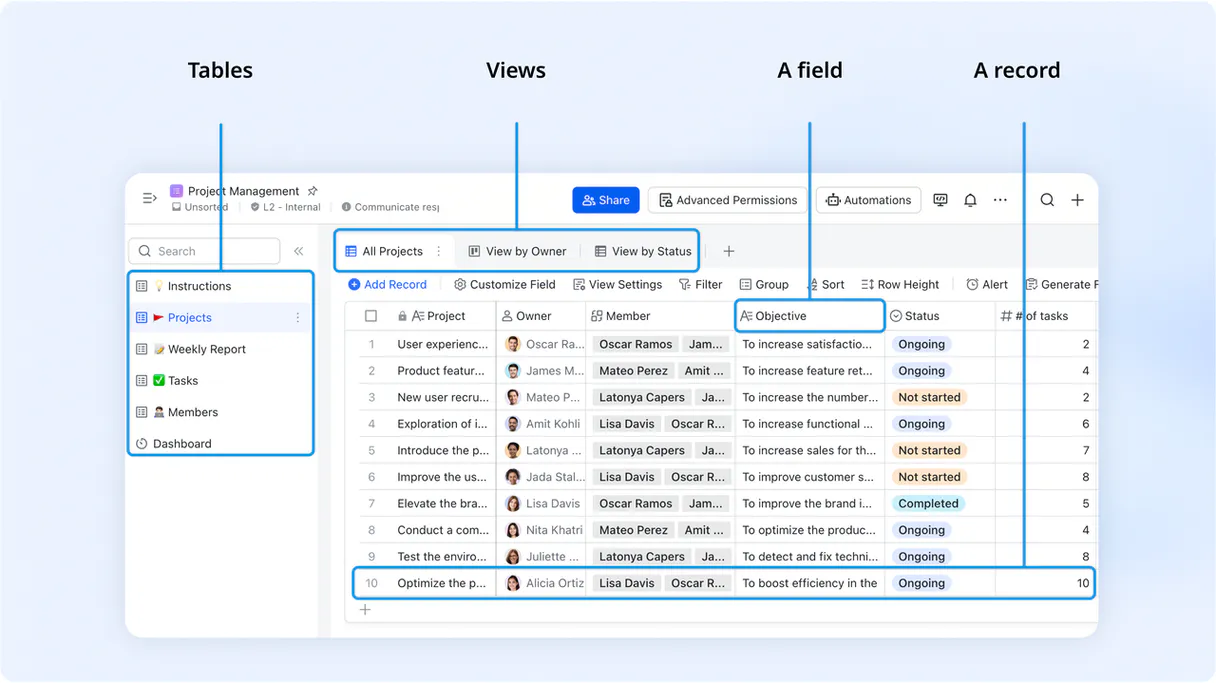
List bases and tables to understand the overall architecture of your Bitable workspace.
List records or search records to pull specific data points or full datasets from any table.
Create new records or update existing records in a table using natural language commands.
List fields and views to understand the exact structure and defined perspectives of your data tables.
Ask AI about this MCP
Supported MCP Clients
Gemini Waiting for input…
Feishu Bitable MCP Server: 10 Tools for Data Management
These tools let your agent read, write, and audit data structures across your Bitable bases. Use them to manage records and tables without leaving your chat client.
019d843acreate records
Adds one or more new records to a specified table.
019d843adelete record
Permanently removes a specific record from a table.
019d843aget base info
Retrieves general information about a Bitable base.
019d843aget record details
Gets the full, detailed data for a single record.
019d843alist fields
Lists all column headers and data types for a specified table.
019d843alist records
Retrieves a list of record IDs and basic data for all records in a table.
019d843alist tables
Lists all the tables available within a specific Bitable base.
019d843alist views
Shows all defined filtered views for a given table.
019d843asearch records
Searches records within a table using specific filter criteria.
019d843aupdate record
Changes the data in an existing record in a table.
Choose How to Get Started
Build a custom MCP for your own tools, or connect a ready-made integration from our catalog.
Build Your Own
Turn any API into an MCP. Import a spec, define Agent Skills, or deploy with MCPFusion.
- Import from OpenAPI, Swagger, or YAML specs
- Create Agent Skills with progressive disclosure
- Deploy to edge with MCPFusion framework
- Built in DLP, auth, and compliance on every call
- Real time usage dashboard and cost metering
- Publish to catalog or keep private
Make Your AI Do More
Start with Feishu Bitable, then connect any of our 4,700+ other servers whenever your AI needs more. One click, no limits.
- Use this MCP plus 4,700+ others, all in one place
- Add new capabilities to your AI anytime you want
- Every connection is secured and compliant automatically
- Track usage and costs across all your servers
- Works with Claude, ChatGPT, Cursor, and more
- New servers added to the catalog every week
What you can do with this MCP connector
Feishu Bitable MCP Server hooks up your AI client right to your Lark Bitable data. You can use this to manage, query, and update structured data without ever opening the web interface. Your agent can list bases, find tables, and read field schemas instantly. It handles full CRUD operations: you can create records, update existing entries, delete records, and search complex datasets using natural language.
To start, you can use get_base_info to get general details about a Bitable base, and list_bases to discover what bases you've got. From there, list_tables shows you every table inside a specific base. You can then use list_fields to list all column headers and data types for a table, or list_views to see every defined filtered view for a given table.
If you need to pull data, you can use list_records to get a list of record IDs and basic data for every record in a table, or search_records to search records using specific filter criteria. To get the deep dive, get_record_details pulls the full, detailed data for a single record.
When you need to change things, you've got create_records to add one or more new records to a specified table, update_record to change the data in an existing record, and delete_record to permanently remove a specific record from a table.
How Feishu Bitable MCP Works
- 1 Subscribe to the server and provide your Feishu/Lark App ID and App Secret.
- 2 Your AI client calls the appropriate tool (e.g.,
list_tables) to query the Bitable API. - 3 The server executes the command, retrieves the structured data, and sends it back to your agent for processing.
The bottom line is you get your AI client to talk to Bitable’s API directly, letting you manage data without touching the web app.
Who Is Feishu Bitable MCP For?
The data manager who gets tired of jumping between spreadsheets and database views. Project leads who need to update status trackers instantly from their workspace. Operations teams that oversee multiple, complex Bitable bases. Anyone who needs to treat structured data like a conversation.
Uses list_fields and get_record_details to audit data structures and pull specific data points for reports.
Uses create_records and update_record to track milestones and update project tables directly from their AI-powered workflow.
Uses list_tables and search_records to oversee multiple Bitable bases, finding records based on complex criteria.
What Changes When You Connect
- Full Data Lifecycle: Use
create_recordsandupdate_recordto manage entries and status changes directly from your chat. No copy-pasting data anymore. - Instant Schema Auditing: Run
list_fieldsto check a table's structure. You instantly know if a required column exists before trying to write data. - Targeted Data Retrieval: Forget browsing pages of data. Use
search_recordsto find records that match complex criteria (e.g., 'Status=Shipped' AND 'Date > 2024-01-01'). - Base Overview: Use
get_base_infoto get context about your entire Bitable base, ensuring your agent knows which data set you're talking about. - Deep Record Access: Need everything on one record?
get_record_detailspulls all associated fields for a single ID, giving you the full context immediately. - Structure Mapping: Use
list_tablesandlist_viewstogether. This lets your agent build a complete map of your workspace before you even start querying.
Real-World Use Cases
The Project Status Update
A project lead needs to update 15 team members' status on the 'Tasks' table. Instead of opening the sheet, copying IDs, and updating 15 times, they prompt their agent: 'Update the status of records 100-115 to 'Complete'. The agent runs update_record and handles the batch change instantly.
Finding a Specific Client Record
A data analyst needs to find a client who bought a specific product last month. They tell their agent, 'Search the 'Clients' table for records where Product='X' and Date > 2024-05-01.' The agent runs search_records and returns the exact details.
Initial Data Audit
A new team member joins and needs to know what tables exist. They ask their agent to 'List all tables in the main base.' The agent runs list_tables and provides the full list, letting them map the system instantly.
Building a New Data Workflow
An operations specialist wants to check the structure of a new data set before using it. They ask the agent to 'List the fields in the 'Inventory' table.' The agent runs list_fields and gives them the schema, preventing errors before the first record is written.
The Tradeoffs
Sequential Data Lookups
Trying to get a record's details by calling list_records first, then grabbing an ID, and finally calling get_record_details for that single ID. This wastes steps and makes the prompt verbose.
→
Instead, use search_records with your filters, or if you know the ID, just use get_record_details directly. Keep the sequence short.
Manual Schema Guesswork
Assuming a column exists (like 'Cost') and trying to update_record with it, only to find the operation fails because the column name is wrong.
→
Always run list_fields first. Check the exact column names before you attempt any write or update operation. It's the fastest way to avoid errors.
Over-relying on Listing
Using list_records when you only need a count or a filtered subset. This retrieves too much data, slowing down the agent and increasing token usage.
→
Use search_records with specific filters. If you just need a count, ask the agent to count the records instead of listing them.
When It Fits, When It Doesn't
Use this server if your primary job involves managing, querying, or updating data across multiple, structured bases in Feishu Bitable. You need an AI agent to act as a natural language layer over your existing database. Don't use it if you only need to read unstructured documents (use a document indexing tool) or if your data structure is highly volatile and changes daily without documentation. If you only need simple API calls (e.g., just listing IDs), the raw Bitable API might be faster, but this MCP server makes the workflow conversational and reliable.
Independent Platform Disclaimer: Vinkius is an independent platform and is not affiliated with, endorsed by, sponsored by, verified by, or otherwise authorized by Feishu Bitable. All third-party trademarks, logos, and brand names are the property of their respective owners. Their use on this website is strictly for informational purposes to identify service compatibility and interoperability.
VINKIUS INFRASTRUCTURE
Cloud Hosted
Managed infra
V8 Isolated
Sandboxed per request
Zero-Trust Proxy
No stored credentials
DLP Enforced
Policy on every call
GDPR Compliant
EU data residency
Token Compression
~60% cost reduction
Works with Claude, ChatGPT, Cursor, and more
The Model Context Protocol standardizes how applications expose capabilities to LLMs. Instead of operating in isolation, your AI gains direct access to external platforms, live data, and real-world actions through secure, standardized connections.
This server provides 10 capabilities that interface natively with Claude, ChatGPT, Cursor, and any MCP client. No middleware. No custom integration required.
Available Capabilities
Sifting through Bitable bases used to feel like navigating a giant, poorly indexed spreadsheet.
Before this server, updating a record meant opening the Bitable web app, finding the right base, clicking the correct table, and then manually locating the specific record ID. If you had to update five records, you copied the ID five times, changed the status, and hit save five times. It’s tedious, error-prone, and you lose context.
Now, your agent handles the whole thing. You simply tell it: 'Update the status for all records in the 'Inventory' table that are marked 'Pending' to 'Review'.'. The agent runs the necessary tools (`search_records` then `update_record`) and confirms the batch change. The whole process is a conversation, not a manual chore.
Feishu Bitable MCP Server: Full Data Management via Conversation
You eliminate the need to jump between the Bitable UI and your AI client. No more clicking through metadata tabs or running multiple, separate API calls just to map the schema. The agent coordinates the entire process—from running `list_tables` to confirming the final `create_records`—in one flow.
It's not just an API wrapper; it’s a command layer. It lets you treat your complex, interconnected data structures like talking to a teammate who already knows where everything is.
Common Questions About Feishu Bitable MCP
How do I list all tables using the Feishu Bitable MCP Server? +
You call the list_tables tool. This tool takes the base ID and returns a list of all table names within that base. This is the first step if you don't know your tables.
Can I search records in Feishu Bitable using the search_records tool? +
Yes. You provide the table ID and the filter criteria (e.g., 'Status' equals 'Shipped'). The tool executes the search and returns only the matching records.
What is the difference between `list_records` and `search_records`? +
list_records retrieves a list of records and basic data for every entry in a table. search_records filters that data, letting you find only records that meet specific criteria.
How do I update a record using the Feishu Bitable MCP Server? +
You use the update_record tool. You must provide the record ID, the table ID, and the specific fields and new values you want to set.
What if I need to see the data structure first? Should I use `list_fields`? +
Yes, list_fields shows you the exact column names and data types for a table. Running this first is critical before you try to write or update any data.
What tool should I use to see all the different views available in a table? (Using `list_views`) +
Use the list_views tool. It shows all predefined views for a specific table. This helps you understand how different subsets of your data are structured for reporting.
How can I add a batch of new entries to a table? (Using `create_records`) +
You use the create_records tool. This tool allows you to input multiple records at once, which is much faster than creating them one by one. You just need the table ID and the data for the new entries.
What is the purpose of `get_base_info`? +
get_base_info retrieves general details about the Bitable base. This function gives you the necessary context and metadata before you can interact with the tables inside it.
How do I find my Feishu/Lark App ID and Secret? +
Log in to the Feishu Open Platform, create a new application or select an existing one, and you will find your App ID and App Secret in the 'Credentials' section.
Where can I find the 'appToken' for my Bitable base? +
The appToken is the unique identifier found in the URL of your Bitable base. It typically looks like AppbcbWCzen6D8dezhoCH2RpMAh and appears after /base/ in the browser address bar.
Does my application need specific permissions? +
Yes. Ensure your application has the 'View, comment, edit and manage Bitable' (bitable:app) permission enabled in the Developer Console and that the bot is added as a collaborator to the base.
Use it with your favorite AI tools
Connect this server to Cursor, Claude, VS Code, and more.
More in this category

Stripe
Manage payments, customers, subscriptions, invoices, and account balance via Stripe — all from any AI agent.

MongoDB Atlas Vector Search
Manage vector storage via MongoDB Atlas — perform similarity searches, query MQL documents, and audit collections.

Federal Register
Access the official daily publication for rules, proposed rules, and notices of Federal agencies and organizations.
You might also like

Teamwork Projects
Manage projects, tasks, milestones, time entries, and messages via Teamwork API.

AppFollow
Manage app reviews and rankings with AppFollow — track sentiment, ratings, and store charts via AI.

Campinas Open Data
Access public data from Campinas, Brazil — search datasets, resources, and city organizations directly from your AI agent.