
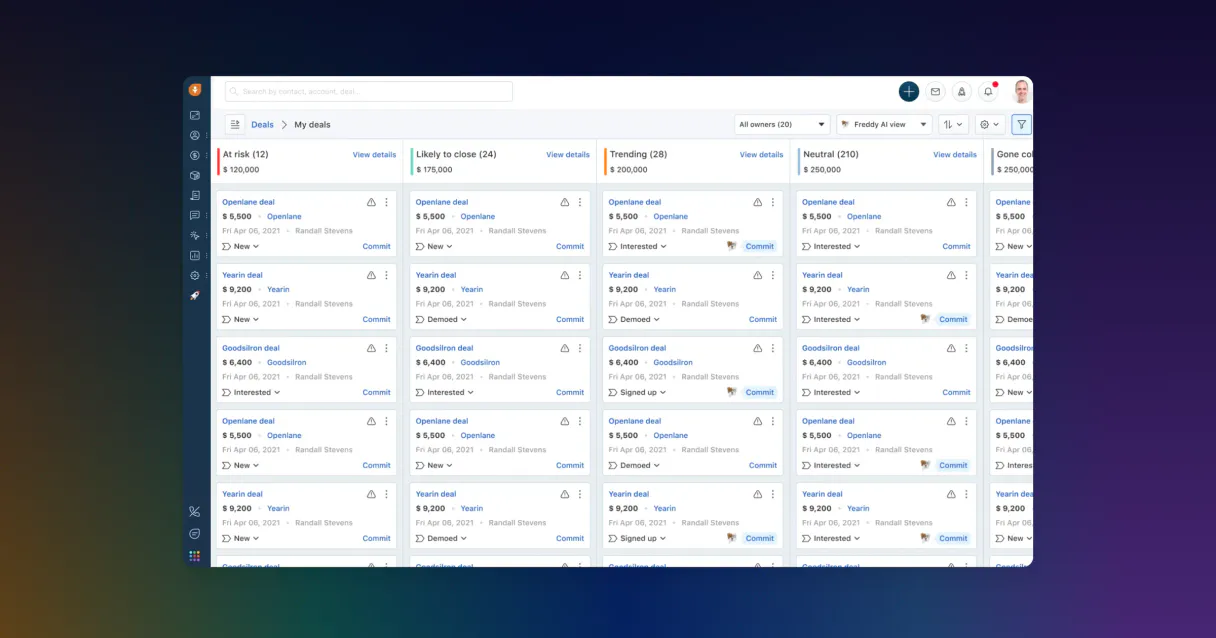
Freshsales MCP for AI. Manage your entire sales pipeline through conversation.
 Gemini
 Works with every AI agent you already use
…and any MCP-compatible client









How this MCP server connects to your AI agent
Freshsales MCP connects your sales pipeline and customer records directly to your AI client. Effortlessly manage leads, track deals, log tasks, and review notes using natural conversation.
Stop clicking through menus; just talk to your CRM.
What AI agents can do with Freshsales Automation
Create lead
This tool lets you create a brand new lead record by providing the last name and an optional email address.
Get contact
Retrieves all detailed information for a specific individual contact using their unique ID.
Get lead
Fetches the complete details and metadata associated with a single lead record.
The agent can create new leads for you or look up detailed information on existing prospects.
Retrieve complete profiles for companies (accounts) and individual people (contacts), keeping a high-fidelity database of your customer base.
List all current sales deals, checking their status in the pipeline to track progress and potential revenue.
View pending tasks, scheduled appointments, or meetings across your team's records.
Access and retrieve contextual notes attached to any record so your agent has the latest background information for conversations.
Ask an AI about this
Waiting for input…
What AI agents can do with Freshsales MCP: 10 Tools for Sales Automation
Use these tools to orchestrate every part of your sales cycle, from creating new leads to listing all open deals using conversational commands.
Make your AI actually useful.
Add this MCP to Claude, Cursor, or Windsurf and your AI stops guessing. It gets real tools to look things up, take action, and handle the stuff you keep doing by hand.
Start using Freshsales on VinkiusCreate Lead
This tool lets you create a brand new lead record by providing the last name and an optional email address.
Get Contact
Retrieves all detailed information for a specific individual contact using their...
Get Lead
Fetches the complete details and metadata associated with a single lead record.
List Sales Accounts
Retrieves an overview of every company account currently tracked in your Freshsales...
List Appointments
Lists all scheduled appointments that are booked or pending across the team.
List Contacts
Gets a full list of every contact record stored in your CRM.
List Deals
Retrieves a comprehensive list of all open and closed sales deals in the pipeline.
List Leads
Generates an overview listing every single lead record maintained by Freshsales.
List Notes
Pulls up a chronological list of all notes and comments left on any given CRM record.
List Tasks
Lists every pending task, reminder, or follow-up action item assigned to the team.
Security and governance baked right in.
Pick your AI client below to get set up. Just create a Vinkius account, subscribe, and you're instantly up and running. We handle the entire backend infrastructure, delivering out-of-the-box support for HTTPS Streamable, SSE, and OAuth2—zero messy routing required.
Claude AI
Open Claude Settings
Go to claude.ai, click your profile icon, then navigate to Customize → Connectors.
Add Custom Connector
Click the "+" button and select Add custom connector. Paste your Vinkius endpoint URL:
https://edge.vinkius.com/[YOUR_TOKEN_HERE]/mcp
Replace [YOUR_TOKEN_HERE] with your token
from cloud.vinkius.com. For OAuth-protected servers, expand
Advanced settings to add credentials.
Start a conversation
Open a new chat. The Freshsales integration is available immediately — no restart needed.
Choose How to Get Started
Build a custom MCP for your own tools, or connect a ready-made integration from our catalog.
Build Your Own
Turn any API into an MCP. Import a spec, define Agent Skills, or deploy with MCPFusion.
- Import from OpenAPI, Swagger, or YAML specs
- Create Agent Skills with progressive disclosure
- Deploy to edge with MCPFusion framework
- Built in DLP, auth, and compliance on every call
- Real time usage dashboard and cost metering
- Publish to catalog or keep private
Make Your AI Do More
Start with Freshsales, then connect any of our 5,100+ other servers whenever your AI needs more. One click, no limits.
- Use this MCP plus 5,100+ others, all in one place
- Add new capabilities to your AI anytime you want
- Every connection is secured and compliant automatically
- Track usage and costs across all your servers
- Works with Claude, ChatGPT, Cursor, and more
- New servers added to the catalog every week
Independent Platform Disclaimer: Vinkius is an independent platform and is not affiliated with, endorsed by, sponsored by, verified by, or otherwise authorized by Freshsales. All third-party trademarks, logos, and brand names are the property of their respective owners. Their use on this website is strictly for informational purposes to identify service compatibility and interoperability.
VINKIUS INFRASTRUCTURE
Cloud Hosted
Managed infra
V8 Isolated
Sandboxed per request
Zero-Trust Proxy
No stored credentials
DLP Enforced
Policy on every call
GDPR Compliant
EU data residency
Token Compression
~60% cost reduction
Built on the Model Context Protocol (MCP) for Claude, ChatGPT, Cursor, and more
The Model Context Protocol standardizes how applications expose capabilities to LLMs. Instead of operating in isolation, your AI gains direct access to external platforms, live data, and real-world actions through secure, standardized connections.
This connection provides 10 powerful capabilities that interface natively with Claude, ChatGPT, Cursor, and other compatible AI platforms. No middleware. No custom integration required.
The endless click-through cycle of managing customer records., Solved with Vinkius AI Gateway
Today, updating or checking on a client's status means jumping through hoops. You have to open the CRM, search for the account, drill down into contacts, then maybe check an associated deal pipeline tab just to see if there are pending tasks. It’s a tedious, clicking-through process that kills momentum and makes you lose track of what details matter most.
With this MCP integrated via Vinkius, you stop doing that. You simply tell your agent what you need—like 'What was the last note on Acme Corp?'—and it compiles the full answer for you in plain text. Your AI client handles all the digging so you can keep talking and selling.
Control your entire sales pipeline with Freshsales MCP.
You no longer need to remember which tab holds which piece of information. You don't have to manually initiate the creation process for new contacts or worry about whether a deal is truly active. The agent manages the record-keeping, automating the most boring parts of sales.
It’s not just reading data; it’s acting on it. Your AI client lets you update statuses and generate records conversationally. It makes your entire workflow feel like talking to a highly competent assistant who already knows everything.
What your AI can actually do with this
You can control your entire sales workflow without opening the Freshsales dashboard. Your agent uses this MCP as a direct portal into your customer data, letting you handle complex operations by simply asking questions or giving commands. Need to update a deal stage? Just tell your AI client to do it.
Want to know what a contact was talking about last week? It pulls up the latest notes immediately. This means no more jumping between tabs or digging through menus just to get basic account information.
The MCP lets you build out powerful workflows that manage everything from listing new prospects and creating initial leads, to monitoring every appointment scheduled for your team. If you're building a catalog of integrations in Vinkius, this is the one that handles core sales operations. Your AI client acts as a dedicated sales operations assistant that lives right inside your chat window.
019dd0f5-01d8-70f3-9dd0-cec0e728170e 
Here's how it actually works
The bottom line is you never have to manually log into Freshsales or navigate its complex menus again.
Subscribe to this MCP on Vinkius, then pull your API Key from Freshsales settings.
Provide your account subdomain and key to your AI client.
Ask your agent a question like, 'List all pending tasks for the Acme account,' and it pulls the data directly.
Who is this actually for?
This MCP is for sales teams that need real-time visibility into their pipeline and customer history, without ever leaving their chat interface. It's built for the Account Manager who needs quick data context or the Sales Ops Lead automating routine reporting.
They use this to get a quick summary of a contact's history, checking recent notes and pending tasks without switching apps.
The rep uses it to instantly create new leads or check deal status before making an outreach call. They keep momentum going.
They use it to automate reporting, running bulk searches across multiple contacts or listing all sales accounts for a health check.
What Changes When You Connect
Centralized visibility: Instead of jumping between tabs, you can list all contacts and get a full picture of who's in your database using one prompt. This saves minutes on every single customer interaction.
Never miss a detail: The agent pulls up contextual notes associated with any record instantly. When you talk to a client, you have the full background without opening a history tab.
Pipeline oversight: You can list deals and immediately check their current stage or value. This gives sales ops leads real-time insight into revenue tracking without running reports.
Proactive task management: Need to know what needs doing next? Listing tasks shows you all pending action items for your team, ensuring nothing falls through the cracks.
Quick data entry: When a new prospect comes in, you can instantly create a lead record using just their name and email. It’s faster than opening the web form.
Team coordination: You get a clear view of all scheduled appointments across multiple people, helping managers quickly coordinate follow-up efforts.
See it in action
A client asks for an update on their account status.
Instead of having the Account Manager manually search records, they ask their agent to retrieve detailed metadata for the client's contact. The agent compiles a summary using get_contact and list_notes, giving the AM immediate talking points.
The sales team needs a quick status report on deals.
A manager asks the agent to list all deals in the 'Negotiation' stage. The tool runs list_deals and filters the results by stage, giving management an immediate count of high-value, active opportunities.
A new prospect comes through a trade show.
The rep doesn't have time to fill out forms. They just tell their agent to create_lead for the person and provide their email. The lead is entered instantly, keeping the sales cycle moving.
Checking team follow-ups before a meeting.
A manager needs to know what tasks are pending today. They ask the agent to list_tasks for the week, ensuring everyone knows who is responsible for which action item before the next team sync.
The honest tradeoffs
Trying to find customer history manually.
A rep remembers a conversation from six months ago but has to navigate through multiple contact tabs and note sections to piece together the context, wasting several minutes.
Just ask your agent to list_notes for that specific contact. The MCP pulls all relevant background information into one place instantly.
Logging leads after the fact.
The sales team gets a promising name via LinkedIn but waits until the end of the day to manually fill out the CRM form, risking missing metadata or having poor initial data quality.
As soon as you get the name and email, use create_lead. It's fast and keeps your pipeline accurate from the start.
Guessing deal status during a call.
During a client call, the rep has to interrupt the conversation to check if the 'License Renewal' deal is still in negotiation or if it moved to proposal stage, losing conversational flow.
Use list_deals before the call. You can verify the precise status and value of all active deals instantly, keeping the discussion focused on closing.
When It Fits, When It Doesn't
Use this MCP if your primary pain point is accessing current customer data or updating records without opening a web browser. If you need to check on who needs follow-up (list_tasks), what deals are open (list_deals), or what a contact's history was (list_notes), this is for you. Don't use it if your goal is pure, complex data analysis—like running pivot tables across ten years of raw financial data. For that, connect to a dedicated Business Intelligence platform using a different MCP type.
Questions you might have
How do I connect Freshsales MCP to my account? +
You must subscribe to this MCP, then follow the steps: retrieve your API Key and identify your Account Subdomain from Freshsales settings. Your AI client uses these credentials for access.
Can I use Freshsales MCP to create leads? +
Yes. You can use the create_lead tool, simply providing a last name and an optional email address to register new prospects in your system.
Does Freshsales MCP only work for contacts? +
No. This MCP covers multiple types of records, including general leads, full company accounts (list_sales_accounts), deals, and individual people.
What does list_notes do in the Freshsales MCP? +
The list_notes tool retrieves a history of contextual notes attached to any CRM record. This gives you the full background story on accounts or contacts.
Can I check appointments using this MCP? +
Yes, use list_appointments. It pulls up all scheduled meetings and appointments across your team's calendar records within Freshsales.
We've already built the connector for Freshsales. Just plug in your AI agents and start using Vinkius.
No hosting. No infrastructure. No complex setup.
All 10 tools are live and waiting.
You're up and running in seconds.
Gemini Vinkius gives your AI agents access to the full catalog of app connectors, all fully managed, secure, and enterprise-ready. One subscription, every tool you need.
Built, hosted, and secured by Vinkius. You just connect and go.