
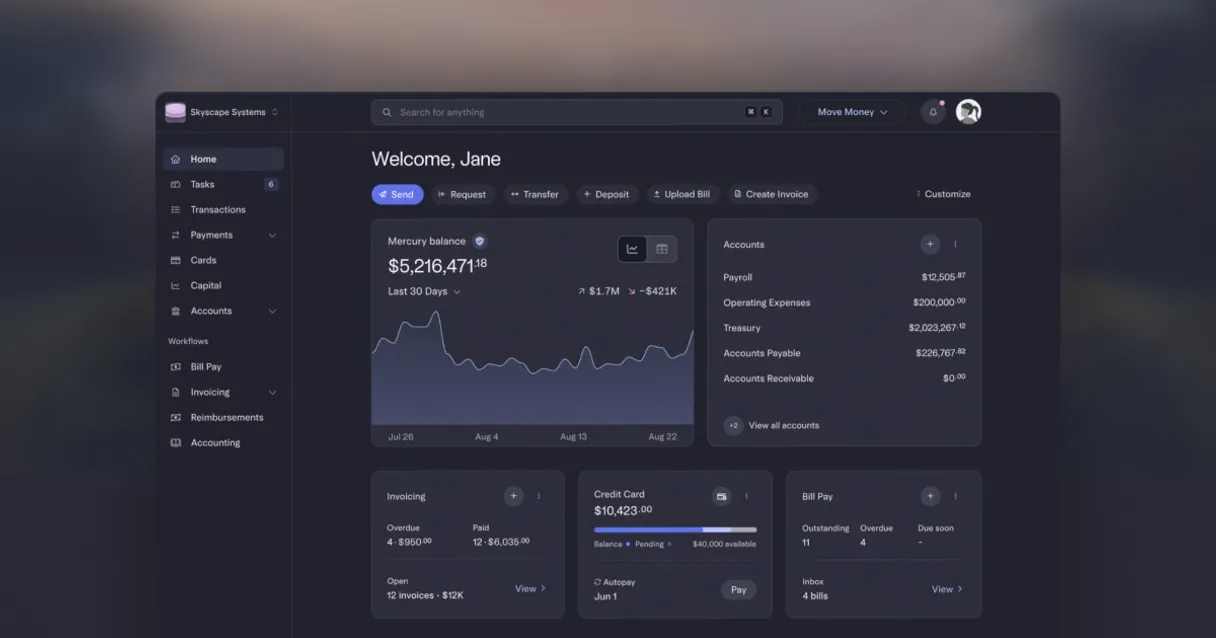
Mercury MCP for AI. Access and analyze live bank data via your AI agent.
 Gemini
 Works with every AI agent you already use
…and any MCP-compatible client









How this MCP server connects to your AI agent
Mercury connects your startup's bank accounts directly to any AI client. Use this MCP Server to manage cash flow by accessing live balances, listing recent transactions, retrieving full statements, and managing payment recipients—all through natural conversation.
What AI agents can do with Mercury Automation
Get account
Retrieves specific detail records for a single Mercury bank account.
Get balance
Returns the current available balance for specified accounts.
List accounts
Provides a list of all linked and active Mercury bank accounts.
Get a consolidated view of your current cash position across all bank types.
Pull filtered lists of past transactions, allowing you to analyze spending patterns or incoming funds.
Access and list saved wire transfer recipients and billing customer records.
Fetch official monthly account statements directly from the bank's data layer.
Ask an AI about this
Waiting for input…
What AI agents can do with Mercury MCP Server: 8 Tools for Business Finance
These tools give your AI client direct access to account details, balance sheets, transaction histories, and banking records from Mercury.
Make your AI actually useful.
Add this MCP to Claude, Cursor, or Windsurf and your AI stops guessing. It gets real tools to look things up, take action, and handle the stuff you keep doing by hand.
Start using Mercury on VinkiusGet Account
Retrieves specific detail records for a single Mercury bank account.
Get Balance
Returns the current available balance for specified accounts.
List Accounts
Provides a list of all linked and active Mercury bank accounts.
List Cards
Lists all associated debit cards tied to the account.
List Customers
Provides a list of clients set up for invoicing purposes.
List Invoices
Retrieves records of accounts receivable invoices issued by the company.
List Recipients
Lists saved payment recipients for ACH and wire transfers.
List Transactions
Gets a detailed, filterable list of transactions associated with an account over...
Security and governance baked right in.
Pick your AI client below to get set up. Just create a Vinkius account, subscribe, and you're instantly up and running. We handle the entire backend infrastructure, delivering out-of-the-box support for HTTPS Streamable, SSE, and OAuth2—zero messy routing required.
Claude AI
Open Claude Settings
Go to claude.ai, click your profile icon, then navigate to Customize → Connectors.
Add Custom Connector
Click the "+" button and select Add custom connector. Paste your Vinkius endpoint URL:
https://edge.vinkius.com/[YOUR_TOKEN_HERE]/mcp
Replace [YOUR_TOKEN_HERE] with your token
from cloud.vinkius.com. For OAuth-protected servers, expand
Advanced settings to add credentials.
Start a conversation
Open a new chat. The Mercury integration is available immediately — no restart needed.
Choose How to Get Started
Build a custom MCP for your own tools, or connect a ready-made integration from our catalog.
Build Your Own
Turn any API into an MCP. Import a spec, define Agent Skills, or deploy with MCPFusion.
- Import from OpenAPI, Swagger, or YAML specs
- Create Agent Skills with progressive disclosure
- Deploy to edge with MCPFusion framework
- Built in DLP, auth, and compliance on every call
- Real time usage dashboard and cost metering
- Publish to catalog or keep private
Make Your AI Do More
Start with Mercury, then connect any of our 5,100+ other servers whenever your AI needs more. One click, no limits.
- Use this MCP plus 5,100+ others, all in one place
- Add new capabilities to your AI anytime you want
- Every connection is secured and compliant automatically
- Track usage and costs across all your servers
- Works with Claude, ChatGPT, Cursor, and more
- New servers added to the catalog every week
Independent Platform Disclaimer: Vinkius is an independent platform and is not affiliated with, endorsed by, sponsored by, verified by, or otherwise authorized by Mercury. All third-party trademarks, logos, and brand names are the property of their respective owners. Their use on this website is strictly for informational purposes to identify service compatibility and interoperability.
VINKIUS INFRASTRUCTURE
Cloud Hosted
Managed infra
V8 Isolated
Sandboxed per request
Zero-Trust Proxy
No stored credentials
DLP Enforced
Policy on every call
GDPR Compliant
EU data residency
Token Compression
~60% cost reduction
Built on the Model Context Protocol (MCP) for Claude, ChatGPT, Cursor, and more
The Model Context Protocol standardizes how applications expose capabilities to LLMs. Instead of operating in isolation, your AI gains direct access to external platforms, live data, and real-world actions through secure, standardized connections.
This connection provides 8 powerful capabilities that interface natively with Claude, ChatGPT, Cursor, and other compatible AI platforms. No middleware. No custom integration required.
Manually tracking startup cash flow is a nightmare of clicks and PDFs., Solved with Vinkius AI Gateway
Today, checking your runway means hopping between the bank portal, logging in, navigating to 'Balances,' then going back to 'Transactions' to see where money left. You download PDF statements just to find one number—the total available cash—and you end up with a messy spreadsheet that takes hours of cleanup.
With this MCP server, your agent handles the complexity. You simply ask: 'What is our current runway?' It uses `get_balance` and `list_transactions` in sequence, giving you one clean answer immediately. No logins, no clicks, just data.
Mercury MCP Server gives your agent immediate access to all accounts & transactions.
Before this server, getting a full picture of incoming revenue required fetching `list_invoices`, cross-referencing that with payments in `list_transactions`, and then confirming the funds in `get_balance`. This chain is slow and error-prone.
Now, it’s automated. Your agent manages that entire workflow instantly. It's not just data retrieval; it's a single point of truth for your whole finance stack.
What your AI can actually do with this
Mercury MCP Server - Managing Startup Cash Flow
Forget logging into the bank portal just to run a quick query. This server plugs your startup's live Mercury banking data right into your AI client. Your agent handles all the financial heavy lifting through natural conversation, giving you instant access to real-world account details and transaction records.
Account Overview and Status
You can get a full picture of your company’s cash position right away. To see every active bank account you've linked—checking, savings, or treasury accounts—you just call list_accounts. If you need the immediate money count across those accounts, your agent uses get_balance, giving you the current available funds for whatever specific accounts you name.
Furthermore, if you gotta know what debit cards are tied to a particular account, it'll pull that list using list_cards.
Tracking Money Movement and Statements
Analyzing cash flow is where this thing shines. To review your spending habits or track incoming funds, your agent runs list_transactions. This tool gives you a detailed, filterable history of every transaction linked to an account over time. You can narrow down the results by date range or type of expense.
When you need official paperwork for accounting, it'll fetch complete monthly statements directly from the bank's data layer—you just ask your agent to get those records.
Managing Customers and Payments
Running a startup means dealing with payments constantly. To keep track of who owes you dough, your agent uses list_invoices to pull all accounts receivable invoices that the company has issued. You can also check out the list of clients set up for billing purposes by calling list_customers, which gives you the names and details needed for invoicing reconciliation.
When it comes time to send money out—whether it's a wire transfer or an ACH payment—you don't have to re-enter anything. Your agent accesses saved payee information using list_recipients, giving you the full list of recipients already stored in Mercury.
Specific Data Retrieval
Need something super specific? If you only want details for one particular bank account, your agent uses get_account to retrieve those exact record details. This gives you granular information without having to pull a massive statement or run a complex query. You can manage cash flow by viewing all linked accounts and balances, reviewing filtered transaction history, retrieving official financial statements, accessing saved payment recipients, and listing active customer records—all through your AI client's conversational interface.
019dd124-0839-7041-927f-c55afacabb32 
Here's how it actually works
The bottom line is: you talk to your agent, it talks to Mercury's APIs, and you get a clean JSON output.
Subscribe to the Mercury MCP Server and provide your unique API Token.
Your AI client sends a request (e.g., 'What were my expenses last week?').
The server executes the necessary tool (list_transactions) and returns structured, actionable data back to your agent.
Who is this actually for?
Founders who need quick cash flow checks without opening the web portal. Finance Ops teams handling month-end reconciliation. Developers building internal financial dashboards that need live banking data.
Needs to check current runway and total available balances instantly from a chat window.
Automates transaction categorization and pulls historical data for month-end reconciliation, avoiding manual report downloads.
Builds internal financial dashboards that require programmatic access to account details and payment recipient lists.
What Changes When You Connect
See real-time balances instantly. Use get_balance to pull the total available cash across all checking, savings, and treasury accounts without navigating multiple dashboards.
Simplify expense tracking. Instead of manually downloading PDFs, use list_transactions to filter and review outgoing payments over a specified date range in seconds.
Automate vendor setup. Use list_recipients to quickly validate saved wire transfer details or check if you need to add a new payeeship before running payroll.
Improve reporting speed. The list_invoices tool lets your agent pull the current status of all accounts receivable, giving instant visibility into cash coming in.
Streamline onboarding. Use list_customers to get an accurate list of who you've invoiced recently, helping finance teams reconcile sales data faster.
See it in action
Checking Q3 Cash Flow
A founder needs to know if they can afford a big hire. They prompt their agent: 'What's the cash flow?' The agent uses list_accounts first, then calls get_balance for each account type, and finally runs list_transactions filtered by expense type, giving an immediate total runway figure.
Reconciling a Client Payment
The finance team notices a payment discrepancy. They ask the agent to check transactions for a specific date range and client ID. The agent uses list_transactions combined with get_account data, pulling up all related payments so they can resolve the mismatch immediately.
Preparing Quarterly Tax Docs
The accounting team needs a comprehensive list of who was paid wires last quarter. They ask the agent to run list_recipients and then use that data structure to pull relevant transaction records from list_transactions, building an auditable export.
Verifying Invoicing Status
A sales rep needs to confirm if a client has outstanding payments. They prompt the agent, which uses list_customers to verify the customer ID and then calls list_invoices against that ID to see all pending receivables.
The honest tradeoffs
Downloading statements manually
The user clicks into the bank portal, navigates through three different menus (Statements > Download > Select Date Range), and then downloads a PDF they have to upload to their workflow.
Let your agent call the list_account tool. The resulting data structure contains all necessary balance and transaction history, eliminating the need for file uploads or manual web navigation.
Searching by keywords in PDFs
The user downloads a large statement PDF and then uses Ctrl+F to search for an expense category. This is slow, unreliable, and doesn't provide structured data.
Use the list_transactions tool. It returns clean, machine-readable JSON that allows your agent to filter by specific amounts, dates, or merchant names instantly.
Guessing account numbers
A developer needs a balance but only knows a vague description ('the savings'). They have to check multiple portals until they find the right account ID.
Start by calling list_accounts. This gives your agent an accurate list of all available accounts, allowing it to correctly call get_balance and get the specific data you need.
When It Fits, When It Doesn't
Use this Mercury MCP Server if your workflow needs live financial numbers—balances, transaction logs, or customer records—and you want an AI agent to access them without human intervention. The key is structured, real-time data. Don't use it if you just need a simple static list of names; for that, basic CRM tools are fine. You also don't need this if your sole requirement is generating custom financial reports based on internal accounting software—for those cases, connect to the ledger system instead. But if you need bank-side truth (like confirming an ACH transfer happened), this server gives you the necessary list_transactions capability.
Questions you might have
How do I get all my account balances using the Mercury MCP Server? +
You use list_accounts first to identify all accounts, then call get_balance for each one. Your agent handles this multi-step process automatically, giving you a consolidated report.
Can I find out who I sent money to with list_transactions? +
Yes. The output from list_transactions includes merchant details and recipient information for most transfers, letting you track where your funds went last week or month.
What's the difference between `get_balance` and `list_accounts`? +
list_accounts gives a list of all available accounts (e.g., Checking, Savings). get_balance takes one or more account IDs from that list and returns the specific monetary balance for each.
Does Mercury MCP Server help with tax prep? +
It helps by providing structured data via tools like list_transactions, which are much easier to feed into accounting software than manually collected PDFs. You can pull specific transaction types needed for quarterly reports.
What information does the Mercury MCP Server need to access my accounts, and how do I authenticate? +
You must provide a valid Mercury API Token for connection. Your AI client uses this token to securely authorize all calls; never embed it directly in prompts.
Can I filter transactions using the `list_transactions` tool for a specific date range or amount? +
Yes, you can pass parameters like start_date, end_date, and minimum_amount. This lets your agent isolate exactly which outgoing payments occurred between two dates.
Does the `list_invoices` tool help me track outstanding payments owed to my company? +
The list_invoices tool pulls your accounts receivable records. You'll get a list of invoices and their current status, helping you see which clients haven't paid yet.
If I need to send money, how does the `list_recipients` tool help me manage existing payee information? +
This tool retrieves all saved wire and ACH recipients. You don't have to manually enter details; your agent uses this list to select known payees for transfers.
Can I view balances and recent transactions? +
Yes. You can query balances for all accounts and list recent incoming/outgoing transactions.
How does Mercury authentication work? +
Mercury uses a Bearer token (API Token) against api.mercury.com/api/v1. Tokens must be generated with read-only scopes.
Can I initiate money transfers via the API? +
The standard API token allows read-only access to balances and transactions for security reasons.
We've already built the connector for Mercury. Just plug in your AI agents and start using Vinkius.
No hosting. No infrastructure. No complex setup.
All 8 tools are live and waiting.
You're up and running in seconds.
Gemini Vinkius gives your AI agents access to the full catalog of app connectors, all fully managed, secure, and enterprise-ready. One subscription, every tool you need.
Built, hosted, and secured by Vinkius. You just connect and go.