
Open Library MCP. Audit book metadata and author bibliographies instantly.
 Gemini
 Works with every AI agent you already use
…and any MCP-compatible client









Just plug in your AI agents and start using Vinkius.
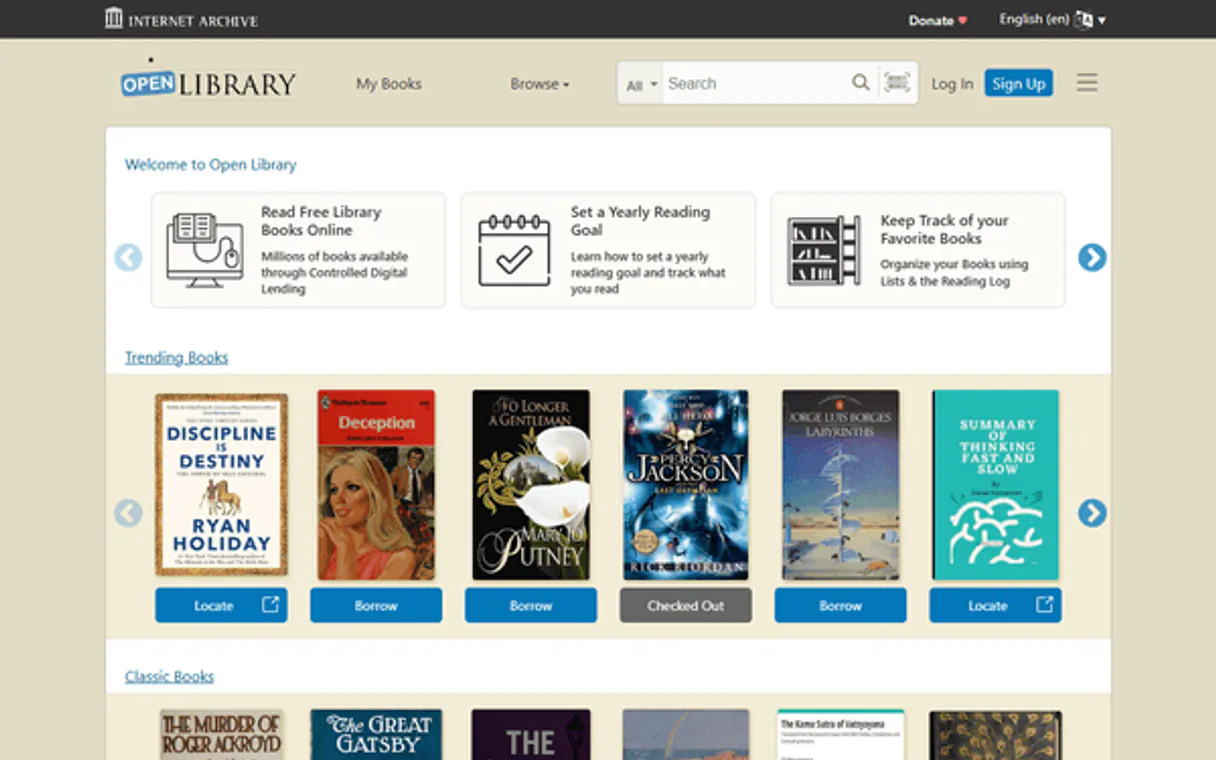
Open Library. Manage all literary research directly through your AI client. This server lets you audit book records, search authors and subjects, and retrieve detailed metadata for any title or ISBN without touching a dashboard.
Your agent acts like a real-time librarian, pulling precise data about publication years, works listed under an author, or recent catalog changes.
What your AI agents can do
Get author
Retrieves specific details for an author when provided with their unique key.
Get author works
Lists all the published works associated with a given author key.
Get book by isbn
Pulls complete book metadata using only an ISBN number.
Retrieves a full profile and details for an author using their unique key.
Returns a complete list of books and works associated with a specific author's profile.
Pulls comprehensive book metadata instantly when you provide the International Standard Book Number (ISBN).
Fetches user ratings data for a specific literary work.
Finds all books categorized under a given academic or literary subject.
Lists the most recent additions and changes made to the Open Library database.
Ask AI about this MCP
Supported MCP Clients
Gemini Waiting for input…
Open Library MCP Server: 10 Tools for Bibliographic Data
These tools let your AI client perform specific, complex searches across the entire Open Library catalog, giving you precise metadata about authors, subjects, and individual works.
019d8464get author
Retrieves specific details for an author when provided with their unique key.
019d8464get author works
Lists all the published works associated with a given author key.
019d8464get book by isbn
Pulls complete book metadata using only an ISBN number.
019d8464get book ratings
Gets the user rating and review summary for a specific work key.
019d8464get lists
Retrieves public reading lists created by users on Open Library.
019d8464get recent changes
Lists what has changed in the entire Open Library database recently.
019d8464get subject
Finds books that are categorized under a specific subject or academic field.
019d8464get work
Retrieves detailed metadata for any single literary work key.
019d8464search authors
Searches the Open Library database to find authors by name or partial keywords.
019d8464search books
Performs a broad search across all books in the catalog using title, keyword, or phrase.
Choose How to Get Started
Build a custom MCP for your own tools, or connect a ready-made integration from our catalog.
Build Your Own
Turn any API into an MCP. Import a spec, define Agent Skills, or deploy with MCPFusion.
- Import from OpenAPI, Swagger, or YAML specs
- Create Agent Skills with progressive disclosure
- Deploy to edge with MCPFusion framework
- Built in DLP, auth, and compliance on every call
- Real time usage dashboard and cost metering
- Publish to catalog or keep private
Make Your AI Do More
Start with Open Library, then connect any of our 4,700+ other servers whenever your AI needs more. One click, no limits.
- Use this MCP plus 4,700+ others, all in one place
- Add new capabilities to your AI anytime you want
- Every connection is secured and compliant automatically
- Track usage and costs across all your servers
- Works with Claude, ChatGPT, Cursor, and more
- New servers added to the catalog every week
What you can do with this MCP connector
Open Library MCP Server - Audit Books & Authors
Look, this isn't some fancy dashboard you gotta click through. Your agent connects straight to Open Library's back end. You can run deep bibliographic searches and audit book records using only conversation with your AI client. It pulls all the detailed metadata for any title or author without you ever touching a web interface.
Here’s the deal: you get real-time, librarian-level data about publication years, catalog changes, and an author's entire body of work.
Finding Books and Subject Matter
You need to find something? You can kick off a broad search across the whole catalog using search_books by title, keyword, or even just a phrase. If you know what niche you’re looking at—say, 'Victorian Poetry' or 'Game Theory'—you use get_subject to pull up every book categorized under that academic field.
You also get the ability to search for authors directly using search_authors, finding them by name or partial keywords so you know exactly who you’re dealing with.
Digging into Specific Works and ISBNs
When you have a solid idea of what you want, your agent pulls comprehensive metadata instantly. You just give it an International Standard Book Number (ISBN) using get_book_by_isbn, and it returns the full details for that book. If you prefer to work with the unique literary key instead, you can use get_work to get detailed information on any single work.
For a deeper dive into community reception, you run get_book_ratings against a specific work key; this fetches the user rating and provides a review summary so you know how people liked it.
Tracking Authors and Their Output
To track an author’s contribution, you first find them using search_authors, then retrieve their full profile with get_author by their unique key. Once you have the profile, your agent uses get_author_works to list every single book and work associated with that person's catalog record. This lets you track an entire career’s output in one go.
Catalog Auditing and Community Data
Want to see what's going down across the whole library? You run get_recent_changes to list everything new or modified in the Open Library database lately. You can also check public reading lists using get_lists, seeing what other users are collecting. If you want a complete picture of one writer, remember that besides listing their works, you can also use get_author_works to see every title they’ve put out.
Your agent makes sure you never have to navigate through menus or click on little buttons; it just hands you the clean data. You're always working with precise information: publication years, ISBNs, and full metadata sets for works found via get_work or specific authors pulled via get_author. It’s like having a grad student who knows every corner of the library and reports back directly to your chat window.
How Open Library MCP Works
- 1 Subscribe to this server. Since it's a free, open service, you won't need an API key.
- 2 Connect the Open Library MCP Server to your preferred client (Claude, Cursor, etc.).
- 3 Tell your agent what you need—for example, 'Find all works by Author X.' The agent then executes the appropriate tool call and returns structured data.
The bottom line is that your AI client handles all the database calls; you just talk to it like talking to a librarian.
Who Is Open Library MCP For?
This server targets researchers, academics, and professional catalogers who deal with structured literary data. If you spend time cross-referencing citations or building comprehensive reading lists, this saves huge amounts of manual effort. It's for the person tired of switching between multiple databases just to verify a single author's full bibliography.
Uses search_books and get_author_works to quickly audit bibliographies, ensuring every citation is properly attributed and fully documented.
Runs get_recent_changes and get_subject to monitor database updates and build cross-functional collection guides based on specific topics.
Employs the agent to run rapid audits using ISBNs (get_book_by_isbn) or keywords, building a detailed personal reading list without leaving their chat window.
What Changes When You Connect
- See an author's full bibliography immediately. Instead of visiting separate profile pages, use
get_author_worksto get a complete list of all published titles for one person in a single call. - Get instant book details from ISBN. You can pass just an ISBN to
get_book_by_isbn, and the agent returns year, title, and metadata—no manual lookups needed. - Scope research by topic, not author. Use
get_subjectto list all relevant literature under a subject like 'Physics,' saving you from keyword guesswork. - Monitor data integrity with
get_recent_changes. You get an immediate feed of the latest database updates, which is critical for large-scale academic projects. - Track book popularity. Run
get_book_ratingson any work key to see user sentiment and aggregate ratings without leaving your chat interface.
Real-World Use Cases
Verifying a Citation's Scope
You're writing a paper and need to make sure you included every book by Author X. You use search_authors first, then pass the key into get_author_works. The agent returns the full list of works, confirming your bibliography is complete.
Building a Subject-Specific Reading List
You're researching 'Climate Change.' Instead of searching by general keywords and getting noise, you ask the agent to use get_subject. It returns 15 books under that exact subject key, allowing you to immediately pull detailed metadata for each one.
Checking an Obscure Edition's Details
You only have a book's ISBN. You feed it into get_book_by_isbn. The agent pulls the title, publication year, and any available ratings instantly, letting you audit the edition without ever Googling the number.
Auditing an Author's Career Trajectory
You want to know how a specific author evolved. You use get_author to get their main profile, then pass that key to get_author_works. This gives you the full chronological list of titles and helps map their career shift.
The Tradeoffs
Searching everything with one query
Trying to find a book's ISBN, its author, AND its ratings all in one massive prompt. This usually leads the agent to fail or only retrieve partial data.
→
Break it down into steps. First, use search_books to locate the title. Then, get the work key and run get_book_by_isbn for metadata. Finally, pass that key to get_book_ratings for user sentiment.
Using only general search
Asking 'books about science' without specifying a subject or keyword. This gives you too much noise and requires manual filtering.
→
If the topic is academic, use get_subject. If it's a specific title, use search_books with quotes. Don't rely on general conversation when precision matters.
Overlooking recent changes
Assuming all data is static and ignoring what might have been recently added or corrected in the catalog.
→
Always start your research by running get_recent_changes. This gives you a snapshot of the freshest data available, ensuring your records are current.
When It Fits, When It Doesn't
Use this server if your work involves auditing structured literary metadata. You need to verify author attribution, cross-reference ISBNs, or build comprehensive bibliographies. It's perfect for librarians and academics who require deep data access.
Don't use it if you just need simple keyword search over general text documents (use a standard document retrieval tool). Also, don't expect the server to write your paper; it only pulls structured facts. If you only care about if a book exists and not its metadata details or ratings, search_books is enough, but if you need the full context, use this.
It works best when chaining tools: e.g., finding a work via get_subject, getting its key, then checking its rating with get_book_ratings. This server is about precision and data layering.
Independent Platform Disclaimer: Vinkius is an independent platform and is not affiliated with, endorsed by, sponsored by, verified by, or otherwise authorized by Open Library. All third-party trademarks, logos, and brand names are the property of their respective owners. Their use on this website is strictly for informational purposes to identify service compatibility and interoperability.
VINKIUS INFRASTRUCTURE
Cloud Hosted
Managed infra
V8 Isolated
Sandboxed per request
Zero-Trust Proxy
No stored credentials
DLP Enforced
Policy on every call
GDPR Compliant
EU data residency
Token Compression
~60% cost reduction
Works with Claude, ChatGPT, Cursor, and more
The Model Context Protocol standardizes how applications expose capabilities to LLMs. Instead of operating in isolation, your AI gains direct access to external platforms, live data, and real-world actions through secure, standardized connections.
This server provides 10 capabilities that interface natively with Claude, ChatGPT, Cursor, and any MCP client. No middleware. No custom integration required.
Available Capabilities
Manual literary research is slow, tedious, and prone to missing links.
Today, if you need to audit a bibliography, you manually check one book's title, then search for the author's profile, copy-paste that key to find their works, and then separately look up the ISBN to verify its publication details. This process involves logging into three different interfaces and copying five separate identifiers.
With this MCP server, your agent handles all those steps in one chat conversation. You ask for an author's complete bibliography—the agent runs `get_author` and `get_author_works`, delivers the full list of titles instantly, giving you a verified record.
Open Library MCP Server: Get structured data from authors and books.
Forget spending time cross-referencing ISBNs against multiple databases. You can pass one number to the agent, which runs `get_book_by_isbn` and returns a clean JSON object with all metadata—publication year, full title, etc.—all in place.
The difference is that you don't just get an answer; you get structured data ready for your next step. It's instant, reliable bibliographic intelligence.
Common Questions About Open Library MCP
How do I find all works by a specific author using the get_author_works tool? +
You must first get the author's key (e.g., via search_authors) and then pass that key to get_author_works. This guarantees you receive a complete list of titles linked only to that profile.
Can I search for books by subject using get_subject? +
Yes. Simply tell your agent the subject (e.g., 'quantum mechanics'). The get_subject tool then returns a list of all relevant titles cataloged under that specific category.
Does get_book_by_isbn provide enough detail for academic citation? +
It provides comprehensive metadata, including the publication year and ISBN. While it won't write your paper, it gives you all the verified facts needed to build an accurate source entry.
How do I check if a book is popular using get_book_ratings? +
Pass the work key into get_book_ratings. The tool pulls aggregate user ratings and review summaries, letting you gauge popularity or critical reception immediately.
Do I need an API key when using `search_books` or any other tool? +
No, you don't need to worry about keys. The server connects directly to the open Open Library service, so your agent doesn't require any credentials or tokens for setup.
What should I do if my agent gets an error when calling `get_work` repeatedly? +
If you make too many requests quickly, the system might temporarily throttle you. Implement a simple delay (like exponential backoff) in your workflow logic and try again later.
How do I use `get_recent_changes` to monitor library activity? +
This tool provides a chronological feed of edits across the database. It tells you which record was changed, what type of change it was, and when that contribution happened.
Should I use `search_authors` or `get_author` to find an author's data? +
Use search_authors if you only know the name, as this finds potential matches. If your agent already has the unique Open Library key, then use get_author for immediate, direct retrieval.
Is an API Key required for Open Library? +
No. Open Library is a free and open service. This server works out of the box without any static credentials required.
Can the agent search for books by ISBN? +
Yes. Use the get_book_by_isbn tool providing the ISBN-10 or ISBN-13. Your agent will retrieve the specific record from the Open Library catalog instantly.
Is it possible to see an author's bibliography via the agent? +
Yes. The get_author_works tool allows your agent to retrieve all known works for a specific author using their unique author key.
Use it with your favorite AI tools
Connect this server to Cursor, Claude, VS Code, and more.
More in this category

Open Food Facts Alternative
Access the world's largest open food database — retrieve nutrition facts, ingredients, and environmental scores for millions of products.

ReliefWeb
Access humanitarian reports, disaster data, job postings and organizational data from the world's leading humanitarian information platform.

Wiktionary
Universal linguistic intelligence — get word definitions, etymologies, and examples via AI.
You might also like
NoiseMeters API
Monitor noise levels — audit decibels and instruments via AI.

Pinterest Ads
Equip your AI agent with direct access to Pinterest Ads — manage campaigns, track pin performance, and optimize shopping ad spend without opening Pinterest Ads Manager.

rct.ai
Create AI-powered NPCs and metaverse scenarios — manage autonomous virtual beings and narrative logic directly from any AI agent.