
Phyllo MCP. Cross-Platform Creator Metrics & Audience Data
 Gemini
 Works with every AI agent you already use
…and any MCP-compatible client









Just plug in your AI agents and start using Vinkius.
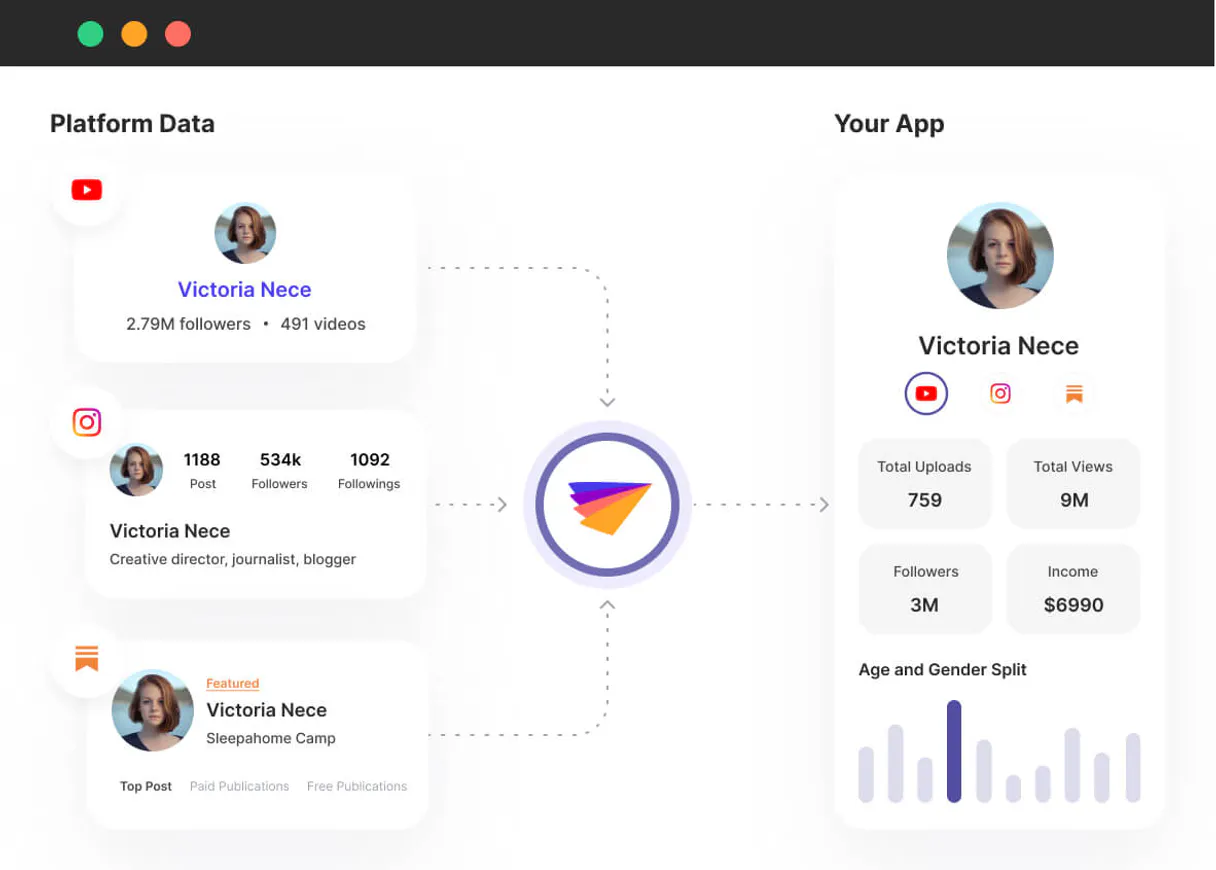
Phyllo connects your AI client directly to live data from dozens of social networks. It pulls creator metrics, audience demographics, and campaign reach—all in one place.
Use it to analyze influencer performance, track cross-platform growth, or verify accounts without manual API calls or scraping.
What your AI agents can do
Create connect session
Generates a secure token needed to authorize the connection session.
Get account income
Fetches verified income streams that are linked to the creator's account.
Get creator audience
Retrieves detailed demographic information about a creator’s audience base.
Find potential partners by running a search across all supported social platforms using search_creators.
Retrieve detailed demographic information about a creator's audience base with get_creator_audience.
Fetch recent posts, videos, or streams from a specific creator account using get_creator_content.
Get specific engagement analytics for any single piece of content using get_engagement_stats.
Check if a creator has verified their real-world identity or account status with get_identity_status.
Ask AI about this MCP
Supported MCP Clients
Gemini Waiting for input…
Phyllo MCP Server: 10 Tools for Creator Analytics
Access verified income streams, audience demographics, content history, and platform lists by calling these ten tools through your AI client.
019d846bcreate connect session
Generates a secure token needed to authorize the connection session.
019d846bget account income
Fetches verified income streams that are linked to the creator's account.
019d846bget creator audience
Retrieves detailed demographic information about a creator’s audience base.
019d846bget creator content
Gets a list of the most recent posts, videos, or streams from a specific creator.
019d846bget creator profile
Pulls a unified profile containing core details across multiple social platforms for one creator.
019d846bget engagement stats
Retrieves specific engagement analytics metrics for any single post or piece of content.
019d846bget identity status
Checks if the creator has verified their real-world identity status with major providers.
019d846bget platform list
Lists every social media platform that Phyllo supports for data collection.
019d846bget webhook status
Checks the status and configuration of any registered webhooks attached to accounts.
019d846bsearch creators
Searches for specific creators across all supported social platforms using keywords or filters.
Choose How to Get Started
Build a custom MCP for your own tools, or connect a ready-made integration from our catalog.
Build Your Own
Turn any API into an MCP. Import a spec, define Agent Skills, or deploy with MCPFusion.
- Import from OpenAPI, Swagger, or YAML specs
- Create Agent Skills with progressive disclosure
- Deploy to edge with MCPFusion framework
- Built in DLP, auth, and compliance on every call
- Real time usage dashboard and cost metering
- Publish to catalog or keep private
Make Your AI Do More
Start with Phyllo, then connect any of our 4,700+ other servers whenever your AI needs more. One click, no limits.
- Use this MCP plus 4,700+ others, all in one place
- Add new capabilities to your AI anytime you want
- Every connection is secured and compliant automatically
- Track usage and costs across all your servers
- Works with Claude, ChatGPT, Cursor, and more
- New servers added to the catalog every week
What you can do with this MCP connector
Phyllo connects your AI client straight to live data from dozens of social networks. You don't need to write a bunch of complex API scripts; you just let your agent talk to the server, and it pulls all that messy data for you.
You can use this thing to analyze how well influencers are doing, track growth across platforms, or verify accounts without manual scraping or making calls yourself.
Search for Creators: You start by running search_creators. This tool lets you search for specific people across every social platform Phyllo supports, using keywords or filters. It's your starting point when you need to find potential partners quickly.
Analyze Audience Demographics: Need to know who the audience is? Use get_creator_audience to pull detailed demographic info about a creator’s base. You get specific data on their audience makeup, which helps you understand where they're at and who they talk to.
Track Content Performance: To see what content is actually working, run get_creator_content. This gets you the most recent posts, videos, or streams from a creator account. You get a list of their activity so you know what material's available for analysis.
Measure Engagement Rates: When you find a piece of content that looks promising—a post, video, or stream—you run get_engagement_stats. This tool pulls specific analytics metrics just for that one item. You get hard numbers on its performance.
Verify Creator Status: Before trusting any data, check the creator's credentials. Use get_identity_status to see if they’ve verified their real-world identity or account status with major providers. It confirms legitimacy.
Platform and Profile Details: You can pull a unified picture of any creator using get_creator_profile. This pulls core details across multiple social platforms for one person, giving you a holistic view. To see what networks Phyllo talks to, run get_platform_list. It lists every single social media platform available for data collection.
Deeper Financial and Technical Checks: Need more depth? You can fetch verified income streams linked to the creator's account with get_account_income. If you’re running automated reporting, check get_webhook_status to see the status and configuration of any registered webhooks attached to accounts. It makes sure your data flow stays live.
Connecting Everything: First, remember you gotta generate a secure token using create_connect_session—that authorizes the whole connection session. If you need to find creators by running a broad search, use search_creators. You can then get their full profile with get_creator_profile, check out who they're talking to via get_creator_audience, and see what kind of stuff they've posted using get_creator_content.
For any single piece of content you want to grade, run get_engagement_stats for the metrics. If you need to confirm their identity or income streams, check get_identity_status and get_account_income, respectively. You can also verify how Phyllo is set up by checking get_webhook_status against the list of supported platforms from get_platform_list.
This gives your agent everything it needs to run deep dives into creator performance across multiple networks.
How Phyllo MCP Works
- 1 Subscribe to the Phyllo server deployment.
- 2 Connect your AI client and input the provided Client/App secrets in the dashboard.
- 3 Tell your agent which data you need (e.g., 'What was the 3-month growth for Creator X?'). The agent executes the necessary tools and returns the compiled metrics.
The bottom line is, your AI client accesses authenticated creator data directly through specific endpoints, skipping manual scraping entirely.
Who Is Phyllo MCP For?
This tool is for marketing agencies, brand managers, and platform administrators. If you spend time manually collecting post counts, checking audience demographics across TikTok and YouTube, or compiling pitch decks from fragmented data sources, this server saves you hours of work.
Generates instant pitch documents by querying the most updated engagement footprint for multiple creators.
Aggregates exact post performance across sponsored chains (like TikTok or Instagram) without leaving their main enterprise communication platform.
Verifies inbound identity applications for new creators, eliminating fraud by checking authenticated account details.
What Changes When You Connect
- Access live, verifiable data. Instead of relying on manual estimates, use
get_creator_audienceto query accurate demographics and historical subscriber growth models. - Automate campaign tracking instantly. Correlate real-time engagement metrics across YouTube, TikTok, and Instagram using
get_engagement_stats, saving you the tedious work of checking three different dashboards. - Verify accounts without friction. Don't guess a creator's reach; use
get_identity_statusto confirm their verified status directly from major providers. - Build comprehensive profiles fast. Use
get_creator_profileandsearch_creatorstogether. Your agent pulls the bio, location, and key metrics into one unified data set instantly. - Streamline reporting. Get a full content history for any user using
get_creator_content, allowing your AI to feed raw video metadata directly into reports.
Real-World Use Cases
Pitching an Influencer Client
An agency planner needs to build a pitch deck for a client. Instead of having to manually log into TikTok, YouTube, and Instagram to check growth, they prompt their agent: 'Give me the 3-month growth insights for Creator X.' The agent runs get_creator_audience and get_creator_content, compiling all metrics—TikTok spikes, overall growth percentage, etc.—into a single report.
Monitoring Brand Sponsorships
A brand manager needs to check every sponsored post for 'Brand XYZ' in the last 48 hours. They prompt their agent, which executes tools like get_engagement_stats and filters content via get_creator_content. The result is a consolidated list of all posts and their combined views.
Vetting New Partners
A platform admin needs to onboard a new creator. They use the agent to run multiple checks: first, get_identity_status to confirm real-world identity; second, search_creators to find their main handles; and finally, get_creator_profile for basic details. This confirms legitimacy instantly.
Calculating Total Campaign Value
A marketer wants to know how much income a creator generates through various streams. They prompt the agent to run get_account_income. The tool returns verified, linked income data, which they can then cross-reference with engagement metrics from another call.
The Tradeoffs
Treating platforms as separate APIs
Trying to pull audience demographics by running a query directly against the TikTok API, and then writing a totally different script for YouTube's reporting tool.
→
Don't write custom scripts for every platform. Use get_creator_audience via Phyllo. It standardizes the demographic output regardless of whether the source is TikTok or YouTube.
Using general web scrapers
Relying on a generic scraper to pull post data, which fails when the platform changes its HTML structure or blocks bot traffic.
→
Use get_creator_content. It connects through authenticated endpoints, meaning it pulls structured, first-party metadata that won't break if the front end updates.
Assuming data is always current
Using old spreadsheets or outdated reports because manually aggregating real-time metrics takes too long.
→
Run get_engagement_stats on demand. This pulls the live, most accurate engagement numbers for any specific piece of content right now.
When It Fits, When It Doesn't
Use Phyllo if your workflow requires cross-platform data aggregation (e.g., combining TikTok views with YouTube demographics) or verified account status checks. It's essential when you need the AI to act like a single, unified analytics dashboard.
Don't use it if all you need is basic web scraping for public information that doesn't require authentication (like pulling text from a simple blog page). For those cases, a generic scraping service is fine. If you only need demographic data and don't care about content history or identity verification, the get_creator_audience tool alone might suffice, but sticking with Phyllo gives you access to everything else too.
Independent Platform Disclaimer: Vinkius is an independent platform and is not affiliated with, endorsed by, sponsored by, verified by, or otherwise authorized by Phyllo. All third-party trademarks, logos, and brand names are the property of their respective owners. Their use on this website is strictly for informational purposes to identify service compatibility and interoperability.
VINKIUS INFRASTRUCTURE
Cloud Hosted
Managed infra
V8 Isolated
Sandboxed per request
Zero-Trust Proxy
No stored credentials
DLP Enforced
Policy on every call
GDPR Compliant
EU data residency
Token Compression
~60% cost reduction
Works with Claude, ChatGPT, Cursor, and more
The Model Context Protocol standardizes how applications expose capabilities to LLMs. Instead of operating in isolation, your AI gains direct access to external platforms, live data, and real-world actions through secure, standardized connections.
This server provides 10 capabilities that interface natively with Claude, ChatGPT, Cursor, and any MCP client. No middleware. No custom integration required.
Available Capabilities
Collecting creator metrics used to require a dozen different dashboards and three hours of copy-pasting.
Today, if an agency wants to build a pitch deck on an influencer, they have to jump between YouTube Studio, TikTok's analytics section, Instagram Insights, and sometimes Google Sheets. They pull follower count from one place, engagement rates from another, and audience demographics from a third. It’s slow, it’s error-prone, and the data is never perfectly aligned.
With the Phyllo MCP Server, your agent handles this mess. You simply ask for '3-month growth insights.' The server runs tools like `get_creator_audience` and `get_creator_content`, pulling everything into a single response. You get clean, consolidated data, not fragmented screenshots.
Phyllo MCP Server: Get authenticated creator metrics instantly.
The biggest manual steps that disappear are the logins and the spreadsheet mapping. No more manually cross-referencing a TikTok engagement spike with a YouTube subscriber count. You don't track it; you just ask for the combined view.
Phyllo makes your AI agent omniscient about creator profiles. It connects to the source data directly, giving you immediate access to metrics that were previously locked behind platform-specific dashboards.
Common Questions About Phyllo MCP
How do I check a creator’s overall profile using Phyllo? +
Use get_creator_profile. This tool pulls a unified view of the creator's core details across multiple platforms into one place. It saves you from visiting every single social media page.
Can I track income using Phyllo? +
Yes, run get_account_income. This fetches verified income streams linked to the creator's account directly through the server tools. You won't have to manually collect revenue reports.
Is `search_creators` limited by keywords? +
No, search_creators supports complex filtering across supported social platforms. You can use multiple criteria in a single query (e.g., 'fitness' AND 'US' AND 'TikTok').
Does Phyllo help verify if an account is real? +
Yes, get_identity_status checks the creator’s status against major providers to confirm their verified identity. This helps prevent fraud before you commit to a partnership.
Before I use any tool, how do I handle the initial setup using `create_connect_session`? +
You first call create_connect_session to generate a secure token. This token authorizes your AI client and ensures that subsequent calls—like fetching audience or content data—are properly authenticated.
What specific metadata does the tool `get_creator_content` retrieve? +
get_creator_content pulls raw performance metadata from recent posts, videos, and streams across platforms. This allows your AI agent to ingest structured data for deep analysis, not just simple counts.
How can I monitor real-time updates using `get_webhook_status`? +
This tool lets you check the active status and configuration of all registered webhooks. It ensures that when a creator posts something new, your AI client gets an immediate notification.
What kind of demographic details does `get_creator_audience` provide? +
get_creator_audience delivers detailed demographics and historical subscriber growth models. You get accurate data on who the creator's audience is and how that base has changed over time.
Can my AI automatically aggregate all engagement statistics across a specific creator's 3 linked socials? +
Yes! Utilize the get_creator_identity combined with get_audience_metrics. Your agent will ping Phyllo, mapping their YouTube, TikTok, and Instagram channels simultaneously to produce a single comprehensive metric report instantly.
How do I easily discover what tier of influencers are trending within the beauty sector? +
Direct your agent to use the search_creators tool, filtering via the 'Beauty/Cosmetics' tag and sorting by active engagement. The agent returns ranked creator profiles dynamically bypassing manual research.
Are there any destructive capabilities regarding a creator's linked accounts? +
No. The API calls are strictly read-only layers fetching authenticated analytical performance or demographic distributions, meaning you cannot post, alter profiles, or delete associations.
Use it with your favorite AI tools
Connect this server to Cursor, Claude, VS Code, and more.
More in this category

Planly
Schedule and auto-publish social media posts across Instagram, TikTok, Twitter, and LinkedIn with a clean visual calendar.

Junip
Manage product reviews, questions, and campaigns via Junip API.

6sense
Account-based marketing intelligence — identify anonymous visitors, enrich company data, and track intent via AI.
You might also like

Cordial
Equip your AI agent to manage subscribers, campaigns, and automated messaging through the Cordial Marketing API.

LMNT (Ultra-low Latency Speech Synthesis)
Synthesize ultra-low latency AI speech, clone voices instantly, and manage your LMNT audio assets directly from any AI agent.

Imgur
Manage Imgur content — upload images, organize albums, and browse the gallery directly from your AI agent.