
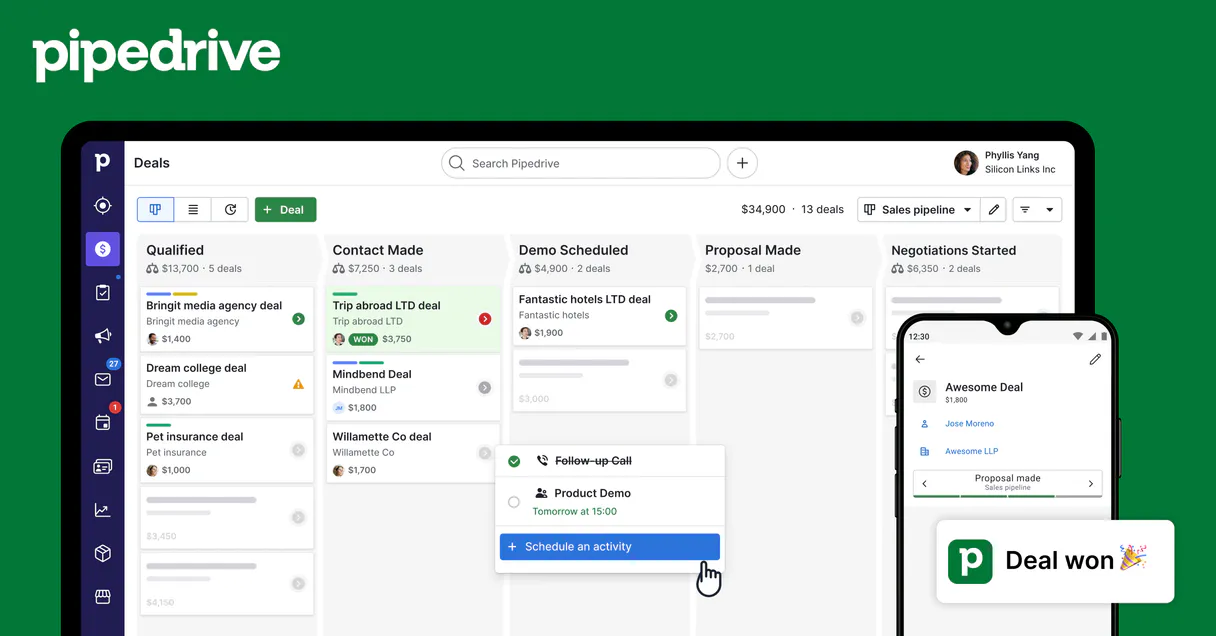
Pipedrive MCP for AI. Manage your entire sales pipeline from chat.
 Gemini
 Works with every AI agent you already use
…and any MCP-compatible client









Connect to your AI in seconds.
Pipedrive lets your AI client manage every part of your sales pipeline—deals, contacts, and activities—without you having to log into the web UI.
It gives your agent full control over CRM data retrieval, record updates, and task creation directly from any chat interface (Claude, Cursor, etc.).
This means instant visibility into deal status and next steps.
What your AI can do
Create new deal
Adds a brand new deal record into your Pipedrive sales pipeline.
Get api status
Checks the connection status and credentials for the Pipedrive server.
Get deal details
Retrieves all specific information about a single, given deal record.
List all deals in your pipelines or create entirely new opportunities by calling the create_new_deal tool.
Get detailed profiles for specific individuals (get_person_details) or view lists of entire companies using list_crm_organizations.
List existing tasks, meetings, and calls via list_user_activities, or prompt the agent to create new ones for team follow-up.
Find deals quickly using keywords or names with the search_deals_by_name tool, skipping broad list searches.
Retrieve lists of all available stages and workflows in your CRM setup using list_pipeline_stages.
Ask an AI about this
Waiting for input…
Pipedrive MCP Server: 12 Tools for Sales & CRM
These tools let your AI agent perform core CRUD operations on all aspects of your sales data—deals, people, organizations, and activities.
Make your AI actually useful.
Add this MCP to Claude, Cursor, or Windsurf and your AI stops guessing. It gets real tools to look things up, take action, and handle the stuff you keep doing by hand.
Start using Pipedrive on VinkiusCreate New Deal
Adds a brand new deal record into your Pipedrive sales pipeline.
Get Api Status
Checks the connection status and credentials for the Pipedrive server.
Get Deal Details
Retrieves all specific information about a single, given deal record.
Get Organization Details
Gets detailed profile information for a specific company or organization.
Get Person Details
Retrieves the full contact details and history for an individual person.
List User Activities
Retrieves a list of past tasks, meetings, and calls associated with users/deals.
List Sales Deals
Retrieves a list of all current deals across various pipelines.
List Crm Organizations
Lists all the company records currently stored in your CRM.
List Crm Persons
Retrieves a list of individual contact names and basic details.
List Sales Pipelines
Lists every distinct sales workflow or pipeline you have set up in Pipedrive.
List Pipeline Stages
Lists every stage available in your sales workflows, helping you understand the...
Search Deals By Name
Searches specifically for deals using keywords or partial names to pinpoint an opportunity quickly.
Security and governance baked right in.
Pick your AI client below to get set up. Just create a Vinkius account, subscribe, and you're instantly up and running. We handle the entire backend infrastructure, delivering out-of-the-box support for HTTPS Streamable, SSE, and OAuth2—zero messy routing required.
Claude AI
Open Claude Settings
Go to claude.ai, click your profile icon, then navigate to Customize → Connectors.
Add Custom Connector
Click the "+" button and select Add custom connector. Paste your Vinkius endpoint URL:
https://edge.vinkius.com/[YOUR_TOKEN_HERE]/mcp
Replace [YOUR_TOKEN_HERE] with your token
from cloud.vinkius.com. For OAuth-protected servers, expand
Advanced settings to add credentials.
Start a conversation
Open a new chat. The Pipedrive integration is available immediately — no restart needed.
Choose How to Get Started
Build a custom MCP for your own tools, or connect a ready-made integration from our catalog.
Build Your Own
Turn any API into an MCP. Import a spec, define Agent Skills, or deploy with MCPFusion.
- Import from OpenAPI, Swagger, or YAML specs
- Create Agent Skills with progressive disclosure
- Deploy to edge with MCPFusion framework
- Built in DLP, auth, and compliance on every call
- Real time usage dashboard and cost metering
- Publish to catalog or keep private
Make Your AI Do More
Start with Pipedrive, then connect any of our 5,100+ other servers whenever your AI needs more. One click, no limits.
- Use this MCP plus 5,100+ others, all in one place
- Add new capabilities to your AI anytime you want
- Every connection is secured and compliant automatically
- Track usage and costs across all your servers
- Works with Claude, ChatGPT, Cursor, and more
- New servers added to the catalog every week
Independent Platform Disclaimer: Vinkius is an independent platform and is not affiliated with, endorsed by, sponsored by, verified by, or otherwise authorized by Pipedrive. All third-party trademarks, logos, and brand names are the property of their respective owners. Their use on this website is strictly for informational purposes to identify service compatibility and interoperability.
VINKIUS INFRASTRUCTURE
Cloud Hosted
Managed infra
V8 Isolated
Sandboxed per request
Zero-Trust Proxy
No stored credentials
DLP Enforced
Policy on every call
GDPR Compliant
EU data residency
Token Compression
~60% cost reduction
Works with Claude, ChatGPT, Cursor, and more
The Model Context Protocol standardizes how applications expose capabilities to LLMs. Instead of operating in isolation, your AI gains direct access to external platforms, live data, and real-world actions through secure, standardized connections.
This connection provides 12 powerful capabilities that interface natively with Claude, ChatGPT, Cursor, and other compatible AI platforms. No middleware. No custom integration required.
Logging into Pipedrive just to check deal status shouldn't take 8 clicks.
Right now, checking a deal means navigating to the CRM dashboard. You pull up the account name, click on the 'Deals' tab, filter by stage, find the right opportunity, and then open its record just for a status update or next action item.
With this MCP server, you simply ask your agent: 'What is the latest status for Acme Corp?' It runs `search_deals_by_name` in the background. You get the full deal summary instantly in the chat—no clicks required.
Pipedrive MCP Server: Update client records and log activities.
Manual steps that disappear include opening a contact card, finding the 'Activity' section, selecting 'Add Task,' filling out the date, description, and linking it to the deal. It’s tedious logging work.
Now you just tell your agent: 'Set a follow-up task for Maria Chen in two weeks.' The agent handles the API calls to update that activity log accurately. Your AI client is now the CRM interface.
What your AI can actually do with this
Listen up: You can run your whole sales show right from your agent—no need to log into Pipedrive and mess with dashboards yourself. This server lets your AI client handle everything in your CRM: the deals, the contacts, all the activity logs. It gives your agent full control over data retrieval and record updates, whether you're using Claude or Cursor.
You'll get instant visibility into deal status and next steps without even thinking about it.
When you use get_api_status, your agent first checks the connection credentials for Pipedrive to make sure everything is running clean. If things are good, you can start managing your pipeline. You won't have to manually click through stages or search pages; your AI client just knows how to get what you need.
To keep tabs on deals, you've got list_sales_pipelines which shows you every distinct sales workflow setup in Pipedrive. Then, if you wanna see all the specific steps within those workflows, calling list_pipeline_stages gives you a complete map of your entire structure. If you need to know what deals are out there right now, running list_sales_deals pulls up every current deal across all pipelines.
But if you're hunting for one specific opportunity by name or keywords, skip the long list and just use search_deals_by_name; it zeroes in on that deal fast.
Want to create a new lead? You can add a whole brand-new deal record into your Pipedrive sales pipeline using create_new_deal. It's dead simple. To get the full picture of any single opportunity, you just ask for it with get_deal_details, which pulls all specific information about that one given deal record.
When it comes to people and companies, your agent doesn't just guess who you mean. You can use list_crm_organizations to pull up a list of every company record currently in the CRM. If you need deep background on a specific client or vendor, calling get_organization_details grabs their full profile information.
Similarly, if you're tracking an individual contact, list_crm_persons gives you a basic roll call of names and details, and get_person_details digs into the history and complete info for that specific person.
Keeping track of who did what is crucial. You can pull up every past task, meeting, or call associated with users or deals using list_user_activities. That lets you see exactly where your team has been. Your agent handles logging new activities too; you can prompt it to create those follow-up tasks instantly so no one forgets a step.
You'll also get a list of all available stages in the CRM, which is great for making sure everyone knows what stage names are used across the board.
Every capability works together. You might start by calling list_crm_organizations to find a company name, then use that info with get_organization_details. Next, you pull up the primary contact using list_crm_persons, and finally, your agent uses all those details to create a new opportunity via create_new_deal, logging it right into the pipeline for follow-up activities that are tracked by list_user_activities.
It's one conversation, every piece of data is handled. You get complete control over deal lifecycle management and contact records without ever touching the web UI.
019dd13c-1d61-7218-87d0-3de2b6c7991b 
Here's how it actually works
The bottom line is: Your AI client treats Pipedrive like a native source of truth, eliminating the need for manual API work or UI logins.
Subscribe to the Pipedrive server, then enter your specific Pipedrive API Token into your agent's preferences.
Your AI client recognizes the connection and makes the tools available for use in conversation (e.g., asking 'What are my open deals?').
The agent executes the necessary tool calls (like list_sales_deals) using your token, fetches the data, and presents it back to you immediately.
Who is this actually for?
Sales Representatives who get tired of context-switching between their CRM and chat apps. Account Managers who manage complex client histories across multiple touchpoints. Sales Operations teams needing real-time, programmatic visibility into pipeline health without writing code.
Uses the agent to track a client's entire interaction history by calling list_user_activities and updating records via get_person_details.
Quickly checks deal status or lists open deals using search_deals_by_name so they don't forget the next follow-up step.
Runs bulk checks on organizational health by listing all companies (list_crm_organizations) and verifying pipeline stage metadata using list_pipeline_stages.
What Changes When You Connect
Stop switching apps. Instead of logging into Pipedrive just to check a deal status, prompt your agent with 'Show me the details for Acme Corp' and get the full record instantly using get_deal_details.
Never lose track of follow-ups again. Use natural language to schedule or list meetings (list_user_activities) linked directly to specific contacts via get_person_details, keeping your team accountable.
Get a 360 view without the UI clutter. You can pull data from multiple sources—like listing all organizations and then running search_deals_by_name on them—all in one conversation thread.
Speed up deal entry. Instead of navigating through forms, you can use create_new_deal to log a new opportunity with minimal input, just telling the agent what it is and who owns it.
Maintain data integrity. You don't have to manually cross-reference; your agent handles listing companies (list_crm_organizations) and ensuring those records match the deal owners.
See it in action
Closing a Deal: Needs follow-up action.
A Sales Rep just had a call with John Smith. Instead of opening Pipedrive, they tell their agent, 'Schedule a demo call with John at Meridian Corp for next Tuesday.' The agent runs list_user_activities and successfully creates the new task using create_new_deal, updating the deal record automatically.
Checking Pipeline Health: Finding bottlenecks.
A Manager needs to know the total value of all deals stuck in 'Negotiation.' They ask their agent, which runs list_sales_deals and filters by stage metadata, giving them a precise dollar figure and identifying stalled opportunities.
Onboarding: Finding client info fast.
A new Account Manager needs to check on 'GlobalTech.' They ask the agent, which uses list_crm_organizations first. Then, they run get_person_details for the main contact, immediately pulling up years of interaction history.
Discovery: Finding a forgotten lead.
An Ops team member knows 'Acme' had a deal but can't remember the name. They use search_deals_by_name with just a few keywords and get a list of potential deals, saving them hours of manual searching.
The honest tradeoffs
Trying to find an open deal by general search.
Asking the agent: 'Tell me about Acme Corp.' This might just give basic contact info, not their current deal stage or value.
You need to be specific. Use search_deals_by_name and mention what you want to know, like 'Search deals for Acme Corp and list the expected close date.' This directs the tool call to the correct function.
Assuming all contacts are linked.
The agent fails because it thinks every person listed in your general directory is a deal owner, leading to bad data retrieval.
Always verify relationships. If you list persons using list_crm_persons, follow up by asking the agent to check which deals are assigned to those specific people using get_deal_details.
Manually logging every activity.
Spending time navigating Pipedrive's internal calendar just to record a quick phone call after a meeting. It’s slow and prone to human error.
Just tell the agent, 'Add an activity for Meridian Corp: 30-minute follow-up call next Friday.' The agent uses list_user_activities capabilities to log it instantly.
When It Fits, When It Doesn't
Use this server if your main job involves managing sales flow—creating deals, tracking contacts, or logging activities within Pipedrive. You need the AI agent to act as a hands-on assistant that can read and write data to specific fields (like deal value or contact status).
Don't use it if you just need general reporting on your company's financials, or if you only need to view non-CRM related documents (e.g., HR files). In those cases, another category of tool might be better suited. If you are building a highly custom workflow that requires complex data joins across multiple external systems not listed here, this server provides the foundational CRUD tools, but you'll still need significant agent logic to stitch it all together.
Questions you might have
How do I list all my open deals using Pipedrive MCP Server? +
You prompt your agent to run list_sales_deals. The agent retrieves a master list of deals, letting you see every opportunity and its current stage in one chat response.
Can I create a new deal with Pipedrive MCP Server? +
Yes. You can use the create_new_deal tool by giving the agent all the required information—the title, value, and associated contacts—and it logs the deal record for you.
What is the difference between list_crm_persons and get_person_details? +
list_crm_persons gives you a simple directory view of all people. get_person_details, however, pulls the full, deep profile for one person, including their organization and interaction history.
Is there a way to track past meetings with Pipedrive MCP Server? +
Absolutely. Use the list_user_activities tool. It retrieves all historical tasks, meetings, and calls linked across your entire CRM for accurate follow-up tracking.
Do I need to list pipelines before creating a deal? (Pipedrive MCP Server) +
No, you don't. The create_new_deal tool handles the necessary structure internally. You only need to use list_sales_pipelines if you want to know what workflows are available.
How do I verify my Pipedrive API Token using the get_api_status tool? +
It confirms your token is active and connected to your account. Running this simple status check validates that your credentials are correctly linked to the Pipedrive API endpoint.
When I use the get_deal_details tool, what kind of metadata do I receive? +
You get a comprehensive look at the deal record. This includes stage history, associated persons, and attached notes, giving your agent full context for the opportunity.
If I need to list many records, how does the server handle list_crm_organizations? +
The server handles pagination automatically. It sends large lists of organizations in controlled batches so you avoid rate limits when gathering extensive company data.
Can my AI automatically find a specific deal by its ID? +
Yes! Use the get_deal tool with the Deal ID. Your agent will respond with complete metadata, including value, status, pipeline stage, and associated contacts in seconds.
How do I find my Pipedrive API Token? +
Log in to Pipedrive, click on your profile icon at the top right, navigate to Personal preferences > API, and you will find your unique secret token there.
We've already built the connector for Pipedrive. Just plug in your AI agents and start using Vinkius.
No hosting. No infrastructure. No complex setup.
All 12 tools are live and waiting.
You're up and running in seconds.
Gemini Vinkius gives your AI agents access to the full catalog of app connectors, all fully managed, secure, and enterprise-ready. One subscription, every tool you need.
Built, hosted, and secured by Vinkius. You just connect and go.