4,500+ servers built on MCP Fusion
Vinkius

QuickBooks Online MCP. Run full accounting workflows from chat.

Claude Claude
ChatGPT ChatGPT
Cursor Cursor
Gemini Gemini
Windsurf Windsurf
VS Code VS Code
JetBrains JetBrains
Vercel Vercel
See Vinkius in Action

Works with every AI agent you already use

…and any MCP-compatible client

QuickBooks Online MCP on Cursor AI Code Editor MCP Client QuickBooks Online MCP on Claude Desktop App MCP Integration QuickBooks Online MCP on OpenAI Agents SDK MCP Compatible QuickBooks Online MCP on Visual Studio Code MCP Extension Client QuickBooks Online MCP on GitHub Copilot AI Agent MCP Integration QuickBooks Online MCP on Google Gemini AI MCP Integration QuickBooks Online MCP on Lovable AI Development MCP Client QuickBooks Online MCP on Mistral AI Agents MCP Compatible QuickBooks Online MCP on Amazon AWS Bedrock MCP Support

Just plug in your AI agents and start using Vinkius.

QuickBooks Online MCP Server connects any AI client to your full accounting backend. Query invoices, build customer profiles with `create_customer`, run Profit & Loss reports using `profit_and_loss`, and automate entire billing cycles through natural conversation.

What your AI agents can do

Create customer

Builds a brand new customer record in QuickBooks using a display name and optional contact details.

Create invoice

Generates a new invoice for an existing customer, specifying all required line items and taxes.

Get company info

Pulls general company data, like the fiscal year or subscription details, to confirm system parameters.

+ 7 more capabilities included
Process new customer accounts

The agent creates records for new clients using create_customer, handling required fields like display name, email, and phone number.

Generate structured invoices

You instruct the server to create an invoice record via create_invoice, providing a target customer reference and detailed line items.

Retrieve financial summaries

The agent pulls specific company details, like the fiscal year or subscription level, using get_company_info.

Track payment status and history

You check historical transactions and associated amounts by calling get_payment, linking payments back to specific invoices.

Run deep financial reports

The server executes the profit_and_loss tool, providing a full breakdown of revenue, COGS, and net income for a specified date range.

Execute custom data queries

For niche reporting not covered by standard tools, your agent uses query to run specific QuickBooks query language statements against the ledger.

Supported MCP Clients

Claude Claude
ChatGPT ChatGPT
Cursor Cursor
Gemini Gemini
Windsurf Windsurf
VS Code VS Code
JetBrains JetBrains
Vercel Vercel
+ other MCP clients
Free for Subscribers

Waiting for input…

AI Agent

QuickBooks Online: 10 Tools for Finance Management

These ten tools let your AI client manage the full customer lifecycle, from creating accounts and invoices to running detailed financial reports.

create019d75fb

create customer

Builds a brand new customer record in QuickBooks using a display name and optional contact details.

create019d75fb

create invoice

Generates a new invoice for an existing customer, specifying all required line items and taxes.

get019d75fb

get company info

Pulls general company data, like the fiscal year or subscription details, to confirm system parameters.

get019d75fb

get customer

Retrieves a specific customer's full profile and history using their ID or name.

get019d75fb

get invoice

Pulls all line-item details for an invoice, including its status and due date.

get019d75fb

get payment

Fetches detailed records of payments made to the company, linking them back to specific invoices.

list019d75fb

list customers

Returns a comprehensive list of all existing customer IDs and basic contact information.

list019d75fb

list invoices

Lists every invoice record, showing key details like amount and outstanding status across the books.

profit019d75fb

profit and loss

Calculates and reports the financial performance (Revenue, COGS, Net Income) for a specified date range.

action019d75fb

query

Runs raw QuickBooks query language statements to pull highly specific data not covered by standard tools.

Choose How to Get Started

Build a custom MCP for your own tools, or connect a ready-made integration from our catalog.

Build Your Own

Turn any API into an MCP. Import a spec, define Agent Skills, or deploy with MCPFusion.

  • Import from OpenAPI, Swagger, or YAML specs
  • Create Agent Skills with progressive disclosure
  • Deploy to edge with MCPFusion framework
  • Built in DLP, auth, and compliance on every call
  • Real time usage dashboard and cost metering
  • Publish to catalog or keep private
Start building

Make Your AI Do More

Start with QuickBooks Online, then connect any of our 4,700+ other servers whenever your AI needs more. One click, no limits.

  • Use this MCP plus 4,700+ others, all in one place
  • Add new capabilities to your AI anytime you want
  • Every connection is secured and compliant automatically
  • Track usage and costs across all your servers
  • Works with Claude, ChatGPT, Cursor, and more
  • New servers added to the catalog every week

What you can do with this MCP connector

QuickBooks Online MCP Server connects your AI agent directly to your entire accounting backbone. You don't have to jump between tabs or remember complex menus; you just talk to it, and your agent handles the ledger work. This server gives your client access to every core function of QuickBooks—reading data, building records, running deep financial reports—all through natural language conversation.

Managing Your Client Base

You need to know who you're dealing with before you bill 'em. You can start by listing everyone in the book using list_customers to get a quick rundown of all existing client IDs and their basic contact info. If you only remember a name, your agent pulls up the full record—their history, profile details—by calling get_customer.

If you've got a brand-new client, you can build their file instantly using create_customer, providing everything from their display name to their email and phone number.

Handling Invoicing and Payments

Getting paid is the whole game. To start a billing cycle, your agent generates an invoice record via create_invoice. When you run this, you tell it which customer it's for and lay out every single line item and tax rate you need to include. Once that invoice sits there waiting, you can check its status or pull up all the detailed items by calling get_invoice, seeing exactly when it was due and what services were billed.

If a client pays up, you don't guess where the money went; your agent fetches detailed records of payments using get_payment, making sure those funds link directly back to the specific invoice they covered. You can also see all outstanding invoices across the books by running list_invoices.

Deep Reporting and System Info

You gotta know if you're profitable, right? For a full picture of your business health, your agent executes the profit_and_loss tool. You just give it a date range, and it spits out a complete breakdown: Revenue, Cost of Goods Sold (COGS), and Net Income. When you need to check system parameters—like confirming what fiscal year QuickBooks is running on or checking subscription details—you call get_company_info.

For specialized reporting that doesn't fit the standard reports—maybe tracking expenses by a specific department code not covered anywhere else—you run raw statements using query, letting it execute complex, niche QuickBooks query language right against the ledger.

This whole setup isn't just for reading data. Your agent handles the full financial lifecycle: from getting company info via get_company_info to creating new revenue streams with create_invoice or pulling obscure reports using query. It’s your one stop shop for the money stuff.

How QuickBooks Online MCP Works

  1. 1 First, tell your AI client exactly what you need. For example: 'List all customers who haven't paid in 60 days.'
  2. 2 The agent processes this request and decides which tools to use (e.g., list_customers then filtering the results). It executes these calls sequentially.
  3. 3 You get a clean, summarized answer—not just raw JSON—that directly addresses your financial question or confirms that the invoice was created.

The bottom line is: you talk to your agent like you're talking to an accountant, and it uses these tools to pull the numbers for you.

Who Is QuickBooks Online MCP For?

This is for accounting staff or operations leads who get bogged down in manual data pulls. If you spend half your day jumping between QuickBooks dashboards—copying customer IDs, pulling P&L reports into Excel, and cross-referencing invoice statuses—you need this. It makes the whole process conversational.

Bookkeeper

You use list_invoices to find outstanding bills and then call get_customer for a client's full profile before manually drafting an invoice in your head.

Accountant

You run the annual review by calling profit_and_loss with precise date ranges, followed by using query to verify specific ledger entries.

Operations Manager

You onboard new clients. You use create_customer, then immediately follow up by drafting and creating the first invoice with create_invoice.

What Changes When You Connect

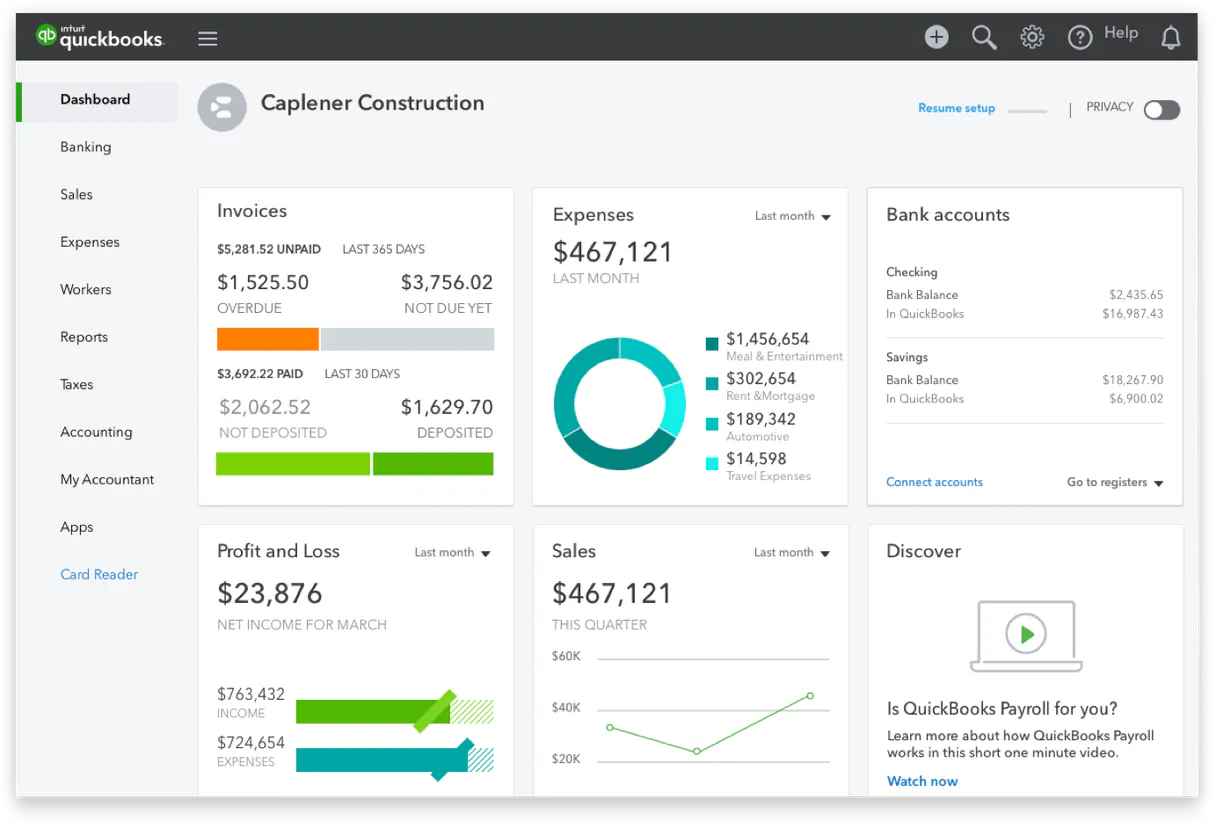
  • See your total outstanding receivables instantly. Instead of running three separate reports, just ask the agent to list unpaid invoices using list_invoices, and it compiles the total amount for you.
  • Setup a new client faster than ever. You can run create_customer and then immediately follow up with get_company_info to confirm setup details—all in one conversation thread.
  • Get precise financial reporting without exporting CSVs. Tell your agent, 'Show me the P&L for Q1,' and it runs profit_and_loss, giving you structured results instantly.
  • Audit customer history quickly. You don't need to manually click through multiple tabs; ask the agent to use get_customer and pull all associated payment records via get_payment.
  • Handle edge-case reporting with raw queries. If a standard tool falls short, you can bypass it by using query, letting your AI client execute complex SQL logic directly.
  • Minimize data entry errors. By generating invoices through create_invoice within the agent, all line items and taxes are logged correctly according to QuickBooks rules.

Real-World Use Cases

01

The end-of-month reconciliation

A bookkeeper needs to reconcile payments. They ask their agent: 'What was paid last month, and which invoices did it cover?' The agent calls list_invoices first (to see what's due) and then uses get_payment to pull the exact transaction details, giving a clean summary of matching amounts.

02

Onboarding a new major client

An operations manager needs to set up Acme Corp. They first call create_customer, providing the name and contact info. Next, they immediately use get_company_info (to confirm company status) and then generate the initial contract invoice using create_invoice. The process takes seconds.

03

Investigating a revenue drop

The CFO notices low Q2 revenue. They prompt their agent: 'Run the P&L for Q2, but only show me expenses over $10k.' The agent runs profit_and_loss and applies a filter using its internal logic to pinpoint exactly where the spending hit too hard.

04

Checking an old client's status

A sales rep needs details on an inactive account. They prompt: 'What is John Smith’s current billing profile?' The agent calls get_customer to get the full record, including their last invoice ID via get_invoice, so the rep knows exactly where to start the conversation.

The Tradeoffs

Running reports without checking data integrity

A user blindly runs profit_and_loss for a date range, assuming all transactions were recorded. They miss payments that haven't been linked.

Always start by running list_invoices and then cross-reference those IDs with payment records using get_payment. This confirms the data you report on is fully accounted for.

Trying to query live financial data manually

A user attempts to guess complex SQL syntax or try to filter transactions that don't exist in the standard toolset.

Don't write full queries yourself. Use query, but first, use a simpler read function like list_customers to confirm you know the correct field names and data structure.

Over-creating records without context

A user runs create_invoice with just line items, forgetting that they need an existing customer ID.

Always run list_customers first to get a valid client ID. Then use the specific get_customer tool with that ID before attempting to call create_invoice.

When It Fits, When It Doesn't

Use this server if your primary need is managing billing cycles, customer records, and financial reporting within the rules of QuickBooks Online. You need it when you must know which tools are available: get_customer, list_customers, create_invoice, etc., because they enforce QBO's specific business logic.

Don't use this if all you need is to read a simple list of names and phone numbers that don't require financial context; then maybe a simpler CRM server works. Also, don't use it if your data isn't in QuickBooks Online—it'll fail. If you only need basic document creation (like sending an email), this tool set is overkill because you aren't touching the ledger.

Independent Platform Disclaimer: Vinkius is an independent platform and is not affiliated with, endorsed by, sponsored by, verified by, or otherwise authorized by QuickBooks Online. All third-party trademarks, logos, and brand names are the property of their respective owners. Their use on this website is strictly for informational purposes to identify service compatibility and interoperability.

VINKIUS INFRASTRUCTURE

Cloud Hosted

Managed infra

V8 Isolated

Sandboxed per request

Zero-Trust Proxy

No stored credentials

DLP Enforced

Policy on every call

GDPR Compliant

EU data residency

Token Compression

~60% cost reduction

How we secure it →

Works with Claude, ChatGPT, Cursor, and more

The Model Context Protocol standardizes how applications expose capabilities to LLMs. Instead of operating in isolation, your AI gains direct access to external platforms, live data, and real-world actions through secure, standardized connections.

This server provides 10 capabilities that interface natively with Claude, ChatGPT, Cursor, and any MCP client. No middleware. No custom integration required.

Available Capabilities

create_customer create_invoice get_company_info get_customer get_invoice get_payment list_customers list_invoices profit_and_loss query

Pulling financial reports shouldn't feel like a tax audit.

Right now, pulling quarterly financials means logging into QuickBooks Online. You navigate to the Reports tab. You select 'Profit & Loss.' You manually set the date range (e.g., 04/01/2026 to 06/30/2026). Then you run it, wait for the page to load, and finally, you have to screenshot or export that entire document into a separate Excel file just so your boss can look at it.

With this MCP server, you just tell your agent: 'Give me the P&L report for Q2 2026.' The agent runs `profit_and_loss` and spits out the structured data directly in the chat. No clicks, no exporting, no context switching. You get the clean answer immediately.

The QuickBooks Online MCP Server lets you manage billing history.

Before this, figuring out where a payment went was a nightmare. You'd find a bank transfer notification—a piece of data with no source ID. Then you’d have to open the invoice ledger and manually cross-reference dates and amounts until you found the matching line item.

Now, tell your agent: 'Show me all payments made last month that aren't linked to an invoice yet.' The agent uses `get_payment` and filters against the `list_invoices` data. It gives you a clear report showing exactly which funds are sitting unallocated.

Common Questions About QuickBooks Online MCP

How do I use the create_invoice tool? +

You tell your agent to 'Create an invoice for John Smith with $500 in services.' The agent uses create_invoice, which requires you to provide a customer reference ID and all line items as structured data.

Can I use list_customers before creating one? +

Yes. It's smart to run list_customers first. This lets you verify that the client you want to add isn't already in the system, preventing duplicate records when you call create_customer.

Does the query tool work for simple list functions? +

It can, but it’s overkill. If you just need a list of all customers, use list_customers. Use query only when you need complex filtering or calculations that standard tools don't cover.

What do I need to get the payment details? +

You typically need a specific invoice ID. Running get_payment with an associated invoice ensures the agent pulls transaction records directly tied to that bill, giving you full context.

When I use the `create_customer` tool, how does it handle duplicates or existing records? +

The API first checks if a customer already exists using the provided details. If you try to create an account that matches an active record, it won't fail; instead, it returns a specific conflict code. Your agent can then use get_customer instead.

When I run a report using `profit_and_loss`, what date format must the parameters be in? +

You need to provide dates strictly in YYYY-MM-DD format. The function requires both a start date and an end date so it knows exactly which fiscal period's data to calculate.

Can I filter the results when calling `list_invoices`? What are the limitations? +

Yes, you can pass specific filters like status (e.g., unpaid) or a date range directly into list_invoices. For highly custom filtering logic, use the general query tool.

Are there any rate limits I need to know about when using the general `query` tool? +

Yes. Since this is a complex query language, QuickBooks imposes execution limits. If your agent sends too many requests in a short time, it will hit a cap and return an error code that signals you need to wait.

Can I run Profit & Loss reports? +

Yes! Use the profit_and_loss tool with start and end dates in YYYY-MM-DD format.

How do I create an invoice? +

Use create_invoice with a JSON payload containing the CustomerRef and Line items.

Can I run custom queries? +

Yes! The query tool accepts any QuickBooks query. Example: SELECT * FROM Invoice WHERE TotalAmt > 500.

More in this category

You might also like

Built & Managed by Vinkius 30s setup 10 tools

We've already built the connector for QuickBooks Online. Just plug in your AI agents and start using Vinkius.

No hosting. No infrastructure. No complex setup.
All 10 tools are live and waiting. You're up and running in seconds.

Claude Claude
ChatGPT ChatGPT
Cursor Cursor
Gemini Gemini
Windsurf Windsurf
VS Code VS Code
JetBrains JetBrains
Vercel Vercel
+ other MCP clients

Vinkius gives your AI agents access to the full catalog of app connectors, all fully managed, secure, and enterprise-ready. One subscription, every tool you need.

Zero hosting required Full MCP catalog included Enterprise-grade security Auto-updated by Vinkius

Built, hosted, and secured by Vinkius. You just connect and go.