
Runn MCP. Check resource capacity across your entire project portfolio.
 Gemini
 Works with every AI agent you already use
…and any MCP-compatible client









Just plug in your AI agents and start using Vinkius.
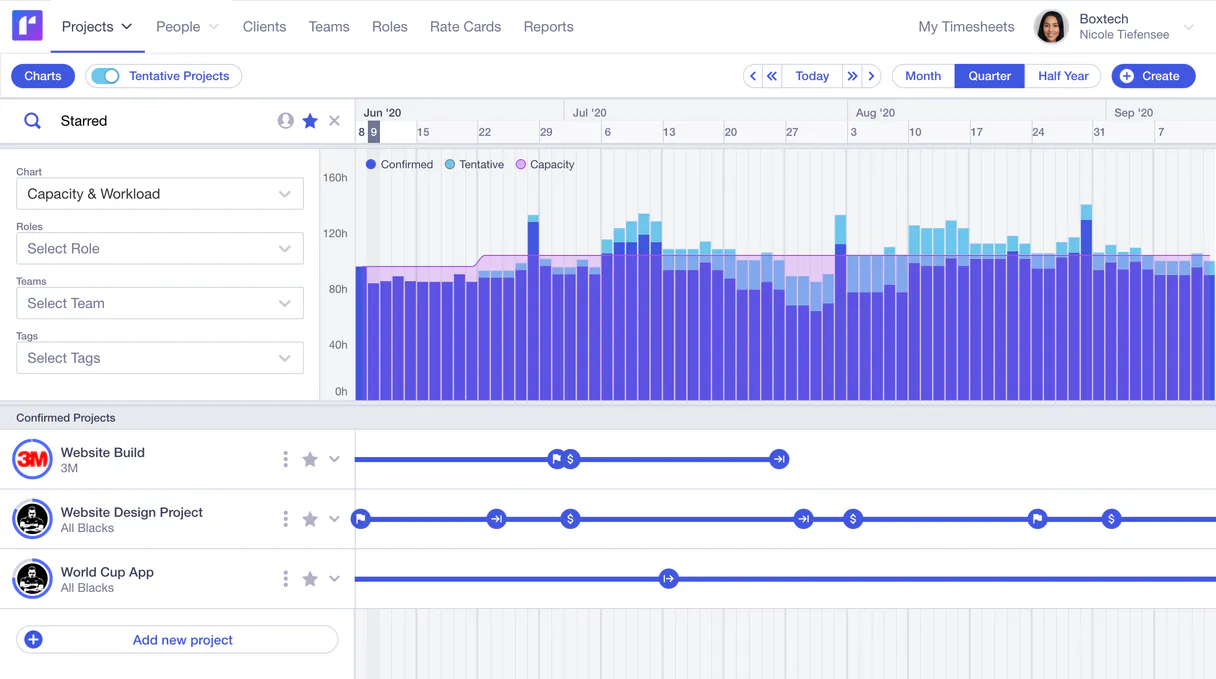
Runn MCP Server connects your AI client directly to your resource planning and forecasting platform. Ask questions about project scope, team assignments, capacity bottlenecks, and logged hours—all via chat.
It gives you immediate visibility into who is working on what and whether you're over-allocated before the meeting even starts.
What your AI agents can do
Get person
Pulls specific profile details for one person in the system.
Get project
Retrieves all current data points for a single project ID.
List actuals
Lists timesheet data showing hours logged by team members.
Retrieve a full project's details or list all active projects in the organization.
List every resource assigned to any project, detailing who is working where and when.
Generate a list of actual hours logged (timesheet data) for comparison against budgeted work.
Fetch specific details about any person or resource in the Runn system.
List all major deadlines and milestones for a given project to track progress against goals.
Ask AI about this MCP
Supported MCP Clients
Gemini Waiting for input…
Runn MCP Server: 12 Tools for Project Operations
These twelve tools allow your AI client to interact with every core function of Runn—from listing all people to auditing specific project milestones.
019d7600get person
Pulls specific profile details for one person in the system.
019d7600get project
Retrieves all current data points for a single project ID.
019d7600list actuals
Lists timesheet data showing hours logged by team members.
019d7600list assignments
Shows every resource currently assigned to any project.
019d7600list clients
Retrieves a list of all clients the organization manages.
019d7600list holidays
Lists known public holidays and non-working days for scheduling checks.
019d7600list milestones
Lists all critical project milestones (deadlines) for a given project.
019d7600list people
Provides a comprehensive list of every person and resource in Runn.
019d7600list phases
Lists the current phases or stages for a specific project.
019d7600list projects
Retrieves a list of every active and archived project in Runn.
019d7600list roles
Shows all defined job roles or positions within the organization.
019d7600list teams
Lists every team unit created and managed in the workspace.
Choose How to Get Started
Build a custom MCP for your own tools, or connect a ready-made integration from our catalog.
Build Your Own
Turn any API into an MCP. Import a spec, define Agent Skills, or deploy with MCPFusion.
- Import from OpenAPI, Swagger, or YAML specs
- Create Agent Skills with progressive disclosure
- Deploy to edge with MCPFusion framework
- Built in DLP, auth, and compliance on every call
- Real time usage dashboard and cost metering
- Publish to catalog or keep private
Make Your AI Do More
Start with Runn, then connect any of our 4,700+ other servers whenever your AI needs more. One click, no limits.
- Use this MCP plus 4,700+ others, all in one place
- Add new capabilities to your AI anytime you want
- Every connection is secured and compliant automatically
- Track usage and costs across all your servers
- Works with Claude, ChatGPT, Cursor, and more
- New servers added to the catalog every week
What you can do with this MCP connector
You connect your AI client directly to Runn's core resource planning and capacity system. You ask questions about project scope, who’s doing what, or if you’re overbooked—and it gives you immediate visibility into every detail.
You can use the list_projects tool to pull a list of every active and archived project in the organization, and you'll get deep readouts on individual scopes using get_project. You want to see what milestones are coming up? Run the list_milestones function to check all critical deadlines for any given project.
For client context, use list_clients to retrieve every managed account.
To map out who’s working where, you can run list_assignments which shows every resource currently assigned to a project. You'll also find the overall employee roster using list_people, and if you need specific details on one person, use get_person. The system tracks job functions with list_roles and manages departmental structure via list_teams.
For any single project, you can track its progression by listing all phases or stages available using list_phases.
When it comes to checking capacity, the system lets you run list_actuals, which gives you timesheet data showing exactly how many hours team members logged. You'll never forget a day off; use list_holidays to pull a list of known public holidays and non-working days for scheduling checks.
If you need to understand the full structure, run list_roles to see every defined job position in the company.
How Runn MCP Works
- 1 Install the core Runn integration into your secure workspace.
- 2 Log into your main Runn account online. Go to Settings and generate a permanent API access string (the API Token).
- 3 Provide that specific Runn API Token inside the integration's configuration section in Vinkius.
The bottom line is: you just ask your agent questions about resource capacity, and it uses the token to pull the current data directly from Runn.
Who Is Runn MCP For?
Project Managers who are tired of manually cross-referencing three different dashboards. Operations Leads needing to prove billable hours instantly. Executives who want status updates on major initiatives without deep-diving into a portal.
Needs to quickly check if any resource is double-booked or if a project milestone date conflicts with team availability.
Uses the tool to compare actual billed hours against forecasted capacity, ensuring client profitability.
Requests high-level summaries on overall project health and resource status without needing technical dashboard access.
What Changes When You Connect
- You can instantly audit time usage. Instead of running reports, asking for
list_actualscompares logged hours against planned work in a single chat response. - Pinpoint staffing conflicts immediately. Using
list_assignmentsshows which team member is allocated to multiple critical paths across different projects. - Get project status summaries on demand. Querying
get_projectgives you the full scope—from clients (list_clients) to resource needs—without clicking through ten tabs. - Track progress against deadlines easily. Asking for milestones uses
list_milestones, confirming if critical dates are set and on track. - Know your people and roles. You can use
get_personorlist_peopleto confirm who holds a specific role (list_roles) before starting a task.
Real-World Use Cases
The Project Manager needs to check for resource conflicts.
A PM knows the 'Internal Design' project is running, but they aren't sure who has capacity next month. They ask their agent: "Show me assignments and available people.". The agent runs list_assignments and list_people, replying that Jane Doe is booked 100% until Q3, allowing the PM to re-scope.
The Ops Lead needs to prove billable hours for a client.
An operations lead receives an inquiry from a major client asking for utilization reports. Instead of digging through spreadsheets, they ask their agent: "Compare planned work against actuals for the Alpha project.". The agent runs list_actuals and references get_project, giving the exact numbers needed.
The Executive needs a quick status update on a major initiative.
An executive asks: "What are the upcoming goals for Project Beta?". The agent runs list_milestones and checks the current project scope using get_project, providing a concise list of deadlines without requiring the executive to log into the internal dashboard.
The Team Lead needs to know if a team member is available.
A team lead needs someone with specific technical skills for a new project. They ask: "Who on the team has the 'Senior Developer' role and is free next week?". The agent runs list_roles to confirm the title, then uses list_people to filter availability.
The Tradeoffs
Asking for everything at once.
Prompt: "Tell me about all projects, who is on them, and what the budget actuals are." This prompt is too vague; it forces the agent to guess which specific project or client you mean.
→
Break it down. First, use list_projects to get the list of IDs. Then, ask for a single action: "What milestones did Project ID 123 hit?" (using list_milestones). Finally, run get_project if you need more context.
Confusing Roles with People.
Prompt: "Show me all the best people." The agent can't tell who is 'best.' It only knows about defined roles and actual team members.
→
Use list_roles to see the types of jobs (e.g., 'Senior Developer'). If you want specific names, use list_people or get_person.
Assuming all data is current.
Prompt: "What was the budget last week?" You might be asking for historical data that isn't logged in a simple list, or you may not know which specific project to check against.
→
Always specify the context. Start with get_project to confirm the project ID, then use list_actuals and reference that ID to get accurate time sheets.
When It Fits, When It Doesn't
Use Runn MCP if your primary need involves internal resource data: Who is working on what? Does this team member have capacity? What are the official project deadlines or roles?
Don't use it if you just need general knowledge (e.g., 'What is agile methodology?')—that requires a standard LLM model.
Also, don't try to use list_actuals for future forecasting; that tool only reports on logged hours. For true financial modeling or predicting revenue, you still need an external finance system connection. This server handles the people and time data; it doesn't handle money outside of timesheet records.
Independent Platform Disclaimer: Vinkius is an independent platform and is not affiliated with, endorsed by, sponsored by, verified by, or otherwise authorized by Runn API. All third-party trademarks, logos, and brand names are the property of their respective owners. Their use on this website is strictly for informational purposes to identify service compatibility and interoperability.
VINKIUS INFRASTRUCTURE
Cloud Hosted
Managed infra
V8 Isolated
Sandboxed per request
Zero-Trust Proxy
No stored credentials
DLP Enforced
Policy on every call
GDPR Compliant
EU data residency
Token Compression
~60% cost reduction
Works with Claude, ChatGPT, Cursor, and more
The Model Context Protocol standardizes how applications expose capabilities to LLMs. Instead of operating in isolation, your AI gains direct access to external platforms, live data, and real-world actions through secure, standardized connections.
This server provides 12 capabilities that interface natively with Claude, ChatGPT, Cursor, and any MCP client. No middleware. No custom integration required.
Available Capabilities
Tracking project resource needs shouldn't require opening four different tabs.
Today, figuring out capacity is a nightmare. You open the main dashboard to see the list of active projects. Then you switch to the assignments tab to map who works on what—and if you need to check budget status, you have to jump over to another sheet entirely. It's all clicking, searching for IDs, and copy-pasting data points just to answer one simple question: 'Can we take on this new client?'
With Runn MCP, that process vanishes. You ask your agent directly: "Can Project Alpha handle two more people?" The system runs multiple checks—it compares the project scope via `get_project`, cross-references current team load using `list_assignments`, and gives you a direct 'yes' or 'no' answer based on real data.
The Runn MCP Server lets you get resource assignments instantly.
Before this, finding out who was assigned to the internal marketing campaign meant running a complex report that filtered by department, project name, and status—a process that took 15 minutes of manual data manipulation. You’d end up with a spreadsheet full of IDs and names, but no immediate insight into availability.
Now, you just ask: "Who is assigned to the Internal Marketing campaign?" The agent executes `list_assignments` immediately. You get a clean list of people and their current load, giving you instant operational intelligence every time.
Common Questions About Runn MCP
How do I find out which projects are active using list_projects? +
You ask your agent to 'List all active projects.' The tool runs list_projects and provides a clean list of every managed project ID and name in the system.
Can I use get_person to check someone's role? +
No, get_person retrieves details about a specific individual. If you need to see all possible job titles or positions, run the list_roles tool.
What is the difference between list_assignments and list_people? +
list_people gives you a directory of every employee in Runn. list_assignments tells you which specific projects those people are actively booked on right now.
How does the tool handle holidays when listing actuals (list_actuals)? +
The agent considers non-working days automatically by running list_holidays in the background. This ensures that billed hours are accurately compared against true working capacity.
Does the get_project tool let me filter project details by a specific department or client? +
You must provide the Project ID to use get_project. The response returns all metadata for that single scope, including associated clients and team members. It doesn't allow filtering outside of the specified project boundaries.
When I run list_phases, does it include the parent project name or just the phase details? +
The output includes both the Phase Name and the Project ID. This allows you to link every reported phase directly back to its originating project for full context.
What happens if I try to run list_projects without proper API authentication? +
The tool throws an 'Authentication Error.' You'll need to check your Runn API Token and confirm it has read access permissions across the project database.
If I use list_people, how many results can the tool process in a single request? +
The tool processes up to 50 records per call. If your organization has more users, you'll need to implement pagination logic or make multiple sequential calls.
Can the AI add new resources, approve timesheets, or assign projects? +
No, this connector is constructed strictly logically explicitly purely as a read-only data extraction protocol naturally seamlessly securely flawlessly organically natively seamlessly explicitly efficiently. It pulls records, reporting scopes organically completely accurately carefully tightly mapped optimally.
What data can the AI retrieve from Runn? +
The integration can list projects, people, roles, teams, milestones, and clients. It provides a comprehensive read-only view of your resource planning data.
Can I see project budgets and utilization rates? +
Yes. By querying project details, the AI can surface budget allocations, scheduled hours, and utilization metrics for each project in your Runn workspace.
Use it with your favorite AI tools
Connect this server to Cursor, Claude, VS Code, and more.
More in this category

Inform Direct
File UK company documents with Companies House digitally and manage statutory records, share registers, and annual filings.

ClockShark
Track field crew hours with GPS-verified timesheets, job costing, and scheduling that keeps construction teams on budget.

KPA Flex
Manage EHS compliance — list inspections, audit employees, and search reports.
You might also like

Pricefx
Equip your AI with advanced enterprise CPQ capabilities — fetch products, manage customers, and generate automated pricing quotes directly via chat.

ImageCharts
Generate charts and graphs as images from URL parameters with a simple API that creates data visualizations on the fly.

INI Parser Engine
Convert INI config files (php.ini, my.cnf, .editorconfig) to JSON and back with absolute precision. 55M+ weekly downloads.