
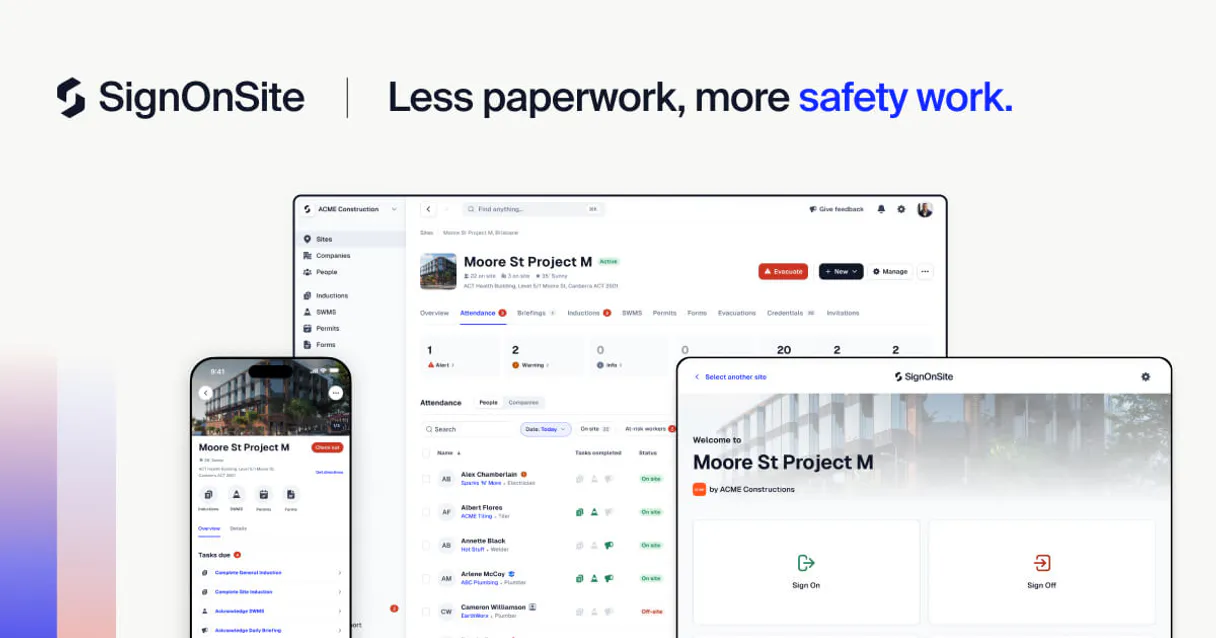
SignOnSite MCP Server with 12 Tools Ready for AI Agents
 GDPR Free for Subscribers
Track who enters and exits your construction sites with digital sign-in, safety inductions, and compliance documentation. Unlock 12 tools ready out of the box. Connect this App Connector to instantly empower AI agents like Claude Code, Cursor, or any MCP-compatible client with advanced capabilities.
Ask AI about this App Connector
Vinkius delivers Streamable HTTP and SSE to any MCP client
* Every MCP server runs on Vinkius-managed infrastructure inside AWS - a purpose-built runtime with per-request V8 isolates, Ed25519 signed audit chains, and sub-40ms cold starts optimized for native MCP execution. See our infrastructure
What is the SignOnSite MCP Server?
The SignOnSite MCP Server gives AI agents like Claude, ChatGPT, and Cursor direct access to SignOnSite via 12 tools. Track who enters and exits your construction sites with digital sign-in, safety inductions, and compliance documentation. Powered by the Vinkius - no API keys, no infrastructure, connect in under 2 minutes.
Built-in capabilities (12)
Tools for your AI Agents to operate SignOnSite
Ask your AI agent "List all workers currently signed onto the 'Skyline Apartments' site." and get the answer without opening a single dashboard. With 12 tools connected to real SignOnSite data, your agents reason over live information, cross-reference it with other MCP servers, and deliver insights you would spend hours assembling manually.
Works with Claude, ChatGPT, Cursor, and any MCP-compatible client. Powered by the Vinkius - your credentials never touch the AI model, every request is auditable. Connect in under two minutes.
Why teams choose Vinkius
One subscription gives you access to thousands of MCP servers - and you can deploy your own to the Vinkius Edge. Your AI agents only access the data you authorize, with DLP that blocks sensitive information from ever reaching the model, kill switch for instant shutdown, and up to 60% token savings. Enterprise-grade infrastructure and security, zero maintenance.
Build your own MCP Server with our secure development framework →The SignOnSite App Connector works with every AI agent you already use
…and any MCP-compatible client









Use all 12 SignOnSite tools with your AI agents right now
Empower your AI agents to connect to SignOnSite and securely perform advanced actions on Vinkius infrastructure. Beyond a simple connection, you gain an advanced AI Gateway that provides complete visibility into agent activity, ensuring maximum governance and optimized token usage.
Enrol a new worker
Get details for a specific site
Get details for a specific worker
List all associated companies
List all construction sites
List all site workers
Query completed safety forms
g., Hot Works, Confined Space) for your projects. Query safety permits
Supports filtering by site and date. Query worker attendance records
Check worker licenses and inductions
Record a manual sign-off for a worker
Record a manual sign-on for a worker
What the SignOnSite MCP Server unlocks
Connect your SignOnSite account to any AI agent and take full control of your construction site safety and attendance orchestration through natural conversation. SignOnSite provides a premier platform for managing worker sign-ons, safety inductions, and site attendance, and this integration allows you to retrieve site metadata, monitor worker enrollments, and track safety briefings directly from your chat interface.
What you can do
- Worker & Site Orchestration — List all active sites and retrieve detailed worker profile metadata, including enrollment status and contact info programmatically.
- Attendance Lifecycle Management — Monitor real-time worker sign-ons and sign-offs to ensure your site attendance is always accurate directly from the AI interface.
- Safety & Permit Control — Access and monitor site permits and safety briefings to ensure your workplace compliance is always synchronized via natural language.
- Enrolment & Credential Intelligence — Access worker credentials and manage enrolment flows to keep your compliance records up to date.
- Operational Monitoring — Track site activities and manage company metadata to ensure your safety orchestration is always optimized using simple AI commands.
How it works
1. Subscribe to this server
2. Enter your SignOnSite API Token from your dashboard
3. Start managing your site safety from Claude, Cursor, or any MCP-compatible client
No more manual sign-on sheets or chasing safety certificates. Your AI acts as a dedicated safety officer or site manager.
Who is this for?
- Site Managers & Foremen — quickly retrieve worker attendance and monitor safety induction statuses without switching apps.
- Safety Officers — automate the retrieval of site permits and track compliance credentials via natural conversation.
- Operations Teams — streamline the retrieval of site-user metadata and monitor multi-site activities directly within the chat.
Frequently asked questions about the SignOnSite MCP Server
Can my AI automatically find which workers are currently signed onto a specific construction site?
Yes! Use the query_attendance tool. Provide the Site ID, and your agent will return the list of currently present workers and their sign-on times in seconds.
How do I check if a specific worker has completed their safety induction for a site?
Simply ask the agent to run the get_worker or query_credentials action. It will retrieve the enrollment status and safety credentials for that individual.
How do I find my SignOnSite API Token?
Log in to your SignOnSite web dashboard, navigate to the Settings > API section, and you will find your unique Company API Token there.
More in this category

Mercado Livre Interactions
5 toolsAnswer buyer questions, check reputation, and view metrics on Mercado Livre.

Pando
11 toolsShare large files and folders securely with clients using branded transfer portals and download analytics for creative teams.

Adobe Customer Journey Analytics (CJA)
6 toolsOmnichannel journey insights — manage data views, connections, and reports via AI.
You might also like
ShowAPI / 易源数据
10 toolsMassive API data marketplace — access weather, translation, stock info, and utilities via AI.

Salesforce
12 toolsConnect your Salesforce CRM to any AI agent — query records with SOQL, manage accounts, contacts, opportunities, run reports, and perform CRUD operations.
Monday.com
12 toolsManage any workflow visually with customizable boards, automations, and dashboards that adapt to how your team actually works.