
TheCocktailDB Alternative MCP. Find recipes and ingredients by category, name, or list.
 Gemini
 Works with every AI agent you already use
…and any MCP-compatible client









Just plug in your AI agents and start using Vinkius.
TheCocktailDB Alternative connects your AI agent directly to a global cocktail database. Search for recipes by name, filter drinks using specific ingredients or categories, and pull detailed instructions for mixology content.
It gives your agent instant access to thousands of drink formulas, ingredient metadata, and professional recipe guidance.
What your AI agents can do
Filter by category
Filters the database to show recipes that belong to a single specified cocktail category.
Filter by ingredient
Finds and lists all cocktails that use one or more specific ingredients you list.
Get cocktail details
Pulls the complete recipe, instructions, and metadata for a cocktail when given its unique ID.
Retrieves the full recipe and instructions when you provide a specific drink title.
Shows all recipes that contain a specified ingredient, helping manage kitchen inventory or themed menus.
Fetches the complete metadata for a drink when you provide its unique ID.
Provides lists of all valid cocktail categories, glasses, and ingredients to guide your searches.
Pulls a completely random drink recipe when you need inspiration or content filler.
Ask AI about this MCP
Supported MCP Clients
Gemini Waiting for input…
TheCocktailDB Alternative: 12 Tools for Mixology Data
These tools allow your AI client to manage and search cocktail recipes, ingredients, categories, and glass types using structured API calls.
019d848cfilter by category
Filters the database to show recipes that belong to a single specified cocktail category.
019d848cfilter by ingredient
Finds and lists all cocktails that use one or more specific ingredients you list.
019d848cget cocktail details
Pulls the complete recipe, instructions, and metadata for a cocktail when given its unique ID.
019d848cget ingredient details
Retrieves all available information about a single ingredient using its specific ID.
019d848cget random cocktail
Generates and returns the full details for a completely random drink recipe.
019d848clist alcoholic filters
Returns a list of available alcohol classifications (e.g., Alcoholic, Non-Alcoholic) to use as filters.
019d848clist categories
Provides a full list of all defined cocktail types or categories in the database.
019d848clist glasses
Returns a comprehensive list of cocktail glass types that can be used to filter recipes.
019d848clist ingredients
Provides an exhaustive list of every ingredient tracked in the database.
019d848csearch cocktail by first letter
Searches for all cocktails that start with a specific letter of the alphabet.
019d848csearch cocktail by name
Finds and retrieves recipes for a cocktail when you provide its full name, like 'Margarita'.
019d848csearch ingredient by name
Searches the database to find details about an ingredient using its common name.
Choose How to Get Started
Build a custom MCP for your own tools, or connect a ready-made integration from our catalog.
Build Your Own
Turn any API into an MCP. Import a spec, define Agent Skills, or deploy with MCPFusion.
- Import from OpenAPI, Swagger, or YAML specs
- Create Agent Skills with progressive disclosure
- Deploy to edge with MCPFusion framework
- Built in DLP, auth, and compliance on every call
- Real time usage dashboard and cost metering
- Publish to catalog or keep private
Make Your AI Do More
Start with TheCocktailDB Alternative, then connect any of our 4,700+ other servers whenever your AI needs more. One click, no limits.
- Use this MCP plus 4,700+ others, all in one place
- Add new capabilities to your AI anytime you want
- Every connection is secured and compliant automatically
- Track usage and costs across all your servers
- Works with Claude, ChatGPT, Cursor, and more
- New servers added to the catalog every week
What you can do with this MCP connector
Listen up. This server hooks your agent right into a massive global cocktail database. You're not just getting recipes; you're getting thousands of drink formulas, ingredient metadata, and professional mixology instructions in one place. Your AI client can instantly pull detailed step-by-step instructions for anything from classic drinks to modern concoctions, check deep details on ingredients, or narrow down results based on everything—glass type, alcohol content, even category.
Finding Recipes by Name or Initial Letter
Need a specific drink? You use search_cocktail_by_name when you know the title, like 'Margarita,' and it pulls the full recipe. If you just remember the first letter but not the name, search_cocktail_by_first_letter gives you every cocktail that starts with a specific alphabet character.
If you're building out content about ingredients, you can search for details using a common item name through search_ingredient_by_name. This function helps you nail down exactly what an ingredient is before linking it to a recipe.
Filtering and Discovery Tools
You don’t always know the name of the drink, but you know something about it. You use filter_by_category when you want all recipes that fall under a single type, like 'Tropical' or 'Sour.' If your client needs to manage inventory for a themed event, filter_by_ingredient lists every cocktail that uses one or more specific ingredients you provide.
To guide those filters, the system gives you several reference tools. You use list_categories to see all available drink types in the database. For glassware constraints, run list_glasses to get a list of valid cocktail glass types for filtering. If you need to check alcohol content levels, list_alcoholic_filters returns all classifications—like Alcoholic or Non-Alcoholic—you can use as filters.
Finally, if you just want random inspiration because the ideas are dry, calling get_random_cocktail spits out a full recipe for a totally random drink.
Deep Dive Details and Utility
Once your agent finds a promising title or ID, it needs the full scoop. If you have a unique cocktail ID, get_cocktail_details pulls every piece of metadata available—the complete instructions, all ingredients, and everything else that makes up the drink. When you only care about what one item is, running get_ingredient_details gives you all the info for a single ingredient using its specific ID.
These tools let your agent act like an expert mixologist: it can use list_ingredients to get an exhaustive list of every tracked component. It can then combine that knowledge—say, filtering by 'Rum' via filter_by_ingredient, and then getting the full details on a specific Rum type using its ID via get_ingredient_details.
You’ll find it makes writing content or managing menus way easier.
How TheCocktailDB Alternative MCP Works
- 1 Subscribe to the server and enter your TheCocktailDB API Key into your AI client.
- 2 Ask your agent for recipes using natural language, letting it decide which tool (like
search_cocktail_by_nameorfilter_by_ingredient) needs to run. - 3 The agent executes the function call against the database and returns structured data—the recipe steps, ingredients, and images—to you.
The bottom line is that your AI client handles all the API calls; you just ask for what you want in plain English.
Who Is TheCocktailDB Alternative MCP For?
This server is built for content creators and hospitality professionals who need reliable, structured data. If you're a copywriter needing 50 recipe ideas fast, or a bartender building a new menu, this tool stops you from spending hours manually cross-referencing ingredient lists and drink categories.
Needs instant, accurate measurements and ratios for hundreds of drinks when developing seasonal menus.
Automates the retrieval of high-quality recipe data and drink images for articles or video scripts.
Uses filters to ensure menu consistency, grouping drinks by specific glass types or alcohol content levels.
What Changes When You Connect
- You stop searching through generic web results. Instead, your agent uses
search_cocktail_by_nameto pull structured data: the exact steps, measurements, and images for a specific drink. - Build themed menus instantly. Use
filter_by_ingredientto find every cocktail that requires lime juice or gin. This is perfect for inventory matching or suggesting pairings. - Get inspiration on demand. Running
get_random_cocktailprovides immediate content ideas without needing manual brainstorming sessions. - Stop guessing what data exists. Use
list_categories,list_glasses, andlist_ingredientsto see the full scope of metadata available before you start building a complex query. - Handle diverse user needs. Whether someone asks for 'a sweet drink' (using category filters) or 'something with rum' (using ingredient filters), your agent routes them correctly.
Real-World Use Cases
Developing a New Menu Section
A restaurant manager needs to create a 'Tropical Summer' section. They use list_categories to see available groups, then run filter_by_category for 'Fruity Drink'. Finally, they can cross-reference the results using filter_by_ingredient to ensure all selected drinks contain pineapple juice.
Writing a Blog Post on Tequila
A content creator needs 10 cocktails that use tequila. They ask their agent to run filter_by_ingredient with 'Tequila'. The agent returns the list of drink names, which they then feed back into get_cocktail_details to pull all necessary recipes and images for the post.
Quickly Finding a Recipe
A home enthusiast wants to make a 'Moscow Mule' but doesn't know if it uses lime. Instead of searching Google, they ask their agent. The agent immediately runs search_cocktail_by_name and provides the full ingredient list and measurements without delay.
Cross-Referencing Ingredients
A bartender has a surplus of Campari. Instead of guessing what to make, they ask their agent to run filter_by_ingredient with 'Campari'. The tool instantly returns every cocktail that uses it, making inventory use immediate.
The Tradeoffs
Asking for a 'best' drink.
I just want the best tropical cocktail. What should I make?
→
Don't rely on vague terms like 'best.' Instead, use filter_by_category to narrow it down (e.g., 'Fruity Drink') or run get_random_cocktail for a surprise suggestion.
Assuming all ingredients are listed.
I need recipes using only things I have on hand: rum, cola, and lemon juice.
→
Use the dedicated filter_by_ingredient tool. Feed it 'rum', 'cola', and 'lemon juice' to get a precise list of matching cocktails.
Mixing up search methods.
I want drinks that are both sweet AND use gin. Which tool do I use?
→
You must combine tools. First, run filter_by_category to select 'Sweet Drink', then pass those results into a subsequent call using filter_by_ingredient with 'Gin'.
When It Fits, When It Doesn't
Use this server if your primary need is structured data retrieval for beverages. Specifically, you need to perform repeatable actions like filtering by ingredient or category, or pulling standardized recipes for content creation (e.g., using filter_by_ingredient then get_cocktail_details). Don't use it if you need real-time inventory tracking (like checking current fridge stock) or advanced chemical analysis. For those tasks, look at dedicated asset management tools. If your goal is general idea generation, running get_random_cocktail works well, but for professional work, rely on the specific search and filter functions.
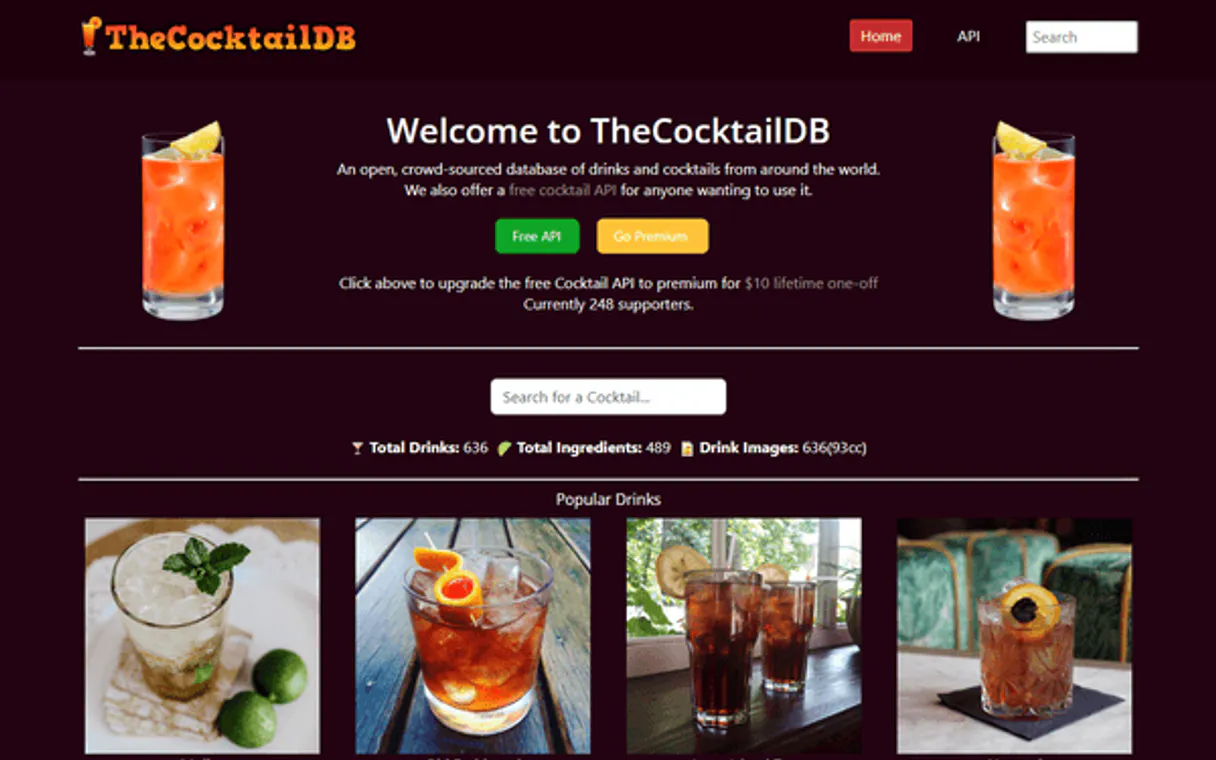
Independent Platform Disclaimer: Vinkius is an independent platform and is not affiliated with, endorsed by, sponsored by, verified by, or otherwise authorized by TheCocktailDB. All third-party trademarks, logos, and brand names are the property of their respective owners. Their use on this website is strictly for informational purposes to identify service compatibility and interoperability.
VINKIUS INFRASTRUCTURE
Cloud Hosted
Managed infra
V8 Isolated
Sandboxed per request
Zero-Trust Proxy
No stored credentials
DLP Enforced
Policy on every call
GDPR Compliant
EU data residency
Token Compression
~60% cost reduction
Works with Claude, ChatGPT, Cursor, and more
The Model Context Protocol standardizes how applications expose capabilities to LLMs. Instead of operating in isolation, your AI gains direct access to external platforms, live data, and real-world actions through secure, standardized connections.
This server provides 12 capabilities that interface natively with Claude, ChatGPT, Cursor, and any MCP client. No middleware. No custom integration required.
Available Capabilities
Manual recipe research wastes hours of time.
Today, figuring out a new drink concept means opening multiple tabs: one for ingredient definitions, another for cocktail types, and then manually cross-referencing dozens of pages to ensure your ingredients match the required ratios. You end up spending more time researching than actually writing.
With this MCP server, you ask your agent once. It handles the complex logic—running `filter_by_ingredient` combined with checking `list_categories`. The result is an instant list of actionable recipes, ready to copy and paste.
TheCocktailDB Alternative MCP Server: Get structured data instantly.
Previously, if you wanted details on a specific mixology technique or ingredient, you had to navigate deep API structures and guess which endpoint was correct. It felt like hacking together a database query in the dark.
Now, you simply call `get_cocktail_details` by ID. You get clean, predictable data: step-by-step instructions, precise measurements, and metadata—all structured for your agent to use immediately.
Common Questions About TheCocktailDB Alternative MCP
How do I find all drinks using a specific ingredient? (using filter_by_ingredient) +
Use filter_by_ingredient. You simply provide the name of the ingredient, and the tool returns every cocktail in the database that requires it. This is faster than manual searching.
Can I search for a drink by its category? (using filter_by_category) +
Yes, run filter_by_category. You first use list_categories to see the accepted types, and then you pass that specific type to the filter tool.
What if I just want some inspiration? (using get_random_cocktail) +
Just call get_random_cocktail. It pulls a complete recipe—name, ingredients, and steps—so you don't have to do the thinking work.
How accurate is search_cocktail_by_name? +
It searches directly against the main database. Just provide the exact name of the cocktail (e.g., 'Margarita') for best results.
What should I pass for the API Key when running a tool like `get_cocktail_details`? +
You must provide your dedicated TheCocktailDB API key. For initial testing, use '1' as recommended by the provider. Switching to your actual key later ensures reliable access and keeps you out of rate limits.
Besides just a name, what kind of metadata does `get_ingredient_details` return? +
It returns full ingredient metadata. This includes usage type, potential substitutes, and specific measurements. Getting this detail is key for building complex inventory matching logic.
Before I use `filter_by_category`, how do I list all available options? +
Just call the list_categories tool. It returns a structured JSON list of every category supported by the database. This lets you validate inputs and ensures your AI client uses the correct taxonomy name.
If I only know part of the drink's name, is there a better way than searching everything? +
Use search_cocktail_by_first_letter. This function efficiently narrows your search scope. Instead of querying the entire database, it limits results based on the initial letter you provide.
Can I search for cocktails that only contain a specific ingredient like Gin? +
Yes! Use the filter_by_ingredient tool with 'Gin'. It will return a list of all cocktails in the database that include Gin as one of their primary components.
How do I get the full instructions and image for a specific drink? +
First, find the drink ID using search_cocktail_by_name. Then, use the get_cocktail_details tool with that ID to retrieve the high-res image URL, full ingredient list, and step-by-step instructions.
Does the integration provide non-alcoholic drink options? +
Absolutely. You can use the list_alcoholic_filters tool to see available filters, and then use filter_by_category or specific search queries to identify 'Non_Alcoholic' drinks.
Use it with your favorite AI tools
Connect this server to Cursor, Claude, VS Code, and more.
More in this category

Coda
Enable your AI agent to manage docs, tables, formulas, and rows via the Coda API.
Buffer
Automate social media management via Buffer — schedule posts, track sent updates, shuffle queues, and manage multi-platform profiles with any AI agent.

Numeral Formatter Engine
Format raw numbers into perfect display strings: currencies ($10,000.00), bytes (2.5MB), percentages (97%), and abbreviations (1.5k).
You might also like

Mailsoftly
Manage marketing campaigns and contacts via the Mailsoftly REST API.

Pixabay API
Search stock media — audit images and videos via AI.
vCita
Run your small business with online scheduling, payment collection, and client management that keeps everything in one place.