
Upper Route Planner MCP. Orchestrate Complex Delivery Logistics by Conversation
Upper Route Planner connects your AI agent to sophisticated delivery logistics tools. It lets you manage entire fleets and complex routes by optimizing schedules, monitoring drivers in real-time, and provisioning new stops instantly using natural conversation.
 Claude
  ChatGPT
  Cursor
  Gemini
  Windsurf
  VS Code
  JetBrains
  Vercel
 Give Claude and any AI agent real-world access
Retrieve a comprehensive list of optimized delivery routes and their associated status metadata.
Pull complete, granular information for any single delivery stop or task location.
Generate and provision entirely new high-fidelity delivery tasks, including time windows and customer data.
List active delivery drivers and access current resource allocation details for your field workforce.
Verify the account's operational connection health and track total route orchestration volume.
Ask an AI about this


Waiting for input…
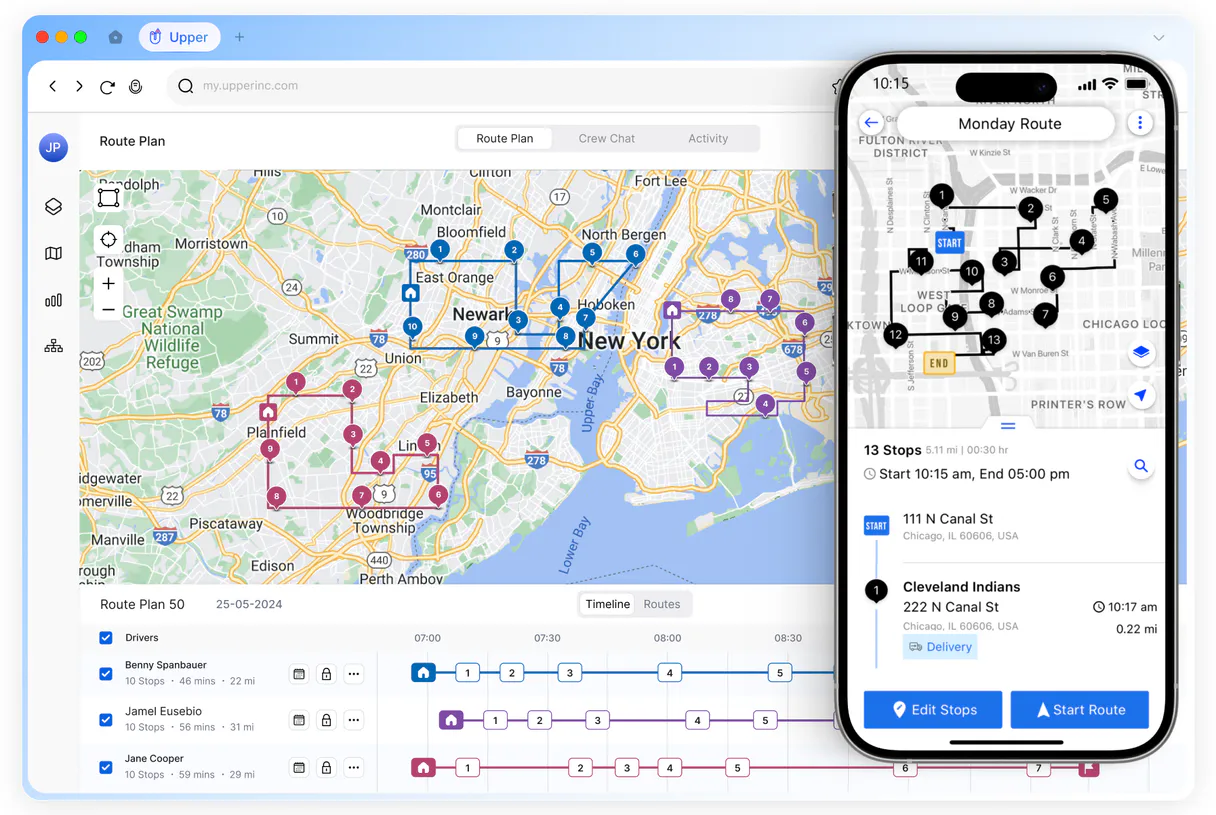
What AI agents can do with Upper Route Planner: 6 Tools for Logistics
These tools let you list all routes, get granular stop details, add new tasks, track drivers, and verify the system's operational status.
Make your AI actually useful.
Add this MCP to Claude, Cursor, or Windsurf and your AI stops guessing. It gets real tools to look things up, take action, and handle the stuff you keep doing by hand.
Start using Upper Route Planner MCPCreate Upper Delivery Task
Adds a brand-new delivery task record into the system.
List Upper Drivers
Retrieves a list of all active delivery drivers and their current assignments.
Get Upper Route Stop
Fetches specific, detailed information about a single route stop.
List Upper Routes
Generates a list of all existing optimized delivery routes and their summary details.
Get Upper Stop Details
Accesses complete, high-fidelity metadata for any specific stop location on a route.
Check Upper Status
Verifies the current API connection status of the Upper platform.
Security and governance baked right in.
Pick your AI client below to get set up. Just create a Vinkius account, subscribe, and you're instantly up and running. We handle the entire backend infrastructure, delivering out-of-the-box support for HTTPS Streamable, SSE, and OAuth2—zero messy routing required.
Claude AI
Open Claude Settings
Go to claude.ai, click your profile icon, then navigate to Customize → Connectors.
Add Custom Connector
Click the "+" button and select Add custom connector. Paste your Vinkius endpoint URL:
https://edge.vinkius.com/[YOUR_TOKEN_HERE]/mcp
Replace [YOUR_TOKEN_HERE] with your token
from cloud.vinkius.com. For OAuth-protected servers, expand
Advanced settings to add credentials.
Start a conversation
Open a new chat. The Upper Route Planner integration is available immediately — no restart needed.




Choose How to Get Started
Build a custom MCP for your own tools, or connect a ready-made integration from our catalog.
Build Your Own
Turn any API into an MCP. Import a spec, define Agent Skills, or deploy with MCPFusion.
- Import from OpenAPI, Swagger, or YAML specs
- Create Agent Skills with progressive disclosure
- Deploy to edge with MCPFusion framework
- Built in DLP, auth, and compliance on each call
- Real time usage dashboard and cost metering
- Publish to catalog or keep private
Make Your AI Do More
Start with Upper Route Planner, then connect any of our 5,200+ other servers whenever your AI needs more. One click, no limits.
- Use this MCP plus 5,200+ others, all in one place
- Add new capabilities to your AI anytime you want
- Connections are secured and governed automatically
- Track usage and costs across all your servers
- Works with Claude, ChatGPT, Cursor, and more
- New servers added to the catalog weekly
Independent Platform Disclaimer: Vinkius is an independent platform and is not affiliated with, endorsed by, sponsored by, verified by, or otherwise authorized by Upper Route Planner. All third-party trademarks, logos, and brand names are the property of their respective owners. Their use on this website is strictly for informational purposes to identify service compatibility and interoperability.
VINKIUS CLOUD
Cloud Hosted
Managed infra
V8 Isolated
Sandboxed per request
Zero-Trust Proxy
No stored credentials
DLP Enforced
Policy on each call
GDPR Compliant
EU data residency
Token Compression
~60% cost reduction
The headache of manual logistics tracking
Right now, managing a delivery day means jumping between spreadsheets, the Upper dashboard, and email threads. You copy-paste stop IDs, check driver availability on one screen, and manually update task statuses in another. If you need to know if a route was completed or why it's delayed, you spend minutes clicking through tabs just to verify basic metadata.
With this MCP, your agent handles the cross-referencing. You don't click anything. You simply ask for the status of a stop or list all active routes, and the AI pulls together the verified details from the system in plain English. It’s instant insight without the dashboard overload.
Upper Route Planner with Upper Route Planner MCP
You never have to manually pull driver assignments and compare them against scheduled tasks again. You can use list_upper_drivers combined with get_upper_route_stop, letting your agent perform that complex comparison for you in one query.
It's not just about getting data; it’s about having an operational brain connected to the system. Your AI client acts as a full-time logistics coordinator, giving you true control over the delivery process.
What Upper Route Planner MCP does for your AI
Managing a fleet of deliveries is usually a headache involving multiple spreadsheets, status dashboards, and endless calls. This MCP changes that. You connect your agent to gain full control over high-fidelity route orchestration through simple conversation. Instead of clicking into separate systems to check driver assignments or verify stop metadata, you just ask your AI client for the information.
It can list all optimized routes, tell you which drivers are assigned where, and even generate new delivery tasks with precise time windows automatically. If you're looking for a central hub to manage this complexity, Vinkius hosts thousands of specialized connectors, making Upper Route Planner one place to orchestrate your entire operation.
Your agent handles the heavy lifting: it can pull detailed information about specific stops or check the overall API status, so you stay on top of field progress without leaving your workspace.
019dd17e-054f-73e0-ae10-1d3ab87840e1 
How to set up Upper Route Planner MCP
The bottom line is you get a single conversational layer that lets your AI act as an expert logistics coordinator for your entire fleet.
Subscribe to this MCP on Vinkius and retrieve your unique API Token from your Upper dashboard settings.
Connect your agent using the token. This gives your AI client access to all of Upper's logistics tools.
Start talking to your agent. You can ask it to list routes, create tasks, or check stop details via natural language commands.
Who uses Upper Route Planner MCP
Anyone whose job involves moving things from Point A to Point B. This MCP is built for the Operations Lead who spends too much time switching between tracking dashboards and spreadsheets, or the Dispatcher tired of manual route verification.
You use this to pull full status reports on your routes and monitor driver progress without manually checking multiple web portals.
You verify complex delivery metadata, manage task priorities across regions, and ensure the field operations stay healthy by querying the system directly.
You analyze technical route efficiency or need to quickly provision a batch of new tasks for tomorrow's manifest using simple AI prompts.
Benefits of connecting Upper Route Planner MCP
Stop manually checking statuses. You can instantly check the status of a stop using get_upper_stop_details, getting proof of delivery data in seconds.
Never lose track of personnel. List all drivers with list_upper_drivers and know exactly which resource is assigned to which route right now.
Provision tasks on demand. Use create_upper_delivery_task to generate new jobs instantly, complete with precise time windows for the driver.
See the big picture fast. List upper routes gives you an overview of your entire day's manifest without clicking into dozens of separate dashboards.
Deep context retrieval: Need details on a specific stop? get_upper_stop_details pulls every piece of necessary metadata, keeping everything perfectly aligned for that parcel.
Upper Route Planner MCP use cases
Handling an unexpected delay
A driver calls and reports they're stuck at a specific location. Instead of calling dispatch, you ask your agent to check the status using get_upper_stop_details for that stop ID. The agent pulls up the full metadata instantly, allowing you to reroute the remaining deliveries immediately.
Building out tomorrow's manifest
You just signed a new client and need 50 delivery tasks added by morning. You use create_upper_delivery_task multiple times in one session, providing all necessary addresses and time windows until the entire job is scheduled.
Reviewing weekly performance
The manager needs to know how many routes were completed last week. You ask your agent to list upper routes for a specific date range, giving you an immediate overview of completion volume and average trip time.
Verifying system health before launch
Before running the entire day's schedule, you use check_upper_status. The agent confirms your API connection is healthy and ready for the full wave of route orchestration volume.
Upper Route Planner MCP tradeoffs
What to watch out for, and the recommended way to handle each one.
Treating it like a simple lookup tool
Asking the AI to just 'tell me where John Doe is.' This only provides basic location data and ignores critical operational details.
To get full context, you must ask for specific stop metadata using get_upper_stop_details or list upper routes. These tools provide the necessary high-fidelity data points.
Over-relying on manual web checks
A dispatcher has to open five different browser tabs just to compare the assigned driver against the task priority and the stop's required time window.
Ask your agent to list_upper_drivers combined with get_upper_stop_details. Your AI client pulls all that complex, cross-referenced information into one answer.
Forgetting to check connectivity
Trying to create tasks or pull routes when the API connection is down and getting vague error messages.
Always run check_upper_status first. This verifies your account-level connectivity before you waste time generating commands that will fail.
When to use Upper Route Planner MCP
Use this MCP if your primary pain point is managing the flow of deliveries, not just reading a single address. You need to know how drivers are assigned, what their current status is, and if the system can handle new tasks reliably. If you only ever need simple mapping or basic tracking (e.g., 'What's the latitude?'), this is overkill; those generic map tools will suffice. However, if your process involves scheduling multiple people, coordinating specific time windows, or monitoring high-volume operations across a whole fleet, then Upper Route Planner is essential because it handles that complex orchestration layer for you. If you only need to view static data, use an analytics tool instead.
Frequently asked questions about Upper Route Planner MCP
How do I start using Upper Route Planner MCP? +
You first subscribe to this MCP on Vinkius and retrieve your API Token from your upper dashboard. Once connected, your agent immediately gains access to all the routing tools.
Can I use Upper Route Planner MCP to add new tasks? +
Yes, you can use create_upper_delivery_task to generate brand-new delivery jobs. You just need to provide the necessary details, like addresses and time windows.
What is the difference between listing routes and getting stop details with Upper Route Planner MCP? +
list_upper_routes gives you a high-level overview of all scheduled trips. get_upper_stop_details drills down to give you every specific piece of metadata for just one single delivery location.
Does Upper Route Planner MCP handle driver assignments? +
Yes, by using list_upper_drivers, your agent pulls the current resource allocation details. This helps you understand who is assigned where across your fleet.
Do I need to use check_upper_status before running routes? +
It's a good habit. Running check_upper_status confirms that the API connection is healthy and ready for high-volume route orchestration, preventing runtime errors.