
Userback MCP. Manage Visual Bugs & Feedback from Chat.
 Gemini
 Works with every AI agent you already use
…and any MCP-compatible client









Just plug in your AI agents and start using Vinkius.
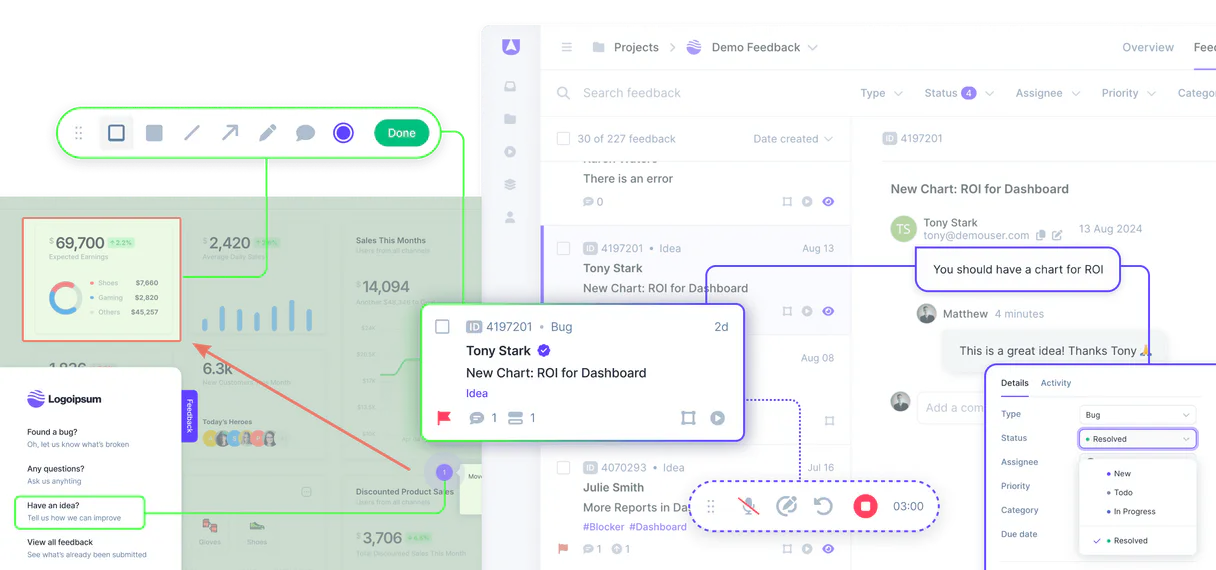
Userback MCP Server collects visual product feedback—annotated screenshots, screen recordings, and bug reports. Connect this server to your AI agent to process user suggestions through natural conversation.
Get instant access to all feedback entries, list projects, track bugs, or create new reports without leaving your chat window.
What your AI agents can do
Create feedback entry
Generates and saves a new bug report or suggestion into your Userback account for a specified project.
Get feedback details
Retrieves all specific metadata, screenshots, and comments associated with one unique feedback entry ID.
Get project details
Pulls the full details and scope of a single Userback project space.
The server retrieves a list of every project space you have set up for collecting user feedback.
It pulls detailed metadata for one chosen project, giving context to the ongoing development effort.
The agent fetches a summary list of every feedback entry logged in your account.
You can pull full details, including annotated screenshots and comments, for one specific bug report or suggestion.
The server lets you programmatically generate a brand-new feedback entry or bug report right through the chat interface.
It lists every user and collaborator who has access to the Userback account, helping map out your review team.
Ask AI about this MCP
Supported MCP Clients
OAuth 2.0 Compatible Gemini Waiting for input…
Userback MCP Server: 6 Tools for Feedback Management
These tools let your AI client list projects, fetch bug details, create new entries, and manage team data directly from the Userback platform.
Make your AI actually useful.
Add this MCP to Claude, Cursor, or Windsurf and your AI stops guessing. It gets real tools to look things up, take action, and handle the stuff you keep doing by hand.
Start using Userback on Vinkius019dd180create feedback entry
Generates and saves a new bug report or suggestion into your Userback account for a specified project.
019dd180get feedback details
Retrieves all specific metadata, screenshots, and comments associated with one unique feedback entry ID.
019dd180get project details
Pulls the full details and scope of a single Userback project space.
019dd180list account users
Fetches a list of all users and collaborators connected to your Userback account.
019dd180list feedbacks
Lists summaries for all feedback entries across the entire Userback account.
019dd180list userback projects
Provides a comprehensive list of every project space currently set up in your Userback account.
Choose How to Get Started
Build a custom MCP for your own tools, or connect a ready-made integration from our catalog.
Build Your Own
Turn any API into an MCP. Import a spec, define Agent Skills, or deploy with MCPFusion.
- Import from OpenAPI, Swagger, or YAML specs
- Create Agent Skills with progressive disclosure
- Deploy to edge with MCPFusion framework
- Built in DLP, auth, and compliance on every call
- Real time usage dashboard and cost metering
- Publish to catalog or keep private
Make Your AI Do More
Start with Userback, then connect any of our 4,900+ other servers whenever your AI needs more. One click, no limits.
- Use this MCP plus 4,900+ others, all in one place
- Add new capabilities to your AI anytime you want
- Every connection is secured and compliant automatically
- Track usage and costs across all your servers
- Works with Claude, ChatGPT, Cursor, and more
- New servers added to the catalog every week
Independent Platform Disclaimer: Vinkius is an independent platform and is not affiliated with, endorsed by, sponsored by, verified by, or otherwise authorized by Userback. All third-party trademarks, logos, and brand names are the property of their respective owners. Their use on this website is strictly for informational purposes to identify service compatibility and interoperability.
VINKIUS INFRASTRUCTURE
Cloud Hosted
Managed infra
V8 Isolated
Sandboxed per request
Zero-Trust Proxy
No stored credentials
DLP Enforced
Policy on every call
GDPR Compliant
EU data residency
Token Compression
~60% cost reduction
Works with Claude, ChatGPT, Cursor, and more
The Model Context Protocol standardizes how applications expose capabilities to LLMs. Instead of operating in isolation, your AI gains direct access to external platforms, live data, and real-world actions through secure, standardized connections.
This server provides 6 capabilities that interface natively with Claude, ChatGPT, Cursor, and any MCP client. No middleware. No custom integration required.
Tracking down user bugs shouldn't take three separate dashboards.
Today, tracking a bug means bouncing between tools: you check Figma for design specs, open Userback to find the annotated screenshot, and then jump into Jira to see if it's assigned. You spend more time copy-pasting IDs than actually diagnosing the issue.
With this MCP server, your agent handles that entire sequence in one conversation. Ask it to list_feedbacks, and it brings you a summary of every bug across all projects. Need details? One prompt to get_feedback_details pulls the visuals and metadata right where you are.
Userback MCP Server: Create structured feedback from zero.
The old way involved a manual process of gathering notes, finding the correct project ID, opening the form, and then filling it out—a multi-step chore that always led to incomplete submissions. You're losing valuable context because the workflow is too clunky.
Now you just tell your agent, 'Create a new suggestion for Project X: Add dark mode.' The server runs create_feedback_entry instantly, capturing all necessary data and linking it correctly. It’s that simple.
What you can do with this MCP connector
Listen up. This Userback MCP Server hooks your visual product feedback—all those annotated screenshots, recordings, and bug reports—straight into your AI client. You'll use it to process user suggestions and track bugs through plain conversation with your agent. It lets you get instant access to every piece of feedback data without ever leaving the chat window.
Managing Your Projects:
You can pull a comprehensive list of every project space you’ve set up in Userback using list_userback_projects, keeping all your development efforts neatly separated. When you need the deep context on one specific initiative, you run get_project_details to pull all the full metadata and scope for that single project space.
Tracking Feedback:
If you wanna see what's been reported across the board, you use list_feedbacks to get a summary list of every bug entry or suggestion logged in your account. For deep dives, you can run get_feedback_details on any unique feedback entry ID; that pulls all the specific metadata, screenshots, and comments attached to that single report.
When you find an issue or have a new idea, you don't gotta switch tabs—you just use create_feedback_entry to generate and save a brand-new bug report or suggestion directly through the chat interface.
Knowing Your Team:
You can run list_account_users anytime to get a list of every user and collaborator connected to your Userback account, so you know exactly who’s on the review team. This setup gives your agent six core functions: listing all projects, getting project details, listing feedback summaries, pulling deep feedback records, creating new reports instantly, and mapping out your entire team.
It's built to handle the raw data—the bits and pieces of info you need to actually ship something good. You tell it what you want, and your AI client pulls it off.
019dd180-57b5-72e7-aa80-44e1d3a32a1e 
How Userback MCP Works
- 1 First, subscribe to this server and provide your API token. This connects your AI agent to your Userback data.
- 2 Next, prompt your agent with a specific request, like 'List all projects' or 'Show me bugs for the checkout flow.'
- 3 Finally, the agent calls the appropriate tool, retrieves the raw data (like project names or bug IDs), and presents it back to you in conversational text.
The bottom line is, your AI client acts as a proxy. It handles the complex API calls so you just talk to it like normal.
Who Is Userback MCP For?
Product Managers and Designers who are sick of switching between Jira, Figma, and Userback dashboards. QA Engineers tired of copying bug details into spreadsheets. Development Leads needing a single source of truth for tracking visual fixes. This is for anyone whose job requires turning raw user observation (screenshots) into structured development tasks.
Uses the server to quickly pull recent feedback and check if high-priority bugs were resolved, all without leaving their chat client.
Runs list_feedbacks and get_feedback_details to verify specific bug reports using embedded annotated screenshots for reproduction steps.
Uses create_feedback_entry when a user suggests an improvement, letting them capture the suggestion's details immediately alongside their notes.
What Changes When You Connect
- Process raw visual input fast. Instead of opening a browser to check bug reports, ask the agent to list all feedbacks or get_feedback_details for specific entries. You see the annotated screenshots right in your chat window.
- Keep development organized with project context. Use list_userback_projects and then get_project_details to confirm exactly which scope you're working on before creating a new entry via create_feedback_entry.
- Track team visibility instantly. The list_account_users tool pulls your entire review board roster, so you always know who owns the sign-off process for a given feature.
- Capture ideas without friction. When users suggest something, use create_feedback_entry. It lets you log the suggestion and notes immediately, preventing valuable user insights from getting lost in email chains.
- Contextualize everything. The combination of list_feedbacks (overview) and get_feedback_details (deep dive) allows your agent to move from a general idea to a specific, actionable bug report seamlessly.
Real-World Use Cases
Reviewing the latest checkout errors.
A QA engineer needs to review all bugs logged for 'Product App v2'. They ask their agent to list_feedbacks. The agent returns 4 recent reports, including a critical one about mobile checkout failure. The engineer then uses get_feedback_details on that specific bug ID to pull the annotated screenshot and reproduction steps.
Onboarding a new team member.
A Product Lead needs to know who is authorized to sign off on UI changes. They ask their agent to list_account_users, which immediately returns all current collaborators. This saves them from manually checking permissions across multiple internal tools.
Capturing a new user suggestion.
A designer talks to a client who suggests dark mode support. Instead of taking screenshots and filling out a form, the designer asks the agent to create_feedback_entry, providing the project ID and key notes—the bug report is logged instantly.
Understanding project scope changes.
A PM wants to know if a specific feature ('Dashboard V3') has been officially scoped. They first use list_userback_projects to find the correct space, then get_project_details to read the latest defined goals and boundaries for that area.
The Tradeoffs
Treating feedback as siloed data.
Manually checking Jira for status, opening Userback for screenshots, and emailing Figma links. This process is slow and relies on copy-pasting multiple IDs.
→ Use the agent to list_feedbacks first. Then ask it to get_feedback_details; this aggregates status tracking, metadata, and visuals into one chat response.
Forgetting project context.
Creating a bug report without linking it to the right development cycle or team space, which causes confusion for developers trying to triage fixes.
→ Always start by listing_userback_projects. Confirm the correct project ID first, then use that specific context when running create_feedback_entry.
Over-relying on email/chat logs.
Having a conversation about a bug fix in Slack and relying on someone else to remember where the original annotated screenshot was stored. The data gets scattered.
→ If you spot an issue, use create_feedback_entry immediately via your agent. It forces the structured capture of all required details and screenshots into Userback.
When It Fits, When It Doesn't
Use this server if your primary pain point is translating unstructured visual observation (screenshots, recordings) into actionable, trackable development tickets. You need a single place to list all projects, pull deep feedback metadata, or create new entries without leaving your chat client.
Don't use this if you only need general bug tracking capabilities that don't involve annotated visuals. If you just want simple task management (e.g., 'Did John complete X?'), a dedicated task list tool will work better. Also, if your team doesn't actively use visual feedback as part of their workflow—meaning they aren't annotating screenshots—this server won't help simplify anything.
Common Questions About Userback MCP
How does the Userback MCP Server work with annotated screenshots? +
The server is built around collecting visual context. When you use get_feedback_details, it pulls not just text, but the full metadata and the embedded annotated screenshots that show exactly where the bug occurred.
Can I list all my projects using the Userback MCP Server? +
Yes. Use list_userback_projects to see every single feedback space you have set up in your account, which is great for knowing where to focus your efforts next.
What if I want to track a bug that's already reported? +
You can use list_feedbacks to get an overview of all entries. Then, run get_feedback_details with the specific ID to pull up all historical context and current status updates for that bug.
Is there a way to create feedback reports directly from my IDE? +
Yes. By connecting this server to your AI client (like Cursor), you can use create_feedback_entry right from your coding environment, streamlining the entire reporting loop.
Before I use the Userback API tokens, where do I find the necessary credentials? +
You find your unique API Token in your account settings under the dedicated API section. This token authenticates your AI client and allows it to run tools like 'list_userback_projects'. It's crucial for connecting your agent to Userback data.
If I try to pull a lot of entries, are there rate limits when using the Userback MCP Server? +
Yes, the server enforces standard API rate limits. If you attempt bulk operations—like listing thousands of feedbacks via 'list_feedbacks'—the connection will throttle your requests temporarily. We recommend batching calls to avoid disruption.
What does the Userback tool handle if I try to get details for a non-existent project? +
If you use 'get_project_details' with an invalid ID, the server will return a specific HTTP error code and a descriptive message. Your AI client can then read this response and tell you exactly which Project ID needs correction.
How can I check who is on my organization’s review team using Userback? +
You use the 'list_account_users' tool to retrieve a roster of all associated users. This lets your agent verify which team members have access and visibility into the feedback projects.
Can I filter feedback by project ID? +
Yes! Use the list_feedbacks tool and provide the optional project_id parameter to retrieve entries only for that specific project.
How do I see the comments on a specific feedback item? +
Run the get_feedback_details query with the unique Feedback ID. Your agent will retrieve the complete metadata, including any internal or user comments.
Is it possible to create a new bug report via AI? +
Absolutely. Use the create_feedback_entry action. Provide the Project ID, a title, and an optional comment to log a new entry in your Userback account.
Use it with your favorite AI tools
Connect this server to Cursor, Claude, VS Code, and more.