
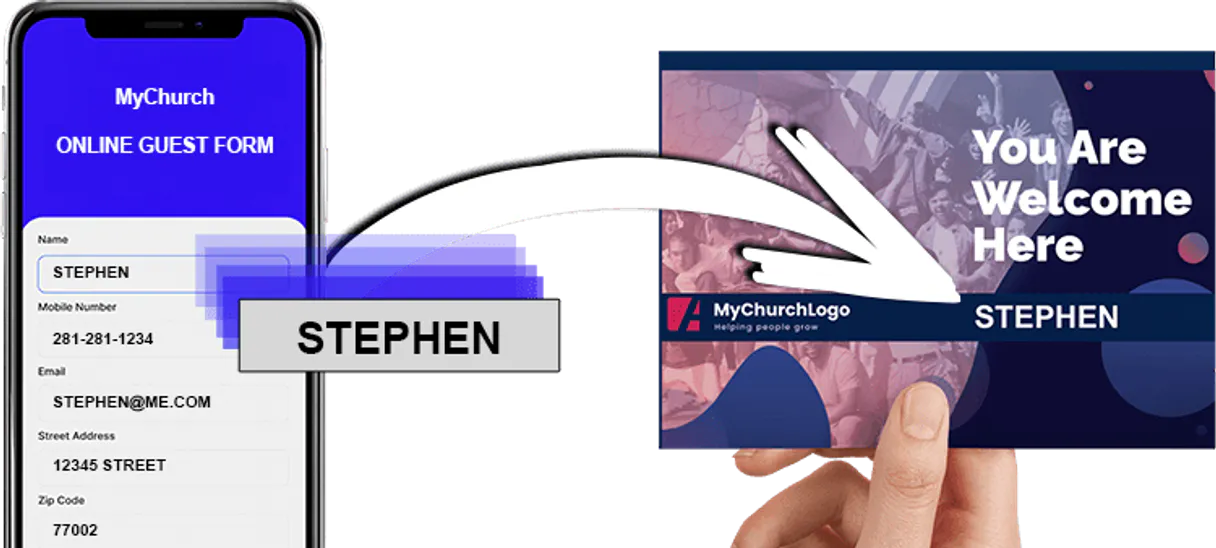
Supercharge your AI with ChurchStamp. Automate Physical Mailings From Conversation.
 Gemini
 Works with every AI agent you already use
…and any MCP-compatible client









Connect to your AI in seconds.
ChurchStamp MCP manages physical direct mail campaigns for ministries and churches. Use this connector to automate postcard outreach, track mailing status in real-time, manage contact lists, and coordinate campaign design through natural conversation with your AI client.
What your AI can do
Check churchstamp status
Verifies that the connection to ChurchStamp is active and working correctly.
Create campaign
Sets up a new mail campaign, optionally assigning it a specific design template.
Create contact
Adds a brand-new member or donor contact to the system directory.
Send personalized postcards and letters to specific contacts using defined designs.
View, list, and retrieve performance details for all active direct mail campaigns.
Add new members to the directory or pull comprehensive lists of existing contacts.
Browse and retrieve technical details for all available postcard templates and design assets.
Check the real-time delivery status of sent mail pieces or verify API connectivity for service uptime.
Ask an AI about this
Compatible AI Apps
OAuth 2.0 Compatible Gemini Waiting for input…
ChurchStamp: 10 Tools for Outreach Management
These tools give you granular control over every step of the direct mail process, from creating a campaign to sending individual postcards.
Make your AI actually useful.
Add this MCP to Claude, Cursor, or Windsurf and your AI stops guessing. It gets real tools to look things up, take action, and handle the stuff you keep doing by hand.
Start using ChurchStamp on VinkiusCheck Churchstamp Status
Verifies that the connection to ChurchStamp is active and working correctly.
Create Campaign
Sets up a new mail campaign, optionally assigning it a specific design template.
Create Contact
Adds a brand-new member or donor contact to the system directory.
Get Campaign
Retrieves detailed information about a specific, existing mail campaign.
Get Design
Fetches technical details and specifications for a specific postcard design.
Get User Details
Retrieves basic information about the connected user account.
List Campaigns
Gets a list of all current and past mail campaigns run through ChurchStamp.
List Contacts
Provides a comprehensive directory listing of all stored contacts in the system.
List Designs
Shows every available postcard and letter template design for use.
Send Mail
Triggers the physical mailing of a personalized postcard or letter to one or more...
Connect to your AI in seconds. Security and governance baked right in.
Pick your AI client below to get set up. Just create a Vinkius account, subscribe, and you're instantly up and running. We handle the entire backend infrastructure, delivering out-of-the-box support for HTTPS Streamable, SSE, and OAuth2—zero messy routing required.
Claude AI
Open Claude Settings
Go to claude.ai, click your profile icon, then navigate to Customize → Connectors.
Add Custom Connector
Click the "+" button and select Add custom connector. Paste your Vinkius endpoint URL:
https://edge.vinkius.com/[YOUR_TOKEN_HERE]/mcp
Replace [YOUR_TOKEN_HERE] with your token from
cloud.vinkius.com. For OAuth-protected servers, expand Advanced
settings to add credentials.
Start a conversation
Open a new chat. The ChurchStamp integration is available immediately — no restart needed.
Choose How to Get Started
Build a custom MCP for your own tools, or connect a ready-made integration from our catalog.
Build Your Own
Turn any API into an MCP. Import a spec, define Agent Skills, or deploy with MCPFusion.
- Import from OpenAPI, Swagger, or YAML specs
- Create Agent Skills with progressive disclosure
- Deploy to edge with MCPFusion framework
- Built in DLP, auth, and compliance on every call
- Real time usage dashboard and cost metering
- Publish to catalog or keep private
Make Your AI Do More
Start with ChurchStamp, then connect any of our 5,000+ other servers whenever your AI needs more. One click, no limits.
- Use this MCP plus 5,000+ others, all in one place
- Add new capabilities to your AI anytime you want
- Every connection is secured and compliant automatically
- Track usage and costs across all your servers
- Works with Claude, ChatGPT, Cursor, and more
- New servers added to the catalog every week
Independent Platform Disclaimer: Vinkius is an independent platform and is not affiliated with, endorsed by, sponsored by, verified by, or otherwise authorized by ChurchStamp. All third-party trademarks, logos, and brand names are the property of their respective owners. Their use on this website is strictly for informational purposes to identify service compatibility and interoperability.
VINKIUS INFRASTRUCTURE
Cloud Hosted
Managed infra
V8 Isolated
Sandboxed per request
Zero-Trust Proxy
No stored credentials
DLP Enforced
Policy on every call
GDPR Compliant
EU data residency
Token Compression
~60% cost reduction
Works with Claude, ChatGPT, Cursor, and more
The Model Context Protocol standardizes how applications expose capabilities to LLMs. Instead of operating in isolation, your AI gains direct access to external platforms, live data, and real-world actions through secure, standardized connections.
This connection provides 10 powerful capabilities that interface natively with Claude, ChatGPT, Cursor, and other compatible AI platforms. No middleware. No custom integration required.
The current way of running physical outreach takes too many steps.
Right now, coordinating a mailing feels like managing three different jobs: you have to log into the contact system to pull names. Then, you jump over to the design portal just to make sure your template is current. Finally, you go back to a separate campaign dashboard just to hit 'send' and wait for confirmation.
With this MCP, it’s one conversation. You tell your agent what you need—say, 'Send out postcards to all new members.' The process handles listing the contacts, finding the right template (`list_designs`), and triggering the actual mailing (`send_mail`) without you having to switch screens.
The ChurchStamp MCP makes sending mail simple.
You no longer have to manually track which contacts were included or what template was used. If you run `create_campaign`, the agent logs all metadata and records it instantly, giving you a single source of truth for performance tracking.
It's immediate control. You just ask, and your AI client orchestrates the entire physical process, delivering actionable results right where you are.
What your AI can actually do with this
You can use your AI agent to run the entire lifecycle of a church's physical communication program without lifting a finger. Instead of manually uploading spreadsheets or logging into multiple portals to check statuses, you simply ask your agent what needs mailing. It handles everything from listing available designs and verifying contact data to launching complex campaigns.
Your agent acts as a dedicated mail coordinator. You can list all active campaign portfolios, retrieve performance metrics for specific outreach efforts, and programmatically send personalized postcards or letters. This automation gives you full control over your direct marketing without the usual back-and-forth with manual forms. It’s how Vinkius helps you take physical outreach from a complicated chore to a simple conversation.
019dd0cd-9428-7052-939e-4ffc1b3db4a4 
Here's how it actually works
The bottom line is: your AI client manages the entire flow of information and action, turning complex backend processes into simple chat commands.
First, connect your AI client and retrieve your Access Token from your ChurchStamp dashboard settings.
Next, use natural language commands to list campaigns or contacts; the agent pulls the necessary data into the conversation context.
Finally, tell the agent exactly what you want—for example, 'Send a welcome postcard to John Doe'—and it triggers the physical mail process.
Who is this actually for?
This MCP is for ministry administrators who are tired of spending hours clicking through dashboards just to track a batch of postcards. It’s built for the outreach coordinator whose job requires managing hundreds of physical mail pieces and ensuring every detail—from design metadata to delivery status—is perfect.
Uses this MCP to instantly trigger welcome postcards or monitor large, ongoing donor outreach campaigns using simple voice commands.
Verifies mail design metadata and checks campaign results without leaving their primary content planning workspace.
Automates the management of recipient lists and assigns mail piece batches through simple AI queries, ensuring no one misses a mailing.
What Changes When You Connect
You don't have to manually upload CSVs anymore. Simply ask your agent to run a campaign, and it handles the recipient list assignment through send_mail.
Never guess if your connection is working again. Use check_churchstamp_status at any time to verify API connectivity before running critical mailings.
Keep everything coordinated by using list_designs. This lets you see all available templates and ensure the brand look is consistent across every outreach piece.
Need performance data? You can ask your agent to list campaigns (list_campaigns) and then drill down with get_campaign for detailed results on any portfolio.
Adding new people is simple. Use create_contact to instantly add a member, or pull the whole roster using list_contacts, all via natural language.
See it in action
Welcome Back Campaign
A volunteer needs to send welcome postcards to 50 members. Instead of manually pulling the list and designing each piece, they tell their agent: 'Send a Welcome Postcard (Design ID: ds_123) to all contacts who joined last month.' The agent uses list_contacts and then send_mail.
Reviewing Last Quarter's Efforts
The marketing manager needs to see how the 'Christmas Outreach' campaign performed. They ask their agent, which first calls list_campaigns, then uses get_campaign to retrieve all performance metadata for detailed reporting.
Updating a Key Donor
A donor moved and the address needs updating. Instead of logging into the contact management system, they ask their agent to use create_contact (or update existing records) with the new mailing details immediately.
Auditing Designs
The design team can quickly review all available templates by calling list_designs, confirming if a required card type is already built before starting a new project.
The honest tradeoffs
Trying to manually track status
Logging into the ChurchStamp dashboard multiple times throughout the day just to check if the mail pieces were delivered or what the current campaign progress is.
Don't waste time refreshing dashboards. Just ask your agent: 'What is the delivery status for Campaign X?' The agent uses get_campaign and reports real-time tracking updates immediately.
Starting a mailing without checking connectivity
Running a major campaign using send_mail only to find out later that the API key expired, requiring an emergency manual fix.
Always start by running check_churchstamp_status. This quick check confirms service readiness before you spend time building or sending anything.
Forgetting who needs to be contacted
A coordinator assumes the list is up-to-date and sends mail, only for it to fail because a few key members were never entered into the system.
Before sending anything, run list_contacts or create_contact first. This ensures your recipient data is complete before you launch a campaign.
When It Fits, When It Doesn't
Use this MCP if your core need involves orchestrating physical mailings for a ministry—from contact management to design coordination and final delivery tracking. It's perfect when the goal is 'send an item in the real world.' Don't use it if you only need digital communication, like sending emails or updating web pages; those require a different tool. If you just need to list contacts but don't intend to send mail, list_contacts handles that fine. But if your process involves 'send,' 'design,' and 'track status,' this is the right MCP.
Questions you might have
How do I check if ChurchStamp MCP is connected? +
Run check_churchstamp_status. This tool verifies your API connectivity and tells you immediately if the service is ready for mailings or if there’s an issue with your credentials.
What tools can I use to find available designs? +
Use list_designs to see a comprehensive list of every postcard template. If you know the design ID, you can also use get_design for full technical specs.
How do I send mail using the ChurchStamp MCP? +
You trigger it with send_mail. To make it work, you'll first need to have a campaign running, so consider calling create_campaign beforehand.
Can I list all contacts in the ChurchStamp MCP? +
Yes. Simply call list_contacts and the agent will give you the full directory of every person recorded in your system.
What parameters does the `create_campaign` tool need to run a new mailing campaign? +
It requires defining the general scope and linking it to an available design template. You must specify whether this is a welcome, annual giving, or outreach mail piece. The system then handles assigning tracking IDs and preparing the metadata for execution.
When using the `create_contact` tool, how does it handle incomplete or incorrectly formatted recipient data? +
The tool validates required fields like names and physical addresses before accepting a record. If data is missing crucial information—for example, an invalid ZIP code—the API returns an explicit validation error code that tells you exactly what needs fixing.
How do I get detailed performance metrics by running the `get_campaign` tool? +
You simply provide the specific Campaign ID to retrieve comprehensive details. This report includes sending history, total volume processed, and any recorded delivery statuses for that campaign's timeline.
Using `get_user_details`, what information can I access about my ChurchStamp account security and limits? +
This tool pulls general account metadata. You can check your current mailing volume thresholds or verify associated user profile data directly through the query. This is useful for planning large outreach efforts.
How do I find my ChurchStamp Access Token? +
Log in to your account, navigate to Settings > Security, and copy your unique Access Token from the API section.
Can I send personalized postcards via AI? +
Yes! The send_churchstamp_mail tool allows your agent to trigger physical mailings by providing recipient metadata and design IDs.
How do I list my mail designs? +
Use the list_designs tool to retrieve your complete directory along with the unique identifiers for all managed templates.
We've already built the connector for ChurchStamp. Just plug in your AI agents and start using Vinkius.
No hosting. No infrastructure. No complex setup.
All 10 tools are live and waiting.
You're up and running in seconds.
Gemini Vinkius gives your AI agents access to the full catalog of app connectors, all fully managed, secure, and enterprise-ready. One subscription, every tool you need.
Built, hosted, and secured by Vinkius. You just connect and go.