
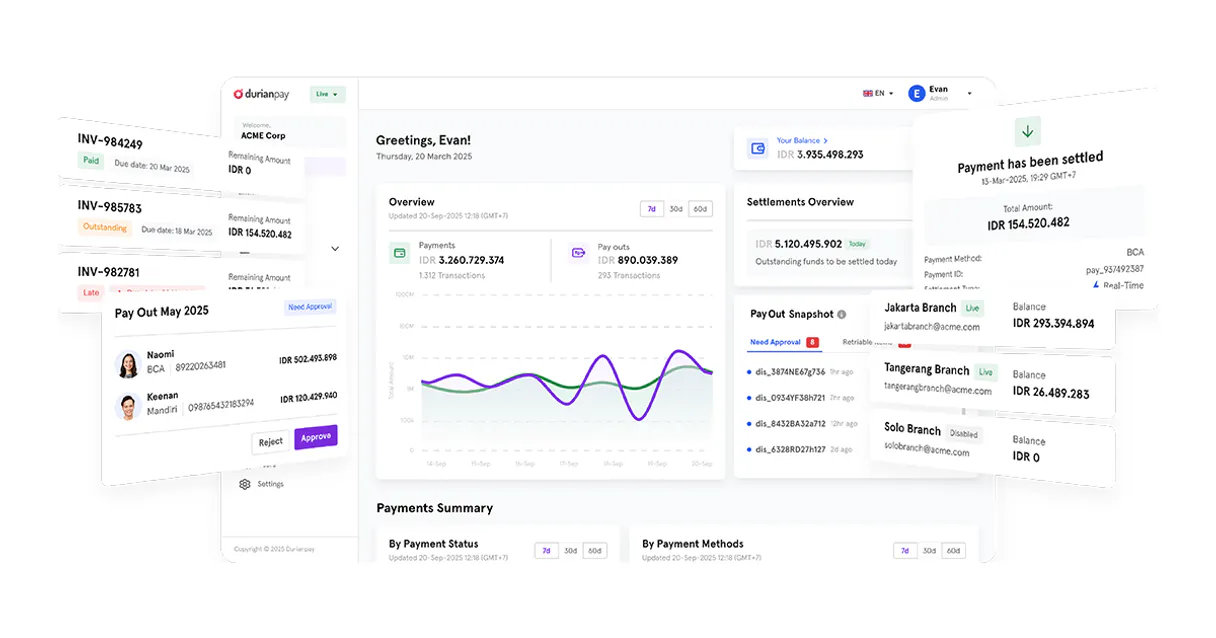
Supercharge your AI with Durianpay. Manage payments, track orders, and audit settlements instantly.
 Gemini
 Works with every AI agent you already use
…and any MCP-compatible client









Connect to your AI in seconds.
Durianpay helps your AI agent manage complex payment operations instantly. You can track every checkout order, pull detailed reports on transactions, list failed payments for reconciliation, and get a high-level audit of your revenue health—all using natural conversation.
What your AI can do
Get durianpay account metadata
Retrieves the usage limits and general metadata for your Durianpay account.
Get payment order details
Retrieves granular details for a single checkout order ID.
Get payment details
Gets complete information, including lifecycle status, for one specific payment ID.
Retrieve detailed records and the current status for any transaction in your Durianpay account.
Get full details on specific checkout orders, including line items and expiration dates.
Instantly pull a high-level summary of payment activity, success rates, and failed transactions without needing complex queries.
List registered customer profiles and their overall transaction history within your organization.
Ask an AI about this
Compatible AI Apps
OAuth 2.0 Compatible Gemini Waiting for input…
Durianpay - 10 Tools
Use these tools to perform every payment operation imaginable—from checking account metadata limits to listing failed transactions.
Make your AI actually useful.
Add this MCP to Claude, Cursor, or Windsurf and your AI stops guessing. It gets real tools to look things up, take action, and handle the stuff you keep doing by hand.
Start using Durianpay on VinkiusGet Durianpay Account Metadata
Retrieves the usage limits and general metadata for your Durianpay account.
Get Payment Order Details
Retrieves granular details for a single checkout order ID.
Get Payment Details
Gets complete information, including lifecycle status, for one specific payment ID.
Quick Revenue Health Audit
Generates a high-level summary of payment activity, showing success rates and...
List Registered Customers
Provides a list of every customer profile registered within the organization.
List Failed Transactions
Identifies and lists payments that were declined or failed for reconciliation purposes.
List Payment Orders
Lists all checkout orders that have been created in your Durianpay account.
List Durianpay Payments
Lists every payment successfully received in your Durianpay account.
List Latest Transactions
Shows the most recently received payments, useful for daily reporting checks.
Search Payment Orders
Searches for specific checkout orders using either an order ID or a customer name...
Connect to your AI in seconds. Security and governance baked right in.
Pick your AI client below to get set up. Just create a Vinkius account, subscribe, and you're instantly up and running. We handle the entire backend infrastructure, delivering out-of-the-box support for HTTPS Streamable, SSE, and OAuth2—zero messy routing required.
Claude AI
Open Claude Settings
Go to claude.ai, click your profile icon, then navigate to Customize → Connectors.
Add Custom Connector
Click the "+" button and select Add custom connector. Paste your Vinkius endpoint URL:
https://edge.vinkius.com/[YOUR_TOKEN_HERE]/mcp
Replace [YOUR_TOKEN_HERE] with your token from
cloud.vinkius.com. For OAuth-protected servers, expand Advanced
settings to add credentials.
Start a conversation
Open a new chat. The Durianpay integration is available immediately — no restart needed.
Choose How to Get Started
Build a custom MCP for your own tools, or connect a ready-made integration from our catalog.
Build Your Own
Turn any API into an MCP. Import a spec, define Agent Skills, or deploy with MCPFusion.
- Import from OpenAPI, Swagger, or YAML specs
- Create Agent Skills with progressive disclosure
- Deploy to edge with MCPFusion framework
- Built in DLP, auth, and compliance on every call
- Real time usage dashboard and cost metering
- Publish to catalog or keep private
Make Your AI Do More
Start with Durianpay, then connect any of our 5,000+ other servers whenever your AI needs more. One click, no limits.
- Use this MCP plus 5,000+ others, all in one place
- Add new capabilities to your AI anytime you want
- Every connection is secured and compliant automatically
- Track usage and costs across all your servers
- Works with Claude, ChatGPT, Cursor, and more
- New servers added to the catalog every week
Independent Platform Disclaimer: Vinkius is an independent platform and is not affiliated with, endorsed by, sponsored by, verified by, or otherwise authorized by Durianpay. All third-party trademarks, logos, and brand names are the property of their respective owners. Their use on this website is strictly for informational purposes to identify service compatibility and interoperability.
VINKIUS INFRASTRUCTURE
Cloud Hosted
Managed infra
V8 Isolated
Sandboxed per request
Zero-Trust Proxy
No stored credentials
DLP Enforced
Policy on every call
GDPR Compliant
EU data residency
Token Compression
~60% cost reduction
Works with Claude, ChatGPT, Cursor, and more
The Model Context Protocol standardizes how applications expose capabilities to LLMs. Instead of operating in isolation, your AI gains direct access to external platforms, live data, and real-world actions through secure, standardized connections.
This connection provides 10 powerful capabilities that interface natively with Claude, ChatGPT, Cursor, and other compatible AI platforms. No middleware. No custom integration required.
Sifting through payment status updates is a huge time sink.
Today, checking if payments are settled means logging into the dashboard, clicking 'Transactions,' filtering by date range, and then manually looking at each transaction's success status. You often have to jump between viewing general payments, listing orders for expiry checks, and finding failed transactions—all across different tabs.
With this MCP, you just ask your agent: 'What's the payment situation for last week?' It pulls together all that data from list_durianpay_payments, list_failed_transactions, and quick_revenue_health_audit into one summary response. You get the answer without clicking anything.
Using Durianpay MCP gives you complete control over payments.
You eliminate the need to copy an order ID from a support ticket, paste it into a separate order tracking portal, and wait for the status update. The agent handles that whole cross-platform retrieval process.
Now, when you talk to your agent, it's like having all those dashboards rolled into one conversation. You can get precise details on any payment using get_payment_details whenever you need them.
What your AI can actually do with this
Stop switching between dashboards to reconcile finances. This MCP connects Durianpay's core platform directly into your AI workflow, letting you handle everything from incoming payments to final settlements through plain language commands. Instead of manually running reports and piecing together data points, you talk to your agent, and it pulls the necessary information for you.
Need to check if a customer's profile is linked to an old payment? Done. Want to see which orders are sitting in 'Awaiting Payment'? No problem. If you're connecting this via Vinkius, you get access to over 4,000 financial tools, meaning your agent can handle more than just payments—it’s a single point of control for all your business data.
019d758a-6e55-72c7-ab2f-a5e428c9a0a1 
Here's how it actually works
The bottom line is that your AI client handles all the complex API calls so you just get a clear answer in conversation.
Connect this MCP to your preferred AI client, then authorize it using your Durianpay Secret API Key.
Ask your agent a specific question, like 'Show me the failed transactions from yesterday,' or 'What's the status of order ORD-123.'
The agent executes the necessary tool calls and returns plain text answers summarizing payment data, customer details, and revenue summaries.
Who is this actually for?
Finance managers who hate reconciliation reports, e-commerce operations staff tired of manually checking order statuses, and support teams who need deep customer payment history for billing inquiries.
Quickly check daily transaction volumes or run a quick revenue health audit to spot anomalies before month-end closing.
Monitor the status of dozens of active checkout orders, ensuring payment links haven't expired and payments are processed on time.
Research a customer’s entire transaction history or pull specific details for an old payment to resolve billing disputes instantly.
What Changes When You Connect
Never miss a payment detail. You can use get_payment_details to pull up the full life cycle status of any single transaction, whether it's pending or completed.
Stop worrying about expired links. list_payment_orders lets you list and search all checkout orders using order ID or customer names via search_payment_orders.
Quickly reconcile finances by running quick_revenue_health_audit to get a success rate summary without writing complex SQL queries.
Support teams can now use list_registered_customers to pull up a customer's full history, drastically speeding up billing inquiries.
You won't forget the bad payments. Running list_failed_transactions immediately identifies which payments were declined or failed for follow-up action.
See it in action
Daily Reconciliation Check
The finance manager needs to know if anything went wrong overnight. They ask their agent to use list_latest_transactions and quick_revenue_health_audit, getting a summary of success rates and any recent failures in minutes.
Investigating a Billing Dispute
A customer claims they paid but the payment isn't showing up. The support team uses list_registered_customers to find the user, then calls get_payment_details with the transaction ID to pull proof of payment.
Checking for Stale Orders
The e-commerce lead needs to check if any checkout orders are about to expire. They use list_payment_orders, then search_payment_orders to find all open links that need immediate attention.
Audit Trail Cleanup
A junior analyst needs to see all payments from a specific week and also identify any payments that failed. They run list_durianpay_payments, followed by list_failed_transactions for comprehensive reporting.
The honest tradeoffs
Treating it like a dashboard query
Trying to ask the agent, 'Show me all payments greater than $100 from last month.' The system can't run complex date-range filters based on natural language alone.
You must first call list_durianpay_payments to get a list of IDs. Then you use get_payment_details for each ID, or narrow your focus by using quick_revenue_health_audit for general metrics.
Confusing order listing with payment listing
Asking the agent to 'list all payments and orders.' This mixes two different data sets, leading to confusion about what is actually paid.
If you need payment records, use list_durianpay_payments. If you need checkout details (items, expiry), use list_payment_orders.
Forgetting to check failures
Only asking about the latest payments and ignoring failed transactions. This leaves revenue gaps unaccounted for.
Always run list_failed_transactions after checking recent activity. It ensures you catch declined or expired payments that need follow-up.
When It Fits, When It Doesn't
Use this MCP if your job involves tracking the full lifecycle of money: from the moment a customer clicks checkout, through payment confirmation, to final settlement reconciliation. If you are dealing with disputes, auditing revenue success rates, or managing order expiration dates, this is what you need. Don't use it if you just need to know general company metrics; in that case, your internal BI tool might suffice. Crucially, don't try to run complex ad-hoc queries (like 'all payments over $X on a specific date'). Instead, narrow your scope by using list_latest_transactions or by first getting the full data set with list_durianpay_payments, and then letting your agent filter it for you.
Questions you might have
How do I check for failed payments with Durianpay MCP? +
You use the list_failed_transactions tool. This immediately tells you which payments were declined or failed, allowing you to track down the specific error code needed for reconciliation.
Can I find a customer's payment history using Durianpay MCP? +
Yes, you can list_registered_customers to get the profile list. Then your agent uses that data in conjunction with listing payments to build out the full transaction view.
Which tool do I use for current revenue reports? (quick_revenue_health_audit) +
Use quick_revenue_health_audit. This provides a high-level, instant summary of payment activity and success rates without requiring you to write complex filtering logic.
How do I check the status of an order? (get_payment_order_details) +
You call get_payment_order_details with the specific order ID. This provides all the necessary information, including line items and how much time is left before the payment link expires.
How do I check my usage limits or account health using the `get_durianpay_account_metadata` tool? +
It retrieves your metadata and current operational limits for the Durianpay account. This tells you exactly what capacity remains for processing payments, helping prevent service interruptions due to overages.
If I only know a customer's name or partial order ID, how do I use `search_payment_orders`? +
You can search for orders using keywords like the customer’s name or part of an ID. This is much faster than listing every single order and filtering it manually.
How do I get a complete record of all payments in my account history using `list_durianpay_payments`? +
This function lists every payment received across your entire Durianpay account. It’s perfect for comprehensive audits or when you need to track transactions that happened long ago.
What specific lifecycle details does `get_payment_details` provide about a single transaction? +
It gives granular information and the full status of one payment. You can confirm if it’s pending, settled, or get detailed reasons why a specific payment failed.
How do I get a Durianpay API Key? +
Log in to your Durianpay dashboard, navigate to Settings > API Keys, and you can find your unique Secret API Key there. Ensure you use the live key for production data.
Can the agent initiate refunds? +
This integration currently focuses on listing and auditing payments and orders. Processing refunds should be managed via the Durianpay dashboard or specific refund API endpoints.
Which payment methods are tracked? +
Durianpay tracks various methods including Virtual Accounts, E-wallets, Credit Cards, and Retail outlets. The agent can retrieve the specific method used for each transaction.
We've already built the connector for Durianpay. Just plug in your AI agents and start using Vinkius.
No hosting. No infrastructure. No complex setup.
All 10 tools are live and waiting.
You're up and running in seconds.
Gemini Vinkius gives your AI agents access to the full catalog of app connectors, all fully managed, secure, and enterprise-ready. One subscription, every tool you need.
Built, hosted, and secured by Vinkius. You just connect and go.