
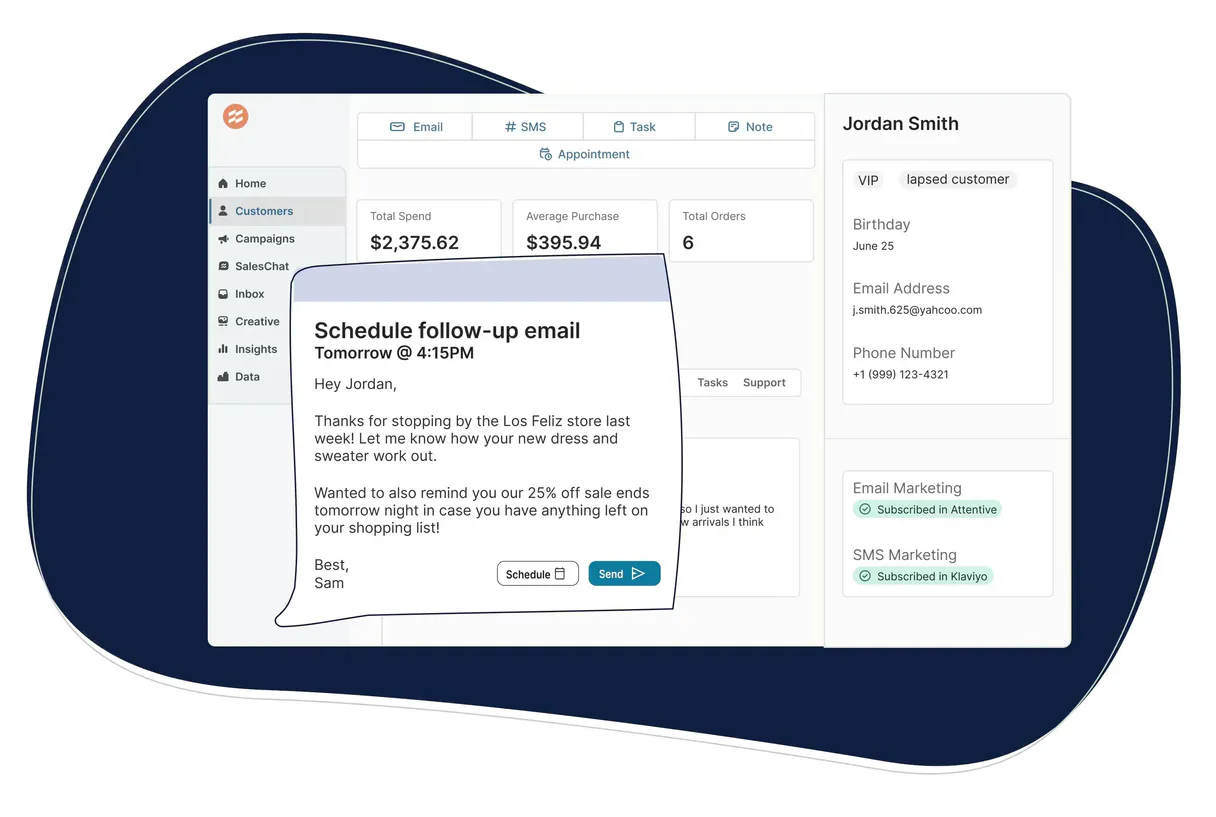
Supercharge your AI with Endear Retail CRM. Get a complete 360-degree view of any retail customer.
 Gemini
 Works with every AI agent you already use
…and any MCP-compatible client









Connect to your AI in seconds.
Endear Retail CRM MCP connects your AI agent directly to a leading retail clienteling platform. It lets you pull complete customer profiles, review order history, and access private notes on customer interactions using only natural conversation.
You can instantly monitor total spend, check task status for the sales team, or search across all product catalogs without ever leaving your chat window.
What your AI can do
Get endear account metadata
Retrieves general settings and metadata about your Endear account setup.
Get customer profile
Fetches detailed information and purchase history for one specific client.
Quick retail performance audit
Generates a fast, summary report covering customers, orders, and product data points.
Fetch a full profile and spending summary for any specific customer.
Pull records of all purchases, including order numbers, amounts, and fulfillment status.
Read every note, interaction record, or follow-up task associated with a customer's account.
Quickly search the entire database for customers using basic contact information.
Generate an immediate, high-level summary of customer activity and overall retail health.
Ask an AI about this
Compatible AI Apps
OAuth 2.0 Compatible Gemini Waiting for input…
Endear Retail CRM: 10 Tools Available
These tools allow you to interact with every part of the Endear platform, from searching customer records to running deep performance audits.
Make your AI actually useful.
Add this MCP to Claude, Cursor, or Windsurf and your AI stops guessing. It gets real tools to look things up, take action, and handle the stuff you keep doing by hand.
Start using Endear Retail CRM on VinkiusGet Endear Account Metadata
Retrieves general settings and metadata about your Endear account setup.
Get Customer Profile
Fetches detailed information and purchase history for one specific client.
Quick Retail Performance Audit
Generates a fast, summary report covering customers, orders, and product data points.
List Customer Clienteling Notes
Retrieves a full history of notes, interactions, and communications for one customer.
List Customer Purchase History
Lists all orders and purchases made by a specific customer over time.
List Retail Customers
Gets a list of every customer currently registered in the CRM.
List Retail Products
Retrieves the full catalog of products available for sale.
List Clienteling Tasks
Lists all follow-up tasks and client management actions assigned to the team.
List Retail Team Members
Lists all employees and sales associates within the organization.
Search Customers By Name Or Email
Finds any customer account using just a name or email address keyword.
Connect to your AI in seconds. Security and governance baked right in.
Pick your AI client below to get set up. Just create a Vinkius account, subscribe, and you're instantly up and running. We handle the entire backend infrastructure, delivering out-of-the-box support for HTTPS Streamable, SSE, and OAuth2—zero messy routing required.
Claude AI
Open Claude Settings
Go to claude.ai, click your profile icon, then navigate to Customize → Connectors.
Add Custom Connector
Click the "+" button and select Add custom connector. Paste your Vinkius endpoint URL:
https://edge.vinkius.com/[YOUR_TOKEN_HERE]/mcp
Replace [YOUR_TOKEN_HERE] with your token from
cloud.vinkius.com. For OAuth-protected servers, expand Advanced
settings to add credentials.
Start a conversation
Open a new chat. The Endear Retail CRM integration is available immediately — no restart needed.
Choose How to Get Started
Build a custom MCP for your own tools, or connect a ready-made integration from our catalog.
Build Your Own
Turn any API into an MCP. Import a spec, define Agent Skills, or deploy with MCPFusion.
- Import from OpenAPI, Swagger, or YAML specs
- Create Agent Skills with progressive disclosure
- Deploy to edge with MCPFusion framework
- Built in DLP, auth, and compliance on every call
- Real time usage dashboard and cost metering
- Publish to catalog or keep private
Make Your AI Do More
Start with Endear Retail CRM, then connect any of our 5,000+ other servers whenever your AI needs more. One click, no limits.
- Use this MCP plus 5,000+ others, all in one place
- Add new capabilities to your AI anytime you want
- Every connection is secured and compliant automatically
- Track usage and costs across all your servers
- Works with Claude, ChatGPT, Cursor, and more
- New servers added to the catalog every week
Independent Platform Disclaimer: Vinkius is an independent platform and is not affiliated with, endorsed by, sponsored by, verified by, or otherwise authorized by Endear Retail CRM. All third-party trademarks, logos, and brand names are the property of their respective owners. Their use on this website is strictly for informational purposes to identify service compatibility and interoperability.
VINKIUS INFRASTRUCTURE
Cloud Hosted
Managed infra
V8 Isolated
Sandboxed per request
Zero-Trust Proxy
No stored credentials
DLP Enforced
Policy on every call
GDPR Compliant
EU data residency
Token Compression
~60% cost reduction
Works with Claude, ChatGPT, Cursor, and more
The Model Context Protocol standardizes how applications expose capabilities to LLMs. Instead of operating in isolation, your AI gains direct access to external platforms, live data, and real-world actions through secure, standardized connections.
This connection provides 10 powerful capabilities that interface natively with Claude, ChatGPT, Cursor, and other compatible AI platforms. No middleware. No custom integration required.
Dealing with disjointed customer data today is a nightmare.
Most days, checking one client means jumping between three places. You start in the CRM to find their profile details; then you switch to the order management system just to see if they paid on time; finally, you open the internal notes platform to read what a colleague wrote last week. It's clicking through tabs, copy-pasting IDs, and losing your train of thought before you even get to the answer.
With this MCP integrated into Vinkius, that manual process vanishes. You simply ask your agent: 'Give me everything on Sarah Miller.' The system pulls profile details, checks her orders, finds all clienteling notes, and gives you a single, cohesive summary in seconds. It's instant context, every time.
Using the Endear Retail CRM MCP for Customer Data Management
The manual steps that disappear are the cross-platform searches and data reconciliation efforts. You no longer have to manually compare a customer's last purchase date (from one system) with their recorded follow-up tasks (in another). Everything lives together.
Now, your agent acts as a unified expert layer on top of all your existing systems. It doesn't just retrieve data; it connects the dots so you can act faster and sell smarter. That's how it should work.
What your AI can actually do with this
This MCP connects Endear’s retail CRM capabilities to your AI workflow. Instead of logging into multiple systems to piece together a customer view, you ask your agent questions and get immediate answers about any client. You can pull detailed profiles for specific customers, check out their full purchase history, or read every note left by the sales team on their file.
The system keeps track of product availability, team tasks, and even provides high-level reports on organizational performance. Everything that used to require clicking through separate tabs—from checking a customer's total lifetime spend to seeing if they bought an item last month—is available right here. By connecting this MCP via Vinkius, you give your AI agent the single source of truth it needs to talk shop with real depth.
019d758f-ff55-7022-9eb0-dfab6dee3474 
Here's how it actually works
The bottom line is you talk to your AI client like a coworker, not a database query language.
Connect the Endear integration to your AI client. You'll need to authorize it using your dedicated Endear API Key.
Once connected, simply prompt your agent with a natural language request—for example, 'What did John Doe buy last month?'
The MCP executes the necessary tool calls and returns clean data that your agent uses to form a cohesive, actionable answer.
Who is this actually for?
This MCP targets retail professionals who deal with complexity under pressure. It's for the field sales rep who needs immediate customer context before talking to someone on the phone, or the operations manager tired of stitching together reports from three different dashboards.
Uses this MCP to look up clienteling notes and profile details via chat. They can personalize service immediately without having to search multiple internal systems.
Rely on the system to quickly check customer spending metrics or monitor task completion across the team, giving them a real-time view of store performance.
Runs quick retail audits and compiles reports on customer volume and order activity to spot trends before they become problems.
What Changes When You Connect
Know the full story behind every sale. You don't have to guess what happened last time; just ask your agent to run list_customer_clienteling_notes and get all past interactions instantly.
Stop wasting time on basic lookups. Instead of opening multiple tabs, you can use search_customers_by_name_or_email to find a person's file and immediately check their total spend using the profile tools.
Maintain sales momentum by keeping track of tasks. You can run list_clienteling_tasks to see who owes whom a follow-up, so no potential sale falls through the cracks because someone forgot.
Run instant health checks on your store's performance. The quick_retail_performance_audit tool aggregates customer volume and order activity into one summary view—no manual report building required.
Deeply understand purchase patterns. You can use list_customer_purchase_history to pinpoint exactly what a client bought, when they bought it, and how much the items cost.
See it in action
Handling an upset customer in-store
A sales associate learns a customer is unhappy. They ask their agent to first use search_customers_by_name_or_email to confirm the person, then immediately run list_customer_clienteling_notes. This shows them every past complaint and interaction in seconds, allowing them to apologize specifically and recommend a solution.
Quarterly team performance review
A retail manager needs data on the top 10% of spenders. They ask their agent to run list_retail_customers and filter by high total spending, then follow up with a summary using quick_retail_performance_audit. This generates actionable data for commission planning.
Onboarding new staff member
A manager trains a new employee on best practices. They prompt the agent to list all available products via list_retail_products and then ask how to cross-reference that with current stock levels, ensuring the team knows what they can sell.
Investigating an old order discrepancy
An ops analyst needs to verify a refund claim. They use list_customer_purchase_history by order number and then cross-reference it with get_customer_profile to confirm the customer's billing details, ensuring compliance.
The honest tradeoffs
Treating data like a spreadsheet
Trying to manually compile a report by calling list_retail_customers, then opening 50 separate profile pages for each one, and pasting the findings into Excel.
Instead of manual compilation, ask your agent to run quick_retail_performance_audit or prompt it with, 'Give me a summary of the top spending customers.' The MCP handles the aggregation so you get an immediate answer.
Forgetting context
Running a basic search using search_customers_by_name_or_email and stopping there. You know who they are, but you don't know if they have specific issues or tasks.
Always follow up the initial search by asking for notes. Prompt: 'Find Sarah Jones, then what clienteling notes does she have?' This gives you the full context needed to solve their problem.
Over-relying on single data points
Only checking list_customer_purchase_history and assuming the customer is happy because they bought something. You miss potential underlying service issues.
Always pair purchase history with clienteling notes. Ask: 'What was their last order, and what did they say about it?' This gives you both the transaction data and the human context.
When It Fits, When It Doesn't
Use this MCP if your core problem is gathering a unified view of customer interactions, history, and status—whether that's for sales or operations. It excels at synthesis: taking profile details, order records, and notes and presenting them as one narrative. Don't use it if you need to create new data (like generating invoices or updating shipping addresses). For those tasks, you need a dedicated payment gateway or ERP tool. If your only goal is simply browsing the product catalog without checking customer history, then list_retail_products is fine on its own, but for true service diagnosis, this MCP is what you need.
Questions you might have
How do I use list_customer_purchase_history to find a customer’s spending? +
The list_customer_purchase_history tool provides all orders. You ask your agent to pull the history, and it will give you the amounts for each order needed to calculate their total spend.
Does get_customer_profile show me more than just name and email? +
It shows detailed profile information plus a summary of their purchase activity. This gives you core details, spending totals, and sometimes even pointers to recent interactions.
What if I don't know the customer's ID? Can I still use list_customer_clienteling_notes? +
No, most tools require identification. You should first run search_customers_by_name_or_email to get an accurate profile or ID before attempting to pull specific notes.
Is quick_retail_performance_audit the best way to see overall store health? +
Yes, it's designed for high-level overviews. It combines customer volume and order activity into one report, which is much faster than running multiple reports manually.
What information does `get_endear_account_metadata` provide about my Endear account setup? +
It retrieves your current metadata and configured permissions. You use this to verify that your API key has the right scopes before running larger queries, like checking if you can access all clienteling notes.
When using `list_retail_products`, how does the MCP handle a massive product catalog? +
The integration manages large datasets by supporting pagination. You request data in smaller chunks; this prevents timeouts and ensures you retrieve every single product without hitting rate limits.
How is `search_customers_by_name_or_email` better than listing all customers? +
It uses keyword matching across names or emails for instant filtering. This method is much faster than running a full list of every customer when you only know part of their details.
Does `list_retail_team_members` help me track who works at my store? +
Yes, it lists all active team members and their roles within your organization. This helps you quickly identify which associates might have been involved with a specific account.
How do I get an Endear API Key? +
Log in to your Endear dashboard, navigate to Settings > API, and you can generate or retrieve your unique API Key from there. API access is typically available on professional and enterprise plans.
Can the agent send messages to customers? +
This integration currently focuses on listing and auditing customers, notes, and orders. Sending outbound SMS or emails via Endear should be managed through the Endear mobile app or dashboard clienteling interface.
Does the integration show real-time stock levels? +
You can retrieve product metadata using the list_retail_products tool. While it shows current product availability, detailed granular inventory across all locations should be confirmed within the Endear inventory module.
We've already built the connector for Endear Retail CRM. Just plug in your AI agents and start using Vinkius.
No hosting. No infrastructure. No complex setup.
All 10 tools are live and waiting.
You're up and running in seconds.
Gemini Vinkius gives your AI agents access to the full catalog of app connectors, all fully managed, secure, and enterprise-ready. One subscription, every tool you need.
Built, hosted, and secured by Vinkius. You just connect and go.