
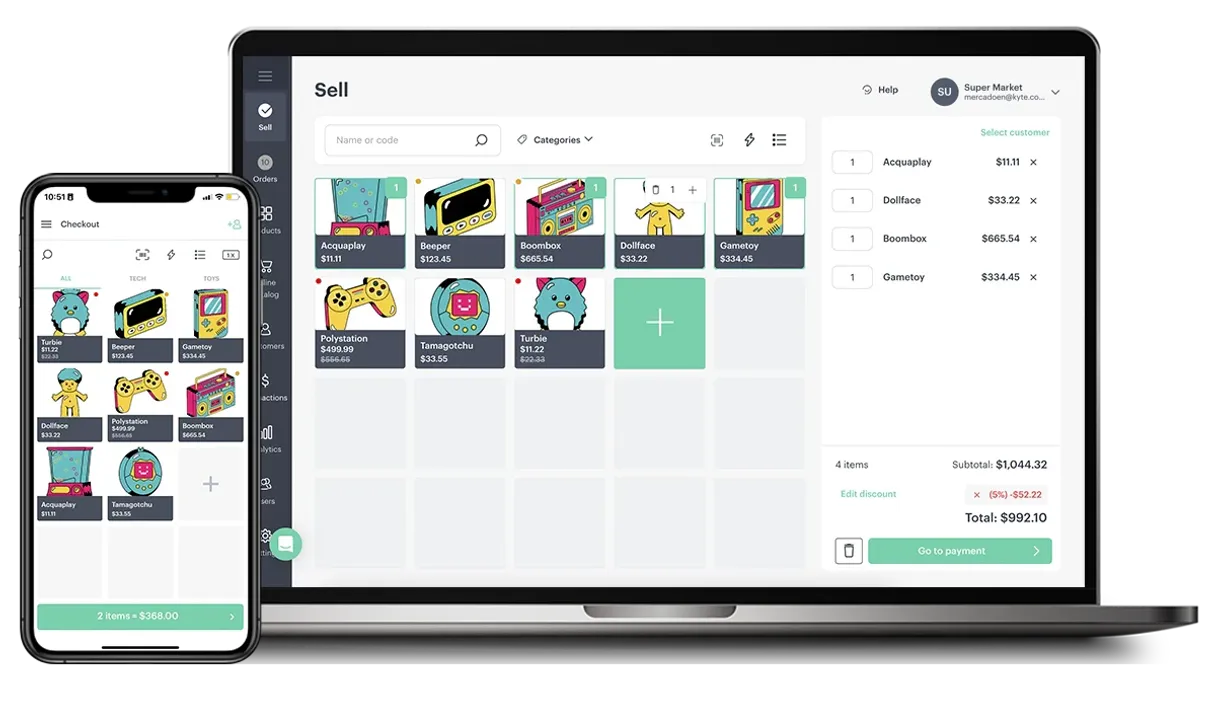
Manage stock, orders, and sales from one place.  Claude
  ChatGPT
  Cursor
  Gemini
  Windsurf
  VS Code
  JetBrains
  Vercel
Gemini Works with every AI agent you already use
…and any MCP-compatible client









Connect to your AI in seconds.
Kyte MCP connects your AI agent directly to a small business's Point-of-Sale (POS) system. You can audit inventory, track sales orders, and pull financial reports for any store location using natural language prompts.
It gives your agent real-time visibility into everything from product stock levels to customer spending history.
What your AI can do
List kyte products
Pulls a full catalog listing of all available products, showing their names and current prices.
Get product details
Gets the pricing, description, and core data for any given product ID.
List kyte orders
Lists recent sales orders, allowing you to audit delivery statuses and transaction dates.
Get a real-time count of items across different product groups.
Review past transactions, see who bought what, and track the status of recent orders.
Pull specific profiles for customers, including their purchase history.
List out all daily transactions and cash register reports to track money flow.
Ask an AI about this
Compatible AI Apps
OAuth 2.0 Compatible Gemini Waiting for input…
Kyte: 10 Tools for Retail Management
These ten tools let your agent interact directly with every aspect of the Kyte POS system, giving you complete control over data retrieval.
Make your AI actually useful.
Add this MCP to Claude, Cursor, or Windsurf and your AI stops guessing. It gets real tools to look things up, take action, and handle the stuff you keep doing by hand.
Start using Kyte on VinkiusList Kyte Products
Pulls a full catalog listing of all available products, showing their names and current prices.
Get Product Details
Gets the pricing, description, and core data for any given product ID.
List Kyte Orders
Lists recent sales orders, allowing you to audit delivery statuses and transaction...
Get Order Details
Pulls all specific information about one single order, including items and shipping...
List Kyte Customers
Returns a complete list of all customers the store has recorded in its database.
Get Customer Profile
Retrieves specific details for a single customer using their ID or name.
List Product Categories
Provides an index of every product category defined in the store's system.
Get Inventory Status
Checks the current stock count and availability of specified products.
List Financial Transactions
Generates a list of sales transactions and cash register entries over a specified...
Get Kyte Store Status
Provides a simple status report on whether the physical store is currently...
Connect to your AI in seconds. Security and governance baked right in.
Pick your AI client below to get set up. Just create a Vinkius account, subscribe, and you're instantly up and running. We handle the entire backend infrastructure, delivering out-of-the-box support for HTTPS Streamable, SSE, and OAuth2—zero messy routing required.
Claude AI
Open Claude Settings
Go to claude.ai, click your profile icon, then navigate to Customize → Connectors.
Add Custom Connector
Click the "+" button and select Add custom connector. Paste your Vinkius endpoint URL:
https://edge.vinkius.com/[YOUR_TOKEN_HERE]/mcp
Replace [YOUR_TOKEN_HERE] with your token
from cloud.vinkius.com. For OAuth-protected servers, expand
Advanced settings to add credentials.
Start a conversation
Open a new chat. The Kyte integration is available immediately — no restart needed.
Choose How to Get Started
Build a custom MCP for your own tools, or connect a ready-made integration from our catalog.
Build Your Own
Turn any API into an MCP. Import a spec, define Agent Skills, or deploy with MCPFusion.
- Import from OpenAPI, Swagger, or YAML specs
- Create Agent Skills with progressive disclosure
- Deploy to edge with MCPFusion framework
- Built in DLP, auth, and compliance on every call
- Real time usage dashboard and cost metering
- Publish to catalog or keep private
Make Your AI Do More
Start with Kyte, then connect any of our 5,000+ other servers whenever your AI needs more. One click, no limits.
- Use this MCP plus 5,000+ others, all in one place
- Add new capabilities to your AI anytime you want
- Every connection is secured and compliant automatically
- Track usage and costs across all your servers
- Works with Claude, ChatGPT, Cursor, and more
- New servers added to the catalog every week
Independent Platform Disclaimer: Vinkius is an independent platform and is not affiliated with, endorsed by, sponsored by, verified by, or otherwise authorized by Kyte. All third-party trademarks, logos, and brand names are the property of their respective owners. Their use on this website is strictly for informational purposes to identify service compatibility and interoperability.
VINKIUS INFRASTRUCTURE
Cloud Hosted
Managed infra
V8 Isolated
Sandboxed per request
Zero-Trust Proxy
No stored credentials
DLP Enforced
Policy on every call
GDPR Compliant
EU data residency
Token Compression
~60% cost reduction
Works with Claude, ChatGPT, Cursor, and more
The Model Context Protocol standardizes how applications expose capabilities to LLMs. Instead of operating in isolation, your AI gains direct access to external platforms, live data, and real-world actions through secure, standardized connections.
This connection provides 10 powerful capabilities that interface natively with Claude, ChatGPT, Cursor, and other compatible AI platforms. No middleware. No custom integration required.
Juggling tabs for basic shop reports takes forever.
Every day, you open the POS system to check current orders. Then you switch to the spreadsheet to see if those items are still in stock. Next, you jump into the customer CRM just to confirm who placed the order. You spend ten minutes doing three separate logins and copying data back and forth.
With this MCP, your agent handles that sequence automatically. Tell it: 'Check order #456.' It uses `get_order_details` for status, then checks `get_inventory_status` to confirm stock, all in one query. You just get the answer.
List Product Categories and Products Gets Your Catalog Ready.
Previously, finding out what products you even sell involved manually browsing through different menus—the main product list, then clicking into categories, and finally viewing the individual items. It was a maze of clicks just to build an index.
Now, your agent can pull that whole structure for you. By using `list_product_categories` followed by `list_kyte_products`, it gives you the full catalog data instantly. You don't navigate; you just get the structured output.
What your AI can actually do with this
Running a physical shop means juggling multiple systems: the cash register, the inventory spreadsheet, and the customer database. Kyte lets you skip all that switching. This MCP connects your AI agent directly to a mobile-first POS system built for small businesses. You can pull everything from your store—customer records, current stock counts, order histories, and financial logs—without ever having to log into Kyte yourself.
Need to know if 'Artisanal Honey' is in stock? Ask your agent. Want to see total revenue last week? Just ask. It aggregates the data you need across product details, customer profiles, and transaction lists. Through Vinkius, you get this whole catalog of shop tools connected to any MCP-compatible client, letting your agent handle complex store operations using plain talk.
019d75c3-96fe-70c0-91cc-f7deab7f4436 
Here's how it actually works
The bottom line is, you tell your agent what report you need, and it builds that query using the tools available in Kyte.
First, subscribe to this MCP on Vinkius. Then, log into Kyte, navigate to Settings > API, and generate a private API Key.
Input that API key into the configuration panel for your AI client. Your agent now has permission to talk to the POS system's data sources.
You prompt your agent using natural language (e.g., 'What are our top 5 selling items?') and it executes the necessary tool calls.
Who is this actually for?
Anyone running a small brick-and-mortar business who gets frustrated having to jump between three different dashboards (POS system, inventory sheet, accounting software) just to get one answer. This is for the owner or manager tired of clicking through menus at 2 AM.
Uses the MCP to quickly check if a product is out of stock before promising it, without opening the physical inventory management system.
Runs end-of-day reports by listing financial transactions and reviewing all recent orders to make sure cash counts match sales records.
Checks current stock levels across multiple categories and lists products needing reordering based on low inventory alerts.
What Changes When You Connect
Stop manually auditing inventory. By calling get_inventory_status, your agent instantly tells you which products are low or sold out across all categories.
Skip the spreadsheet work. Instead of cross-referencing multiple tabs to see recent purchases, use list_kyte_orders to get an immediate snapshot of sales and delivery status.
Need a customer's history? Calling get_customer_profile pulls their full transaction record right away, letting you give them personalized service without searching databases.
Quickly monitor cash flow. The list_financial_transactions tool gives you an immediate summary of sales and payment types, so you never lose track of the till balance.
Get a full product overview instantly. Use list_kyte_products to get all names and current prices in one go—perfect for quickly verifying pricing before a big sale.
See it in action
The daily stock count is wrong.
A manager needs to know if they have enough 'Ceramic Mug' inventory before placing a large order. Instead of physically counting or logging into the separate inventory portal, they ask their agent to get_inventory_status for that specific item and see the number instantly.
A customer asks about an old purchase.
The store owner needs to verify a payment made three months ago. They tell their agent to pull the customer's details using get_customer_profile, which immediately surfaces the transaction history needed for the conversation.
End of day reconciliation is slow.
The store manager can't reconcile the cash drawer because they have to print out reports from multiple tabs. They ask their agent to list_financial_transactions, which pulls all necessary sales data into one readable log.
Figuring out what products exist is hard.
A new employee needs a list of everything the store carries. Instead of browsing through every category, they simply ask their agent to list_kyte_products and get names and prices right away.
The honest tradeoffs
Trying to check stock without knowing what product it is.
A user might just prompt: 'Tell me about the coffee mugs.' The agent can't know which mug you mean, so the request fails or requires too much manual clarification.
Always specify your goal. If you want to check stock, use get_inventory_status and provide the exact product name or ID. This gives the agent a clear parameter.
Asking for 'sales reports' vaguely.
Prompting: 'Show me all sales data.' This is too broad; it could mean anything from yesterday's receipts to last year's revenue, causing system overload or incorrect data dumps.
Be specific with timeframes and types of transactions. Try asking the agent to list_financial_transactions for 'last Monday's sales'.
Mixing up customer and order data.
A user might ask: 'What did John Doe buy last week?' This requires two steps—finding the profile, then finding the orders. If done poorly, the agent gets confused about which tool to use first.
Let your agent combine tools for you. Ask it to get the customer details (get_customer_profile) and then automatically check list_kyte_orders associated with that account.
When It Fits, When It Doesn't
Use this MCP if your primary pain point is getting visibility across disparate retail systems, meaning you need a single view of inventory, sales, and customer data. You should use it when you need to perform lookups like checking get_product_details or listing all available items via list_kyte_products. Don't use this if your problem is complex accounting ledger manipulation; for that, you might need a dedicated financial API integration instead of simply calling list_financial_transactions. If you only need to know the store's operating hours, checking get_kyte_store_status is faster than running a full report.
Questions you might have
How do I check stock levels using the get_inventory_status tool? +
You tell your agent which product and category to check. It runs get_inventory_status against the live system, giving you a real-time count of how many units are available for sale right now.
Can I use list_kyte_orders to find out who paid? +
Yes. list_kyte_orders gives the transaction record, which often includes customer identifiers. You can then pass that ID into get_customer_profile for full name and contact details.
Does Kyte MCP track cash registers? +
Yes. The list_financial_transactions tool accesses the sales logs, letting you pull specific records or summarize daily revenue totals from the POS system's financial ledger.
What if I need to find a product that was discontinued? +
You can use list_kyte_products first to get a list of all items, and then ask your agent to filter or check the details using get_product_details for specific information.
If I need to check a specific person's history, how do I use the get_customer_profile tool? +
The tool pulls comprehensive data for one client. You retrieve details like their full profile, contact information, and complete transaction history from your store.
How can I audit my entire product catalog using list_kyte_products? +
This command lists every item in your system, providing the product ID, current name, and active price for all units. It’s perfect for quick inventory audits.
What does get_kyte_store_status tell me about my operations? +
This tool confirms if your store is currently operational or if there are known system issues. You check the status to ensure uninterrupted service and accurate reporting.
Does list_financial_transactions cover things other than sales orders? +
Yes, it tracks all money movement within Kyte. This includes refunds, fee payouts, and adjustments, giving you a full picture of your store's financial activity.
Where do I find my Kyte API Key? +
Log in to the Kyte web dashboard or app, navigate to Settings, and look for the API or Developer section to generate a key.
Can I see stock levels for specific products? +
Yes, use the get_inventory_status tool to see quantities for all products in your catalog.
Does this support multiple store locations? +
The API key is typically linked to a specific store account. Ensure you are using the correct key for the desired store.
We've already built the connector for Kyte. Just plug in your AI agents and start using Vinkius.
No hosting. No infrastructure. No complex setup.
All 10 tools are live and waiting.
You're up and running in seconds.
Gemini Vinkius gives your AI agents access to the full catalog of app connectors, all fully managed, secure, and enterprise-ready. One subscription, every tool you need.
Built, hosted, and secured by Vinkius. You just connect and go.