
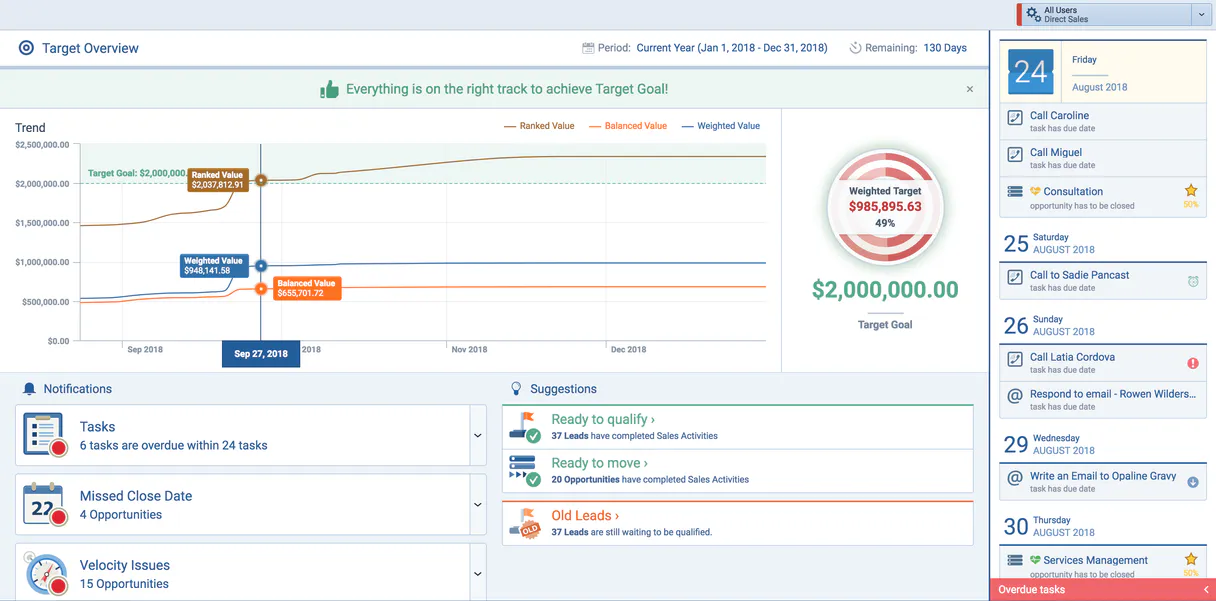
Pipeliner MCP. Manage every lead and deal from natural conversation.
 Gemini
 Works with every AI agent you already use
…and any MCP-compatible client









Just plug in your AI agents and start using Vinkius.
Pipeliner MCP Server connects your CRM to any AI agent, letting you manage sales pipelines and opportunities via natural conversation.
Instead of jumping between tabs or running complex reports, ask your agent to list leads, check opportunity status, or audit team activity directly in the chat window.
It’s full control over your entire sales ecosystem from one place.
What your AI agents can do
Get pipeliner lead
Retrieves deep details for one specific lead, including its full history and metadata.
Get pipeliner opportunity
Gets the current state and detailed information for a single sales opportunity.
List pipeliner accounts
Lists every company account in your Pipeliner space.
You give the agent a lead identifier, and it pulls all associated metadata and history.
The agent fetches deep details on any opportunity, including its current value and stage progress.
It retrieves a list of every company account recorded in your Pipeliner space.
You get a comprehensive list of all business contacts associated with your accounts and leads.
The agent lists recent sales activities or checks the status of assigned tasks for the team.
It reads and lists all available pipelines, helping you understand your deal flow structure.
Ask AI about this MCP
Supported MCP Clients
OAuth 2.0 Compatible Gemini Waiting for input…
Pipeliner MCP Server: 10 Tools for Pipeline Management
Manage every aspect of your sales cycle—from initial lead capture to final opportunity tracking—by calling these ten specialized tools through your preferred AI client.
Make your AI actually useful.
Add this MCP to Claude, Cursor, or Windsurf and your AI stops guessing. It gets real tools to look things up, take action, and handle the stuff you keep doing by hand.
Start using Pipeliner on Vinkius019d75f5get pipeliner lead
Retrieves deep details for one specific lead, including its full history and metadata.
019d75f5get pipeliner opportunity
Gets the current state and detailed information for a single sales opportunity.
019d75f5list pipeliner accounts
Lists every company account in your Pipeliner space.
019d75f5list pipeliner activities
Pulls all recent sales activities and assigned tasks for the team.
019d75f5list pipeliner contacts
Generates a list of every business contact linked to your accounts or leads.
019d75f5list pipeliner leads
Lists all sales leads, providing an overview of who is in the pipeline.
019d75f5list pipeliner opportunities
Lists all active sales opportunities across your entire organization.
019d75f5list pipeliner pipelines
Shows a list of every defined sales pipeline within Pipeliner CRM.
019d75f5list pipeliner tasks
Retrieves an inventory of all assigned tasks for the team to work through.
019d75f5list pipeliner users
Lists all users who have access or are set up within your Pipeliner space.
Choose How to Get Started
Build a custom MCP for your own tools, or connect a ready-made integration from our catalog.
Build Your Own
Turn any API into an MCP. Import a spec, define Agent Skills, or deploy with MCPFusion.
- Import from OpenAPI, Swagger, or YAML specs
- Create Agent Skills with progressive disclosure
- Deploy to edge with MCPFusion framework
- Built in DLP, auth, and compliance on every call
- Real time usage dashboard and cost metering
- Publish to catalog or keep private
Make Your AI Do More
Start with Pipeliner, then connect any of our 4,900+ other servers whenever your AI needs more. One click, no limits.
- Use this MCP plus 4,900+ others, all in one place
- Add new capabilities to your AI anytime you want
- Every connection is secured and compliant automatically
- Track usage and costs across all your servers
- Works with Claude, ChatGPT, Cursor, and more
- New servers added to the catalog every week
Independent Platform Disclaimer: Vinkius is an independent platform and is not affiliated with, endorsed by, sponsored by, verified by, or otherwise authorized by Pipeliner. All third-party trademarks, logos, and brand names are the property of their respective owners. Their use on this website is strictly for informational purposes to identify service compatibility and interoperability.
VINKIUS INFRASTRUCTURE
Cloud Hosted
Managed infra
V8 Isolated
Sandboxed per request
Zero-Trust Proxy
No stored credentials
DLP Enforced
Policy on every call
GDPR Compliant
EU data residency
Token Compression
~60% cost reduction
Works with Claude, ChatGPT, Cursor, and more
The Model Context Protocol standardizes how applications expose capabilities to LLMs. Instead of operating in isolation, your AI gains direct access to external platforms, live data, and real-world actions through secure, standardized connections.
This server provides 10 capabilities that interface natively with Claude, ChatGPT, Cursor, and any MCP client. No middleware. No custom integration required.
Checking deal status shouldn't feel like logging into five separate apps.
Today, checking a single opportunity’s status means opening the CRM. You navigate to the Opportunity tab. Then you might click on 'Related Contacts' to check who was last talking to them. If that contact belongs to a different company, you have to open *another* tab or app to get their full history and recent activities.
With Pipeliner MCP Server, you just ask your agent: 'What happened with the Acme Corp deal?' It runs `get_pipeliner_opportunity` and pulls in associated data from contacts and leads automatically. The answer appears right where you are talking—no clicking required.
list_pipeliner_contacts: See every person attached to a deal without manual searching.
Manual processes require you to guess who is involved. You might find the Account, but then have to search separately for the specific decision-maker's email or phone number, risking outdated information.
Now, with `list_pipeliner_contacts`, your agent pulls a complete list of all relevant people across accounts and leads—cleanly organized and instantly available. It’s one single source of truth delivered through chat.
What you can do with this MCP connector
You don't gotta jump into the Pipeliner CRM app just to check a status or grab some data point. We connect your entire Pipeliner CRM space directly to any AI client, so you can manage every deal and lead through natural conversation. Your agent handles all the heavy lifting, letting you get full control of your sales process without leaving the chat window.
It’s like having a dedicated ops analyst sitting right next to you.
Handling Leads and Opportunities
Need an overview? You can ask your agent to pull up a list of every single sales lead—you'll see who's currently in your pipeline at a glance using list_pipeliner_leads. If you zero in on one specific prospect, you just give the agent an identifier, and it runs get_pipeliner_lead, pulling back deep metadata and the entire history for that lead.
That way, you know exactly where they came from.
When it comes to deals, you can list all active sales opportunities across your whole organization using list_pipeliner_opportunities. But if you want the nitty-gritty on one specific deal, the agent uses get_pipeliner_opportunity to fetch its current value and detailed stage progress. You'll see exactly where that opportunity sits in terms of potential revenue.
Mapping Out Your Network
You can map out your entire client base too. The agent runs list_pipeliner_accounts to give you a master list of every company account recorded in Pipeliner. If you need names, it pulls all business contacts linked to those accounts or leads via list_pipeliner_contacts. You also can check out the people who run the show by listing every user with access through list_pipeliner_users.
Tracking Process and Activity
Want to know how your deals are structured? The agent lists every defined sales pipeline using list_pipeliner_pipelines, so you'll see your whole deal flow structure laid out. For keeping tabs on the team, you can pull all recent sales activities and assigned tasks with one command; list_pipeliner_activities handles that for you.
If you just want to audit the to-do list, the agent uses list_pipeliner_tasks to retrieve an inventory of every task assigned to the team.
Essentially, your AI client doesn't just read reports; it performs actions across your entire sales ecosystem. You can check opportunity status, view leads and contacts, monitor pipeline structure, or audit team tasks—all from one chat window. It’s full visibility without the tab hopping.
019d75f5-453d-7164-9186-b19c05a66e09 
How Pipeliner MCP Works
- 1 1. Subscribe to the Pipeliner MCP Server and provide your API credentials (Token, Space ID).
- 2 2. Your AI client connects through the Vinkius Marketplace using these keys.
- 3 3. You simply ask your agent a question like: 'What's the status of the Global Bank deal?' The agent runs the necessary tool call and returns the data.
The bottom line is that you treat Pipeliner as just another API endpoint, calling all its functions using plain language prompts rather than navigating a UI.
Who Is Pipeliner MCP For?
This server is for anyone who spends time jumping between CRMs, spreadsheets, and chat apps. If you're an Account Executive tired of opening 12 tabs to prep for a meeting, or a Sales Manager needing real-time visibility into deal bottlenecks without logging in—this is for you. It puts the data where your agent can actually use it.
Prep for client calls by asking the agent to pull recent contact details or check the history of a specific lead before joining the meeting.
Audit team performance quickly. Ask the agent, 'What tasks are overdue on the Enterprise pipeline?' without opening the full dashboard.
Monitor process health by listing all available pipelines or checking for potential data overlaps between accounts and leads in a single query.
What Changes When You Connect
- Instant Status Checks: You don't need to log into the CRM just to know if a deal is stuck. Use
get_pipeliner_opportunityto instantly pull up key metrics, current value, or last activity—all in chat. - Audit Trail on Demand: Ever wonder why a contact record is missing context? Run
list_pipeliner_contactsand then useget_pipeliner_leadto immediately check the lead's full history. It's instant due diligence. - Team Oversight Without Dashboards: A manager can ask, 'What are our top 5 opportunities in the Q2 pipeline?' and get a clean list from
list_pipeliner_opportunities, bypassing complex reporting dashboards. - Contact Data Prep for Meetings: Before an important call, simply prompt your agent to run
list_pipeliner_contactsusing the client's company name. You walk into the meeting knowing everyone's role and history. - Task Management Visibility: Keep the team accountable by asking, 'Who owns the overdue tasks?' The agent uses
list_pipeliner_tasksto give you a real-time accountability report.
Real-World Use Cases
The Pre-Call Intelligence Dump
An AE has a client meeting. Instead of opening Pipeliner, navigating to the contact record, and manually reviewing notes, they ask their agent: 'What's the history for Acme Corp?' The agent runs list_pipeliner_contacts and get_pipeliner_lead, giving them a summarized activity report instantly in the chat. They walk into the meeting fully briefed.
Pipeline Bottleneck Discovery
A Sales Manager notices deals are stalling between 'Discovery' and 'Proposal.' They ask their agent to run list_pipeliner_opportunities filtered by that stage. The results show 12 opportunities stalled for >30 days, allowing the manager to prioritize follow-ups immediately.
Rapid Lead Qualification
A new lead comes in via a web form. Instead of waiting for manual data entry, the user asks their agent: 'List all leads matching this industry.' The agent runs list_pipeliner_leads, instantly surfacing similar or related contacts and allowing immediate follow-up.
Team Capacity Check
A Sales Ops team member needs to know who is responsible for what. They ask the agent: 'List all assigned tasks that need review.' The agent runs list_pipeliner_tasks, providing a clear, actionable list of ownership and due dates across the entire department.
The Tradeoffs
Relying on Native UI Searches
Opening Pipeliner CRM, clicking 'Search,' entering keywords, waiting for filters to load, then exporting a CSV of results. This takes 5-10 clicks and is prone to timeout errors.
→
Instead, ask your agent: 'List all opportunities with value over $50k in the last quarter.' The agent uses list_pipeliner_opportunities directly and delivers the filtered data immediately.
Copy-Pasting Data Between Tools
Pulling a contact's name from one report, then manually pasting it into another tool or sheet to check associated activities. This breaks easily if names change.
→
Let your agent handle the relationship lookups. Prompt: 'Show me all activity records for John Doe at Acme Corp.' The agent runs list_pipeliner_contacts and list_pipeliner_activities in one flow.
Ignoring Data Separation
Trying to build a full pipeline view by stitching together data from 5 different reports (accounts, leads, contacts, opportunities). This is messy and requires manual reconciliation.
→
Use the specific tools. For an overview, run list_pipeliner_pipelines first to understand structure, then use list_pipeliner_opportunities for the deal data.
When It Fits, When It Doesn't
You should use this server if your primary pain point is context switching—the friction of moving between dedicated sales tools (CRM, task manager, sheet) to get a simple answer. It excels when you need an agent to synthesize multiple pieces of related data into one conversational response.
However, don't rely on it if you need complex transactional logic or mass updates. This setup is best for reading and listing. For instance, while the tools allow listing opportunities (list_pipeliner_opportunities), they aren't designed to update an opportunity stage based on a chat decision (that requires internal CRM permissions). If your core workflow involves scheduled data changes or complex conditional updates across different external systems, you may need a dedicated ETL service layer instead of just relying on the read-heavy nature of these tools.
Common Questions About Pipeliner MCP
How do I get details for a specific lead using get_pipeliner_lead? +
You provide the agent with the unique ID or identifier for that lead. The tool runs and returns all associated metadata, including their history and current status.
Can list_pipeliner_opportunities show me deals by stage? +
Yes. You can prompt your agent to filter the results of list_pipeliner_opportunities based on stages (e.g., 'Show all opportunities in the Negotiation phase').
What is the difference between list_pipeliner_leads and list_pipeliner_accounts? +
list_pipeliner_leads shows individual potential contacts that haven't been fully qualified. list_pipeliner_accounts lists the established corporate entities you work with.
Can I check team activities using list_pipeliner_activities? +
Yes. This tool pulls a record of recent sales actions and tasks, allowing you to audit who did what and when across the whole team.
How does running `list_pipeliner_users` confirm that my API credentials are working? +
It confirms your connection details allow read access to the user directory. Running this tool pulls a list of all system users, verifying that the token and space ID grant proper permissions for basic data retrieval.
If I run `list_pipeliner_opportunities` and get thousands of results, how does it handle pagination? +
The server handles large datasets using standard pagination. It returns the first set of records along with a pointer to the next batch, allowing your agent to iterate until all opportunities are retrieved.
With `list_pipeliner_accounts`, can I filter by specific criteria like industry or size? +
Yes, the tool supports optional filters based on account metadata. You pass parameters like 'Industry: Finance' directly in the query to limit the results immediately.
If I use `list_pipeliner_contacts`, can I find out which specific opportunity they are linked to? +
The contact object includes relationship metadata fields. You must examine the returned JSON payload for associated Opportunity IDs or Account IDs to map connections.
How do I find my Pipeliner Space ID and Service URL? +
Log in to Pipeliner, go to Admin Space > API. There you can find your unique Space ID and the specific API Service URL for your instance.
Can I see opportunities across multiple pipelines? +
Yes! Use the list_pipeliner_opportunities tool to retrieve a full list of deals. You can then ask the AI agent to filter or group them by pipeline name.
Does this support looking up individual user activities? +
Absolutely. Use the list_pipeliner_activities tool to retrieve a log of all sales tasks, calls, and meetings recorded in your CRM space.
Use it with your favorite AI tools
Connect this server to Cursor, Claude, VS Code, and more.