
AgroLog MCP. Control aeration and read sensor data from silos.
 Gemini
 Works with every AI agent you already use
…and any MCP-compatible client









Just plug in your AI agents and start using Vinkius.
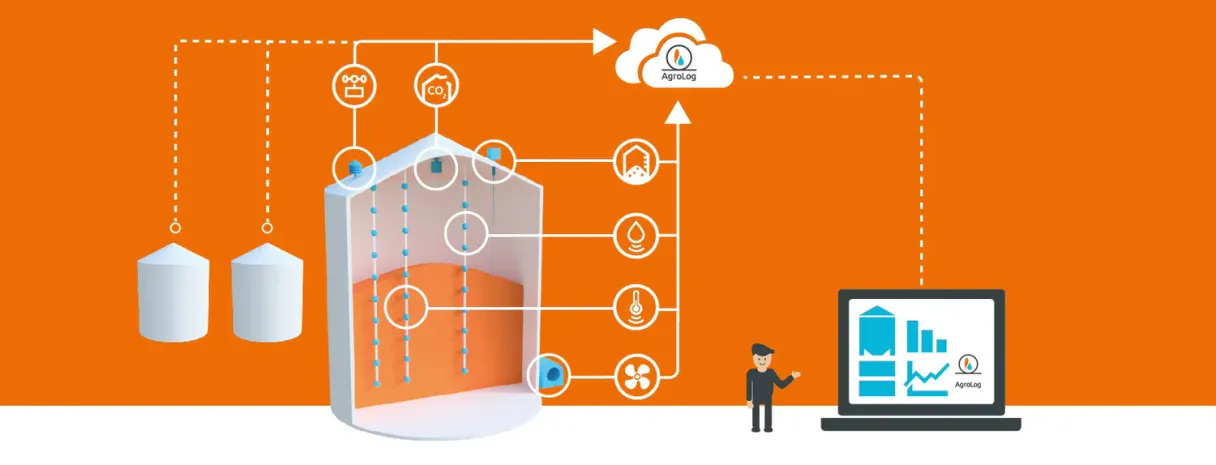
AgroLog provides full access to grain monitoring data via an MCP Server. Your agent reads real-time sensor inputs for temperature, moisture, and CO2 levels across silos.
It tracks crop inventory, checks active alarms, gets local weather readings, and lets you remotely manage aeration fans and dryers directly through natural conversation.
What your AI agents can do
Get alarms
Retrieves active and historical alarms for the entire monitoring system.
Get co2
Gets current headspace gas readings to detect early signs of grain spoilage.
Get crop level
Checks the volume or height of grain in a specific silo for inventory tracking.
Get instant temperature, moisture, and CO2 readings from any monitored grain bin.
Remotely turn fans, aeration blowers, or dryers on or off using the set_relay_state tool.
Determine how full a silo is by retrieving current crop level readings for logistics planning.
Retrieve historical sensor data over time, allowing you to see temperature or moisture changes across days.
List active alarms (critical, warning) and check CO2 levels for early signs of mold or spoilage.
Ask AI about this MCP
Supported MCP Clients
Gemini Waiting for input…
AgroLog: 11 Tools for Silo Management
These tools give your AI client direct access to every sensor reading, alarm status, and operational function within the AgroLog monitoring system.
019d7549get alarms
Retrieves active and historical alarms for the entire monitoring system.
019d7549get co2
Gets current headspace gas readings to detect early signs of grain spoilage.
019d7549get crop level
Checks the volume or height of grain in a specific silo for inventory tracking.
019d7549get customer devices
Lists all monitoring devices belonging to a specified customer account.
019d7549get device attributes
Retrieves configuration details and metadata for any specific sensor or device.
019d7549get device telemetry
Pulls historical data points (temp, moisture, etc.) from a sensor over time.
019d7549get devices
Lists all available monitoring sensors and equipment in the system.
019d7549get moisture
Gets the current grain moisture percentage from a specific monitoring device.
019d7549get temperature
Retrieves the most recent temperature reading in Celsius for a monitored silo or bin.
019d7549get weather
Gets the latest outdoor data, including wind speed and rainfall forecasts.
019d7549set relay state
Remotely turns physical equipment (like fans or blowers) on or off.
Choose How to Get Started
Build a custom MCP for your own tools, or connect a ready-made integration from our catalog.
Build Your Own
Turn any API into an MCP. Import a spec, define Agent Skills, or deploy with MCPFusion.
- Import from OpenAPI, Swagger, or YAML specs
- Create Agent Skills with progressive disclosure
- Deploy to edge with MCPFusion framework
- Built in DLP, auth, and compliance on every call
- Real time usage dashboard and cost metering
- Publish to catalog or keep private
Make Your AI Do More
Start with AgroLog, then connect any of our 4,700+ other servers whenever your AI needs more. One click, no limits.
- Use this MCP plus 4,700+ others, all in one place
- Add new capabilities to your AI anytime you want
- Every connection is secured and compliant automatically
- Track usage and costs across all your servers
- Works with Claude, ChatGPT, Cursor, and more
- New servers added to the catalog every week
What you can do with this MCP connector
AgroLog provides full, hands-on control over your grain monitoring system. Your agent reads real-time sensor inputs for temperature, moisture, and CO2 levels across silos. You'll track crop inventory, check active alarms, get local weather readings, and manage aeration fans or dryers right through a conversation with your AI client.
Checking Current Conditions & Threats
To get an instant read on what’s going down in the bins, you use get_temperature to grab the latest temperature reading in Celsius for any silo. You can check the current moisture content with get_moisture, which tells you the percentage of water in the grain. For spoilage detection, get_co2 gets the headspace gas readings—this lets you spot early mold or decay signs before anything else changes.
When things are going sideways, get_alarms pulls a list of active and historical alarms for the whole setup. You also need to know what equipment you've got; run get_devices to see every monitoring sensor and piece of gear in the system.
Tracking Trends & Planning Ahead
Want to see how things changed over time? Use get_device_telemetry. This tool pulls historical data points—temp, moisture, etc.—from a specific sensor across days or weeks. It lets you see environmental trends for deep analysis. For planning drying cycles, get_weather gives you the latest outdoor report, including wind speed and rainfall forecasts.
When you need to know how much product you've got left, run get_crop_level; it checks the volume or height of grain in a specific silo for your logistics planning.
Controlling the Facility
Don’t just read data—control stuff. You manage the facility equipment using set_relay_state. This lets you remotely turn physical gear like fans, blowers, or dryers on or off with a simple command. If you need to know which sensors belong to your account, use get_customer_devices; it lists all monitoring devices tied to your customer ID.
For deep dives into any specific sensor's setup, get_device_attributes retrieves the full configuration details and metadata for that device.
How AgroLog MCP Works
- 1 Subscribe to the AgroLog server and enter your credentials (username, password, base URL).
- 2 Your AI client accesses the API gateway using natural language commands (e.g., 'What's the moisture in bin 4?').
- 3 The agent executes the necessary tool call (
get_moistureorget_temperature), retrieves the real-time data, and formats a plain English report for you.
The bottom line is your AI acts as a dedicated grain storage analyst that reads sensors and controls equipment without you having to touch any dashboard.
Who Is AgroLog MCP For?
This is for facility managers and operations staff who are tired of manually checking dozens of silo dashboards just to catch a temperature spike. It’s for the grain elevator operator who needs instant, aggregated data across multiple bins—and sometimes needs to fix it remotely.
Uses this to monitor all storage units simultaneously, checking get_alarms and running checks like 'What is the status of Silo 7?' across multiple devices.
Runs trend analysis using get_device_telemetry to recommend optimized aeration schedules or drying protocols for client facilities.
Manages equipment by calling set_relay_state based on sensor readings, ensuring fans run only when critical parameters are breached.
What Changes When You Connect
- Immediate Spoilage Detection: By checking
get_co2levels, your agent detects mold activity hours before temperature spikes happen. This gives you time to act when it counts. - Full Facility Control: You can use the
set_relay_statetool to activate aeration or dryers instantly. No need to log into a separate control panel—just tell your AI client what to do. - Deep Historical Analysis: Instead of just seeing today's numbers, run
get_device_telemetryto pull moisture trends over the last month. This data helps you predict when drying cycles will be needed. - Inventory Visibility: Running
get_crop_levelgives you a current count across all bins. You immediately know which silos are full and where your grain volume stands for logistics planning. - Remote Monitoring & Alerts: The system automatically tracks critical alarms via
get_alarms. Your agent reports on these alerts, telling you exactly what needs attention right now.
Real-World Use Cases
Emergency Temperature Spike
The facility manager notices a temperature jump. They ask their agent: 'Check the temp and moisture in Silo 7.' The agent uses get_temperature and get_moisture, sees both are high, and suggests action by calling set_relay_state to turn on the fans.
Pre-Harvest Assessment
A consultant needs a full picture of the site. They prompt: 'What's the weather forecast for next week, and what is my current inventory?' The agent calls get_weather and then loops through all silos using get_crop_level, giving a complete operational report.
Investigating Slow Spoilage
The operator suspects something is wrong, but the temperature is fine. They ask: 'Check for gas leaks in Bin 2.' The agent runs get_co2, confirming elevated levels and advising a ventilation check before spoilage becomes critical.
Multi-Site Checkup
A regional manager needs an overview of all facilities. They ask: 'List all devices for the West Coast farm.' The agent uses get_customer_devices to get a list, then runs get_alarms against those specific IDs to prioritize site visits.
The Tradeoffs
Checking every sensor separately
Calling get_temperature, then get_moisture, then get_co2 for the same silo, one by one. This is slow and makes the conversation choppy.
→ Instead of multiple calls, ask your agent to check all key metrics together: 'What's the full status of Silo 3?' The agent should intelligently group these checks into a single logical request.
Forgetting the history
Only looking at today’s temperature reading and assuming everything is fine. This ignores slow, steady spoilage patterns.
→
Use get_device_telemetry to pull data over a specific period (e.g., 'Show me moisture trends for the last 30 days'). History reveals the full story.
Ignoring device setup
Trying to troubleshoot an alarm without knowing which sensor is installed or what its calibration range is.
→
Always check the metadata first. Use get_device_attributes when a tool fails, or before running diagnostics, to confirm the sensor type and proper configuration.
When It Fits, When It Doesn't
Use this server if your primary need is real-time operational control over physical systems (fans, blowers) combined with immediate, multi-sensor data reading. If you only need simple reporting or historical analysis without the ability to send commands back out, other dedicated database connectors might suffice. You MUST use AgroLog when a decision requires knowing if grain storage is safe right now. Don't just run get_temperature; always follow up with get_moisture and get_co2 because high temperature alone isn't enough to determine risk; you need the whole picture.
Independent Platform Disclaimer: Vinkius is an independent platform and is not affiliated with, endorsed by, sponsored by, verified by, or otherwise authorized by AgroLog. All third-party trademarks, logos, and brand names are the property of their respective owners. Their use on this website is strictly for informational purposes to identify service compatibility and interoperability.
VINKIUS INFRASTRUCTURE
Cloud Hosted
Managed infra
V8 Isolated
Sandboxed per request
Zero-Trust Proxy
No stored credentials
DLP Enforced
Policy on every call
GDPR Compliant
EU data residency
Token Compression
~60% cost reduction
Works with Claude, ChatGPT, Cursor, and more
The Model Context Protocol standardizes how applications expose capabilities to LLMs. Instead of operating in isolation, your AI gains direct access to external platforms, live data, and real-world actions through secure, standardized connections.
This server provides 11 capabilities that interface natively with Claude, ChatGPT, Cursor, and any MCP client. No middleware. No custom integration required.
Available Capabilities
Manual inspections waste time and miss slow problems.
Right now, checking a grain storage facility means logging into different dashboards. You jump from the temperature panel to the moisture graph, then check the CO2 readout on another tab. It's clicking through pages, cross-referencing numbers, and making notes—all just to confirm if everything is stable.
With AgroLog MCP Server, you skip the dashboards. You talk to your agent: 'Is Silo 5 safe?' The system runs multiple checks (`get_temperature`, `get_moisture`, `get_co2`) in one go and gives a single, actionable verdict. It's instant, cross-referenced data.
AgroLog MCP Server lets you manage equipment directly.
Previously, if the temperature hit 28°C, your team had to physically go to the control panel or log into a separate SCADA system to flip a switch and activate aeration. That's slow, and nobody wants to be there at 3 AM.
Now, you tell your agent: 'Activate aeration for Silo 7.' The server uses `set_relay_state` to handle the command instantly, closing the loop between monitoring and physical action. It’s hands-off control.
Common Questions About AgroLog MCP
How often can I check moisture using get_moisture in AgroLog? +
The get_moisture tool retrieves the most current reading available from the sensor, which is generally near real-time. If you need historical data (e.g., over a year), use get_device_telemetry instead.
Can I control my fans with set_relay_state? +
Yes, the set_relay_state tool accepts device IDs and relay names. You must specify the desired state (true for on, false for off) to activate or deactivate equipment like fans or dryers.
What is the best way to see all my silos? +
Start by running get_devices to get a list of every sensor and monitoring device ID. Then, you can use those IDs when calling other tools like get_temperature or get_alarms.
Does AgroLog tell me why there is spoilage risk? +
The system identifies risks using multiple data points. If your agent detects high CO2 via get_co2, it indicates biological activity, which is the primary sign of potential mold or spoilage.
When I use get_device_telemetry, how can I check long-term trends for temperature or moisture? +
You specify a time range and key metrics in the request. The tool returns time-series data points based on your custom keys (like 'temperature' or 'moisture'). This lets you plot historical graphs to identify seasonal trends or gradual deterioration over months.
How does get_customer_devices help me manage multiple farms? +
This tool lists all monitoring devices across different client organizations. It’s essential for service providers who need to verify which sensors belong to a specific customer account before querying any data.
What specific types of events does get_alarms report? +
The tool reports alarms triggered by threshold breaches, such as critical temperature spikes, high moisture levels, or excessive CO2. It includes the severity (warning, critical), device ID, and timestamp for immediate action.
How does get_weather assist my grain storage decisions? +
The tool pulls current external data like wind speed, humidity, and rainfall forecasts. This context helps you decide if natural air drying or other outdoor management strategies are feasible before adjusting internal systems.
Can my AI check the current temperature and moisture in my grain silo? +
Yes! First use get_devices to find the device ID for your silo sensors. Then use get_temperature and get_moisture with that device ID to get current readings. Temperature above 25°C or moisture above 15% may indicate spoilage risk. For historical trends, use get_device_telemetry with keys=temperature,moisture to see how conditions have changed over time.
How do I detect early signs of grain spoilage using CO2 levels? +
Use the get_co2 tool to check CO2 readings from headspace sensors in your bins. Elevated CO2 levels (above 1500 ppm) indicate biological activity from mold, insects, or grain respiration — often appearing days before temperature changes. Combine with get_alarms to check for any active spoilage alerts. If CO2 is rising, consider turning on aeration using set_relay_state to ventilate the bin and reduce spoilage risk.
Can I remotely control my aeration fans based on sensor readings? +
Yes! Use the set_relay_state tool with your device ID, relay name (e.g., "fan", "aeration"), and desired state (true for ON, false for OFF). Before activating, check current conditions with get_temperature and get_moisture, and verify weather conditions with get_weather to ensure outdoor conditions are suitable for aeration. For example, avoid running aeration during high humidity or rain.
Use it with your favorite AI tools
Connect this server to Cursor, Claude, VS Code, and more.
More in this category

PurpleAir
Real-time air quality monitoring — access PM2.5, temperature, and pollution data from 50K+ sensors worldwide via AI.

Cartrack
Manage fleet operations via Cartrack — track vehicle locations, monitor fuel, and analyze trip history directly from any AI agent.

General Motors
AI connected car: control GM vehicles, check diagnostics, and track location via agents.
You might also like

Lusha
Equip your AI agent with direct access to Lusha — find verified B2B contact details, enrich prospect data, and build lead lists without opening the Lusha platform.

NCR Voyix
Manage commerce and retail operations via NCR Voyix — track orders, sites, products, and inventory directly from your AI agent.

data.world
Equip your AI agent to discover and manage data assets, projects, and queries directly via the data.world API.