
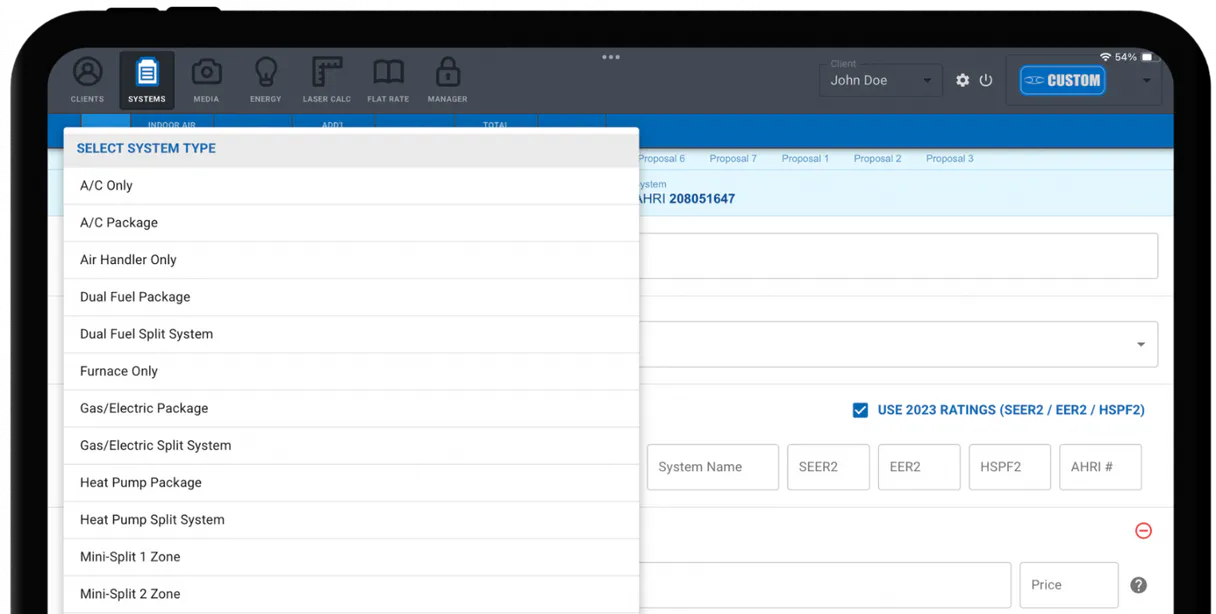
AirMatch Pro MCP for AI. Coordinate Your HVAC Sales Pipeline Effortlessly
 Gemini
 Works with every AI agent you already use
…and any MCP-compatible client









How this MCP server connects to your AI agent
AirMatch Pro MCP manages the entire HVAC sales lifecycle, letting you automate everything from lead capture and proposal creation to syncing financial records in QuickBooks.
Connect your AI client to track every job, manage customer data, and keep a perfect audit trail for scaling field service businesses.
What AI agents can do with AirMatch Pro Automation
Check airmatch status
Checks the connection status and API health of your AirMatch Pro account.
Create proposal
Generates a new detailed service proposal, which can optionally be linked to an existing customer record.
Get lead
Retrieves specific details about any potential client lead in your system.
List and track all leads, customers, jobs, and proposals through simple conversational commands.
Generate new service proposals, optionally linking them to an existing customer record.
Sync sales activity and transaction records directly with QuickBooks for automated accounting documentation.
Get the latest details on any lead or customer, including their full profile information.
Access a complete directory of historical estimates and active maintenance projects across your organization.
Ask an AI about this
Waiting for input…
What AI agents can do with AirMatch Pro with 10 Tools
These tools let you programmatically manage every aspect of your HVAC business, from listing all active jobs to syncing financial records.
Make your AI actually useful.
Add this MCP to Claude, Cursor, or Windsurf and your AI stops guessing. It gets real tools to look things up, take action, and handle the stuff you keep doing by hand.
Start using AirMatch Pro on VinkiusCheck Airmatch Status
Checks the connection status and API health of your AirMatch Pro account.
Create Proposal
Generates a new detailed service proposal, which can optionally be linked to an...
Get Lead
Retrieves specific details about any potential client lead in your system.
Get Profile
Fetches the core profile information for your AirMatch Pro account.
Get Proposal
Retrieves all specific details about a single, existing proposal.
List Customers
Returns a comprehensive list of every customer record in your database.
List Estimates
Lists all historical and active estimates created for jobs.
List Jobs
Retrieves a list of all current or completed maintenance jobs in the field.
List Leads
Provides a list view of all captured leads that need to be qualified and followed up...
List Proposals
Retrieves a full listing of every proposal currently in your sales pipeline.
Security and governance baked right in.
Pick your AI client below to get set up. Just create a Vinkius account, subscribe, and you're instantly up and running. We handle the entire backend infrastructure, delivering out-of-the-box support for HTTPS Streamable, SSE, and OAuth2—zero messy routing required.
Claude AI
Open Claude Settings
Go to claude.ai, click your profile icon, then navigate to Customize → Connectors.
Add Custom Connector
Click the "+" button and select Add custom connector. Paste your Vinkius endpoint URL:
https://edge.vinkius.com/[YOUR_TOKEN_HERE]/mcp
Replace [YOUR_TOKEN_HERE] with your token
from cloud.vinkius.com. For OAuth-protected servers, expand
Advanced settings to add credentials.
Start a conversation
Open a new chat. The AirMatch Pro integration is available immediately — no restart needed.
Choose How to Get Started
Build a custom MCP for your own tools, or connect a ready-made integration from our catalog.
Build Your Own
Turn any API into an MCP. Import a spec, define Agent Skills, or deploy with MCPFusion.
- Import from OpenAPI, Swagger, or YAML specs
- Create Agent Skills with progressive disclosure
- Deploy to edge with MCPFusion framework
- Built in DLP, auth, and compliance on every call
- Real time usage dashboard and cost metering
- Publish to catalog or keep private
Make Your AI Do More
Start with AirMatch Pro, then connect any of our 5,100+ other servers whenever your AI needs more. One click, no limits.
- Use this MCP plus 5,100+ others, all in one place
- Add new capabilities to your AI anytime you want
- Every connection is secured and compliant automatically
- Track usage and costs across all your servers
- Works with Claude, ChatGPT, Cursor, and more
- New servers added to the catalog every week
Independent Platform Disclaimer: Vinkius is an independent platform and is not affiliated with, endorsed by, sponsored by, verified by, or otherwise authorized by AirMatch Pro. All third-party trademarks, logos, and brand names are the property of their respective owners. Their use on this website is strictly for informational purposes to identify service compatibility and interoperability.
VINKIUS INFRASTRUCTURE
Cloud Hosted
Managed infra
V8 Isolated
Sandboxed per request
Zero-Trust Proxy
No stored credentials
DLP Enforced
Policy on every call
GDPR Compliant
EU data residency
Token Compression
~60% cost reduction
Built on the Model Context Protocol (MCP) for Claude, ChatGPT, Cursor, and more
The Model Context Protocol standardizes how applications expose capabilities to LLMs. Instead of operating in isolation, your AI gains direct access to external platforms, live data, and real-world actions through secure, standardized connections.
This connection provides 10 powerful capabilities that interface natively with Claude, ChatGPT, Cursor, and other compatible AI platforms. No middleware. No custom integration required.
The Manual Sales Cycle is a Time Sink, Solved with Vinkius AI Gateway
Right now, running an HVAC sales operation means jumping between screens: You check the CRM to see if a lead exists. Then you open the proposal tool and manually select the right customer ID. After that, you have to log into QuickBooks and remember to copy-paste the sale details so accounting knows about it.
With this MCP, your agent manages the whole flow. You simply tell it what you need—like 'Get me all proposals for Q3.' It gathers the status from AirMatch Pro, coordinates the data sync with QuickBooks, and gives you one clear answer. The process takes seconds, not ten minutes of clicking.
AirMatch Pro MCP: Full Visibility on Proposals
Previously, checking a client's status meant calling them or logging into multiple systems to see if the proposal was created, approved, and finally entered into billing. It was messy and slow.
Now, you ask your agent for a list of all proposals using `list_proposals`. You instantly get their current state, whether it needs technical details (`get_proposal`), or if they've moved on to the next job. The sales cycle is visible, accurate, and immediate.
What your AI can actually do with this
Need to coordinate complex HVAC sales or field services? This MCP lets you take full control of the entire pipeline using nothing but natural conversation with your agent. You can programmatically list all active jobs, track who's ready for maintenance, and pull up detailed technical proposals instantly. It keeps everything organized—from initial leads to final billing.
Beyond managing customer records, you get financial intelligence sync built in. Your AI client handles the coordination of sales data right into QuickBooks, keeping your books perfectly synced with your fieldwork. You can also check API connectivity status and pull up complete company profiles when needed. When working through Vinkius, you connect this MCP alongside any other services to build a single source of truth for your whole HVAC operation.
019dd0b6-fc29-70a6-9ce1-11c2e2b505f2 
Here's how it actually works
The bottom line is you talk to your agent like talking to an employee who knows every detail of your HVAC operation.
Subscribe to this MCP on Vinkius.
Get your unique API Key from the AirMatch Pro dashboard settings.
Connect the key to your AI client (like Cursor or Claude) and ask it to manage a task, such as listing all active proposals.
Who is this actually for?
This MCP is for the field service owner, the sales manager, or the operations lead running a small-to-midsize HVAC company. If you're tired of juggling five different tabs—the CRM, the proposal generator, QuickBooks, and the job board—you need this.
Uses the MCP to get instant sales recaps or monitor proposal statuses without manually logging into multiple portals.
Generates and checks HVAC proposals directly through their AI client, keeping them in one workspace rather than switching between apps.
Automates the synchronization of sales data to QuickBooks using simple AI queries, maintaining a clean audit trail for billing.
What Changes When You Connect
Get immediate visibility into proposals. Instead of manually opening the portal, you can ask your agent to list all active proposals and check their status instantly.
Keep books clean with QuickBooks sync. You don't need a separate workflow; just asking your agent to sync sales data handles the audit trail automatically.
Never lose track of a client again. Use get_lead or list_leads to grab all recent contact information, letting you follow up without searching through folders.
Manage complex projects easily. From viewing past estimates (list_estimates) to checking active jobs (list_jobs), the MCP gives you one place for all field service history.
Generate quotes fast. You can trigger a new proposal using create_proposal right inside your agent, and it'll link directly to the correct customer record.
See it in action
Following up on stalled jobs
A sales rep asks their agent, 'What are my active proposals for the Smith account?' The MCP uses list_proposals and get_proposal to return a detailed list of quotes that need follow-up, preventing lost revenue because of manual oversight.
Quarterly financial reconciliation
The operations manager asks the agent, 'Sync all sales from last quarter.' The MCP handles the data transfer and syncs everything to QuickBooks, giving the team a verified audit trail without needing to manually export CSV files.
Onboarding a new field tech
A manager asks for 'all maintenance jobs in Zone B.' The MCP uses list_jobs to pull up the current resource allocation, allowing the new tech to immediately see what needs attention without needing physical maps or logins.
Quickly vetting a cold lead
A salesperson captures a name and asks the agent to 'pull up this client's history.' The MCP uses get_lead and list_customers to immediately provide all relevant contact details, making the first call much more informed.
The honest tradeoffs
Manual cross-checking
Logging into your CRM dashboard, then opening QuickBooks, and finally switching to the job board just to see if a proposal was approved.
Instead, ask your agent to coordinate the whole process. Use list_proposals for status checks, while simultaneously asking it to sync data using the financial intelligence features.
Forgetting historical context
Starting a conversation with a customer and forgetting which estimates or jobs they had from last year.
Use list_estimates first. This pulls up all historical records, giving your agent the full context before you even talk to the client.
When It Fits, When It Doesn't
You need this MCP if your business relies on coordinating more than two separate systems—for example, a CRM and accounting software and job scheduling. If your main pain point is simply listing contacts or managing one single type of document (like just leads), then basic list tools might suffice. However, because AirMatch Pro handles the full lifecycle, you need this MCP's ability to chain actions: check status -> get lead details -> create a proposal -> sync data. Don't use this if you only want read-only access; it’s built for coordinated action.
Questions you might have
How do I check proposal status with AirMatch Pro MCP? +
You can list all active proposals using list_proposals or get the full details for one specific quote using get_proposal. This lets you see exactly where a job stands in your pipeline.
Can AirMatch Pro MCP sync sales data to QuickBooks? +
Yes, the MCP features financial intelligence synchronization that handles transmitting sale records directly into QuickBooks for proper audit trails.
Which tool do I use to see a new potential client's information? +
Use get_lead or list_leads. These tools retrieve the specific details and contact metadata for any newly captured lead you need to follow up on.
What if I need to start a new quote right away? +
You can trigger it with the create_proposal tool. You just tell your agent what's needed, and it generates the document for you.
We've already built the connector for AirMatch Pro. Just plug in your AI agents and start using Vinkius.
No hosting. No infrastructure. No complex setup.
All 10 tools are live and waiting.
You're up and running in seconds.
Gemini Vinkius gives your AI agents access to the full catalog of app connectors, all fully managed, secure, and enterprise-ready. One subscription, every tool you need.
Built, hosted, and secured by Vinkius. You just connect and go.