
Albacross MCP. Identify anonymous visitors and manage B2B leads.
 Gemini
 Works with every AI agent you already use
…and any MCP-compatible client









Just plug in your AI agents and start using Vinkius.
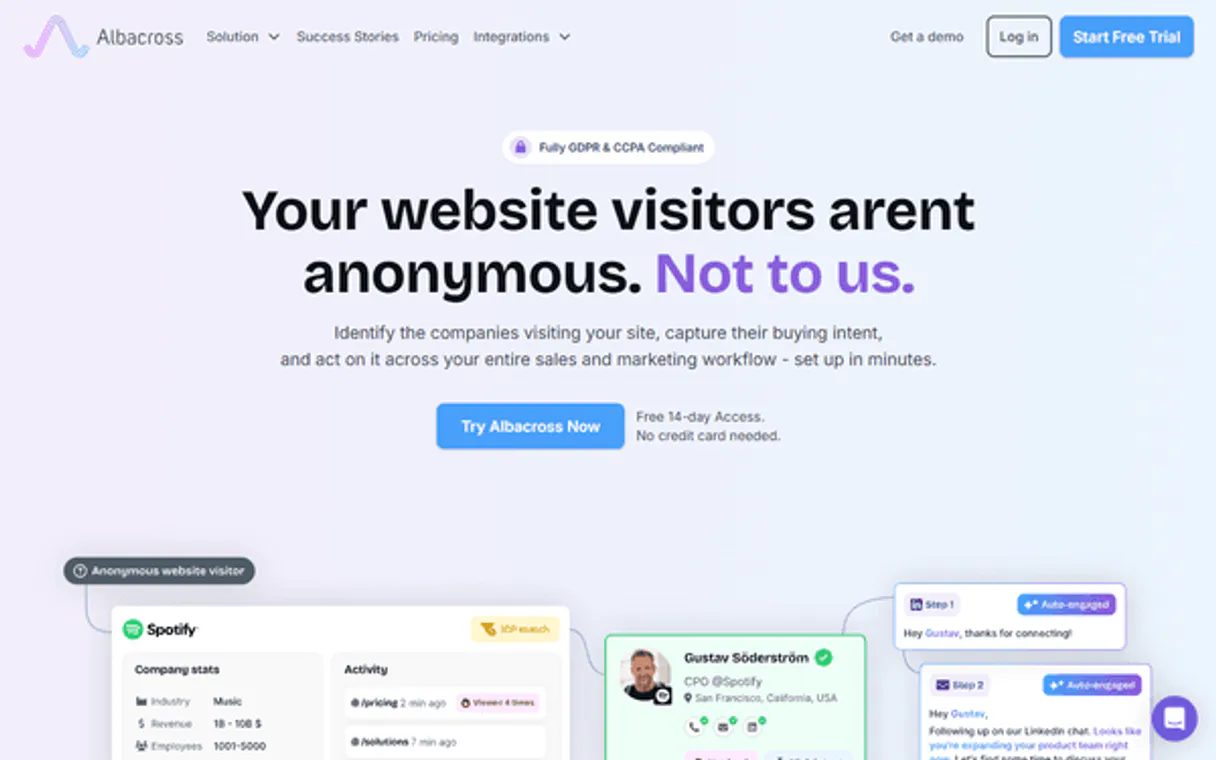
Albacross MCP Server identifies anonymous website visitors and builds B2B intelligence. Use it to get firmographic data from an IP address, audit lead segments, and track automated workflows.
Your AI agent handles account-based marketing by revealing who is researching your site, even if they don't give you a name.
What your AI agents can do
Get account info
Retrieves general metadata about your Albacross account.
Get lead details
Gets detailed metadata for a specific identified lead.
Get usage stats
Returns the current API usage limits and statistics.
You feed the tool an IP address, and it returns detailed company metadata, like the industry and employee count.
You ask the agent to list leads or retrieve specific details for identified accounts, filtering by segments or dates.
You list and examine your defined lead segments, checking for specific industry or revenue filters.
You check the status of automated data syncs and webhooks to ensure your sales stack is updating correctly.
You retrieve general information about your Albacross account setup.
Ask AI about this MCP
Supported MCP Clients
Gemini Waiting for input…
Albacross MCP Server: 8 Tools for B2B Intelligence
These tools let your AI agent perform core B2B intelligence functions: identifying companies, listing leads, segmenting accounts, and auditing system workflows.
019d754bget account info
Retrieves general metadata about your Albacross account.
019d754bget lead details
Gets detailed metadata for a specific identified lead.
019d754bget usage stats
Returns the current API usage limits and statistics.
019d754bidentify company by ip
Identifies the company associated with a given IP address.
019d754blist industries
Lists all available industry sectors for filtering.
019d754blist leads
Lists all identified companies that match your criteria.
019d754blist segments
Lists your predefined, custom lead segments.
019d754blist workflows
Lists and checks the operational status of your automated data workflows.
Choose How to Get Started
Build a custom MCP for your own tools, or connect a ready-made integration from our catalog.
Build Your Own
Turn any API into an MCP. Import a spec, define Agent Skills, or deploy with MCPFusion.
- Import from OpenAPI, Swagger, or YAML specs
- Create Agent Skills with progressive disclosure
- Deploy to edge with MCPFusion framework
- Built in DLP, auth, and compliance on every call
- Real time usage dashboard and cost metering
- Publish to catalog or keep private
Make Your AI Do More
Start with Albacross, then connect any of our 4,700+ other servers whenever your AI needs more. One click, no limits.
- Use this MCP plus 4,700+ others, all in one place
- Add new capabilities to your AI anytime you want
- Every connection is secured and compliant automatically
- Track usage and costs across all your servers
- Works with Claude, ChatGPT, Cursor, and more
- New servers added to the catalog every week
What you can do with this MCP connector
You're connecting your Albacross account to your AI agent for serious B2B lead intel. This server lets your agent run your account-based marketing strategy just by talking to it. identify_company_by_ip takes an IP address and spits out detailed company metadata, like the industry and how many employees they've got. You can use list_leads and get_lead_details to list identified companies or grab specific details on accounts, letting you filter by date or segment.
You check out your custom lead segments using list_segments, which shows you and lets you look at industry or revenue filters. You monitor automated data syncs and webhooks to make sure your sales stack is always updated by running list_workflows. You can pull general setup info about your Albacross account with get_account_info.
You can also check your API usage limits and stats using get_usage_stats.
How Albacross MCP Works
- 1 You subscribe to the server and provide your Albacross API Key.
- 2 You prompt your AI agent with a request (e.g., 'What company is at 192.168.1.1?').
- 3 The agent executes the necessary tool (
identify_company_by_ip), returning the company's detailed profile to you.
The bottom line is, your AI client handles the API calls so you can talk to your B2B intelligence platform like it's a conversation.
Who Is Albacross MCP For?
This is for Sales Development Reps and Marketing Ops Engineers who waste time manually cross-referencing IP addresses and lead lists. If you're tired of guessing who is interested in your product, this gives you the data to prove it. It’s built for people who need a verifiable, real-time view of buyer intent.
Uses identify_company_by_ip to find firmographic data for warm leads, ensuring the outreach message is highly targeted.
Runs list_segments and list_leads to audit lead quality, confirming that the campaign is hitting the right industries and revenue brackets.
Calls list_workflows to confirm that automated data syncs (like CRM updates) are running without errors.
What Changes When You Connect
- See who's visiting your site right now. Use
identify_company_by_ipto pull firmographics from an IP address—you don't need a cookie or a name to know who they are. - Audit your lead quality instantly. Run
list_segmentsto check if your leads are in the right industry or revenue band before wasting time on cold calls. - Keep your data synced automatically. Use
list_workflowsto verify that your CRM syncs and webhooks are actually running and not failing in the background. - Target the right accounts faster.
list_leadsgives you a clean list of all identified companies, letting you prioritize outreach on the hottest contacts. - Avoid data blind spots.
get_lead_detailslets you drill down into any single lead to get comprehensive information without having to export and manually cross-reference spreadsheets.
Real-World Use Cases
The SDR needs a quick list of high-value targets.
A new SDR needs leads for a cold outreach campaign. Instead of relying on old lists, they prompt their agent: 'List the top 10 leads in the Tech industry.' The agent runs list_segments and list_leads, giving the SDR a fresh, actionable list of high-intent companies for immediate calling.
Marketing needs to verify campaign performance.
The Marketing Manager just ran a campaign targeting 'Healthcare' leads. They ask the agent to run list_segments and then get_lead_details for the segment. The agent confirms the segment size, verifies the industry filters, and provides data on the actual companies captured.
Ops needs to confirm data integrity.
The Ops Specialist knows the CRM sync is failing. They prompt the agent: 'Check the status of the CRM sync workflow.' The agent runs list_workflows and confirms the sync is active, reports the last successful run date, and flags any errors.
A founder needs to know who visited the site.
A founder is concerned about a competitor visiting the site. They provide the IP and ask the agent to run identify_company_by_ip. The agent immediately returns the company's name, industry, and size, giving the founder immediate competitive intelligence.
The Tradeoffs
Treating lead data like a static database.
Assuming that just because a lead exists in the CRM, you know its current industry or size. You waste time calling people who no longer fit your ideal customer profile (ICP).
→
Always run list_segments first. This tool lets you check if the lead fits your current criteria, confirming the lead's industry and revenue filters before you spend time contacting them.
Manually tracking workflow status.
The Ops team having to check the CRM integration dashboard every morning to see if the data sync ran overnight and if there were errors.
→
Use list_workflows. This tool lets your agent check the operational status of the syncs and report any reported errors directly, saving you from dashboard fatigue.
Guessing the company from an IP address.
Seeing an IP address on a visitor log and guessing the company name or industry based on a general search. This is usually wrong and wastes time.
→
Run identify_company_by_ip. This tool gives verified, detailed firmographic data for any anonymous IP, giving you reliable data for immediate outreach.
When It Fits, When It Doesn't
Use this if your primary need is identifying intent or account quality. Specifically, if you need to know: 1) who visited your site (use identify_company_by_ip); 2) if a lead matches your ICP (use list_segments); or 3) if your data is syncing correctly (use list_workflows).
Don't use this if you just need to store unstructured data or manage raw content. For simple data storage or content generation, use a dedicated database service. You need this server because it acts as a live intelligence layer, giving you actionable metadata that transforms an IP address into a sales opportunity.
Independent Platform Disclaimer: Vinkius is an independent platform and is not affiliated with, endorsed by, sponsored by, verified by, or otherwise authorized by Albacross. All third-party trademarks, logos, and brand names are the property of their respective owners. Their use on this website is strictly for informational purposes to identify service compatibility and interoperability.
VINKIUS INFRASTRUCTURE
Cloud Hosted
Managed infra
V8 Isolated
Sandboxed per request
Zero-Trust Proxy
No stored credentials
DLP Enforced
Policy on every call
GDPR Compliant
EU data residency
Token Compression
~60% cost reduction
Works with Claude, ChatGPT, Cursor, and more
The Model Context Protocol standardizes how applications expose capabilities to LLMs. Instead of operating in isolation, your AI gains direct access to external platforms, live data, and real-world actions through secure, standardized connections.
This server provides 8 capabilities that interface natively with Claude, ChatGPT, Cursor, and any MCP client. No middleware. No custom integration required.
Available Capabilities
Finding out who visited your site shouldn't require a cookie or a name.
Today, when a potential client visits your site, your current setup only records a generic IP address. You're forced to manually cross-reference that IP against external databases or wait for a cookie to drop—a process that takes hours of tedious, error-prone detective work just to confirm the company name.
With the Albacross MCP Server, you give your agent the IP address. The agent runs `identify_company_by_ip` and instantly pulls the company's full profile—its industry, employee count, and HQ location—right into your chat. You get actionable intelligence, not just a log entry.
List_workflows: Monitor data sync status directly from your chat.
Manual data syncing requires checking multiple dashboards: the CRM dashboard, the webhook logs, and the internal data pipeline status page. You spend minutes just confirming if the last 15 leads successfully made it from the website to HubSpot.
Now, you ask the agent to check the workflow status. The agent uses `list_workflows` and reports the sync status, last successful run, and error count in one go. The data integrity check is instantaneous.
Common Questions About Albacross MCP
How does the `identify_company_by_ip` tool work? +
The identify_company_by_ip tool takes a single IP address and returns the corresponding company's full profile. It identifies firmographic data like the industry, employee count, and location for that anonymous visitor.
Can I use `list_segments` to filter leads? +
Yes, list_segments lists your custom lead segments. You can then use these segment names to refine your searches, focusing only on leads that match specific industry or revenue filters.
What is the difference between `list_leads` and `list_segments`? +
The difference is scope: list_segments shows the defined groups of leads you've created (the containers). list_leads lists the actual companies that fall into those defined groups.
Does `get_lead_details` provide enough info? +
It provides specific, detailed metadata for one identified lead. This is useful when you need to deep-dive into a single company's history or attributes, rather than getting a summary list.
How do I check the status of my automated exports using `list_workflows`? +
The list_workflows tool shows the status and recent activity of your automated data exports. You can see if webhooks or CRM syncs ran successfully and if any errors occurred.
What is the difference between `list_leads` and `list_segments`? +
The list_leads tool retrieves actual, identified companies. The list_segments tool provides the categories and filters you've created for those leads, like 'High Intent' or 'Industry X'.
Can I use `get_usage_stats` to monitor my API limits? +
Yes, get_usage_stats provides current usage and remaining limits for your API. This helps you manage your call volume and avoid unexpected rate limits.
How does `identify_company_by_ip` handle ambiguous IP addresses? +
The tool analyzes the IP address and returns the most likely company match, along with confidence scores. If data is incomplete, it tells you what information is missing.
How do I find my Albacross API Key? +
Log in to your Albacross dashboard, navigate to Integrations or API, and generate a new API key. This key is used for the Reveal API and other REST interactions.
Can I identify a company using only an IP address? +
Yes! The identify_company_by_ip tool uses the Reveal API to provide detailed firmographics (name, size, industry) based on any valid IPv4 address.
Does this support lead lists from specific segments? +
Yes, the list_leads tool allows you to filter identified companies by segment_id, helping you focus on leads that match your high-intent or target industry criteria.
Use it with your favorite AI tools
Connect this server to Cursor, Claude, VS Code, and more.
More in this category

MailerLite Alternative
Automate email marketing via MailerLite — manage subscribers, organize groups, and track campaign activity directly from any AI agent.

Weimob / 微盟
Leading E-commerce and marketing SaaS platform in China — manage products, orders, and members via AI.
Landbot
Build conversational landing pages and chatbot flows with a visual builder that replaces boring forms with engaging conversations.
You might also like
ZIP Codes API
Manage ZIP code data — audit locations, distances, and regions via AI.

TeamUp
Manage events, customers, coaches, memberships, and payments for your TeamUp-powered fitness studio through natural conversation.

Wherefour
Manage inventory, traceability, and orders with Wherefour ERP through AI.