
ApparelMagic MCP. Manage orders, inventory, and shipments from natural language.
 Gemini
 Works with every AI agent you already use
…and any MCP-compatible client









Just plug in your AI agents and start using Vinkius.
ApparelMagic MCP Server handles the entire product lifecycle for fashion brands. Use it to manage styles, track inventory levels, process sales orders, and monitor shipments directly from your AI client.
It connects your AI agent to your ApparelMagic Cloud ERP, giving you full visibility into everything from initial design to final delivery.
What your AI agents can do
Get customer
Gets specific profile data for one customer.
Get order
Gets full details for a specific sales order.
Get product
Gets specific details for one product or style.
Retrieves specific profile information for a customer using the get_customer tool.
Gets detailed records for a single sales order using the get_order tool.
Fetches specific information about an item or product using the get_product tool.
Retrieves the current tracking and status details for a specific shipment using the get_shipment tool.
Retrieves a list of all customers stored in the ApparelMagic system using list_customers.
Checks and lists the current stock counts for all products or styles using list_inventory.
Provides a list of recent sales orders from the system using list_orders.
Ask AI about this MCP
Supported MCP Clients
Gemini Waiting for input…
ApparelMagic MCP Server: 10 Tools for Order & Inventory Control
Use these tools to query, list, and manage all aspects of your apparel operations, from customer records to final shipment tracking.
019d754fget customer
Gets specific profile data for one customer.
019d754fget order
Gets full details for a specific sales order.
019d754fget product
Gets specific details for one product or style.
019d754fget shipment
Gets tracking and status details for a specific shipment.
019d754flist customers
Lists all customer records available in ApparelMagic.
019d754flist inventory
Lists the current stock counts across the apparel inventory.
019d754flist orders
Lists recent sales orders from the ApparelMagic system.
019d754flist products
Lists all available products and styles in the catalog.
019d754flist shipments
Lists recent shipment records and statuses.
019d754flist styles
Lists all defined styles used for product grouping.
Choose How to Get Started
Build a custom MCP for your own tools, or connect a ready-made integration from our catalog.
Build Your Own
Turn any API into an MCP. Import a spec, define Agent Skills, or deploy with MCPFusion.
- Import from OpenAPI, Swagger, or YAML specs
- Create Agent Skills with progressive disclosure
- Deploy to edge with MCPFusion framework
- Built in DLP, auth, and compliance on every call
- Real time usage dashboard and cost metering
- Publish to catalog or keep private
Make Your AI Do More
Start with ApparelMagic, then connect any of our 4,700+ other servers whenever your AI needs more. One click, no limits.
- Use this MCP plus 4,700+ others, all in one place
- Add new capabilities to your AI anytime you want
- Every connection is secured and compliant automatically
- Track usage and costs across all your servers
- Works with Claude, ChatGPT, Cursor, and more
- New servers added to the catalog every week
What you can do with this MCP connector
ApparelMagic MCP Server connects your AI agent directly to your ApparelMagic Cloud ERP. You'll manage your entire apparel operation—from initial product styles to final delivery—all through your AI client. You won't have to jump between dashboards and spreadsheets; you just talk to your agent. You can use the list_styles tool to see all defined styles for product grouping, and list_products shows every product and style in your catalog.
You can check specific item data with get_product and see full details for a specific style using list_styles. You can list all customer records with list_customers or pull a specific customer's profile data using get_customer. You'll get detailed records for a single sales order with get_order or view a list of recent sales orders using list_orders.
You can check the current stock counts across the apparel inventory using list_inventory, and list_inventory helps you check stock for all products or styles. You can track shipments and see their status using list_shipments or get specific tracking details with get_shipment. You'll use these tools to manage everything from design to shipment.
How ApparelMagic MCP Works
- 1 Subscribe to the server and provide your API credentials (API Token and Account Subdomain).
- 2 Your AI client connects, authenticating the connection to your ApparelMagic ERP.
- 3 You ask your AI client a question (e.g., 'What is the inventory for SKU X?'), and the agent runs the appropriate tool to get the data.
The bottom line is that your AI client handles the API calls, letting you talk to your ERP instead of writing code.
Who Is ApparelMagic MCP For?
This server is built for fashion brands and operations teams who run complex supply chains. It helps people who are sick of switching between a dashboard, an inventory sheet, and a CRM just to answer one question. If your job involves coordinating products, orders, and shipping across multiple systems, this is for you.
Uses the server to coordinate inventory checks and shipping tasks across different departments without generating manual reports.
Monitors production and sales performance on the fly, checking order status and stock levels without needing to log into the core ERP.
Quickly looks up customer history and order details during a client call, eliminating the need to open three different tabs.
What Changes When You Connect
- Check real-time stock counts for any item using
list_inventory. You get immediate data, knowing exactly what you can sell. - Pull full customer history and order details with
get_customerandget_order. This lets support agents solve problems faster, without manual database lookups. - Monitor your entire supply chain from chat. Use
list_shipmentsto track where everything is, orget_shipmentfor a specific package. - Handle product questions instantly. With
list_productsandget_product, you can pull style sheets and details without navigating the core ERP. - See your full sales pipeline. Running
list_ordersgives you a quick overview of the latest orders, letting you monitor fulfillment status instantly. - Manage your product lines efficiently. Use
list_stylesto browse and manage all defined style groups, keeping your collection organized.
Real-World Use Cases
Checking stock for a rush order
A sales rep needs to confirm if they can promise 50 units of a new dress style. Instead of calling inventory, they ask their agent: 'What is the inventory level for SKU X?' The agent runs list_inventory and reports the available units and allocated stock.
Investigating a delayed shipment
A client calls about an order that hasn't arrived. The agent asks: 'Show me the status for order #1001.' The agent uses get_order to find the order, then get_shipment to trace the package, giving the client a definitive update in one chat window.
Onboarding a new support agent
A support manager trains a new team member by having them ask: 'What is the history for customer CUST-889?' The agent uses get_customer and list_orders to synthesize a complete client profile immediately.
Planning new product drops
A product manager needs a list of all current styles to plan a seasonal refresh. They prompt: 'List all defined styles.' The agent uses list_styles and provides the full list, allowing the manager to check for gaps before creation.
The Tradeoffs
Calling tools out of order
Trying to find a product's stock level by first calling list_products (which gives a massive list) and then manually searching for the SKU to pass to get_product. This is slow and requires multiple steps.
→
Just use list_inventory or get_product directly. The list_inventory tool checks stock for everything in one go, which is faster and requires fewer steps.
Assuming data is always available
Asking the AI agent, 'Get me the order for the customer who bought the blue dress last month.' The agent needs more info and fails because you didn't provide the customer ID or order number.
→
Mixing up inventory and styles
Asking for 'the stock of the style.' The system doesn't know what you mean. You must use list_styles to see the style group, then list_inventory to see the stock for specific SKUs within that group.
→
When It Fits, When It Doesn't
Use this server if your core business process revolves around the physical movement of goods, product lifecycles, and sales fulfillment. You need a system that can answer, 'Where is it, and what is it worth?'
Don't use this if your primary need is managing non-physical data—like only managing internal employee communications or complex financial ledgers that don't tie to physical stock. For those needs, look at dedicated messaging or accounting tools instead. If you only need to view a single, static list (e.g., just names), a simple database read tool might suffice, but for any interaction involving status, history, or cross-reference, this is the right choice.
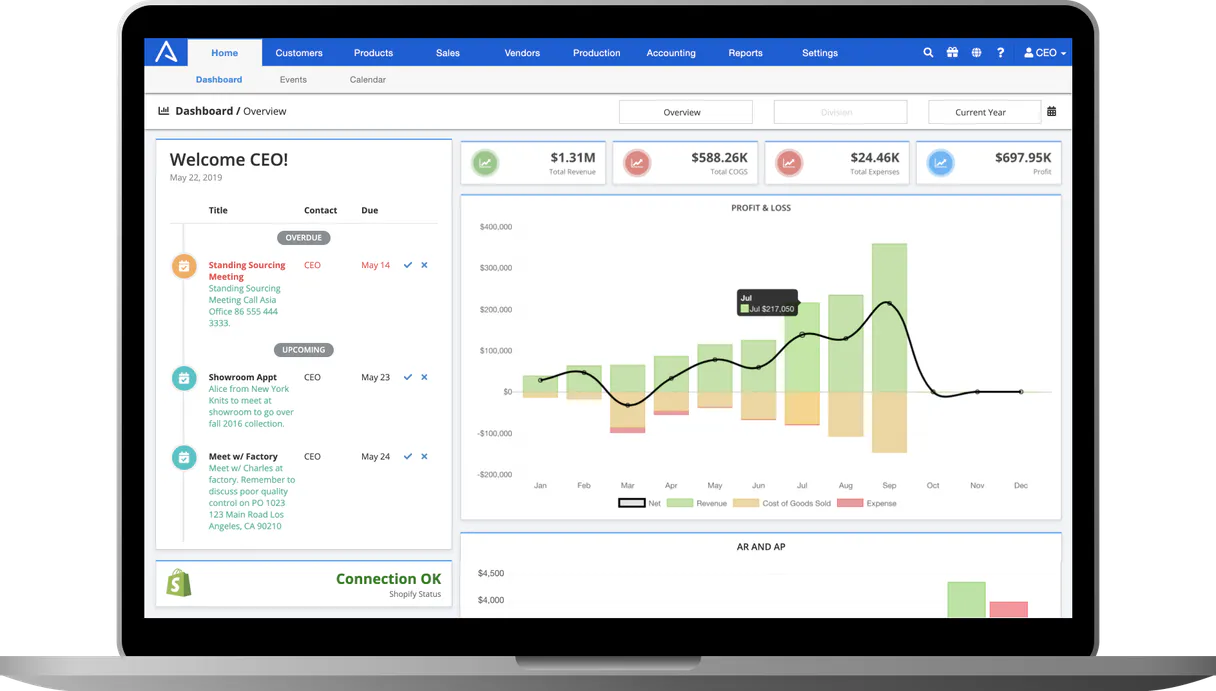
Independent Platform Disclaimer: Vinkius is an independent platform and is not affiliated with, endorsed by, sponsored by, verified by, or otherwise authorized by ApparelMagic. All third-party trademarks, logos, and brand names are the property of their respective owners. Their use on this website is strictly for informational purposes to identify service compatibility and interoperability.
VINKIUS INFRASTRUCTURE
Cloud Hosted
Managed infra
V8 Isolated
Sandboxed per request
Zero-Trust Proxy
No stored credentials
DLP Enforced
Policy on every call
GDPR Compliant
EU data residency
Token Compression
~60% cost reduction
Works with Claude, ChatGPT, Cursor, and more
The Model Context Protocol standardizes how applications expose capabilities to LLMs. Instead of operating in isolation, your AI gains direct access to external platforms, live data, and real-world actions through secure, standardized connections.
This server provides 10 capabilities that interface natively with Claude, ChatGPT, Cursor, and any MCP client. No middleware. No custom integration required.
Available Capabilities
Tracking a shipment shouldn't require jumping between three different tabs.
Today, figuring out where a package is involves logging into the order dashboard, finding the tracking number, copying it, switching to the carrier's website, and manually pasting it into a tracking form. If you need the order details too, you have to open a separate CRM tab and search for the customer.
With the ApparelMagic MCP Server, you ask your agent: 'Where is order #1001?' The agent runs `get_order` to pull the details, then runs `get_shipment` to pull the live status, and gives you everything in one response. It's all one chat conversation.
ApparelMagic MCP Server: See real-time inventory and order data.
Manual tasks include running separate reports for inventory counts and then cross-referencing those numbers against sales orders to see what's sold vs. what's in stock. This takes time and risks human error when merging data.
Now, you ask your agent to 'What's the stock for the blue t-shirt?' The agent executes `list_inventory` and returns the precise count, instantly solving the inventory discrepancy problem without needing a single manual report.
Common Questions About ApparelMagic MCP
How do I use the `list_orders` tool with ApparelMagic MCP Server? +
The list_orders tool retrieves a list of recent sales orders. You typically prompt your agent to 'List the last 10 orders' to get a quick summary of order numbers and their current status.
What is the difference between `list_products` and `list_styles`? +
The list_products tool gives you a list of specific, sellable items (SKUs). The list_styles tool gives you a list of broader style categories that group multiple products together.
Can I check customer details using `get_customer`? +
Yes, get_customer pulls specific details for a single customer ID. You just need to tell your agent which customer you're looking up.
Which tool do I use to see stock levels? +
Use list_inventory. This tool checks and lists the current stock counts for all items in your catalog. It's the best tool for knowing what you have on hand.
Does `get_order` provide shipment tracking? +
No. get_order gives you the order's internal details (items, customer, date). For tracking, you must use the dedicated get_shipment tool.
How do I use the `get_shipment` tool to check tracking details? +
You must provide the specific shipment ID. This tool pulls tracking information and status directly from ApparelMagic, letting you see where an order is in the fulfillment process.
If I need a complete list of all products, should I use `list_products` or `list_styles`? +
list_products shows the actual marketable items, while list_styles focuses on the foundational design templates. Use list_products when you need to view what's available to buy.
Can the `list_customers` tool handle filtering by a specific date range? +
The list_customers tool returns the full list of accounts. While it doesn't filter by date, you can then process the results through your agent to filter records based on any criteria you need.
How do I get my ApparelMagic API Token? +
Log in to your ApparelMagic Cloud account, navigate to Settings > API > Tokens, and generate a new token. You will also need your account subdomain (e.g., 'yourbrand' in yourbrand.app.apparelmagic.com).
Does the API support real-time inventory updates? +
Yes, the list_inventory tool queries ApparelMagic's current stock records, allowing your AI agent to provide accurate availability information based on latest transactions.
Can I filter orders by their modification date? +
While the current MCP tools provide basic listing, you can ask your AI agent to 'find recent orders' and it will parse the results from ApparelMagic to identify newly created or updated records.
Use it with your favorite AI tools
Connect this server to Cursor, Claude, VS Code, and more.
More in this category

Dynamo Software
Equip your AI agent to manage alternative investments, track portfolios, and monitor funds via the Dynamo API.
Clearstory
Manage construction change orders and T&M tags via Clearstory — track projects, monitor CORs, and manage project rates directly from any AI agent.

Booking Manager
Manage yacht charters via Booking Manager — track yachts, check availability, and manage bookings directly from any AI agent.
You might also like

Lorem Picsum
Generate placeholder images and retrieve image metadata directly from your AI agent using the Lorem Picsum API.

LinkAce
Manage your bookmarks, tags, and collections via the LinkAce REST API.
DISCO
Equip your AI agent to manage legal matters, track documents, and monitor review teams via the DISCO API.