
Clearstory MCP. Track construction change orders and project rates from chat.
 Gemini
 Works with every AI agent you already use
…and any MCP-compatible client









Just plug in your AI agents and start using Vinkius.
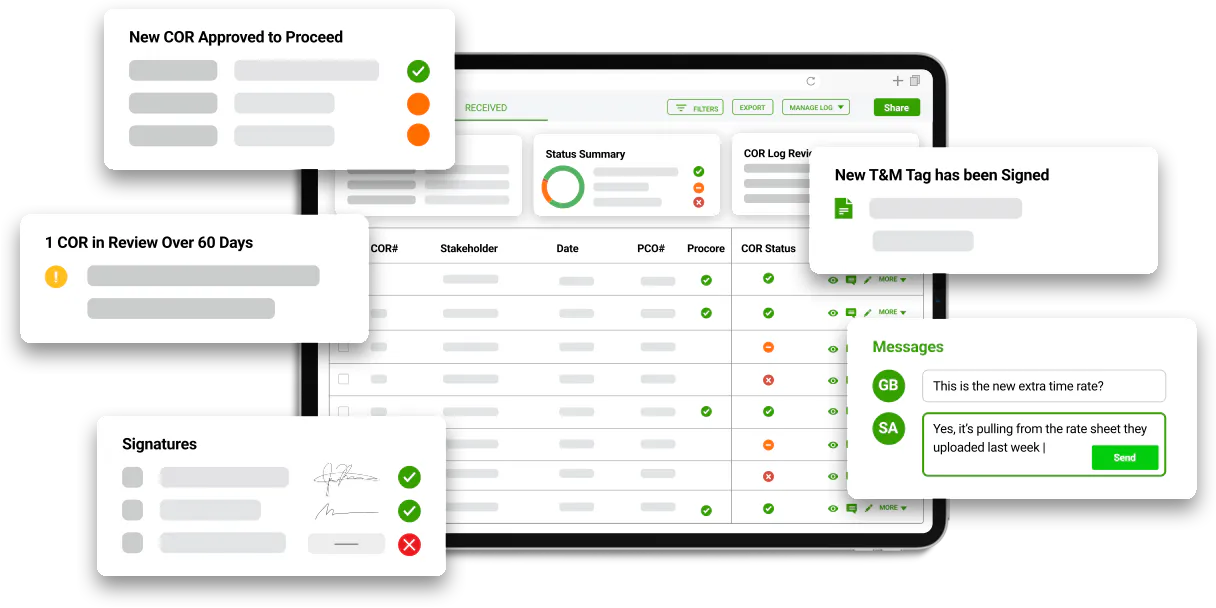
Clearstory connects your construction financial data to your AI agent. Use it to track projects, monitor Change Order Requests (CORs), and manage Time & Material (T&M) tags.
You can list all construction projects, review contract details, and check current Labor, Material, Equipment, and Other (LMEO) rates—all from a chat interface.
What your AI agents can do
Get cor details
Gets the full details for one specific Change Order Request.
Get project construction details
Gets detailed information for a single construction project.
List change notifications
Lists all change notifications exchanged between customers and contractors.
Retrieves detailed information for any specified construction project.
Generates a list of every construction project, whether active or inactive, within Clearstory.
Lists all Change Order Requests and allows you to get specific details for any COR.
Retrieves a list of digital Time & Material tags recorded in the field.
Lists and accesses contracts that are directly linked to change orders.
Lists all standard Labor, Material, Equipment, and Other (LMEO) rates configured for your projects.
Lists all change notifications exchanged between customers and contractors.
Ask AI about this MCP
Supported MCP Clients
Gemini Waiting for input…
Clearstory MCP Server: 8 Tools for Construction Finance
Use these tools to list projects, track CORs, and retrieve critical financial data like rates and contracts via natural language commands.
019d7571get cor details
Gets the full details for one specific Change Order Request.
019d7571get project construction details
Gets detailed information for a single construction project.
019d7571list change notifications
Lists all change notifications exchanged between customers and contractors.
019d7571list change order requests
Lists all available Change Order Requests (CORs).
019d7571list construction projects
Lists every construction project in your account.
019d7571list construction rates
Lists all configured Labor, Material, Equipment, and Other (LMEO) rates.
019d7571list project contracts
Lists all contracts that are tied to change orders.
019d7571list tm tags
Lists all digital Time & Material tags recorded in the field.
Choose How to Get Started
Build a custom MCP for your own tools, or connect a ready-made integration from our catalog.
Build Your Own
Turn any API into an MCP. Import a spec, define Agent Skills, or deploy with MCPFusion.
- Import from OpenAPI, Swagger, or YAML specs
- Create Agent Skills with progressive disclosure
- Deploy to edge with MCPFusion framework
- Built in DLP, auth, and compliance on every call
- Real time usage dashboard and cost metering
- Publish to catalog or keep private
Make Your AI Do More
Start with Clearstory, then connect any of our 4,700+ other servers whenever your AI needs more. One click, no limits.
- Use this MCP plus 4,700+ others, all in one place
- Add new capabilities to your AI anytime you want
- Every connection is secured and compliant automatically
- Track usage and costs across all your servers
- Works with Claude, ChatGPT, Cursor, and more
- New servers added to the catalog every week
What you can do with this MCP connector
Clearstory hooks up your construction finance data straight to your AI agent. You use it to track projects, monitor Change Order Requests (CORs), and manage Time & Material (T&M) tags. You can list all construction projects, check contract details, and pull up current Labor, Material, Equipment, and Other (LMEO) rates—all from a chat interface.
List all construction projects gives you a rundown of every project in your account, whether it's active or sitting dormant. Get detailed information for a single construction project lets you dive deep into any specific project's records.
Check Change Order Requests (CORs) lets you see a list of all CORs available. You can also use get_cor_details to pull the full details for one specific COR.
List field T&M tags retrieves a list of the digital Time & Material tags recorded out in the field. Track change notifications lists every change notification that's been exchanged between customers and contractors.
Get contract information lists all the contracts tied directly to change orders. View project rates pulls up all the standard Labor, Material, Equipment, and Other (LMEO) rates configured for your projects. List all configured rates gives you a full rundown of every rate type, too.
How Clearstory MCP Works
- 1 Subscribe to the Clearstory server and enter your API Key (found in Settings > Offices > Integrations).
- 2 Tell your AI agent what data you need—for example, 'List all active projects.'
- 3 The agent runs the necessary tool calls and presents the data (e.g., project list, COR status, or rate details) directly in the chat.
The bottom line is, you get full access to complex construction financials without navigating the Clearstory web dashboard.
Who Is Clearstory MCP For?
Project Managers who need to monitor COR statuses and project health instantly. Specialty Contractors who need to review T&M tags and change notifications without logging into the main portal. Finance Teams who need to look up contract details and project rates straight from their chat interface. General Contractors who need to verify change order volumes across multiple projects.
Monitors COR statuses and project health using natural language prompts.
Reviews T&M tags and change notifications immediately without opening the full dashboard.
Looks up contract details and project rates straight from the chat interface for quick auditing.
Verifies change order volumes and checks supply chain risk across various projects.
What Changes When You Connect
- Full Project Status in Chat: Instead of jumping between project dashboards, ask your agent to list all construction projects and get their current status in one go. You can start by calling
list_construction_projects. - Instant COR Review: You don't need to navigate to the Change Orders tab. Ask your agent to list all Change Order Requests (
list_change_order_requests) and see status, amounts, and dates instantly. - Rate Visibility on Demand: Need to know the labor rate for a specific project? Run
list_construction_ratesto see the LMEO rates without leaving your chat window. This is key for quick quoting. - Contract Auditing: When a COR comes in, you can instantly cross-reference it by calling
list_project_contractsto see which contract it falls under. This saves time auditing compliance. - Field Data Integration: Get a real-time view of field spending by running
list_tm_tags. This brings your site data into your conversational workflow. - Change History Tracking: Review all change notifications sent between parties using
list_change_notificationsto maintain a clear record of project communications.
Real-World Use Cases
Determining the project scope and status
A Project Manager needs to know which projects are active and what their current change order volumes are. They ask their agent to run list_construction_projects and then use list_change_order_requests to get the count and status of CORs for the top three listed projects. This gives them a quick, high-level status report without opening a single project dashboard.
Auditing a disputed rate
A Finance Team member is questioning a billed rate. They ask their agent to run list_construction_rates and then cross-reference that data by calling list_project_contracts to verify the rate against the master contract terms. This solves the dispute immediately in the chat.
Tracking a recent site change
A Specialty Contractor just finished a phase and needs to submit time and material data. Instead of logging into the field app, they ask the agent to run list_tm_tags. This immediately pulls the digital records into their workflow for review.
Reviewing communication history
A General Contractor needs to understand the history of changes for a building. They ask the agent to run list_change_notifications and then use get_cor_details on the most recent COR ID. This provides a complete chronological view of the change, from initial notice to final request.
The Tradeoffs
Manual Dashboard Juggling
The user logs into the main Clearstory website, navigates to 'Projects,' filters for 'Active,' clicks into Project A, then has to switch tabs to 'Changes' to find CORs, and finally opens a separate 'Rates' page to check costs. This takes 5-7 minutes and requires constant context switching.
→
Ask your agent to run list_construction_projects to see the list. Then, ask it to pull the COR status and the associated list_construction_rates for the top projects. It handles the navigation and data aggregation for you.
Ignoring Contract Links
A Project Manager sees a high COR total but doesn't know if it's covered by the master agreement. They assume the project status is fine because the COR status is 'Pending.'
→
Always run list_project_contracts when reviewing CORs. This tool links the change order directly to the governing contract, ensuring you know if the scope creep is covered by the current agreement.
Treating Data as Separate Silos
The user calls list_construction_projects to get the names, and then calls list_change_order_requests separately, resulting in two lists that require manual matching in a spreadsheet. The connection point is lost.
→
Tell your agent to check for project status. Ask it to combine list_construction_projects data with list_change_order_requests data using the project ID. This gives you one unified report.
When It Fits, When It Doesn't
Use this server if your job requires stitching together data from multiple sources—specifically, if you need to see a project's status, its contract limits, and its current change orders all in one view. It's perfect for compliance and auditing work. Don't use it if you just need to update a single field or run a simple report that doesn't involve cross-referencing data (e.g., just generating a list of all projects). If you only need to check the project list, simple data retrieval tools are enough. But if you need to know why a project's rate changed, you need the full context provided by the list_project_contracts and get_cor_details tools.
Independent Platform Disclaimer: Vinkius is an independent platform and is not affiliated with, endorsed by, sponsored by, verified by, or otherwise authorized by Clearstory. All third-party trademarks, logos, and brand names are the property of their respective owners. Their use on this website is strictly for informational purposes to identify service compatibility and interoperability.
VINKIUS INFRASTRUCTURE
Cloud Hosted
Managed infra
V8 Isolated
Sandboxed per request
Zero-Trust Proxy
No stored credentials
DLP Enforced
Policy on every call
GDPR Compliant
EU data residency
Token Compression
~60% cost reduction
Works with Claude, ChatGPT, Cursor, and more
The Model Context Protocol standardizes how applications expose capabilities to LLMs. Instead of operating in isolation, your AI gains direct access to external platforms, live data, and real-world actions through secure, standardized connections.
This server provides 8 capabilities that interface natively with Claude, ChatGPT, Cursor, and any MCP client. No middleware. No custom integration required.
Available Capabilities
Tracking project financials shouldn't feel like a database query.
Today, getting a full picture of a project's finances means clicking through a dozen tabs: the project overview, the COR tab, the contract documents, and the rates page. You copy project IDs, open a spreadsheet, and then manually cross-reference the rate changes against the contract clauses. It's slow, and you almost always miss a critical link.
With Clearstory, you just talk to your agent. You ask for the project status, and it runs the necessary tools—pulling the project details, the COR history, and the rates—and hands you the synthesized answer. You get the full picture, instantly.
Clearstory MCP Server: Get the full change order lifecycle status.
You no longer have to wait for a team member to manually compile the change order history. Instead, you ask your agent to check all notifications (`list_change_notifications`) and then immediately fetch the full details for the COR (`get_cor_details`). This connects the 'why' (the notification) to the 'what' (the request).
It means your AI client handles the data stitching. You get a single, definitive report on the change order's journey, from initial communication to final request, without touching a single dashboard tab.
Common Questions About Clearstory MCP
How do I use the `list_construction_projects` tool to see my projects? +
Run the list_construction_projects tool. This lists every construction project in your account, giving you a starting list of all IDs and names to reference in subsequent queries.
Can I use `get_cor_details` to check the status of one change order? +
Yes. You pass the specific COR ID to get_cor_details. This retrieves all detailed financial and status information for that single Change Order Request.
What is the best way to track rates using `list_construction_rates`? +
Run list_construction_rates to get a list of all LMEO rates. You can then ask your agent to filter or compare those rates against specific projects or contracts.
How does `list_change_notifications` help with project history? +
The list_change_notifications tool shows all communications sent between customers and contractors. This helps you establish the timeline and communication context before a COR was filed.
How do I use `list_tm_tags` to review physical time and material logs? +
The list_tm_tags tool retrieves digital time and material tags directly from the field. You can use this to verify recorded labor hours and material usage without opening the main Clearstory dashboard.
Can I use `list_project_contracts` to find contract details for a specific COR? +
Yes, list_project_contracts lists all contracts linked to change orders. This lets your AI client cross-reference the specific contract terms against the proposed changes in a COR.
Which tool should I use to see all available Change Order Requests (CORs)? +
Use list_change_order_requests. This tool provides a complete list of all CORs, allowing you to quickly see amounts, statuses, and the dates they were submitted.
What information does `get_project_construction_details` provide? +
This tool gets detailed information for a specific project. It provides a comprehensive overview of the project's scope, status, and key financial metrics beyond just the basic project listing.
Can I see the total amount of outstanding CORs for a project? +
Yes! Use the list_change_order_requests tool. The agent will return all CORs, and you can ask it to calculate or filter for the total value of those in 'Pending' or 'Under Review' status.
How do I check the latest T&M tags from the field through the agent? +
Use the list_tm_tags tool. Your agent will fetch the most recent digital Time & Material tags, allowing you to review labor hours and material usage without opening the web app.
Where do I find my Clearstory API Key? +
Log in to Clearstory, navigate to Settings > Offices, select your office, and go to the Integrations tab. You can generate and copy your API key from there.
Use it with your favorite AI tools
Connect this server to Cursor, Claude, VS Code, and more.
More in this category

Towio
Coordinate towing and roadside assistance operations with dispatch management, GPS tracking, and job status updates.

leadtributor.cloud
Distribute leads to your sales team and partner network with routing rules, SLA tracking, and performance analytics.

Cloudbeds
Manage hotel reservations, guests, rooms, housekeeping, availability, and revenue dashboard for your Cloudbeds property through natural conversation.
You might also like

Alpaca Trading
Trade stocks and crypto, access real-time market data, and manage your Alpaca brokerage account directly through any AI agent.

Wati
Send WhatsApp template and session messages, and manage contacts on Wati — the leading WhatsApp Business API solution.

Zapier
Monitor automated workflows, audit app connections, and search for Zap templates on Zapier — the leader in AI orchestration.