
Booqable MCP. Manage orders and inventory from your chat agent.
 Gemini
 Works with every AI agent you already use
…and any MCP-compatible client









Just plug in your AI agents and start using Vinkius.
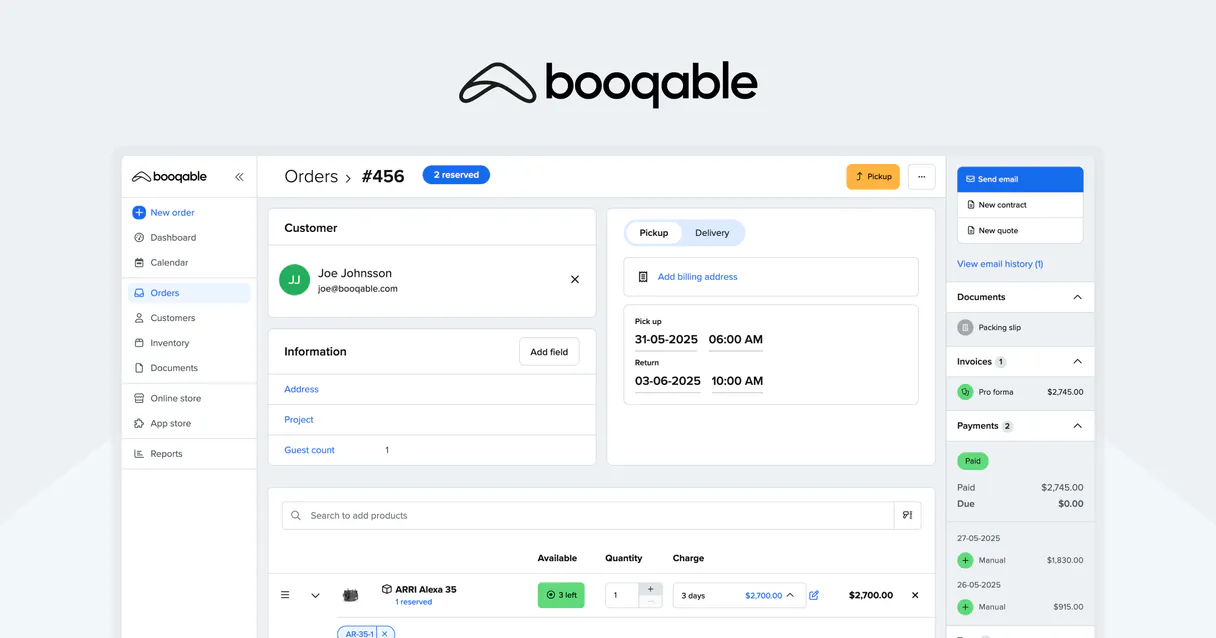
Booqable MCP Server manages your rental operations. Your AI agent can list all orders, check if specific items are available for dates, create new rentals, and update order status (start/stop).
It keeps your inventory and customer data organized, letting you handle pickups, returns, and catalog checks directly from your chat interface.
What your AI agents can do
Check availability
Checks if a specific product group has units available for a given date range.
Create order
Creates a brand new rental order record in Booqable.
Get customer
Retrieves the profile and contact details for one specific customer.
Determines if a specific product group has units available for a given date range, preventing double bookings.
Generates a new rental order record in Booqable, moving the process from concept to an active state.
Fetches specific contact and profile information for a customer using their identifier.
Retrieves lists of all orders or detailed records for a single order number.
Browses and retrieves details about product groups to ensure accurate inventory management.
Changes an order's status, marking it as 'started' (picked up) or 'stopped' (returned) directly in Booqable.
Ask AI about this MCP
Supported MCP Clients
Gemini Waiting for input…
019d7561check availability
Checks if a specific product group has units available for a given date range.
019d7561create order
Creates a brand new rental order record in Booqable.
019d7561get customer
Retrieves the profile and contact details for one specific customer.
019d7561get order
Fetches all the details for a single order number.
019d7561get product group
Gets detailed information about a specific product category or group.
019d7561list customers
Lists basic details for all customers in your system.
019d7561list orders
Lists basic information for all active and past rental orders.
019d7561list product groups
Retrieves a full list of all product groups in your catalog.
019d7561start order
Marks an order as 'started' (picked up), updating its status in Booqable.
019d7561stop order
Marks an order as 'stopped' (returned), updating its status in Booqable.
Choose How to Get Started
Build a custom MCP for your own tools, or connect a ready-made integration from our catalog.
Build Your Own
Turn any API into an MCP. Import a spec, define Agent Skills, or deploy with MCPFusion.
- Import from OpenAPI, Swagger, or YAML specs
- Create Agent Skills with progressive disclosure
- Deploy to edge with MCPFusion framework
- Built in DLP, auth, and compliance on every call
- Real time usage dashboard and cost metering
- Publish to catalog or keep private
Make Your AI Do More
Start with Booqable, then connect any of our 4,700+ other servers whenever your AI needs more. One click, no limits.
- Use this MCP plus 4,700+ others, all in one place
- Add new capabilities to your AI anytime you want
- Every connection is secured and compliant automatically
- Track usage and costs across all your servers
- Works with Claude, ChatGPT, Cursor, and more
- New servers added to the catalog every week
What you can do with this MCP connector
Booqable MCP Server - Manage Rentals & Inventory
Your AI agent handles your whole rental operation. It lets you list every order, check if items are available for certain dates, create new rentals, and update order statuses—like marking something as picked up or returned. You'll keep your inventory and customer data tight, handling everything from pickups and returns to catalog checks right through your chat interface.
Orders: You can use list_orders to see basic info for every active and past rental order, and get_order to pull up all the details for a specific order number. You can also use start_order to mark an order as 'started' when the client picks it up, and stop_order to mark it as 'stopped' when they return it.
To kick off a new rental, just call create_order.
Inventory: Need to know if you got units of a specific product group available for a date range? Run check_availability to find out, which keeps you from double-booking. You can also get a full list of all product groups using list_product_groups, and dig into the details of a specific category with get_product_group.
Customers: You can list basic details for all customers in your system using list_customers, or grab the specific profile and contact info for one person with get_customer.
It all runs through your agent. You talk to your agent, and it uses the tools to run the necessary Booqable actions.
How Booqable MCP Works
- 1 Subscribe to the server and provide your Booqable API Key and Subdomain credentials.
- 2 Your AI client sends a natural language request (e.g., 'Check if the camera kit is available next week').
- 3 The agent maps the request to the correct tool (e.g.,
check_availability) and executes it. The result is fed back to you in plain text.
The bottom line is that you never have to leave your AI chat window to manage your entire rental lifecycle.
Who Is Booqable MCP For?
This is for the operations manager who gets stuck clicking through dashboards just to verify an order status. It’s for the support specialist who has to copy-paste customer IDs to check availability. Stop jumping between the booking dashboard and your chat tools. Get everything done from one place.
Monitors stock levels and processes pickups or returns by calling start_order or stop_order without logging into the Booqable dashboard.
Uses get_customer and get_order to verify a client's details and current rental status when a client calls with an issue.
Runs list_product_groups and check_availability to audit the catalog and ensure the right amount of equipment is available for upcoming dates.
What Changes When You Connect
- Stop manually checking order statuses. Use
list_ordersandget_orderto get the status of any rental without opening the dashboard. - Stop guessing if you have enough stock. Run
check_availabilityto see if the 'Camera Kit' is available for specific dates, and then usecreate_orderto lock it in. - Stop wasting time on customer lookup.
get_customerpulls up a client's full profile instantly, letting your agent know exactly who you're dealing with. - Stop forgetting lifecycle steps. Use
start_orderorstop_orderto mark pickups and returns. The inventory updates automatically. - Stop building custom dashboards. Access core functions like
list_product_groupsandget_product_groupdirectly through your AI agent's tools. - Stop switching context. All your inventory, order, and customer management happens in one conversation, powered by the Booqable tools.
Real-World Use Cases
Audit Today's Pickups and Returns
The ops lead needs to know what's being picked up today. They ask their agent to 'List all orders marked for pickup today.' The agent runs list_orders, filtering by status, and the lead gets a list of IDs and item groups to confirm the day's pickups.
Handling a New Client Request
A client calls needing a 'DJ Setup' for next week. The agent runs check_availability for the 'DJ Setup' group. If available, the agent runs create_order, generating a new rental record and sending the details back to the client.
Resolving an Inventory Discrepancy
The inventory manager notices a product group's count is off. They run list_product_groups to verify the catalog, then use get_product_group to check the technical details, resolving the discrepancy using the precise data.
Processing a Return
The support team member confirms Order #1001 was returned. They tell the agent to 'Mark Order #1001 as returned.' The agent executes stop_order, immediately updating the inventory status for that equipment group.
The Tradeoffs
Building a custom dashboard
Creating a bespoke dashboard that requires multiple data source connections (e.g., inventory API, CRM, order API) and constant maintenance updates.
→
Instead, use the Booqable MCP Server. Your agent runs tools like list_orders and check_availability to pull the exact data you need without building a persistent UI layer.
Copy-pasting data between systems
Manually taking a customer ID from a spreadsheet, pasting it into the Booqable website, and then copying the order number into a ticketing system.
→
Use the get_customer tool to pull the customer profile directly, and then use get_order to link that customer to their specific order record in one flow.
Relying on partial data views
Checking only the order status on the main dashboard, but missing the actual item availability or product group details.
→
Always run check_availability and get_product_group in sequence. This gives you the full picture: the order status and the physical stock count.
When It Fits, When It Doesn't
Use this server if your core pain point is managing the end-to-end lifecycle of rentals. Specifically, if you need to move data—for instance, changing an order status or creating a new record—based on live inventory checks. You must be able to track an order from 'concept' to 'returned' using tools like create_order, check_availability, and stop_order.
Don't use this if you just need a simple read-only feed of data (e.g., 'Show me a list of all customers'). For simple viewing, an API wrapper might suffice. But if you need to act on that data—like marking an order as picked up or creating a new booking—you need the full orchestration layer here.
Independent Platform Disclaimer: Vinkius is an independent platform and is not affiliated with, endorsed by, sponsored by, verified by, or otherwise authorized by Booqable. All third-party trademarks, logos, and brand names are the property of their respective owners. Their use on this website is strictly for informational purposes to identify service compatibility and interoperability.
VINKIUS INFRASTRUCTURE
Cloud Hosted
Managed infra
V8 Isolated
Sandboxed per request
Zero-Trust Proxy
No stored credentials
DLP Enforced
Policy on every call
GDPR Compliant
EU data residency
Token Compression
~60% cost reduction
Works with Claude, ChatGPT, Cursor, and more
The Model Context Protocol standardizes how applications expose capabilities to LLMs. Instead of operating in isolation, your AI gains direct access to external platforms, live data, and real-world actions through secure, standardized connections.
This server provides 10 capabilities that interface natively with Claude, ChatGPT, Cursor, and any MCP client. No middleware. No custom integration required.
Available Capabilities
Checking inventory and order status shouldn't take five different clicks.
Right now, checking if a piece of equipment is available means jumping to the Booqable dashboard. You check the calendar. Then you navigate to the product group. If you find a spot, you have to open the order details. It's a painful, multi-tab, copy-paste cycle just to confirm a booking.
With the Booqable MCP Server, you just ask your agent: 'Is the Camera Kit available June 10th to June 12th?' It runs `check_availability` and gives you the answer. You then ask it to `create_order` if you want to book it. Done.
Booqable MCP Server: Manage order status and inventory.
Previously, marking an order as picked up or returned required logging into the system and manually changing the status in the dashboard. This meant an extra step, an extra click, and a chance for human error.
Now, you tell your agent, 'Mark Order #1001 as returned.' It runs `stop_order` and handles the full update. The inventory count adjusts immediately. No dashboard login required.
Common Questions About Booqable MCP
How do I use the `check_availability` tool with Booqable MCP Server? +
You ask your agent to check availability for specific dates and product groups. You need to provide the product group name and the start/end dates so the agent can run the check.
Can I use `create_order` to book equipment if I don't have a customer ID? +
Yes, the agent manages the process. You simply ask it to create the order and provide the necessary product details. The agent handles the required inputs for the create_order tool.
Does `list_orders` show me cancelled orders? +
The list_orders tool lists all orders. You need to specify the status you are looking for (e.g., 'active' or 'reserved') so the agent can filter the results correctly.
What is the difference between `get_product_group` and `list_product_groups`? +
list_product_groups gives you a list of all available product groups (the catalog). get_product_group lets you pull all the specific details for one group you already know the name of.
How do I mark an order as returned using `stop_order`? +
Just tell your agent, 'Mark Order #1001 as returned.' The agent runs stop_order and confirms the status change and inventory update.
How do I get the details of a specific customer using `get_customer`? +
You provide the customer's ID to get_customer. The tool returns their full profile, including contact info and rental history. This lets your agent access all necessary customer data without switching apps.
What information does `list_orders` provide for each rental order? +
The list_orders tool provides key details for every order, including its current status, associated product groups, and the total number of items. You can then use get_order to dive deeper into any specific order.
Can I use `start_order` or `stop_order` if I don't know the order ID? +
No, you must provide the specific order ID to either start_order or stop_order. These tools require the unique ID to correctly update the order status and manage inventory levels.
Can I check if an item is available for rent next weekend? +
Yes! Use the check_availability tool with the start and end dates. Your agent will check the real-time inventory in Booqable to confirm if the product group has free stock.
How do I mark a rental order as picked up? +
Simply ask the agent to start_order and provide the Order ID. This will transition the booking status to 'Started' in your Booqable account.
Does the integration allow creating a new customer profile? +
The current toolset focuses on order management, inventory auditing, and availability checks. Creating or editing core customer profiles should be done through the Booqable admin dashboard or public storefront.
Use it with your favorite AI tools
Connect this server to Cursor, Claude, VS Code, and more.
More in this category

Redo
Manage returns, track shipping protection claims, and oversee exchanges via AI agents with Redo.

BigCommerce
Automate eCommerce native workflows via BigCommerce — manage full catalogs, orders, customers, and active coupons directly from your AI agent.
GrazeCart
Manage your GrazeCart store — track orders, update inventory, and manage customers directly via AI.
You might also like

USITC DataWeb (International Trade Commission)
Access US international trade statistics directly. Query imports, exports, and trade balances using HS, SITC, or NAICS classifications.
Residential Proxies
Route web traffic through residential IP addresses worldwide for scraping, testing, and research that avoids blocks and captchas.

Frame.io
Collaborate on video, manage creative assets, and track comments via AI agents with Frame.io.