
CallPage MCP. Manage leads, calls, and widgets via conversation.
 Gemini
 Works with every AI agent you already use
…and any MCP-compatible client









Just plug in your AI agents and start using Vinkius.
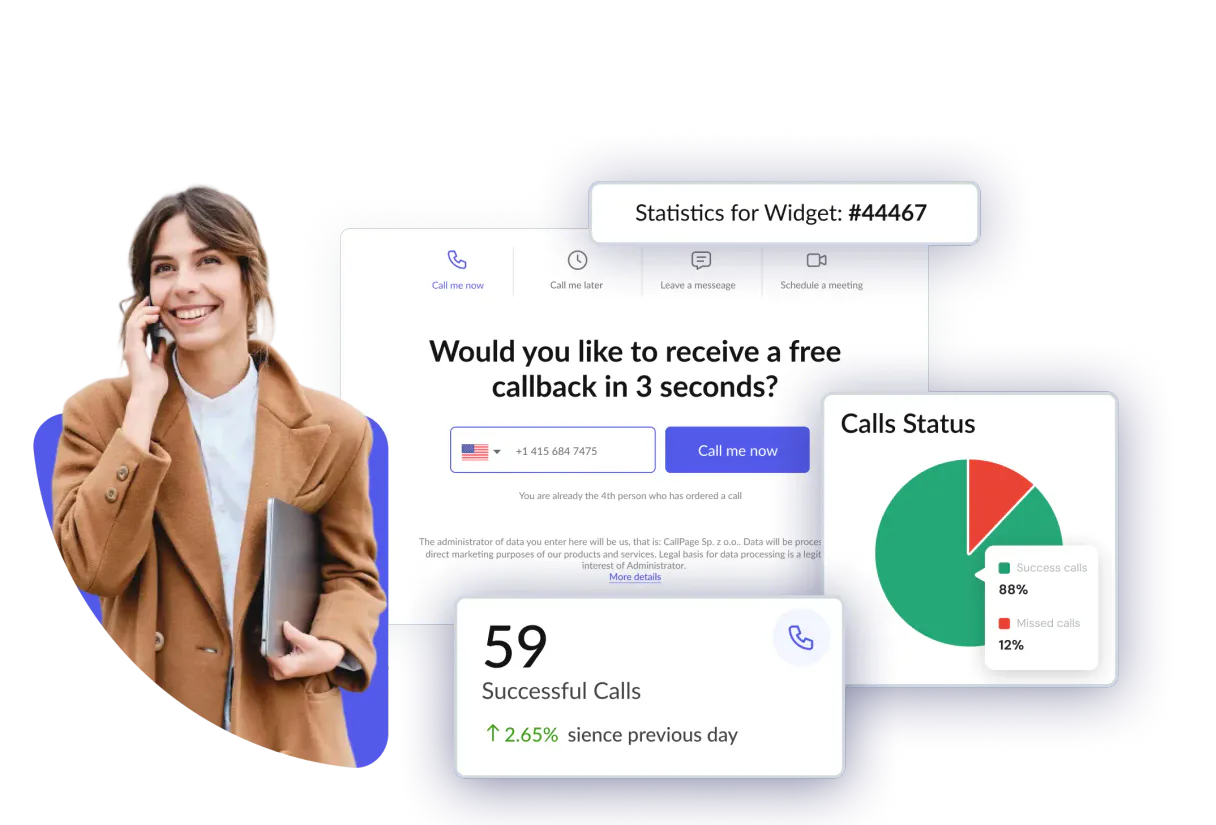
CallPage MCP Server manages your entire lead pipeline and callback flow. Use your AI agent to list all captured leads from widgets, check call recordings, track departmental assignments, and monitor widget performance—all without leaving your chat window.
It coordinates sales and marketing data directly from your AI client.
What your AI agents can do
Get account info
Retrieves core manager and account information from your CallPage workspace.
Get call details
Fetches specific details about a single callback call.
Get lead details
Gets detailed information for a specific captured lead.
List all callback calls and retrieve detailed metadata, including recording URLs and durations.
List all captured leads from widgets and retrieve detailed profiles, including contact information and intent.
List all CallPage widgets and retrieve their specific configuration and performance settings.
Access the list of company departments and managers to understand routing rules.
List the available SMS templates used for automated follow-ups.
Retrieve core manager and account information from the workspace.
Ask AI about this MCP
Supported MCP Clients
Gemini Waiting for input…
CallPage MCP Server: 10 Tools for Call Data Management
Use these tools to retrieve lead profiles, list calls, manage widget settings, and access departmental data directly through your AI agent.
019d7567get account info
Retrieves core manager and account information from your CallPage workspace.
019d7567get call details
Fetches specific details about a single callback call.
019d7567get lead details
Gets detailed information for a specific captured lead.
019d7567get widget settings
Retrieves the configuration and status of a single CallPage widget.
019d7567list calls
Lists all recorded callback calls and their associated metadata.
019d7567list departments
Retrieves a list of company departments used for lead routing.
019d7567list leads
Lists all captured leads collected through your CallPage widgets.
019d7567list managers
Retrieves a directory of team managers within CallPage.
019d7567list sms templates
Lists all available SMS templates used for automated follow-ups.
019d7567list widgets
Lists every active widget configured in your CallPage account.
Choose How to Get Started
Build a custom MCP for your own tools, or connect a ready-made integration from our catalog.
Build Your Own
Turn any API into an MCP. Import a spec, define Agent Skills, or deploy with MCPFusion.
- Import from OpenAPI, Swagger, or YAML specs
- Create Agent Skills with progressive disclosure
- Deploy to edge with MCPFusion framework
- Built in DLP, auth, and compliance on every call
- Real time usage dashboard and cost metering
- Publish to catalog or keep private
Make Your AI Do More
Start with CallPage, then connect any of our 4,700+ other servers whenever your AI needs more. One click, no limits.
- Use this MCP plus 4,700+ others, all in one place
- Add new capabilities to your AI anytime you want
- Every connection is secured and compliant automatically
- Track usage and costs across all your servers
- Works with Claude, ChatGPT, Cursor, and more
- New servers added to the catalog every week
What you can do with this MCP connector
Your AI client handles your whole lead pipeline and callback flow. You'll use it to list every captured lead from widgets, check call recordings, track which department handles a lead, and monitor widget performance—all without ever leaving your chat window. It links sales and marketing data directly from your agent.
Review Call Records: You can use list_calls to get a list of all recorded callback calls, and get_call_details to grab the specific metadata for any single call, including recording URLs and how long it lasted. Inspect Lead Profiles: You can use list_leads to pull a list of all leads captured through widgets, and get_lead_details to get a deep dive on a specific lead's profile, including contact info and what they were interested in. Verify Widget Settings: You can use list_widgets to see every active widget you've set up, and get_widget_settings to pull its specific configuration and performance settings. Map Internal Structure: You can use list_departments to see all company departments, and list_managers to get a directory of your team managers. Manage Follow-Up Texts: You can use list_sms_templates to list all the SMS templates available for automated follow-ups. Get Account Details: You can use get_account_info to pull the core manager and account information from your CallPage workspace.
How CallPage MCP Works
- 1 Subscribe to the server and enter your CallPage External API Key.
- 2 Direct your AI agent to run a tool, such as
list_leads, providing the required parameters. - 3 The agent executes the API call, and the result—like a list of leads or call records—is returned to your chat window.
The bottom line is you run complex CallPage operations using simple, natural language prompts in your AI client.
Who Is CallPage MCP For?
Sales Development Representatives (SDRs) who need instant access to lead status and call transcripts. Marketing Managers who track widget performance and lead quality. Customer Success agents who need to verify departmental assignments or account details without opening a dozen tabs.
Checks new leads or reviews call recordings instantly to follow up with prospects, eliminating manual dashboard logins.
Monitors widget performance and lead quality by listing captured leads and widget configurations directly from their workflow tools.
Retrieves department and manager information to ensure a lead is properly routed before making contact.
What Changes When You Connect
- See all captured leads and their intent instantly using
list_leads. You get a quick view of who's interested and why, eliminating the need to manually check widget dashboards. - Audit call performance by running
list_calls. You get a list of every callback recording, along with its duration and URL, so you can review interactions immediately. - Verify lead routing logic by calling
list_departmentsandlist_managers. You confirm which teams are supposed to receive leads, ensuring no lead falls through the cracks. - Check widget health using
list_widgets. You confirm that every active widget is configured correctly and running its intended callback process. - Deep-dive into a specific record by using
get_lead_detailsorget_call_details. You get all the raw data points for one lead or one call without stitching together multiple pages. - Streamline follow-ups by calling
list_sms_templates. You confirm the exact text and rules for automated communications, keeping your sales process consistent.
Real-World Use Cases
A lead drops off after a call.
The SDR hears a prospect mentioned a specific need. Instead of writing notes and waiting for follow-up, they ask their agent: 'What are the details for lead X?' The agent runs get_lead_details, retrieving contact info and stated intent. The SDR immediately knows how to draft a personalized follow-up.
Marketing needs to audit widget performance.
The Marketing Manager suspects a widget is underperforming. They prompt their agent: 'Show me the widget settings and the last 5 leads.' The agent uses list_widgets and list_leads, giving the manager both the configuration and the raw data points to pinpoint the issue.
A call needs immediate review.
The Customer Success agent gets an alert for a new call. They ask their agent to 'List the last 3 calls.' The agent runs list_calls, providing links and durations. The agent can then use get_call_details to pull the full metadata for the specific call.
Ensuring correct lead assignment.
A new lead comes in from the website. The agent checks the lead's profile and runs list_departments. This confirms if the lead's stated intent (e.g., 'IT Support') maps correctly to the 'Technology' department, ensuring the right team gets the alert.
The Tradeoffs
Searching for a single lead's info
Going to the main dashboard, clicking the 'Leads' tab, finding the lead, and then clicking 'Details' to see contact info and intent.
→
Just ask your agent: 'What are the details for lead Y?' The agent runs get_lead_details and gives you the info in one chat response.
Checking all call recordings
Logging into the CallPage platform and navigating to the 'Calls' section to manually filter and download the last week's recordings.
→
Ask your agent to list_calls. It gives you a comprehensive list of all records and their links immediately.
Verifying widget setup
Trying to remember which widget handles which department or if the callback delay is set correctly across multiple tabs.
→
Run list_widgets and then use get_widget_settings for the specific widget. You get the full config data, not just a summary view.
When It Fits, When It Doesn't
Use this server if your workflow requires correlating data across multiple CallPage components (leads, calls, widgets, departments) without leaving your AI client. It's best when you need to run multiple checks—for instance, 'List all leads from the Sales department and get the call details for the top 5.'
Don't use this if you only need to read a single, static report (e.g., a CSV export). If your need is simple data viewing, check if the native CallPage dashboard is enough. But if you need the data actionably within a conversation, this is what you need.
Independent Platform Disclaimer: Vinkius is an independent platform and is not affiliated with, endorsed by, sponsored by, verified by, or otherwise authorized by CallPage. All third-party trademarks, logos, and brand names are the property of their respective owners. Their use on this website is strictly for informational purposes to identify service compatibility and interoperability.
VINKIUS INFRASTRUCTURE
Cloud Hosted
Managed infra
V8 Isolated
Sandboxed per request
Zero-Trust Proxy
No stored credentials
DLP Enforced
Policy on every call
GDPR Compliant
EU data residency
Token Compression
~60% cost reduction
Works with Claude, ChatGPT, Cursor, and more
The Model Context Protocol standardizes how applications expose capabilities to LLMs. Instead of operating in isolation, your AI gains direct access to external platforms, live data, and real-world actions through secure, standardized connections.
This server provides 10 capabilities that interface natively with Claude, ChatGPT, Cursor, and any MCP client. No middleware. No custom integration required.
Available Capabilities
Sifting through dashboards to find one lead's status shouldn't take 10 clicks.
Today, you have to jump between the Widgets tab, the Leads tab, and the Call Log to build a single picture of a prospect. You click the widget, then copy the lead ID, then paste it into the Call Log to see if they spoke to anyone. It's a manual, copy-paste cycle that kills momentum.
With the CallPage MCP Server, you ask your agent to check the status. You can ask it to 'Show me the lead and the calls.' It runs the necessary tools and gives you the full, correlated data right in the chat. You don't leave your workflow.
CallPage MCP Server: Manage leads, calls & widgets
You stop manually checking the status of different widgets, then switching tabs to check the lead list, and finally jumping to the call logs. That coordination effort is wasted time.
Now, you run the tools in sequence via your agent. You get a single, unified output that covers the lead, the widget config, and the call metadata. It just works.
Common Questions About CallPage MCP
How do I use the `list_leads` tool to find new prospects? +
The list_leads tool retrieves a list of all leads captured through your CallPage widgets. You can filter this list to find new prospects or leads with a specific stated intent.
Can I check a specific call's metadata using `get_call_details`? +
Yes, get_call_details fetches detailed information for a single callback call. You need to provide the specific call ID to pull up the full record.
What is the difference between `list_widgets` and `get_widget_settings`? +
The list_widgets tool shows every widget you have configured. Use get_widget_settings to pull the specific, granular configuration data for one widget.
Do I need `list_departments` to route a new lead? +
You use list_departments to see the available departments. This list helps your agent understand the correct routing structure for assigning the lead.
How do I check the most recent call recordings using `list_calls`? +
list_calls pulls all callback calls. You get a list that includes the recording URLs and the duration of each call, making it easy to review recent interactions.
How do I list all available SMS templates using the `list_sms_templates` tool? +
You use list_sms_templates to see every template available for automated follow-ups. This tool provides the exact names and content of the SMS messages you can send out to leads.
What kind of data does `get_lead_details` return for a specific lead? +
It returns a full profile including contact information and the lead's stated intent. This means you get more than just a name and phone number—you know why they reached out.
If I run `list_managers` and get an empty list, what does that mean? +
An empty list means no managers are currently set up in your CallPage account. You'll need to ensure your directory information is configured in CallPage before running this tool.
Can I listen to call recordings using the agent? +
Yes! Use the list_calls or get_call_details tool. If a recording is available, your agent will provide the recording_url which you can click to listen to the conversation.
How do I see the details of a specific lead? +
Simply ask the agent to get_lead_details and provide the Lead ID. It will retrieve the full profile, including phone number, email, and any custom data captured by the widget.
Does the integration allow updating widget settings? +
The current toolset focuses on querying and monitoring (Read-Only) for operational control. Updating widget styles or complex behaviors should be managed through the CallPage administrator dashboard.
Use it with your favorite AI tools
Connect this server to Cursor, Claude, VS Code, and more.
More in this category
SmartChatAI
Manage AI bots, knowledge bases, and messaging on SmartChatAI with AI agents.

ChatFly
Launch conversational AI chatbots that qualify leads, answer product questions, and book meetings without human intervention.
Clickatell
Deliver transactional and marketing messages over SMS, WhatsApp, and chat channels with global reach and high deliverability.
You might also like
MakePlans
Manage appointments, services, and customers via the MakePlans REST API.

World Bank Economy
Instantly query GDP, inflation, economic growth, and financial sector indicators from the World Bank. Zero auth required.

QuickNode
Manage blockchain infrastructure via QuickNode — create data streams, configure webhooks, and interact with RPC nodes directly from your AI agent.