4,500+ servers built on MCP Fusion
Vinkius

Chroma (Vector DB) MCP. Query, audit, and manage your semantic knowledge base.

Claude Claude
ChatGPT ChatGPT
Cursor Cursor
Gemini Gemini
Windsurf Windsurf
VS Code VS Code
JetBrains JetBrains
Vercel Vercel
See Vinkius in Action

Works with every AI agent you already use

…and any MCP-compatible client

Chroma (Vector DB) MCP on Cursor AI Code Editor MCP Client Chroma (Vector DB) MCP on Claude Desktop App MCP Integration Chroma (Vector DB) MCP on OpenAI Agents SDK MCP Compatible Chroma (Vector DB) MCP on Visual Studio Code MCP Extension Client Chroma (Vector DB) MCP on GitHub Copilot AI Agent MCP Integration Chroma (Vector DB) MCP on Google Gemini AI MCP Integration Chroma (Vector DB) MCP on Lovable AI Development MCP Client Chroma (Vector DB) MCP on Mistral AI Agents MCP Compatible Chroma (Vector DB) MCP on Amazon AWS Bedrock MCP Support

Just plug in your AI agents and start using Vinkius.

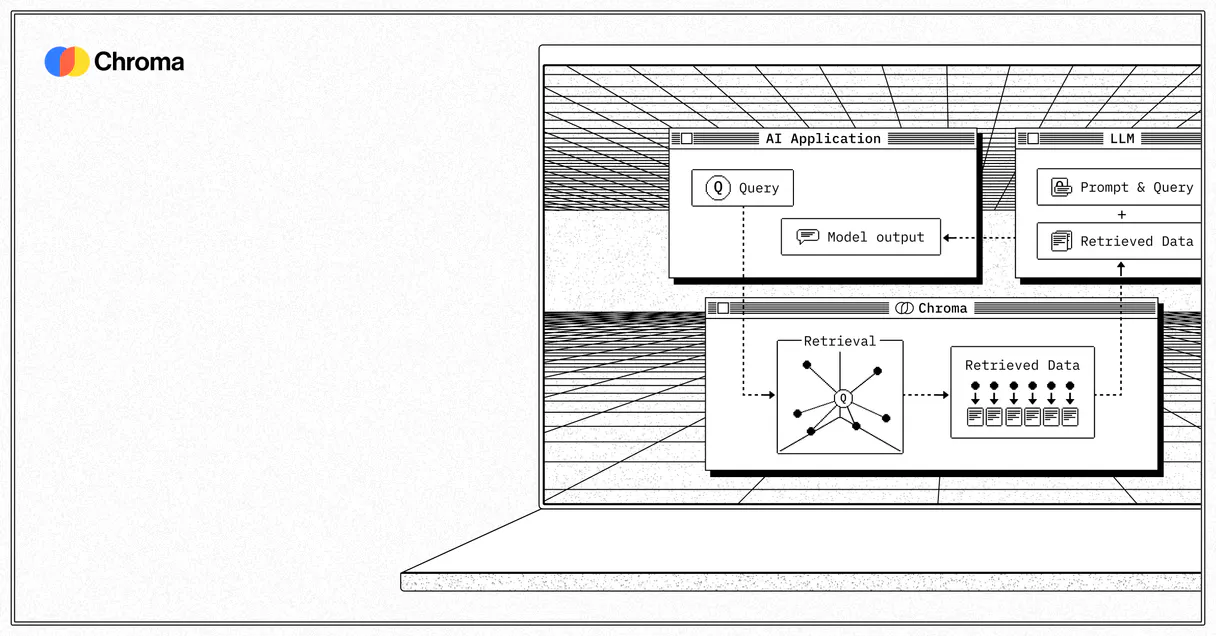
Chroma (Vector DB) MCP Server lets your AI client manage semantic data. You can list collections, run vector similarity searches, and audit document counts directly from conversation.

It connects your AI agent to your stored embeddings, letting you query, inspect, and manage your knowledge base without writing any Python scripts.

What your AI agents can do

Check heartbeat

Validates basic network connection and operational status against Chroma API nodes.

Count documents

Counts the total number of documents within a specific collection.

Get collection

Reads the specific settings and metadata defining a vector collection.

+ 4 more capabilities included
Find Semantic Context

Run query_embeddings to find the closest matching data points to a given input vector.

Audit Data Volume

Use count_documents to get the total number of records in a specified collection.

Inspect Schema Details

Run get_collection to read the specific configuration and metadata of a vector collection.

View Sample Documents

Use peek_documents to extract a limited, non-query sample of the data within a collection.

List Available Data Sets

Call list_collections to see every defined collection within your database instance.

Retrieve Specific Records

Use get_documents to pull specific documents and their semantic context from known arrays.

Supported MCP Clients

Claude Claude
ChatGPT ChatGPT
Cursor Cursor
Gemini Gemini
Windsurf Windsurf
VS Code VS Code
JetBrains JetBrains
Vercel Vercel
+ other MCP clients
Free for Subscribers

Waiting for input…

AI Agent

Chroma (Vector DB) MCP Server: 7 Tools for Vector Management

Use these tools to query embeddings, list collections, and audit the metadata of your vector database through your AI client.

check019d756f

check heartbeat

Validates basic network connection and operational status against Chroma API nodes.

count019d756f

count documents

Counts the total number of documents within a specific collection.

get019d756f

get collection

Reads the specific settings and metadata defining a vector collection.

get019d756f

get documents

Retrieves the actual content and semantic context for specific documents.

list019d756f

list collections

Lists all defined vector collections in the current database tenant.

peek019d756f

peek documents

Shows a small, representative preview of the data stored in a collection.

query019d756f

query embeddings

Performs a search using high-dimensional vector similarity to find relevant context.

Choose How to Get Started

Build a custom MCP for your own tools, or connect a ready-made integration from our catalog.

Build Your Own

Turn any API into an MCP. Import a spec, define Agent Skills, or deploy with MCPFusion.

  • Import from OpenAPI, Swagger, or YAML specs
  • Create Agent Skills with progressive disclosure
  • Deploy to edge with MCPFusion framework
  • Built in DLP, auth, and compliance on every call
  • Real time usage dashboard and cost metering
  • Publish to catalog or keep private
Start building

Make Your AI Do More

Start with Chroma (Vector DB), then connect any of our 4,700+ other servers whenever your AI needs more. One click, no limits.

  • Use this MCP plus 4,700+ others, all in one place
  • Add new capabilities to your AI anytime you want
  • Every connection is secured and compliant automatically
  • Track usage and costs across all your servers
  • Works with Claude, ChatGPT, Cursor, and more
  • New servers added to the catalog every week

What you can do with this MCP connector

Listen up. This Chroma Vector DB MCP Server lets your AI client manage all your semantic data. You can run operations—like querying embeddings or listing collections—just by talking to it. It hooks your agent right up to your stored embeddings, letting you query, inspect, and manage your whole knowledge base without needing to write a single line of Python.

To start, your AI client can use list_collections to see every defined collection in your database tenant. You can then run get_collection to read the specific settings and metadata for any given vector collection. Need to know how many records you've got? Use count_documents to get the total number of documents in a specific collection.

If you wanna just eyeball what's in there, peek_documents shows you a small, representative preview of the data. You can pull specific documents and their semantic context from known arrays using get_documents. When you're ready to find context, you run query_embeddings to search using high-dimensional vector similarity, finding the closest matching data points to whatever vector you feed it.

To make sure the whole thing is working right, your agent can run check_heartbeat to validate the network connection and operational status against the Chroma API nodes. It's straightforward: you use these tools to get everything you need from your vector store.

How Chroma (Vector DB) MCP Works

  1. 1 Subscribe to the server and input your Chroma URL and API Key.
  2. 2 Your AI client sends a natural language command requesting data (e.g., 'Count documents in the knowledge base').
  3. 3 The MCP Server executes the relevant tool (e.g., count_documents) and returns the structured result to your AI client.

The bottom line is you can talk to your vector database using natural language and get structured data back, all through your AI client.

Who Is Chroma (Vector DB) MCP For?

This server is for the data practitioners who spend too much time in the terminal. If you're a developer or engineer who needs to debug complex vector search logic, or an operations person who needs to audit data volume across multiple environments, this saves hours of manual scripting.

AI Developer

Tests and debugs vector search logic by asking the agent to run tools like query_embeddings instead of writing Python code.

Data Engineer

Audits collection volumes and checks metadata consistency across development, staging, and production environments using list_collections and count_documents.

Product Manager

Inspects the context that your AI agents are actually using by running peek_documents to view stored embeddings.

DevOps Engineer

Monitors instance connectivity and health by checking heartbeats with check_heartbeat.

What Changes When You Connect

  • Query Context: Instead of writing complex vector search code, just ask your agent to run query_embeddings and get relevant context instantly.
  • Audit Data Integrity: Use count_documents to verify the volume of records in a collection without needing to run complex SQL-like queries.
  • Debug Schema: Need to know what's inside a collection? get_collection provides the full configuration and metadata you need for debugging.
  • Inspect Live Data: Use peek_documents to sample a small set of documents. This lets you check the stored embeddings and data types before building a full query.
  • Track Instance Health: The check_heartbeat tool lets you monitor the server's connectivity and latency without logging into a dashboard.
  • Isolate Environments: list_collections lets you see every collection, helping you manage separate tenants and staging environments.

Real-World Use Cases

01

Debugging a Semantic Search Failure

The agent needs to find a specific record but fails. Instead of debugging Python code, the user prompts the agent to run list_collections to confirm the target collection exists. Then, they run get_collection to check the correct metadata, finally using query_embeddings to pinpoint the missing context.

02

Auditing Production Data Volume

A data engineer needs to know if the 'user-profiles' collection grew overnight. They tell their agent to run count_documents. The agent executes the tool, confirming the exact volume. This replaces manually querying the cloud dashboard and confirms data consistency across environments.

03

Quick Schema Check

A PM wants to see what kind of data is stored in the 'API-docs' collection. They ask the agent to peek_documents. The agent pulls the first few records, allowing the PM to verify the presence of necessary metadata fields (like 'source' or 'last_updated') without complex filtering.

04

Verifying Infrastructure Status

A DevOps team member needs a quick health check. They ask the agent, 'Is Chroma online?' The agent executes check_heartbeat, providing an immediate status and latency metric, confirming the instance is fully operational.

The Tradeoffs

Bulk Data Retrieval

Asking the agent to simply 'get all documents' without specifying a limit or collection. This attempts to load the entire database into memory, causing connection timeouts and service failure.

Always use get_documents with a specific collection name and, if possible, a query filter. If you just want a quick look, run peek_documents instead. This keeps the load minimal.

Guessing Collection Names

Trying to run query_embeddings when the collection name is wrong. The tool will fail, and the user wastes time checking documentation instead of the actual names.

First, run list_collections. This provides the definitive list of all available collections, ensuring your query targets the right data set.

Ignoring Instance Status

Starting a large data pipeline job right after a service outage. The job fails because the underlying connection is dead, and the user doesn't know why.

Always start by calling check_heartbeat. This confirms network availability and service health before running any resource-intensive tool like query_embeddings.

When It Fits, When It Doesn't

Use this server if you need to perform read-only operations on a structured vector database. You're working with embeddings, semantic search, or need to audit the volume/schema of your stored knowledge.

Don't use this if you need to write or update data (e.g., deleting records or changing collection settings). For those tasks, you'll need a dedicated write-enabled service. If your goal is just general data storage without vector capabilities, a simple key-value store might be sufficient. Use list_collections to confirm your database type and ensure you're using the right tools.

Independent Platform Disclaimer: Vinkius is an independent platform and is not affiliated with, endorsed by, sponsored by, verified by, or otherwise authorized by Chroma. All third-party trademarks, logos, and brand names are the property of their respective owners. Their use on this website is strictly for informational purposes to identify service compatibility and interoperability.

VINKIUS INFRASTRUCTURE

Cloud Hosted

Managed infra

V8 Isolated

Sandboxed per request

Zero-Trust Proxy

No stored credentials

DLP Enforced

Policy on every call

GDPR Compliant

EU data residency

Token Compression

~60% cost reduction

How we secure it →

Works with Claude, ChatGPT, Cursor, and more

The Model Context Protocol standardizes how applications expose capabilities to LLMs. Instead of operating in isolation, your AI gains direct access to external platforms, live data, and real-world actions through secure, standardized connections.

This server provides 7 capabilities that interface natively with Claude, ChatGPT, Cursor, and any MCP client. No middleware. No custom integration required.

Available Capabilities

check_heartbeat count_documents get_collection get_documents list_collections peek_documents query_embeddings

Checking data structure and content shouldn't require writing a dozen setup scripts.

Today, checking a vector database's structure means jumping through hoops: you run a `list_collections` command, then you have to manually check the metadata for each collection, and if you want to see the data, you run a separate, complex query just to get a sample. It's slow, it's brittle, and you always risk missing a critical field definition.

With this MCP server, you can ask your agent to run `list_collections` and then, if needed, `get_collection` to see the full metadata. To see the content, simply `peek_documents`. You get the full data picture in conversation, not across five separate terminal tabs.

Chroma (Vector DB) MCP Server: Querying embeddings and auditing data.

Manual data retrieval forces you to guess the right query parameters, often resulting in empty sets or partial results. You spend time adjusting filters when you should be analyzing the context.

Now, you tell your agent to `query_embeddings`. It handles the high-dimensional search and returns the exact context needed. It's a direct conversation about data, not a session of SQL debugging.

Common Questions About Chroma (Vector DB) MCP

How do I use the `list_collections` tool? +

You ask the agent to run list_collections. It will return a list of every collection name in your database, letting you know exactly what data sets are available.

What is the difference between `peek_documents` and `get_documents`? +

peek_documents pulls a small, non-query sample of the data, which is good for a quick look. get_documents retrieves specific, targeted records using known criteria.

Can `query_embeddings` handle multiple inputs? +

Yes. You feed it the input vectors and the relevant collection name, and it runs the similarity search to find the closest matching context.

How do I check if the Chroma server is online using `check_heartbeat`? +

Simply ask the agent to run check_heartbeat. It provides an immediate status and latency check, confirming the connection is active and operational.

What should I do if `count_documents` returns an unexpected volume? +

It means the collection structure is correct but the data source might be empty or misconfigured. Check the collection's metadata using get_collection to confirm the expected document count parameters.

How can I use `get_documents` to filter by specific document IDs? +

You specify the exact IDs in the tool's parameters. The tool retrieves the full document content and associated metadata for only those IDs you provide.

Is the `query_embeddings` tool secure for production environments? +

Yes, the tool operates directly against your specified, isolated Chroma instance. Data access is governed by the API keys and credentials you provide when connecting the server.

Can `list_collections` help me manage different environments like staging and production? +

Absolutely. By listing all available collections, you can identify and switch context between different tenants or databases, ensuring you audit the correct environment.

Can my agent perform semantic search across my collections? +

Yes. Provide the vector embedding array in JSON format, and your agent will return the closest document matches along with their distance metrics. It is the perfect way to test your RAG (Retrieval-Augmented Generation) logic without complex scripts.

How can I verify the health of my self-hosted Chroma instance? +

Simply ask your agent to check the heartbeat. The agent performs a nanosecond-level responsiveness test against your API nodes, confirming the physical database is active and reachable from the gateway.

I manage multiple tenants — how do I switch between them? +

You can define the tenant and database names during the setup phase. If you need to switch often, you can update the credentials in the dashboard. The agent uses these values for all collection and document operations to ensure strict isolation.

More in this category

You might also like

Built & Managed by Vinkius 30s setup 7 tools

We've already built the connector for Chroma (Vector DB). Just plug in your AI agents and start using Vinkius.

No hosting. No infrastructure. No complex setup.
All 7 tools are live and waiting. You're up and running in seconds.

Claude Claude
ChatGPT ChatGPT
Cursor Cursor
Gemini Gemini
Windsurf Windsurf
VS Code VS Code
JetBrains JetBrains
Vercel Vercel
+ other MCP clients

Vinkius gives your AI agents access to the full catalog of app connectors, all fully managed, secure, and enterprise-ready. One subscription, every tool you need.

Zero hosting required Full MCP catalog included Enterprise-grade security Auto-updated by Vinkius

Built, hosted, and secured by Vinkius. You just connect and go.