
ContentKing MCP. Get real-time SEO audit metrics, not just dashboard views.
 Gemini
 Works with every AI agent you already use
…and any MCP-compatible client









Just plug in your AI agents and start using Vinkius.
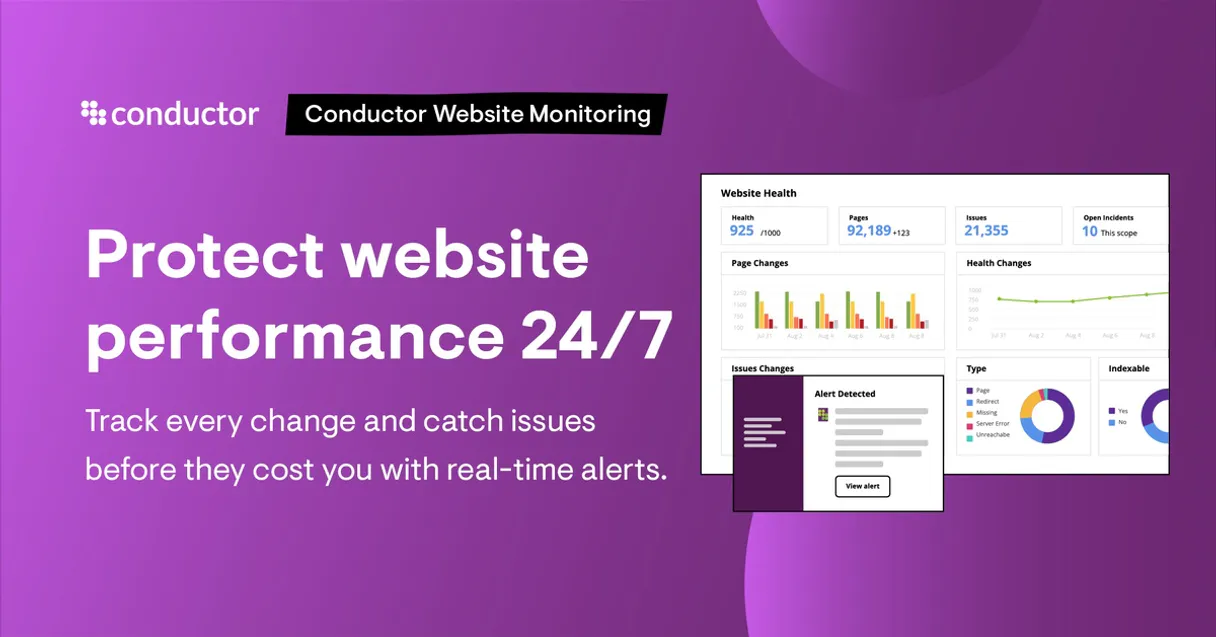
ContentKing fetches real-time SEO audit metrics and monitors website changes. Your AI agent uses ContentKing to run site audits, track technical SEO risks, and pull page-level health scores across an entire domain portfolio.
It lets you diagnose organic performance and validate infrastructure changes without opening a single dashboard.
What your AI agents can do
Get active alerts
Retrieves immediate monitoring alerts for a specific website.
Get issue details
Gets detailed information about a specific SEO issue found during an audit.
Get portfolio summary
Returns a high-level health summary score across all monitored websites.
Get a high-level health summary score across multiple websites you manage.
Retrieve the current health score and operational status for any single website.
Get a list of specific SEO issues found on a given website or page.
Check for immediate, critical monitoring alerts across your monitored domains.
Find specific monitored pages by searching using a URL keyword.
List all websites or pages currently being monitored by the system.
Ask AI about this MCP
Supported MCP Clients
Gemini Waiting for input…
ContentKing MCP Server: 10 Tools for SEO Auditing
These tools let your AI client audit website health, track specific SEO issues, and manage monitoring data across multiple domains.
019d757aget active alerts
Retrieves immediate monitoring alerts for a specific website.
019d757aget issue details
Gets detailed information about a specific SEO issue found during an audit.
019d757aget portfolio summary
Returns a high-level health summary score across all monitored websites.
019d757aget website health
Returns the current health score and operational status for a specific website.
019d757alist monitored pages
Retrieves monitoring data for pages within a specified website.
019d757alist seo issues
Lists all current SEO issues detected for a given website.
019d757alist websites
Lists every website currently tracked by ContentKing.
019d757anotify page update
Tells ContentKing the agent triggered a re-crawl for a specific page update.
019d757anotify sitemap update
Tells ContentKing that a website's sitemap was updated, triggering a check.
019d757asearch pages by url
Searches for monitored pages using a keyword found in the page's URL.
Choose How to Get Started
Build a custom MCP for your own tools, or connect a ready-made integration from our catalog.
Build Your Own
Turn any API into an MCP. Import a spec, define Agent Skills, or deploy with MCPFusion.
- Import from OpenAPI, Swagger, or YAML specs
- Create Agent Skills with progressive disclosure
- Deploy to edge with MCPFusion framework
- Built in DLP, auth, and compliance on every call
- Real time usage dashboard and cost metering
- Publish to catalog or keep private
Make Your AI Do More
Start with ContentKing, then connect any of our 4,700+ other servers whenever your AI needs more. One click, no limits.
- Use this MCP plus 4,700+ others, all in one place
- Add new capabilities to your AI anytime you want
- Every connection is secured and compliant automatically
- Track usage and costs across all your servers
- Works with Claude, ChatGPT, Cursor, and more
- New servers added to the catalog every week
What you can do with this MCP connector
ContentKing hooks your AI agent up to real-time SEO auditing. You'll run full site audits and track technical risks across every site you own. It lets you figure out your organic performance and check infrastructure changes without opening a damn dashboard.
Checking Portfolio Health
You've got a bunch of sites, right? Use get_portfolio_summary to get a high-level health score for every site you're tracking. You can also use list_websites to see every site ContentKing is watching. If you need to know what pages are being tracked, list_monitored_pages shows you that data for a specific site.
Auditing Specific Sites
Need to check one site? Use get_website_health to pull the current health score and operational status for that single domain. If you find a problem, list_seo_issues gives you a list of specific SEO problems for that site or page. To drill down on a specific problem, get_issue_details pulls all the details on that issue.
If you need to find a page by what's in the URL, search_pages_by_url searches all monitored pages using a keyword from the URL.
Monitoring and Alerts
Use get_active_alerts to check for immediate, critical monitoring alerts across your domains. You can also tell ContentKing that a site's sitemap was updated with notify_sitemap_update, or that you triggered a re-crawl for a page with notify_page_update.
Managing Data
If you want to see what pages are currently being tracked, list_monitored_pages gets that data. You can also just get a list of every website ContentKing is watching using list_websites.
How ContentKing MCP Works
- 1 Add the ContentKing integration and supply your API Key to your AI client.
- 2 Ask your agent to query specific domains or site metrics using natural language.
- 3 The agent executes the relevant tools, returning structured data like health scores and error lists.
The bottom line is, you tell your agent what you need—a score, a list of issues, or an alert—and it fetches the live data.
Who Is ContentKing MCP For?
The SEO Specialist who needs to diagnose organic performance without clicking through multiple dashboards. The Web Developer who must audit post-deployment changes to validate infrastructure health. The Digital Marketer who needs to pull comparative domain health data quickly for client reports.
Runs full site audits to find technical SEO risks, or uses the agent to list all current SEO issues across a portfolio.
Validates that infrastructure changes (like sitemap updates) did not break the site's technical SEO health.
Gathers comparative health data across multiple client domains to report on overall digital performance.
What Changes When You Connect
- See a high-level portfolio score instantly. Instead of checking 10 different sites manually, use
get_portfolio_summaryto get an average health score for all monitored properties in one go. - Pinpoint the exact problem. When an alert fires, don't just see 'Issue detected.' Use
get_issue_detailsto get the full context: why it's bad, where it lives, and how severe it is. - Validate infrastructure changes instantly. After a dev pushes code, use
notify_sitemap_updateto trigger a crawl and check if the deployment broke the site's SEO health usingget_website_health. - Run deep audits on demand. Need to know what broke? Run
list_seo_issuesto get a complete list of technical problems, or useget_active_alertsto filter only the critical warnings. - Track page changes automatically. If a page gets updated, use
notify_page_updateto tell ContentKing to re-crawl it, ensuring your metrics are always current. - Scope out your entire setup. Use
list_websitesto get a master list of every domain monitored, letting your agent know exactly what's in scope before you start querying.
Real-World Use Cases
The dev needs to validate a new sitemap.
A web developer deploys a new site structure and needs to confirm the SEO health didn't suffer. They ask the agent to run notify_sitemap_update and then check the site's status using get_website_health. The agent confirms the score and details any immediate technical regressions.
A marketer needs to compare client sites.
A digital marketing manager needs to compare the health of three different client sites. They ask the agent to call get_portfolio_summary to get a combined view, then use get_website_health on individual sites to pinpoint which one needs the most attention.
An SEO specialist tracks a breaking change.
An SEO specialist notices a sudden drop in performance. They ask the agent to run get_active_alerts to find critical issues, and then use list_seo_issues to get the full list of technical errors associated with that alert.
Finding a specific page's data.
A user knows a page exists but isn't sure of the exact URL. They ask the agent to use search_pages_by_url with a keyword. The agent returns the list of monitored pages that match the search criteria.
The Tradeoffs
Treating metrics as static data
Just reading a dashboard that shows the 'last successful crawl' date. This gives a false sense of security because the data could be hours old and doesn't reflect real-time changes.
→
Always check the system status first. Use get_active_alerts to see if there are any immediate warnings, and then use get_website_health to confirm the score is current and accurate.
Ignoring the portfolio view
Only checking the health of the main site, while ten other sites in the portfolio are failing silently. You miss the systemic risk because you didn't look beyond the primary domain.
→
Start by running get_portfolio_summary. This tool gives you a high-level view of all monitored sites, instantly surfacing performance dips across the whole portfolio.
Copy-pasting issue lists
Manually downloading a list of 50 SEO issues and trying to cross-reference them in a spreadsheet, which takes hours and is prone to human error.
→
Let the agent do the heavy lifting. Use list_seo_issues to get the structured data, and then feed that output directly into the agent for immediate analysis or reporting.
When It Fits, When It Doesn't
Use ContentKing if your primary bottleneck is synthesizing scattered SEO data across multiple domains. This tool excels when you need to move beyond simple reporting and trigger actions—like using notify_page_update when a page changes, or checking immediate risk with get_active_alerts. Don't use it if your main goal is simple data storage or retrieval (e.g., you just need to read a list of URLs). For that, a simple database or listing tool suffices. If you need to track historical trends over months, you'll need an external data warehouse. ContentKing focuses on real-time state and change detection.
Independent Platform Disclaimer: Vinkius is an independent platform and is not affiliated with, endorsed by, sponsored by, verified by, or otherwise authorized by ContentKing. All third-party trademarks, logos, and brand names are the property of their respective owners. Their use on this website is strictly for informational purposes to identify service compatibility and interoperability.
VINKIUS INFRASTRUCTURE
Cloud Hosted
Managed infra
V8 Isolated
Sandboxed per request
Zero-Trust Proxy
No stored credentials
DLP Enforced
Policy on every call
GDPR Compliant
EU data residency
Token Compression
~60% cost reduction
Works with Claude, ChatGPT, Cursor, and more
The Model Context Protocol standardizes how applications expose capabilities to LLMs. Instead of operating in isolation, your AI gains direct access to external platforms, live data, and real-world actions through secure, standardized connections.
This server provides 10 capabilities that interface natively with Claude, ChatGPT, Cursor, and any MCP client. No middleware. No custom integration required.
Available Capabilities
SEO monitoring shouldn't require jumping between five different tabs.
Today, finding out if a site is healthy means logging into the SEO tool, checking the main health dashboard, then clicking into the 'Errors' tab to see what's wrong, and finally switching to the 'Alerts' section just to see if anything was fixed. It's a click-heavy, manual process that takes time and makes it easy to miss critical issues.
With ContentKing, you tell your agent to check the site's status. It runs the audit, aggregates the score, and surfaces every alert in one response. You get the score and a prioritized list of problems without opening a single browser tab.
ContentKing MCP Server: Get the full picture of site health.
You eliminate the need to manually run multiple checks: you don't have to run a sitemap check, then manually check for alerts, and then manually pull the overall score. You let your agent run `get_portfolio_summary` and it gives you the macro view. Then, you drill down with `get_website_health` for the specifics. The manual, multi-step audit process is gone.
The difference is control. You move from reacting to a single, isolated alert to understanding the systemic health of your entire digital footprint.
Common Questions About ContentKing MCP
How do I use the ContentKing MCP Server to check a site's health? +
Use the get_website_health tool. This tool returns the current health score and status for a specific website. It's the best place to start when you need a quick check on one domain.
What is the difference between `get_active_alerts` and `list_seo_issues`? +
get_active_alerts finds critical, immediate warnings (like 'Title tag missing'). list_seo_issues gives a detailed, comprehensive list of all known technical SEO problems on the site.
Can ContentKing check multiple sites at once? +
Yes. Use get_portfolio_summary to get a combined health score across all your monitored websites. This is much faster than checking them one by one.
Does ContentKing monitor changes automatically? +
Yes. You can use notify_page_update or notify_sitemap_update to trigger a re-crawl, ensuring your metrics reflect the latest changes.
How do I find a page if I only know part of the URL? +
Use the search_pages_by_url tool. This searches all monitored pages and returns results based on a keyword you provide in the URL.
How do I use `list_websites` to manage my monitored domains? +
It lists all websites currently tracked in ContentKing. This is useful for quickly verifying which domains the system is monitoring, helping you keep track of your entire portfolio.
If I update a page, how do I use `notify_page_update`? +
You call notify_page_update and pass the relevant URL. This immediately tells ContentKing to re-crawl that specific page, ensuring your health data is fresh right away.
What kind of data does `get_portfolio_summary` provide? +
It gives a high-level health summary across every website you manage. This single tool lets you see an average score and identify which sites need attention before digging into the details.
How do I get a ContentKing API Key? +
Log in to ContentKing, go to Account Settings > API, and click Create API Key. Copy the key and paste it into the field below.
Can the agent make changes to my SEO settings? +
No. The integration operates in read-only mode. It reads metrics, lists alerts, and retrieves data for analysis, but cannot modify any SEO settings or configurations.
What types of metrics can I check? +
You can fetch domain health scores, tracked URL counts, active alerts by severity, page load times, and summaries of issues found during the latest crawls.
Use it with your favorite AI tools
Connect this server to Cursor, Claude, VS Code, and more.
More in this category

GDACS
Monitor global disaster alerts — earthquakes, cyclones, floods, volcanoes, wildfires and droughts with real-time impact estimates.

Bing Search
Power your AI agent with global web data via Bing Search — query web pages, images, news, videos, and local businesses in real-time.

Dades Obertes Catalunya
Access Catalonia's Open Data portal — search catalogs and query datasets using SoQL to extract public information directly.
You might also like
Kiwify
Sell digital products and online courses in the Brazilian market with a platform that handles payments, delivery, and affiliates.

Civo (Cloud-native Kubernetes Cloud Provider API)
Manage Civo cloud infrastructure — provision Kubernetes clusters, control compute instances, and monitor usage directly via AI.

Marqo AI (Vector Search & Embeddings)
Manage semantic search via Marqo — execute tensor queries, index JSON documents, and audit vector indices.