
Endear Retail CRM MCP. Get customer history and notes instantly, right in your chat.
 Gemini
 Works with every AI agent you already use
…and any MCP-compatible client









Just plug in your AI agents and start using Vinkius.
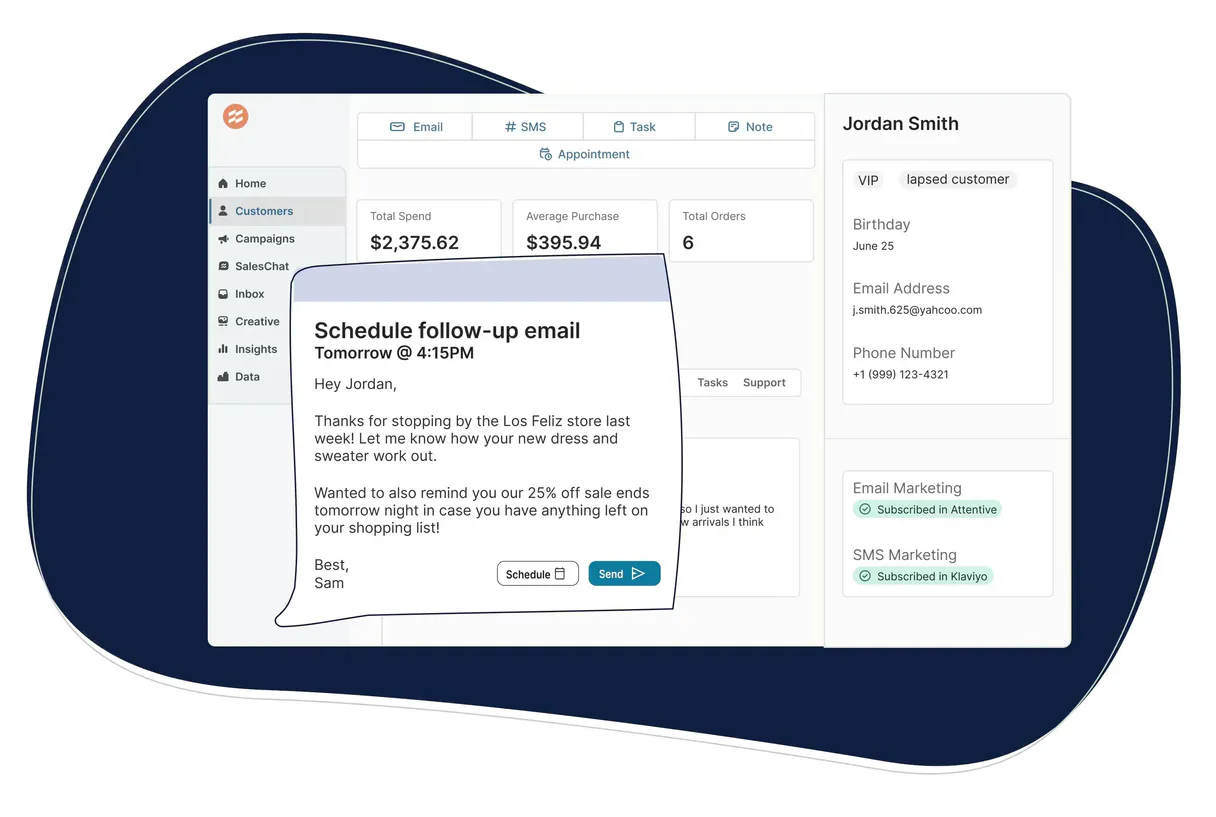
Endear Retail CRM: Connect your AI agent to Endear to manage customer profiles, track orders, and monitor clienteling notes. Your AI client can list all customers, retrieve full purchase histories, and access detailed notes for personalized service, all through natural language conversation.
What your AI agents can do
Get customer profile
Gets a specific customer's detailed profile and purchase history.
Get endear account metadata
Retrieves metadata and settings for your Endear account.
List clienteling tasks
Lists all clienteling and follow-up tasks assigned to the team.
Retrieve a customer's full profile, spending history, and contact information using get_customer_profile.
Find specific customers by searching their name or email using search_customers_by_name_or_email.
List a customer's complete order history, including order numbers and fulfillment statuses, with list_customer_purchase_history.
Access all recorded clienteling notes and interactions for a customer using list_customer_clienteling_notes.
View and list all pending clienteling and follow-up tasks for the sales team with list_clienteling_tasks.
Get a high-level summary of customer volume, order activity, and product catalog status with quick_retail_performance_audit.
Ask AI about this MCP
Supported MCP Clients
Gemini Waiting for input…
Endear Retail CRM MCP Server: 10 Tools for Retail Operations
These tools let your AI client manage customer profiles, pull order history, and track clienteling notes directly from Endear CRM.
019d758fget customer profile
Gets a specific customer's detailed profile and purchase history.
019d758fget endear account metadata
Retrieves metadata and settings for your Endear account.
019d758flist clienteling tasks
Lists all clienteling and follow-up tasks assigned to the team.
019d758flist customer clienteling notes
Lists all notes and interactions recorded for a specific customer.
019d758flist customer purchase history
Lists all orders and purchase history for a specific customer.
019d758flist retail customers
Lists every customer currently in your Endear CRM.
019d758flist retail products
Lists all products available in your retail catalog.
019d758flist retail team members
Lists all team members and sales associates in the organization.
019d758fquick retail performance audit
Retrieves a high-level summary of customer volume, orders, and products.
019d758fsearch customers by name or email
Searches for customers using a name or email keyword.
Choose How to Get Started
Build a custom MCP for your own tools, or connect a ready-made integration from our catalog.
Build Your Own
Turn any API into an MCP. Import a spec, define Agent Skills, or deploy with MCPFusion.
- Import from OpenAPI, Swagger, or YAML specs
- Create Agent Skills with progressive disclosure
- Deploy to edge with MCPFusion framework
- Built in DLP, auth, and compliance on every call
- Real time usage dashboard and cost metering
- Publish to catalog or keep private
Make Your AI Do More
Start with Endear Retail CRM, then connect any of our 4,700+ other servers whenever your AI needs more. One click, no limits.
- Use this MCP plus 4,700+ others, all in one place
- Add new capabilities to your AI anytime you want
- Every connection is secured and compliant automatically
- Track usage and costs across all your servers
- Works with Claude, ChatGPT, Cursor, and more
- New servers added to the catalog every week
What you can do with this MCP connector
When you connect your AI agent to Endear, you get direct access to manage customer data and track orders. Your agent can list every customer in the CRM, pull up a specific customer's full profile and purchase history, and access all recorded clienteling notes. You'll also find ways to search for customers using a name or email and to view all products in the retail catalog.
Your agent can list all team members and sales associates in the organization. It can list all clienteling and follow-up tasks assigned to the team. You can check the high-level retail performance by getting a summary of customer volume, orders, and products.
To get a customer's full profile, including their purchase history and contact info, use get_customer_profile. To find a specific person, run search_customers_by_name_or_email with a name or email keyword. To see a customer's complete order history, including order numbers and fulfillment statuses, run list_customer_purchase_history. To access all recorded clienteling notes and interactions for a customer, use list_customer_clienteling_notes.
For the sales team, your agent can list all pending clienteling and follow-up tasks using list_clienteling_tasks. You can get a quick snapshot of the whole operation with quick_retail_performance_audit by checking customer volume, order activity, and product catalog status.
If you need to know everything about your Endear setup, your agent can pull the account metadata and settings using get_endear_account_metadata. You can also list all retail products using list_retail_products and all customers using list_retail_customers.
How Endear Retail CRM MCP Works
- 1 Connect the Endear integration to your AI client and authorize it with your Endear API Key.
- 2 Your AI client executes a command (e.g., 'What did Sarah spend last year?').
- 3 The MCP Server runs the necessary tools (like
list_customer_purchase_history) and sends the structured data back to your AI client for a natural language response.
The bottom line is, your AI client speaks to the Endear system directly, getting data and insights without you leaving the chat window.
Who Is Endear Retail CRM MCP For?
Retail Managers and Sales Associates who need a single source of truth on customer data. This is for the manager tired of juggling spreadsheets and multiple dashboards. It’s for the associate who needs to know a customer's history right now to make the sale, without having to interrupt their flow to run a manual report.
Checks total customer spending and monitors team task completion to ensure follow-ups happen.
Researches customer notes and past orders via chat to personalize service and suggest products.
Pulls high-level summaries of order volume or product catalog status to audit store health.
What Changes When You Connect
- Know the customer before they talk to you. Use
get_customer_profileto pull a customer's full history and contact details instantly. No more guessing what they bought last time. - Track everything said about a customer.
list_customer_clienteling_noteslets your agent pull up every interaction note and task, giving associates instant context for better service. - See exactly what they bought and when. Running
list_customer_purchase_historygives immediate access to order numbers, amounts, and fulfillment status. - Run a quick store health check. The
quick_retail_performance_audittool gives you a high-level overview of customer activity and order volume without running a separate report. - Manage the team's follow-up. Use
list_clienteling_tasksto see all pending tasks and ensure no follow-up—like a returned item—gets missed. - Find the right person fast.
search_customers_by_name_or_emaillets you locate a specific customer by name or email without scrolling through a list of thousands.
Real-World Use Cases
The associate needs to sell a high-end item.
A customer mentions a specific need. The associate asks their agent to run get_customer_profile and list_customer_purchase_history. The agent pulls up the customer's past high-ticket items and total spend. The associate can then reference those exact details to suggest the next perfect item, closing the sale.
The store manager needs to audit team performance.
The manager asks the agent to run list_clienteling_tasks and quick_retail_performance_audit. The agent instantly provides a summary of open tasks and current sales volume. The manager gets a full picture of both operational health and team follow-up status.
A customer asks about a specific past order.
The customer mentions an order number, but the associate needs confirmation. They run list_customer_purchase_history for that customer. The agent verifies the order number, checks the amount, and confirms the fulfillment status in real time.
Onboarding a new employee to the sales floor.
A new associate needs to know the background on a top client. They use the agent to search_customers_by_name_or_email and then list_customer_clienteling_notes to get the full context of the client relationship.
The Tradeoffs
Treating the chat as a simple data dump
Asking the agent to 'give me all the data' results in a giant, unformatted JSON block that is impossible to read or act on in a conversation. The data is there, but the insight is lost.
→
Ask the agent a specific, human-centric question. For example: 'Based on John Doe's profile and last three orders, what should I mention to encourage a repeat purchase?' This forces the agent to synthesize the data from get_customer_profile and list_customer_purchase_history into actionable talking points.
Ignoring the team's collective effort
Focusing only on the customer's transaction history misses the personal touch. The sales associate forgets to check the notes, leaving the customer feeling like just another account number.
→
Always cross-reference the transaction data with list_customer_clienteling_notes. The notes show why the customer bought something, not just that they bought it. This builds loyalty.
Searching without context
Just running list_retail_customers gives you a massive list. You're forced to manually scroll and find the right person, defeating the purpose of the AI assistant.
→
Use search_customers_by_name_or_email first. This narrows the list down immediately, letting you drill down to the specific customer ID you need before running other tools.
When It Fits, When It Doesn't
Use this if you need to turn scattered data points into immediate, conversational insights. You need to know why a customer is buying, not just that they bought it. For example, if you need to check if a customer is high-value, use get_customer_profile first. If you need to know if the team needs to follow up on a specific sale, check list_clienteling_tasks. Don't use this if you just need a static report—those are better handled by native BI tools. If you just need a list of all available products, list_retail_products works fine. But if you need to combine that product list with the customer's history, this MCP Server is essential.
Independent Platform Disclaimer: Vinkius is an independent platform and is not affiliated with, endorsed by, sponsored by, verified by, or otherwise authorized by Endear Retail CRM. All third-party trademarks, logos, and brand names are the property of their respective owners. Their use on this website is strictly for informational purposes to identify service compatibility and interoperability.
VINKIUS INFRASTRUCTURE
Cloud Hosted
Managed infra
V8 Isolated
Sandboxed per request
Zero-Trust Proxy
No stored credentials
DLP Enforced
Policy on every call
GDPR Compliant
EU data residency
Token Compression
~60% cost reduction
Works with Claude, ChatGPT, Cursor, and more
The Model Context Protocol standardizes how applications expose capabilities to LLMs. Instead of operating in isolation, your AI gains direct access to external platforms, live data, and real-world actions through secure, standardized connections.
This server provides 10 capabilities that interface natively with Claude, ChatGPT, Cursor, and any MCP client. No middleware. No custom integration required.
Available Capabilities
Manually compiling customer intelligence is a massive time sink.
Right now, a sales associate has to jump between the CRM dashboard, the POS system, and the internal task board. They pull up a profile, click to see orders, then open a separate tab to check notes. This process takes minutes and introduces a high chance of outdated information or missed context.
With this MCP Server, your agent handles the jumps. You ask, 'What's the story with this customer?' and the agent pulls the profile, the purchase history, and the last notes into one single, immediate answer. You get the full customer story in seconds.
Endear Retail CRM MCP Server: Get the full customer story.
Instead of manually running separate queries for every piece of data—like running `list_customer_purchase_history` and then manually cross-referencing it with `list_customer_clienteling_notes`—your AI client orchestrates it. It pulls the orders and the notes simultaneously, giving you a single, unified context.
The difference is workflow. You stop retrieving data and start having conversations. It's instant, and it's conversational.
Common Questions About Endear Retail CRM MCP
How does the `get_customer_profile` tool work? +
It retrieves a specific customer's full profile, including contact details and total spending. This tool is your starting point for any customer interaction.
Can I use `list_customer_purchase_history` to check multiple customers? +
No, this tool requires a specific customer ID. It only retrieves the order history for one individual at a time.
Is `list_customer_clienteling_notes` the same as the profile? +
No. The profile holds static data (address, email). The notes tool tracks the interactions—what people talked about and what tasks were assigned.
What if I want to know the overall store performance? +
Use the quick_retail_performance_audit tool. It provides a high-level summary of customer volume, order activity, and product status without needing to drill down into a specific account.
How do I find a customer by name using `search_customers_by_name_or_email`? +
You provide a name or email keyword. The tool returns a list of matching customer IDs, allowing you to select the right person for further actions.
What should I use to see all available team members? (Using `list_retail_team_members`) +
The list_retail_team_members tool lists every employee in your Endear account. This lets you quickly verify which sales associates are active and what their roles are for team coordination.
Can I get a full picture of a customer's spending habits using `list_customer_purchase_history`? +
Yes, list_customer_purchase_history provides a chronological record of all orders. You can analyze the purchase dates, amounts, and fulfillment statuses to track spending patterns over time.
How do I check the overall health of the store using `quick_retail_performance_audit`? +
The quick_retail_performance_audit tool delivers a summary of customer volume, order activity, and product data. It gives you a high-level snapshot of your retail operations instantly.
How do I get an Endear API Key? +
Log in to your Endear dashboard, navigate to Settings > API, and you can generate or retrieve your unique API Key from there. API access is typically available on professional and enterprise plans.
Can the agent send messages to customers? +
This integration currently focuses on listing and auditing customers, notes, and orders. Sending outbound SMS or emails via Endear should be managed through the Endear mobile app or dashboard clienteling interface.
Does the integration show real-time stock levels? +
You can retrieve product metadata using the list_retail_products tool. While it shows current product availability, detailed granular inventory across all locations should be confirmed within the Endear inventory module.
Use it with your favorite AI tools
Connect this server to Cursor, Claude, VS Code, and more.
More in this category

NCR Voyix
Manage commerce and retail operations via NCR Voyix — track orders, sites, products, and inventory directly from your AI agent.

Salesbricks
Integrate Salesbricks seamlessly into your AI. Quickly manage B2B customer billing, track active subscriptions, list available software plans, and audit invoices natively.
Toast
Manage restaurant orders, menus, employees, labor, tables, and payments for your Toast POS through natural conversation.
You might also like

Bing Search
Empower your AI agent with real-time web, image, and news search via Bing.

HeyGen
Automate AI video generation via HeyGen — manage avatars, videos, and templates directly from any AI agent.
IBGE Economia — CNAE Activities
Navigate Brazil's entire economic taxonomy: 1,332 CNAE activity codes across 21 sectors, 87 divisions, 285 groups — the definitive resource for business classification, compliance, and market analysis.