
EOSDA Agriculture MCP. Calculate crop health and monitor soil moisture from satellite data.
 Gemini
 Works with every AI agent you already use
…and any MCP-compatible client









Just plug in your AI agents and start using Vinkius.
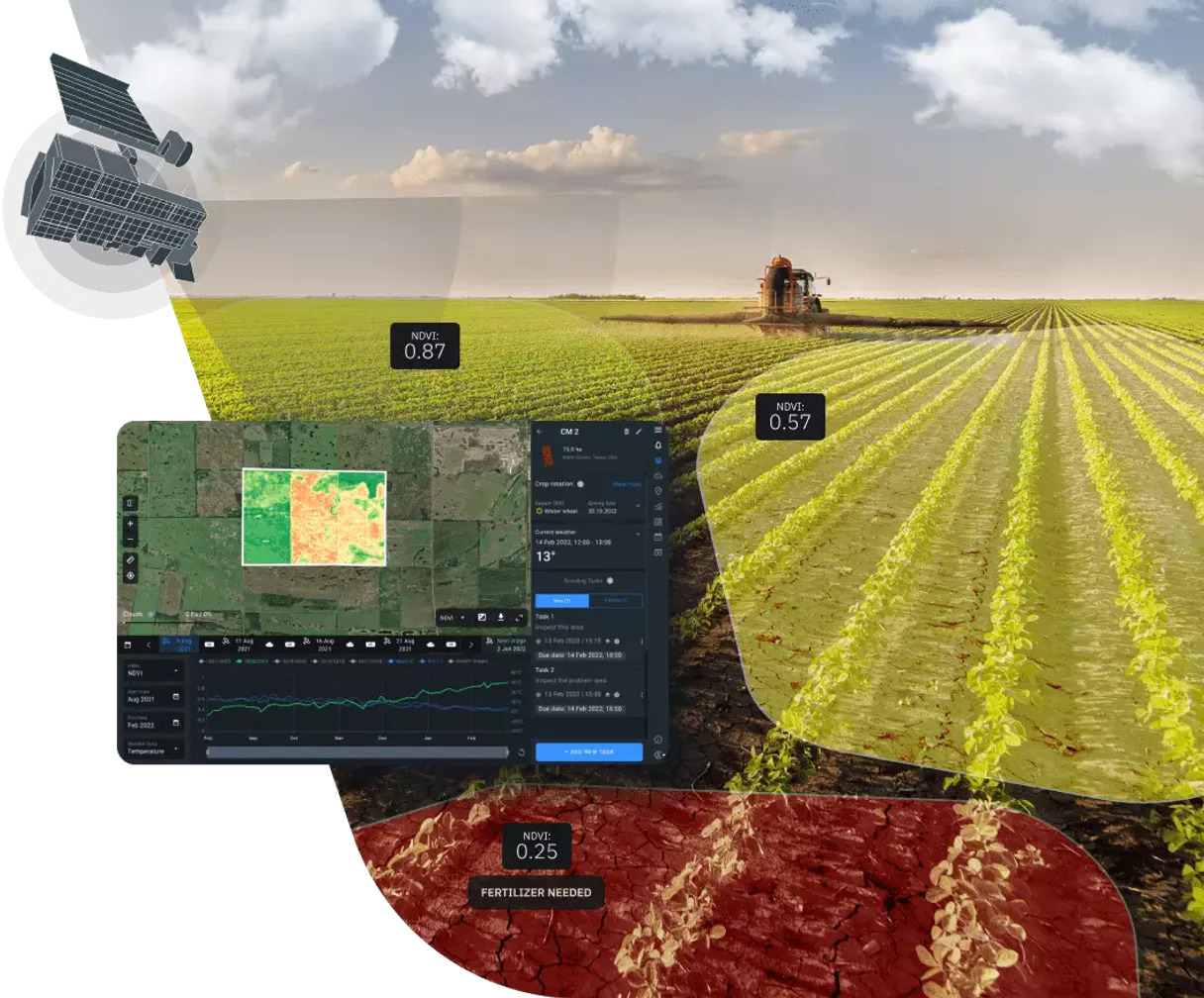
EOSDA Agriculture Satellite Data MCP Server gives your agent instant access to global satellite imagery. It searches massive datasets (Sentinel, Landsat) by date and location, calculates vegetation indices (NDVI, EVI), and monitors soil moisture.
Use it to audit crop health, track land use changes, or optimize fertilizer application without leaving your chat interface.
What your AI agents can do
Create vegetation task
Creates a vegetation index calculation task (NDVI, EVI, etc.) for a specific area of interest.
Get available datasets
Retrieves a list of all available satellite datasets for use in searching imagery.
Get available indices
Lists all valid vegetation indices you can calculate for a task.
The agent finds available satellite scenes from multiple datasets (Sentinel-2, Landsat 8/9, MODIS) across a specified date range and area of interest.
The agent initiates processing tasks to compute specific indices like NDVI, EVI, and MSAVI for defined areas.
The agent fetches the final data, including download URLs and status, after a vegetation index calculation task is complete.
The agent lists all available satellite datasets, including their IDs and technical specifications for use in other tools.
The agent provides a list of valid vegetation indices, guiding you on which metrics (e.g., NDVI, EVI) to use for analysis.
Ask AI about this MCP
Supported MCP Clients
Gemini Waiting for input…
EOSDA Agriculture Satellite Data: 6 Tools for Geospatial Analysis
Use these tools to search, compare, and process massive satellite datasets to calculate vegetation indices and monitor crop health.
019d8434create vegetation task
Creates a vegetation index calculation task (NDVI, EVI, etc.) for a specific area of interest.
019d8434get available datasets
Retrieves a list of all available satellite datasets for use in searching imagery.
019d8434get available indices
Lists all valid vegetation indices you can calculate for a task.
019d8434get task result
Retrieves the final processed vegetation index data, download links, and status of a calculation task.
019d8434search dataset
Searches for satellite imagery from a single, specified dataset within a date range and area of interest.
019d8434search multi dataset
Searches for satellite imagery across multiple specified datasets (e.g., Sentinel-2 and Landsat 8) within a date range.
Choose How to Get Started
Build a custom MCP for your own tools, or connect a ready-made integration from our catalog.
Build Your Own
Turn any API into an MCP. Import a spec, define Agent Skills, or deploy with MCPFusion.
- Import from OpenAPI, Swagger, or YAML specs
- Create Agent Skills with progressive disclosure
- Deploy to edge with MCPFusion framework
- Built in DLP, auth, and compliance on every call
- Real time usage dashboard and cost metering
- Publish to catalog or keep private
Make Your AI Do More
Start with EOSDA Agriculture Satellite Data, then connect any of our 4,700+ other servers whenever your AI needs more. One click, no limits.
- Use this MCP plus 4,700+ others, all in one place
- Add new capabilities to your AI anytime you want
- Every connection is secured and compliant automatically
- Track usage and costs across all your servers
- Works with Claude, ChatGPT, Cursor, and more
- New servers added to the catalog every week
What you can do with this MCP connector
Your agent gives you instant access to global satellite imagery using the EOSDA Agriculture Satellite Data MCP Server. You can use it to check crop health, track land use changes, or optimize fertilizer application without ever leaving your chat interface. It searches huge datasets—like Sentinel and Landsat—by date and location, calculates vegetation indices (NDVI, EVI), and monitors soil moisture.
search_multi_dataset lets your agent find satellite images from multiple sources, like Sentinel-2 and Landsat 8/9, across a date range and specific area. search_dataset narrows that down, letting your agent look for images from one single dataset within a date range and area of interest. get_available_datasets shows you every dataset available, listing their IDs and technical specs so you know what you're working with. get_available_indices tells you which vegetation indices, like NDVI or EVI, you can calculate. create_vegetation_task starts the processing job, letting your agent calculate a specific vegetation index for an area you define. get_task_result retrieves the final processed data, including download links and the status of the calculation job.
How EOSDA Agriculture MCP Works
- 1 First, ask the agent to list available datasets using
get_available_datasetsto know what data exists. - 2 Next, tell the agent to search for images using
search_multi_dataset(orsearch_dataset) with the dates and location you need. - 3 Finally, ask the agent to run the calculation using
create_vegetation_taskand wait for the result withget_task_result.
The bottom line is that you tell your agent the goal, and it executes the multi-step data search, processing, and retrieval automatically.
Who Is EOSDA Agriculture MCP For?
Agronomists and Farm Managers need this when they can't physically visit every field. Ag-Tech Developers use it to build custom data pipelines. Sustainability Officers rely on it to track land use changes over huge areas. Researchers use it to access historical satellite data for academic studies.
Uses the server to monitor field performance and calculate crop health indices (like NDVI) without needing to visit the site.
Determines where fertilizer is needed most by analyzing soil moisture trends and identifying stress areas across large properties.
Tracks changes in land use and vegetation health across entire geographic regions over time.
What Changes When You Connect
- Identify stress zones fast. By running
create_vegetation_taskwith an area of interest, your agent flags specific spots needing attention, saving manual site visits. - Handle massive datasets. Use
search_multi_datasetto pull imagery from multiple satellites (Sentinel, Landsat) in one call, giving you a broader view than single-source tools. - Never guess the data type. Run
get_available_datasetsfirst. This ensures your subsequent calls tosearch_datasetorsearch_multi_datasetuse valid, current data IDs. - Process indices reliably. If you aren't sure what index to use, run
get_available_indices. This list tells you exactly which metrics (NDVI, EVI) are available for calculation. - Close the loop. After
create_vegetation_taskstarts the job, useget_task_resultto retrieve the final, processed data and download links. - Focus on the area that matters. Use GeoJSON input to restrict searches and calculations to precise boundaries, ignoring global noise.
Real-World Use Cases
Auditing a multi-crop farm's health
A farm manager needs to check the health of three different fields. They ask their agent to use search_multi_dataset for the last month, then instruct the agent to run create_vegetation_task for NDVI across the entire GeoJSON boundary. The agent returns the results using get_task_result, allowing the manager to see which specific section of the farm is struggling.
Tracking deforestation over time
A sustainability officer needs historical data. They use get_available_datasets to confirm the best satellite sources, then use search_dataset to pull images for a specific region across a five-year date range. This provides the raw inputs needed to track land-use change.
Optimizing fertilizer application
An agronomist wants to save money on fertilizer. They ask the agent to calculate the EVI index for the current season's crop. The agent uses create_vegetation_task and monitors the output. The resulting data identifies exactly where the biomass is low, guiding precise application.
Comparing different satellite views
A researcher wants to compare the data quality of Sentinel-2 vs. Landsat 8. They use search_multi_dataset to pull scenes from both in the same timeframe. The agent then lets them analyze the differing cloud cover percentages and resolutions side-by-side.
The Tradeoffs
Assuming data exists
Just asking the agent to 'Find the NDVI for my farm last week.' This fails because the agent doesn't know what dataset or index to use first.
→
First, run get_available_datasets to confirm the source. Then, use search_multi_dataset to get the images, and finally, pass the results to create_vegetation_task.
Mixing search tools
Trying to use search_dataset and search_multi_dataset interchangeably without checking the required inputs. This leads to invalid calls and no results.
→
Use search_dataset when you only need one source (e.g., Landsat 8). Use search_multi_dataset when you need to compare data from two or more sources (e.g., Sentinel-2 and MODIS).
Skipping the task status check
Calling create_vegetation_task and assuming the result is ready immediately. The task runs in the background, and the call fails to deliver data.
→
After create_vegetation_task returns a task ID, you must use get_task_result repeatedly until the status is 'complete' and you get the download URLs.
When It Fits, When It Doesn't
Use this server if your goal is calculating derived metrics (like NDVI or soil moisture) from large, historical, or multi-source satellite images. You need to analyze what the crop is doing, not just where it is. Don't use this if you just need simple geographic lookups or current weather reports; those require different data sources. If you only need to search for a single, known dataset, search_dataset works. But if you need to compare or build a full analysis, you need the multi-tool approach: get_available_datasets → search_multi_dataset → create_vegetation_task.
Independent Platform Disclaimer: Vinkius is an independent platform and is not affiliated with, endorsed by, sponsored by, verified by, or otherwise authorized by EOSDA. All third-party trademarks, logos, and brand names are the property of their respective owners. Their use on this website is strictly for informational purposes to identify service compatibility and interoperability.
VINKIUS INFRASTRUCTURE
Cloud Hosted
Managed infra
V8 Isolated
Sandboxed per request
Zero-Trust Proxy
No stored credentials
DLP Enforced
Policy on every call
GDPR Compliant
EU data residency
Token Compression
~60% cost reduction
Works with Claude, ChatGPT, Cursor, and more
The Model Context Protocol standardizes how applications expose capabilities to LLMs. Instead of operating in isolation, your AI gains direct access to external platforms, live data, and real-world actions through secure, standardized connections.
This server provides 6 capabilities that interface natively with Claude, ChatGPT, Cursor, and any MCP client. No middleware. No custom integration required.
Available Capabilities
Manually finding usable satellite imagery is a nightmare.
Today, getting good data means jumping between vendor dashboards. You check the date range on one site, find the dataset ID on another, and then manually calculate the appropriate index—all before you can even look at the map. If the cloud cover is high, you have to start the whole process over.
With this MCP server, you tell your agent the goal. It automatically handles the search across multiple datasets, filters by cloud cover, and prepares the data for analysis. You get the final insights, not a list of raw files.
EOSDA Agriculture Satellite Data MCP Server: Calculate crop health from satellite imagery.
Before, calculating an index like NDVI required a specific script, manual parameter setting, and waiting for a batch job to finish. You were locked into that process.
Now, your agent runs the entire pipeline—from searching the source data to calculating the index—in natural conversation. It's a complete, end-to-end analysis.
Common Questions About EOSDA Agriculture MCP
How do I use the `search_dataset` tool with EOSDA Agriculture Satellite Data? +
You pass the specific dataset ID, the desired date range, and the area of interest (AOI). The tool returns scene IDs, cloud percentages, and download links for that single source.
What is the difference between `search_dataset` and `search_multi_dataset`? +
search_dataset looks at one specific data source at a time. search_multi_dataset pulls scenes from multiple sources simultaneously, which is necessary for comprehensive comparisons.
Does `create_vegetation_task` handle the geometry? +
Yes. You provide a GeoJSON area of interest to the create_vegetation_task tool, ensuring the index calculation is localized only to your specified farm boundaries.
Where do I find the list of indices for `create_vegetation_task`? +
Use the get_available_indices tool. This function provides the exact list of metrics (like NDVI, EVI) that the server can calculate.
After running `create_vegetation_task`, how do I get the final result? +
The task runs asynchronously. You must use the get_task_result tool, passing the task ID returned by create_vegetation_task, to check the status and retrieve the data.
How do I check which datasets are available using `get_available_datasets`? +
Run get_available_datasets to get a list of all supported dataset IDs. These IDs are required inputs for both search_dataset and create_vegetation_task.
What happens if I use `create_vegetation_task` with an invalid Area of Interest (AOI)? +
The system returns an error detailing the invalid geometry format or coordinates. You must ensure the AOI follows standard GeoJSON or WKT specifications.
Can I search for imagery across multiple datasets using `search_multi_dataset`? +
Yes, search_multi_dataset allows you to combine multiple datasets (e.g., Sentinel-2 and Landsat 8) into a single search query. This returns a comprehensive list of scenes from all specified sources.
What satellites are covered by this integration? +
The server provides access to Sentinel-2 (high resolution), Sentinel-1 (radar), Landsat 8 and 9 (historical and medium res), and MODIS (high temporal resolution).
How do I calculate the NDVI for a specific field? +
Use the create_vegetation_task tool. You need to provide the index_type as 'NDVI', the dataset_id (e.g., 'sentinel2'), and the aoi (Area of Interest) coordinates in GeoJSON format.
Is the area of interest (AOI) required for searches? +
For general searches, it is optional but highly recommended to narrow down results. For index calculation tasks (create_vegetation_task), the AOI is mandatory to define the target area.
Use it with your favorite AI tools
Connect this server to Cursor, Claude, VS Code, and more.
More in this category
Nord Pool
Access European electricity market data via Nord Pool — query day-ahead prices, auction volumes, cross-border flows, and consumption forecasts from any AI agent.

openFDA
Access the powerful openFDA databases for drug adverse events, food recalls, and medical device safety reports globally.
World Bank Full Access
The ultimate Mega-Server integration: A massive 30-tool suite granting your AI zero-auth access to the entire World Bank catalog (29,506 indicators) across all 21 specific categories.
You might also like

Marqo AI (Vector Search & Embeddings)
Manage semantic search via Marqo — execute tensor queries, index JSON documents, and audit vector indices.

Language Detector Engine
Detect the language of any text local using exact n-gram analysis. Supports 400+ languages. When AI guesses wrong on short or mixed text, this engine proves it.

Quotable API
Access thousands of quotes — audit authors and tags via AI.