
GovCon API MCP. Audit contracts and map agency spending instantly.
 Gemini
 Works with every AI agent you already use
…and any MCP-compatible client









Just plug in your AI agents and start using Vinkius.
GovCon API. This server gives your AI agent access to official government procurement data. Your agent can search thousands of active contracts, audit agencies, and retrieve detailed opportunity metadata from the authoritative GovCon source.
It handles complex market research and bid tracking without you having to visit any government website. It's designed for deep-dive analysis of public sector spending.
What your AI agents can do
Check api status
Checks if the GovCon service is operational and available.
Get procurement details
Retrieves all full details for a specific government opportunity ID.
List government agencies
Lists every government agency registered in the GovCon database.
Your agent searches thousands of government contracts and procurement opportunities using natural language queries or keywords.
Your agent pulls a complete list of every registered government agency in the GovCon database.
Your agent retrieves all specific details for a single government opportunity ID, including title and agency.
Your agent pulls unique identifiers and financial markers from contracts to support fiscal analysis.
Your agent checks the service status to confirm the procurement research workflow is currently active.
Ask AI about this MCP
Supported MCP Clients
Gemini Waiting for input…
GovCon API: 4 Tools for Procurement Data
These tools allow your agent to search government contracts, list agencies, retrieve specific details, and check the service status.
019d8443check api status
Checks if the GovCon service is operational and available.
019d8443get procurement details
Retrieves all full details for a specific government opportunity ID.
019d8443list government agencies
Lists every government agency registered in the GovCon database.
019d8443search government contracts
Searches for government contracts and procurement opportunities using keywords and filters.
Choose How to Get Started
Build a custom MCP for your own tools, or connect a ready-made integration from our catalog.
Build Your Own
Turn any API into an MCP. Import a spec, define Agent Skills, or deploy with MCPFusion.
- Import from OpenAPI, Swagger, or YAML specs
- Create Agent Skills with progressive disclosure
- Deploy to edge with MCPFusion framework
- Built in DLP, auth, and compliance on every call
- Real time usage dashboard and cost metering
- Publish to catalog or keep private
Make Your AI Do More
Start with GovCon API, then connect any of our 4,700+ other servers whenever your AI needs more. One click, no limits.
- Use this MCP plus 4,700+ others, all in one place
- Add new capabilities to your AI anytime you want
- Every connection is secured and compliant automatically
- Track usage and costs across all your servers
- Works with Claude, ChatGPT, Cursor, and more
- New servers added to the catalog every week
What you can do with this MCP connector
GovCon API hooks up your agent to official government procurement data. Your agent can search thousands of active contracts, audit agencies, and pull detailed opportunity metadata from the authoritative GovCon source. It handles deep-dive market research and bid tracking without you having to visit any government website. This thing is built for serious analysis of public sector spending.
Your agent can use list_government_agencies to pull a complete roster of every registered government agency in the GovCon database. It can use search_government_contracts to search thousands of government contracts and procurement opportunities using keywords or filters. Your agent retrieves all specific details for a single government opportunity ID using get_procurement_details.
It can also pull unique identifiers and financial markers from contracts using get_procurement_details for fiscal analysis. You can check if the service is running right now with check_api_status. These tools let your agent handle complex government contract searches and agency audits.
How GovCon API MCP Works
- 1 Subscribe to the GovCon API server and provide your API Key to your AI client.
- 2 Tell your agent the goal (e.g., 'Find all cybersecurity contracts in the Midwest').
- 3 The agent runs the necessary tools, gathers the data, and presents you with a summary and the raw results.
The bottom line is, you skip the government portal and get structured data directly into your workflow.
Who Is GovCon API MCP For?
Government contractors, market researchers, and business development leads need this. If your job involves tracking public sector spending, verifying agency patterns, or finding specific contract opportunities, this saves hours of manual web scraping and manual data comparison. It lets you treat your agent like a real-time procurement consultant.
Uses the API to monitor opportunity timelines and pull official metadata straight into their workflow, rather than waiting for manual reports.
Runs audits on agency patterns and procurement distributions across multiple sectors to verify market gaps and identify potential clients.
Performs rapid audits of contract markers and uses natural language to identify relevant lead patterns without having to build complex database queries.
What Changes When You Connect
- Find opportunities fast. Instead of manually searching government portals, the
search_government_contractstool lets your agent filter thousands of contracts by keyword or agency in seconds. - Understand the whole picture. Use
list_government_agenciesto audit the full roster of public sector agencies. You get the organizational reach data without leaving your chat interface. - Drill down on specific bids. If you find an ID,
get_procurement_detailspulls every piece of high-resolution data for that opportunity. It gives you the full story immediately. - Analyze the money trail. The API lets you pull unique identifiers and amount markers for contracts. This is key for deep-dive fiscal analysis, something manual spreadsheets struggle with.
- Maintain uptime. Run
check_api_statusanytime to confirm the GovCon service is up. You won't get stuck with a broken data source in the middle of a big project.
Real-World Use Cases
Checking for Cybersecurity Bids
A security consultant needs to see all active contracts related to 'cybersecurity'. They ask their agent to run search_government_contracts with 'cybersecurity'. The agent returns a list of relevant contracts, showing specific requirements for network monitoring and system audits, solving the manual search problem.
Mapping Agency Influence
A market researcher needs to know which government agencies are buying the most services. They run list_government_agencies. The agent provides a catalog of over 50 agencies, allowing the researcher to quickly audit the public sector's buying power and map out new market segments.
Validating a Lead Opportunity
A BD lead finds a potential opportunity ID ('12345'). Instead of spending an hour on a government site, they use get_procurement_details. The agent immediately returns the title, agency, and estimated value, allowing them to qualify the lead instantly.
Analyzing Regional Spending Patterns
An operations lead wants to understand procurement distribution across different regions. They use search_government_contracts with geographical filters and then use the metadata markers to compare spending patterns, automating what used to be a cross-functional data audit.
The Tradeoffs
Manual portal diving
Trying to find contract data by clicking through multiple government websites, copying names, and pasting them into a spreadsheet. This is slow, prone to errors, and often misses the full context.
→
Use the GovCon API. Your agent runs search_government_contracts with your keywords. The API handles the portal complexity, giving you structured data directly.
Assuming data completeness
Relying on a single public database that might miss agency connections or the latest contract amendments. This leads to incomplete market views.
→
Run list_government_agencies first. This provides the full, audited catalog of registered agencies, ensuring you account for every potential market player.
Forgetting to check status
Starting a critical research task only to find out the data source is temporarily down or rate-limited, wasting hours of work.
→
Always run check_api_status first. This confirms the GovCon service is operational before you initiate any complex data retrieval.
When It Fits, When It Doesn't
Use this if your core task is deep-dive, authoritative analysis of government contracts or public sector spending. You need to verify agency patterns, audit market distribution, or pull official metadata straight from the source.
Don't use it if you just need a general overview of a single, small company's spending, or if you are looking for consumer-level product reviews. For that, a general web search or a private CRM tool works fine. This server is for enterprise-level, regulated procurement data only. If your need is merely 'to see what's out there,' use a general search; if it's 'to know what's officially being bought,' use the GovCon API.
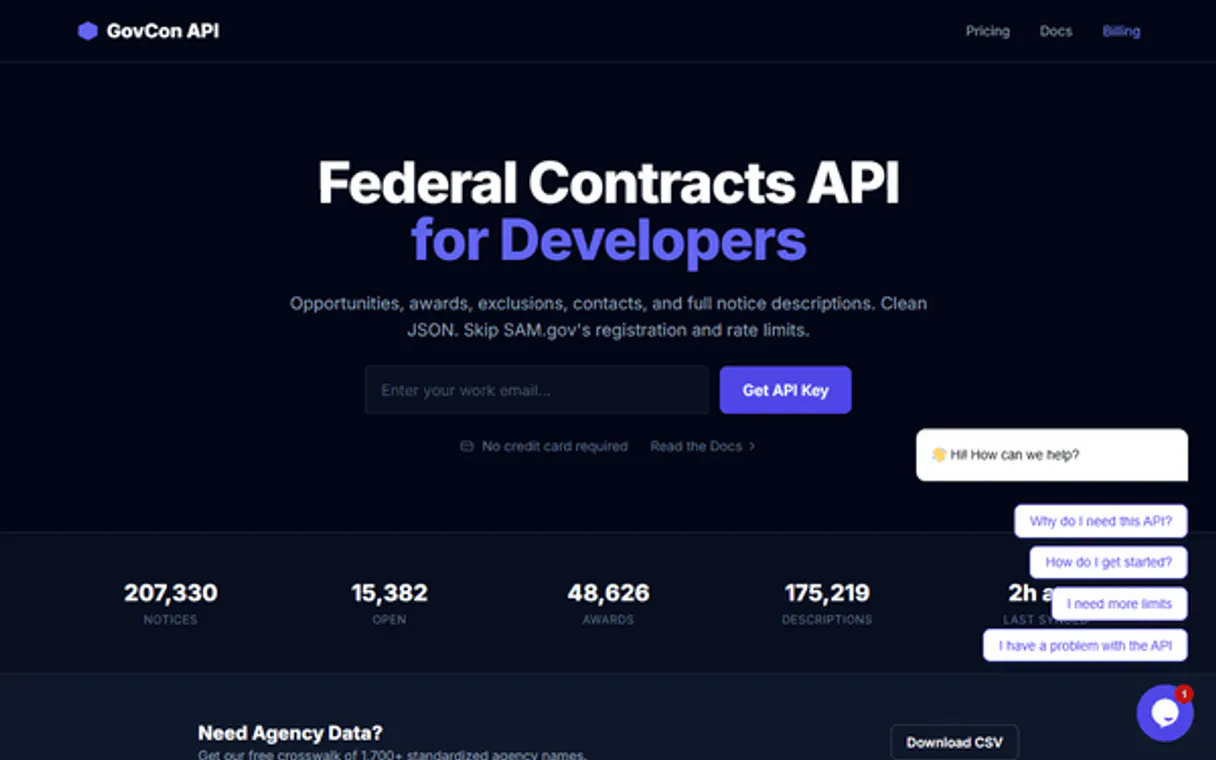
Independent Platform Disclaimer: Vinkius is an independent platform and is not affiliated with, endorsed by, sponsored by, verified by, or otherwise authorized by GovCon. All third-party trademarks, logos, and brand names are the property of their respective owners. Their use on this website is strictly for informational purposes to identify service compatibility and interoperability.
VINKIUS INFRASTRUCTURE
Cloud Hosted
Managed infra
V8 Isolated
Sandboxed per request
Zero-Trust Proxy
No stored credentials
DLP Enforced
Policy on every call
GDPR Compliant
EU data residency
Token Compression
~60% cost reduction
Works with Claude, ChatGPT, Cursor, and more
The Model Context Protocol standardizes how applications expose capabilities to LLMs. Instead of operating in isolation, your AI gains direct access to external platforms, live data, and real-world actions through secure, standardized connections.
This server provides 4 capabilities that interface natively with Claude, ChatGPT, Cursor, and any MCP client. No middleware. No custom integration required.
Available Capabilities
Tracking government contracts shouldn't involve 15 browser tabs.
Right now, finding procurement data means logging into multiple government portals. You start with a general search, then you have to filter by agency, copy the unique ID, and paste it into a second tool to get the full details. This is a painful, manual, click-by-click process that burns hours and inevitably misses context.
With the GovCon API, your agent does all that work in one go. You ask it to search for 'renewable energy contracts in the South.' It runs the necessary tools, pulls the list, and gives you structured metadata and opportunity details—all in a single response. The data is clean, verified, and ready to use.
GovCon API MCP Server: Search for contracts and agencies.
You no longer have to manually cross-reference an agency list with contract search results. Your agent runs `list_government_agencies` to get the full roster, and then uses that data to filter results from `search_government_contracts`. This linkage is impossible to do quickly by hand.
The difference is that your agent doesn't just retrieve data; it orchestrates the retrieval. It understands the relationship between the agencies and the contracts, giving you a complete picture of the market's structure.
Common Questions About GovCon API MCP
How do I use the search_government_contracts tool in the GovCon API? +
You tell your agent to search for contracts, specifying keywords or agencies. The agent uses the search_government_contracts tool to query the database and returns a list of matching opportunities.
What is the best way to check agency coverage using the GovCon API? +
Run list_government_agencies. This pulls the complete, audited catalog of every agency registered in the GovCon database, letting you audit the full scope of public sector procurement.
Can I get details on a single contract ID using the GovCon API? +
Yes, use get_procurement_details. Just provide the opportunity ID, and the agent returns all the full, high-resolution details for that specific contract.
Does the GovCon API handle real-time status checks? +
Yes, run check_api_status. This confirms the service is operational before you start any major data retrieval task, preventing workflow failure.
How do I use the list_government_agencies tool to map out public sector reach? +
The list_government_agencies tool returns a comprehensive list of all registered agencies. This lets you quickly map the organizational footprint of public sector procurement for your market research.
What information does the get_procurement_details tool provide for a specific ID? +
The get_procurement_details tool gives full, high-resolution data for a single opportunity ID. You'll get details needed for deep-dive classification and analysis.
Is the search_government_contracts tool suitable for keyword-based market audits? +
Yes, search_government_contracts handles keyword searches across thousands of contracts. You can narrow down market opportunities by topic or agency.
Does the check_api_status tool help with workflow reliability? +
The check_api_status tool verifies the current operational status of the GovCon service. You can confirm the stability of your entire procurement research workflow.
How do I find my GovCon API Key? +
Log in to your GovCon account, and you will find your API Key in your dashboard. Copy and paste it below.
Does it support multiple agencies? +
Yes. GovCon aggregates procurement data across various federal and local government agencies.
Can the agent show award amounts? +
Yes. Every contract record retrieved by your agent includes metadata on the award amount where available.
Use it with your favorite AI tools
Connect this server to Cursor, Claude, VS Code, and more.
More in this category
EBI PDBe
Explore 3D protein structures, ligand interactions, and molecular assemblies from the Protein Data Bank in Europe.
Zinrelo
Manage loyalty programs, reward points, and customer engagement via the Zinrelo API.

Câmara dos Deputados (v2)
Access real-time data from the Brazilian Chamber of Deputies — track expenses, speeches, and legislative activities of all deputies.
You might also like

Jinshuju / 金数据
Powerful online form and data collection platform — manage forms, entries, and webhooks via AI.

Finch
Connect Finch to automate HRIS and Payroll integration — list employees, retrieve employment data, and manage pay statements directly from your AI agent.

PDFMonkey
Generate dynamic PDF documents from JSON data and HTML templates with an API built for high-volume document automation.