
ISO New England MCP. Model real-time power costs and grid stress.
 Gemini
 Works with every AI agent you already use
…and any MCP-compatible client









Just plug in your AI agents and start using Vinkius.
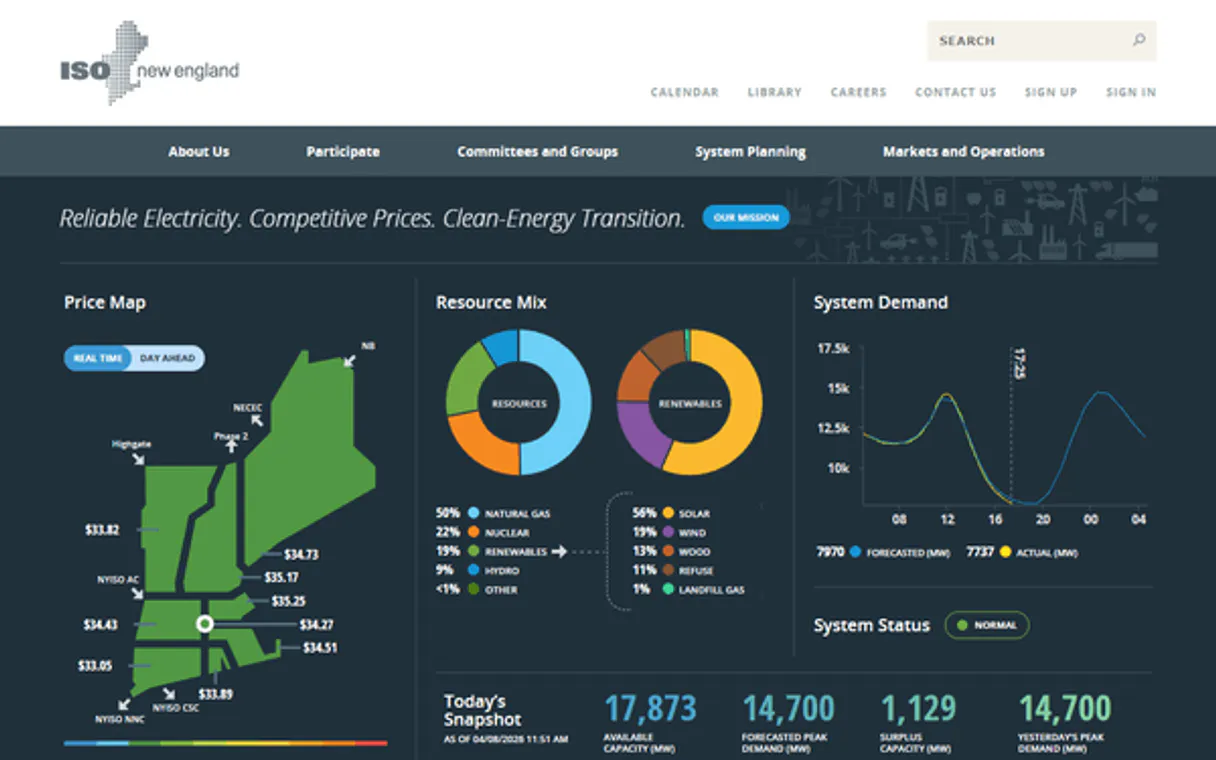
ISO New England MCP Server provides access to real-time and historical energy market data for the New England grid. Use tools to retrieve current system load, locational marginal prices (LMP), generation fuel mix, and market forecasts.
This server lets your AI agent analyze energy market volatility, model grid stress, and track power costs directly from the official ISO New England API.
What your AI agents can do
Get actual interchange
Retrieves actual data showing net imports and exports of electricity between regions.
Get day ahead lmp
Retrieves Locational Marginal Prices (LMP) expected for the coming day for market planning.
Get fuel mix
Retrieves real-time data on the fuel sources powering the grid (e.g., Gas, Nuclear, Renewables).
Retrieves the current total system load in megawatts (MW) across the New England grid.
Fetches 5-minute Locational Marginal Prices (LMP) in USD/MWh, showing the cost of power at specific locations.
Retrieves real-time data on the fuel mix powering the grid (e.g., natural gas, nuclear, renewables).
Accesses day-ahead LMP data and seven-day load forecasts for planning energy procurement.
Gets hourly load data and hourly LMP data for long-term consumption pattern analysis.
Checks reserve requirements, regulation clearing prices, and actual electricity interchange between regions.
Ask AI about this MCP
Supported MCP Clients
Gemini Waiting for input…
ISO New England MCP Server: 10 Tools for Energy Analysis
Run complex energy market simulations by querying real-time load, pricing, fuel mix, and multi-day forecasts from the New England grid.
019d75bcget actual interchange
Retrieves actual data showing net imports and exports of electricity between regions.
019d75bcget day ahead lmp
Retrieves Locational Marginal Prices (LMP) expected for the coming day for market planning.
019d75bcget fuel mix
Retrieves real-time data on the fuel sources powering the grid (e.g., Gas, Nuclear, Renewables).
019d75bcget hourly lmp
Retrieves Locational Marginal Prices (LMP) with hourly granularity for historical price analysis.
019d75bcget hourly load
Retrieves hourly load data, useful for analyzing long-term consumption patterns.
019d75bcget lmp
Retrieves 5-minute Locational Marginal Prices (LMP) in USD/MWh, tracking immediate market volatility.
019d75bcget regulation
Retrieves regulation requirements and clearing prices, necessary for analyzing grid stability services.
019d75bcget reserve
Retrieves reserve requirements and clearing prices, essential for auditing grid resilience capacity.
019d75bcget seven day forecast
Retrieves the seven-day load forecast, crucial for anticipating future grid stress.
019d75bcget system load
Retrieves the current, real-time total system load in megawatts (MW) for immediate monitoring.
Choose How to Get Started
Build a custom MCP for your own tools, or connect a ready-made integration from our catalog.
Build Your Own
Turn any API into an MCP. Import a spec, define Agent Skills, or deploy with MCPFusion.
- Import from OpenAPI, Swagger, or YAML specs
- Create Agent Skills with progressive disclosure
- Deploy to edge with MCPFusion framework
- Built in DLP, auth, and compliance on every call
- Real time usage dashboard and cost metering
- Publish to catalog or keep private
Make Your AI Do More
Start with ISO New England, then connect any of our 4,700+ other servers whenever your AI needs more. One click, no limits.
- Use this MCP plus 4,700+ others, all in one place
- Add new capabilities to your AI anytime you want
- Every connection is secured and compliant automatically
- Track usage and costs across all your servers
- Works with Claude, ChatGPT, Cursor, and more
- New servers added to the catalog every week
What you can do with this MCP connector
Your AI agent connects to the ISO New England MCP Server to monitor the New England power grid using the official ISO-NE Web Services API. You can use the exposed tools to get real-time and historical energy market data, analyze grid stability, and track power costs.
Monitor Real-Time System Load and Pricing
To check the current total system load in megawatts (MW), use get_system_load. For immediate market pricing, get_lmp provides 5-minute Locational Marginal Prices (LMP) in USD/MWh, tracking rapid market shifts. You can analyze the grid's power sources with get_fuel_mix, which delivers real-time data on the fuel mix, like natural gas, nuclear, and renewables.
You'll see net electricity imports and exports between regions with get_actual_interchange.
Forecast Costs and Grid Stress
For planning energy procurement, you can use get_day_ahead_lmp to access Locational Marginal Prices expected for the coming day. You can anticipate future grid stress by checking the seven-day load forecast using get_seven_day_forecast. Long-term consumption patterns are visible when you grab hourly load data with get_hourly_load, and historical price analysis uses get_hourly_lmp for hourly LMP data.
Audit Grid Stability and Market Requirements
To analyze grid stability services, you'll check regulation requirements and clearing prices via get_regulation. You can audit grid resilience capacity by running get_reserve, which retrieves reserve requirements and clearing prices. Market planning also requires knowing the full scope of the grid's flow; you'll get this by running get_actual_interchange alongside get_system_load.
The Tools You'll Use
get_system_load: Gets the current total system load in megawatts (MW).get_lmp: Retrieves 5-minute Locational Marginal Prices (LMP) in USD/MWh.get_fuel_mix: Provides real-time data on the fuel sources powering the grid (e.g., Gas, Nuclear, Renewables).get_day_ahead_lmp: Retrieves Locational Marginal Prices (LMP) expected for the coming day for market planning.get_hourly_lmp: Gets Locational Marginal Prices (LMP) with hourly granularity for historical price analysis.get_actual_interchange: Retrieves actual data showing net imports and exports of electricity between regions.get_regulation: Retrieves regulation requirements and clearing prices, necessary for analyzing grid stability services.get_reserve: Retrieves reserve requirements and clearing prices, essential for auditing grid resilience capacity.get_seven_day_forecast: Retrieves the seven-day load forecast, crucial for anticipating future grid stress.get_hourly_load: Retrieves hourly load data, useful for analyzing long-term consumption patterns.
How ISO New England MCP Works
- 1 Instruct your agent to call a specific tool, like
get_system_load, to initiate data retrieval. - 2 The MCP Server executes the request against the ISO New England API, pulling the specified real-time or historical data.
- 3 Your agent receives the raw data (e.g., 5-minute LMP, MW load, or fuel mix) and processes it for analysis.
The bottom line is that your AI agent uses the tools to gather disparate, official utility data points, allowing you to build a complete picture of the energy market state.
Who Is ISO New England MCP For?
Grid operators, energy traders, and power market analysts need this. If your job involves predicting energy costs, modeling grid stress, or understanding the financial inputs into power generation, this is for you. It helps you stop guessing about market volatility.
Uses the tools to compare get_day_ahead_lmp against current get_lmp to identify optimal times for buying or selling power.
Checks get_system_load and get_reserve to assess if the grid has enough capacity or if load projections are too high.
Combines get_fuel_mix and get_actual_interchange to model the environmental impact and regional flow of electricity.
What Changes When You Connect
- See the real-time cost of power with
get_lmp. Instead of reading sporadic dashboard updates, your agent pulls 5-minute LMP data, giving you immediate visibility into market volatility. - Predict future grid needs using
get_seven_day_forecast. You don't have to manually check weekly reports; your agent retrieves the seven-day load forecast, letting you plan energy procurement weeks out. - Understand grid health by comparing
get_system_loadtoget_reserve. You can instantly check if current load is stressing capacity and what the required reserve levels are. - Track market shifts by combining
get_fuel_mixandget_actual_interchange. You get a clear picture of which energy sources are powering the grid and where the power is actually moving. - Analyze cost over time using
get_hourly_lmp. This lets you run historical price models, moving past simple snapshots to build comprehensive cost histories. - Account for stability requirements by using
get_regulationandget_reserve. You get access to clearing prices and capacity needs, which is key when assessing grid stability services.
Real-World Use Cases
Modeling a Short-Term Price Spike
A trader needs to know if a sudden drop in supply will raise costs. They ask their agent to call get_lmp alongside get_system_load. The agent returns the current 5-minute pricing and the real-time MW load, letting the trader immediately assess the severity and cost of the spike.
Planning for Next Week's Energy Needs
An energy manager needs to budget for the next seven days. They instruct their agent to retrieve the get_seven_day_forecast. This gives them the load forecast, which they can then use with get_day_ahead_lmp to build a reliable procurement budget.
Auditing Cross-Regional Energy Flow
A consultant must assess regional energy dependencies. They ask the agent to call get_actual_interchange and get_fuel_mix. This provides the net flow of power and the source mix, showing exactly where the power is coming from and going to.
Analyzing Long-Term Consumption Trends
A research scientist wants to spot seasonal consumption patterns. They use get_hourly_load and get_hourly_lmp to pull years of hourly data, allowing them to model historical demand and price correlations.
The Tradeoffs
Only checking current prices
Running get_lmp only tells you the price right now. This doesn't tell you if the price spike is temporary, if the grid is stressed, or what the costs will be tomorrow.
→
To get a full picture, run get_lmp first, then check get_system_load for immediate stress, and finally cross-reference with get_day_ahead_lmp to understand the expected trend.
Ignoring regulatory costs
Calculating cost based only on get_fuel_mix is insufficient. You ignore the costs associated with keeping the grid stable, which is a huge part of the final price.
→
Always include get_regulation and get_reserve in your analysis. These tools provide the clearing prices and capacity requirements that factor into the true cost of power.
Treating data as static
Assuming the energy mix or load is fixed for the entire day. This fails when a major weather event or unexpected transmission failure occurs.
→
Use get_seven_day_forecast to anticipate changes, and get_actual_interchange to track how the physical system responds to real-world stress.
When It Fits, When It Doesn't
Use this if your analysis requires combining physical metrics with economic signals. For instance, if you're modeling a risk scenario, you must combine get_system_load (the physical constraint) with get_lmp (the immediate cost) and get_day_ahead_lmp (the planning cost). Don't use it if you just need to know what the fuel mix is; use get_fuel_mix alone. If you need a comprehensive view of the market—including reserves, regulation, and physical flow—you must execute a multi-step workflow involving get_system_load, get_reserve, and get_actual_interchange together. Never trust any single data point for critical decision-making.
Independent Platform Disclaimer: Vinkius is an independent platform and is not affiliated with, endorsed by, sponsored by, verified by, or otherwise authorized by ISO New England. All third-party trademarks, logos, and brand names are the property of their respective owners. Their use on this website is strictly for informational purposes to identify service compatibility and interoperability.
VINKIUS INFRASTRUCTURE
Cloud Hosted
Managed infra
V8 Isolated
Sandboxed per request
Zero-Trust Proxy
No stored credentials
DLP Enforced
Policy on every call
GDPR Compliant
EU data residency
Token Compression
~60% cost reduction
Works with Claude, ChatGPT, Cursor, and more
The Model Context Protocol standardizes how applications expose capabilities to LLMs. Instead of operating in isolation, your AI gains direct access to external platforms, live data, and real-world actions through secure, standardized connections.
This server provides 10 capabilities that interface natively with Claude, ChatGPT, Cursor, and any MCP client. No middleware. No custom integration required.
Available Capabilities
Manually tracking energy market data is a nightmare of tabs and spreadsheets.
Right now, tracking energy prices means jumping between the ISO website, downloading hourly load reports, and manually cross-referencing fuel mix data. You spend hours copying numbers from one dashboard to another, trying to build a single, coherent picture of the grid's health.
With the ISO New England MCP Server, your agent handles the data plumbing. You ask for the current load and the 5-minute LMP, and the server returns a clean, structured data payload. You get the answer, not the spreadsheet.
ISO New England MCP Server: Get the full market picture.
The biggest time sink is reconciling different timeframes. You need to know the 5-minute price (`get_lmp`), but also the 7-day forecast (`get_seven_day_forecast`) and the historical hourly data (`get_hourly_lmp`). Doing this manually is impossible.
The server provides all these distinct data streams in one place. It lets you compare the immediate price (`get_lmp`) against the planned price (`get_day_ahead_lmp`) and the long-term forecast, giving you true market context.
Common Questions About ISO New England MCP
What is the difference between `get_lmp` and `get_hourly_lmp`? +
get_lmp returns the current 5-minute Locational Marginal Price. get_hourly_lmp retrieves the same data, but aggregated to an hourly interval, useful for historical pattern analysis.
How do I check the system's current stress level using `get_system_load`? +
Call get_system_load to get the real-time total load in MW. You then compare this figure against the reserve data pulled from get_reserve to determine if capacity is strained.
Can I use `get_day_ahead_lmp` for financial modeling? +
Yes. get_day_ahead_lmp provides the projected market prices for the next day, which is essential for building financial models and making day-ahead trading decisions.
What data does `get_fuel_mix` provide? +
get_fuel_mix provides real-time data on the sources powering the grid, such as Natural Gas, Nuclear, and Renewables, helping you analyze the energy source composition.
Do I need to check `get_actual_interchange`? +
Yes. get_actual_interchange tracks the physical flow of electricity, letting you know the true net imports and exports, which is vital for understanding regional market dependencies.
What is the purpose of the `get_seven_day_forecast` tool? +
It retrieves the expected load for the next seven days. This forecast helps users plan energy procurement and anticipate potential grid stress well in advance.
Does `get_regulation` include information on capacity requirements? +
Yes, it returns both the clearing prices and the necessary regulation requirements. This data is key for analyzing grid stability services and auditing capacity.
If I need historical pricing, should I use `get_hourly_lmp` or `get_lmp`? +
Use get_hourly_lmp for historical analysis. While get_lmp gives 5-minute data, get_hourly_lmp is better suited when you only need hourly granularity.
How do I get ISO New England API credentials? +
You need to register for an ISO Express account at https://www.iso-ne.com/isoexpress/login. Use your account username and password for API authentication.
What data is available in real-time? +
The API provides real-time updates for system load, fuel mix, and 5-minute locational marginal prices (LMP).
Does it support historical data? +
This MCP currently focuses on retrieving the most recent current and daily data available through the Web Services API.
Use it with your favorite AI tools
Connect this server to Cursor, Claude, VS Code, and more.
More in this category

Blockchain.com Data
Access real-time Bitcoin blockchain data via Blockchain.com — query blocks, transactions, and addresses directly from any AI agent.

NCDC Climate Data Online
Access authoritative historical weather and climate data via NCDC — track datasets, stations, and climate records directly from your AI agent.
NIST NVD
Access authoritative vulnerability and product data via NIST NVD — track CVEs, CPEs, and security history directly from your AI agent.
You might also like

CrowdSec
Automate threat intelligence via CrowdSec — query local decisions, stream security updates, and check global IP reputation directly from any AI agent.

HashiCorp Nomad
Manage workloads and orchestration via Nomad — track jobs, nodes, and deployments directly from your AI agent.

BoxLock
Secure package deliveries with smart lockbox technology that verifies carriers and prevents porch theft at the door.