
Kyte MCP. Audit your store's inventory and sales data instantly.
 Gemini
 Works with every AI agent you already use
…and any MCP-compatible client









Just plug in your AI agents and start using Vinkius.
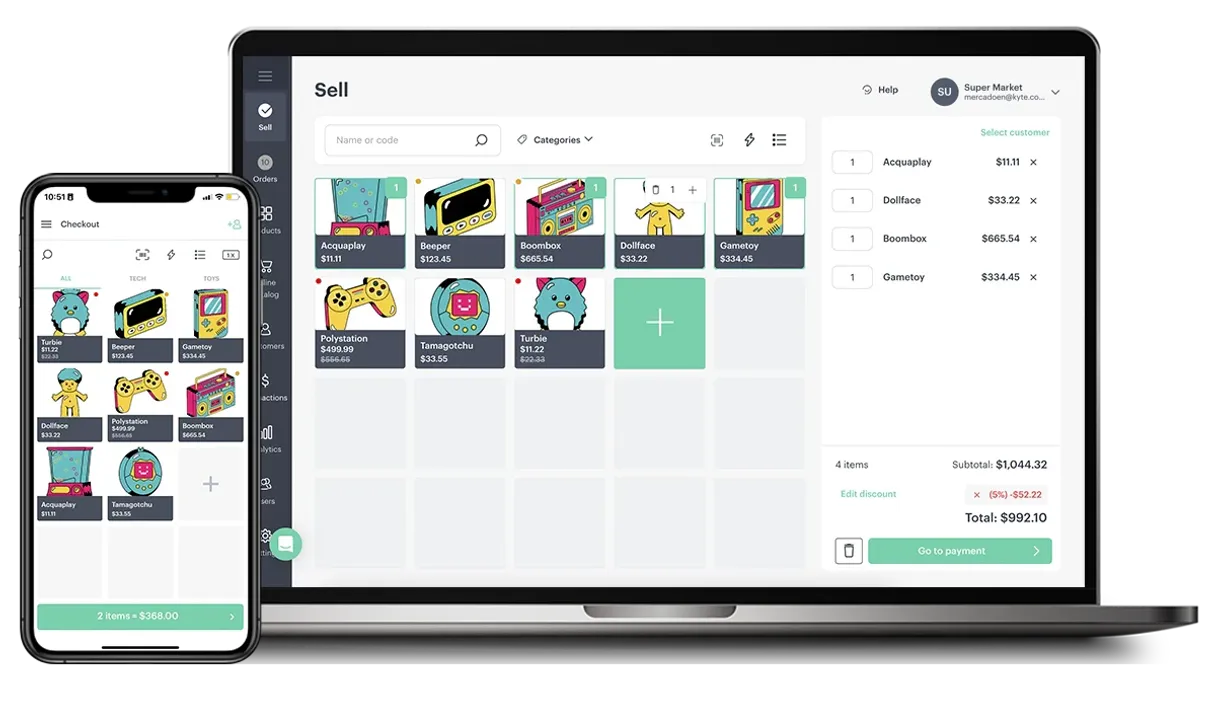
Kyte MCP Server manages your Point of Sale (POS) operations. Use it to list products, audit inventory levels, track specific customer profiles, and monitor financial transactions.
It gives your AI agent the ability to read your entire store's operational data—from current stock counts to recent sales orders.
What your AI agents can do
Get customer profile
Retrieves detailed information for a specific customer.
Get inventory status
Checks the current stock count for products.
Get kyte store status
Gets the operational status of the physical store.
List all available products, their names, and current prices in the store.
Access and review details for specific sales orders or list the most recent transactions for auditing.
Check the current stock count for specific items to prevent running out of inventory.
Retrieve individual customer profiles and review their transaction history for a full view of their spending.
Get the operational status of the store and list key financial transactions or casher logs.
List all categories of products sold in the store.
Ask AI about this MCP
Supported MCP Clients
Gemini Waiting for input…
019d75c3get customer profile
Retrieves detailed information for a specific customer.
019d75c3get inventory status
Checks the current stock count for products.
019d75c3get kyte store status
Gets the operational status of the physical store.
019d75c3get order details
Retrieves detailed information about a specific sales order.
019d75c3get product details
Gets specific information about a product.
019d75c3list financial transactions
Lists all financial transactions and cash register logs for auditing.
019d75c3list kyte customers
Lists all customers stored in the store system.
019d75c3list kyte orders
Lists recent store orders and their delivery statuses for auditing.
019d75c3list kyte products
Returns a list of all products, including their IDs, names, and current prices.
019d75c3list product categories
Retrieves a list of all product categories available in the store.
Choose How to Get Started
Build a custom MCP for your own tools, or connect a ready-made integration from our catalog.
Build Your Own
Turn any API into an MCP. Import a spec, define Agent Skills, or deploy with MCPFusion.
- Import from OpenAPI, Swagger, or YAML specs
- Create Agent Skills with progressive disclosure
- Deploy to edge with MCPFusion framework
- Built in DLP, auth, and compliance on every call
- Real time usage dashboard and cost metering
- Publish to catalog or keep private
Make Your AI Do More
Start with Kyte, then connect any of our 4,700+ other servers whenever your AI needs more. One click, no limits.
- Use this MCP plus 4,700+ others, all in one place
- Add new capabilities to your AI anytime you want
- Every connection is secured and compliant automatically
- Track usage and costs across all your servers
- Works with Claude, ChatGPT, Cursor, and more
- New servers added to the catalog every week
What you can do with this MCP connector
Kyte MCP Server manages your Point of Sale (POS) operations. Your AI agent uses it to list products, audit inventory levels, track specific customer profiles, and monitor financial transactions. It gives your AI agent access to your store's operational data—from current stock counts to recent sales orders.
Audit Product Catalog: You can get a list of all available products, including their IDs, names, and current prices using list_kyte_products. You'll also find all product categories available in the store by running list_product_categories.
Manage Stock Levels: Use get_inventory_status to check the current stock count for specific items, which keeps you from running out of inventory.
Track Sales and Orders: You can review details for a specific sales order using get_order_details, or you can list the most recent store orders and their delivery statuses for auditing with list_kyte_orders. To check out the full picture, you can also review all financial transactions and cash register logs using list_financial_transactions.
The system also lets you review details for a specific sales order using get_order_details.
Analyze Customer Data: Your agent can list all customers stored in the store system using list_kyte_customers, and it can grab detailed information for a specific customer using get_customer_profile. By checking out customer profiles, your AI agent gets a full view of their spending and transaction history.
Monitor Store Health: You can get the operational status of the physical store with get_kyte_store_status. For a full financial audit, you can list all financial transactions and cash register logs using list_financial_transactions.
Your AI client accesses the store's core data directly. It uses the list_kyte_products tool to see all items and their prices. It uses list_product_categories to see what types of products you sell. It uses get_inventory_status to check how much stock you've got. You can check specific order details with get_order_details or look at recent orders with list_kyte_orders.
You can check out all your customers with list_kyte_customers and then dive into one person's details using get_customer_profile. You can check the store's status with get_kyte_store_status and see all your cash register logs by running list_financial_transactions.
How Kyte MCP Works
- 1 Subscribe to the Kyte MCP Server and generate an API Key in the Kyte settings.
- 2 Configure your AI agent with the API Key. Your agent now has access to all ten exposed tools.
- 3 Ask your agent a question in plain language (e.g., 'Show me the total sales for last week and which items are running low'). The agent executes the necessary tools and returns the compiled data.
The bottom line is, your AI client acts as the single interface for your entire store's data, letting you query complex business questions without logging into multiple systems.
Who Is Kyte MCP For?
Small business owners, store managers, and e-commerce operations leads who spend too much time switching between POS dashboards, inventory sheets, and accounting software. If you're tired of manually cross-referencing stock levels with sales reports, this is for you.
Uses this to check current stock against sales forecasts, ensuring the store never sells out of popular items.
Uses this to run end-of-day reports on cashiers, track top-selling products, and see the overall store performance.
Uses this to audit product categories and check real-time stock status, streamlining the reordering process.
What Changes When You Connect
- Check stock levels on demand. The
get_inventory_statustool immediately tells you if a product is low or out, letting you adjust your reorder schedule without checking a separate dashboard. - Track customer spending history. Use
get_customer_profileto pull a customer's full transaction record. This helps you target marketing efforts or spot trends in their purchases. - Audit sales performance. Running
list_financial_transactionsgives you a clear list of all money movement and cashier logs, making end-of-day reconciliation fast and accurate. - Manage product visibility.
list_kyte_productsprovides a current list of every item and its price, whilelist_product_categorieshelps you map out your entire catalog structure. - Review recent sales flow.
list_kyte_orderslets you see the status of the last five orders and their delivery status, which is crucial for managing customer expectations. - Get specific order details. If a customer calls about an old sale,
get_order_detailspulls up the exact transaction details, saving you the phone call back and forth.
Real-World Use Cases
The Product is Missing from the Catalog
A store owner needs to know if a newly stocked item is available to sell. They ask their agent: 'List all products.' The agent runs list_kyte_products, giving the owner the names and prices. The owner then uses get_product_details on the item's ID to confirm specific specs, solving the manual cross-reference problem.
Checking Inventory After a Big Sale
A manager notices a sudden dip in sales and needs to know if they sold out of a key product. They ask the agent: 'What's the stock count for our best seller?' The agent executes get_inventory_status, providing an immediate number. This stops them from fulfilling orders they can't fulfill.
Investigating a Customer Dispute
A customer disputes a charge from last month. The manager asks the agent to check the account. The agent runs get_customer_profile and get_order_details using the customer's ID. This provides the exact transaction record and item list needed for a quick resolution.
Audit End-of-Day Cash Flow
It's time for accounting. The manager tells the agent: 'List all financial transactions and list recent orders.' The agent runs list_financial_transactions and list_kyte_orders together. This gives a complete picture of cash flow and recent activity, eliminating manual ledger work.
The Tradeoffs
Searching for product data manually
Opening the inventory screen, then switching to the catalog, and finally opening the customer CRM to see who bought it. This takes 15 minutes of clicking and copying data.
→
Just ask your agent: 'Find out which customers bought the Artisan Coffee last month and check the current stock.' The agent runs list_kyte_products, then list_kyte_customers, and finally get_inventory_status—all in one go.
Assuming data consistency
Thinking that a product listed in list_kyte_products has the same stock count as the one returned by get_inventory_status without checking. These tools might pull from different source databases.
→
Always specify the tool and the data point you need. If you need the stock count, use get_inventory_status. If you need the price list, use list_kyte_products. Don't assume they match.
Using the wrong tool for the job
Trying to get the total revenue by only running list_kyte_orders. This only shows order records, not the actual financial cash flow.
→
To get a full financial picture, run list_financial_transactions first. This provides the audited log of money movement, which is more reliable than just looking at order records.
When It Fits, When It Doesn't
Use Kyte if your primary job is retail operations, inventory management, or sales auditing. You need to query across multiple business domains (inventory, customer records, finance) using natural language prompts. This setup works best for roles that require cross-functional reporting, like a store manager or accounting analyst. Don't use it if your need is simple data entry—you're still better off using the Kyte interface directly. Also, don't use it if you need data from non-Kyte systems (like a separate payroll system). The tools here are limited to Kyte's ecosystem.
Independent Platform Disclaimer: Vinkius is an independent platform and is not affiliated with, endorsed by, sponsored by, verified by, or otherwise authorized by Kyte. All third-party trademarks, logos, and brand names are the property of their respective owners. Their use on this website is strictly for informational purposes to identify service compatibility and interoperability.
VINKIUS INFRASTRUCTURE
Cloud Hosted
Managed infra
V8 Isolated
Sandboxed per request
Zero-Trust Proxy
No stored credentials
DLP Enforced
Policy on every call
GDPR Compliant
EU data residency
Token Compression
~60% cost reduction
Works with Claude, ChatGPT, Cursor, and more
The Model Context Protocol standardizes how applications expose capabilities to LLMs. Instead of operating in isolation, your AI gains direct access to external platforms, live data, and real-world actions through secure, standardized connections.
This server provides 10 capabilities that interface natively with Claude, ChatGPT, Cursor, and any MCP client. No middleware. No custom integration required.
Available Capabilities
Manually tracking store inventory and sales is a nightmare.
Every day, managers have to jump between five different tabs: the product catalog, the sales log, the customer list, the inventory sheet, and the financial ledger. They copy prices, cross-reference order IDs, and check stock levels manually. It’s slow, and it’s easy to get numbers wrong.
With the Kyte MCP Server, you simply ask your agent: 'Show me all items that sold more than 10 units last week and tell me their current stock.' The agent runs the necessary tools and gives you a single, clean report. You stop clicking and start analyzing.
Kyte MCP Server: Getting a full financial picture.
Instead of manually pulling cash register reports and then matching those records against the order log, you just ask for the financial data. The agent runs `list_financial_transactions` and `list_kyte_orders` simultaneously. This eliminates hours of spreadsheet matching.
What's different now is that you get a unified, auditable view of your cash flow and sales history, all triggered by a single conversational prompt. It's the difference between knowing what happened and knowing why it matters.
Common Questions About Kyte MCP
How do I check stock levels using the get_inventory_status tool? +
You simply ask your agent to run get_inventory_status and specify the product name or ID. The agent returns the current count. You can also combine this with list_kyte_products to get a full overview.
Can I get a customer's history using the get_customer_profile tool? +
Yes. Running get_customer_profile pulls the customer's details. You can then follow up by asking the agent to list their associated transactions using get_order_details for a complete history.
Which tool should I use to see all available product types? +
Use list_product_categories. This tool gives you a list of all product groups, which is the starting point for auditing your full catalog.
Does list_kyte_orders include payment status? +
Yes. list_kyte_orders provides a list of recent sales and their delivery statuses, which is key for managing customer expectations and fulfillment.
Can I list all transactions for tax reporting? +
You must use list_financial_transactions. This tool is designed to pull the audited financial logs, which is the correct source for tax and accounting purposes.
How do I list all product categories using the list_product_categories tool? +
You use the list_product_categories tool. It returns a comprehensive list of every category in your store, letting you organize your data before listing products.
What kind of data does the get_order_details tool provide? +
The get_order_details tool gives you a full breakdown of a specific sale. You get the order items, the total amount, shipping info, and customer details all in one place.
Does list_financial_transactions cover all store expenses? +
Yes, list_financial_transactions lists all recorded financial activity. You can audit sales, refunds, and operational expenses to monitor your store's full financial health.
Where do I find my Kyte API Key? +
Log in to the Kyte web dashboard or app, navigate to Settings, and look for the API or Developer section to generate a key.
Can I see stock levels for specific products? +
Yes, use the get_inventory_status tool to see quantities for all products in your catalog.
Does this support multiple store locations? +
The API key is typically linked to a specific store account. Ensure you are using the correct key for the desired store.
Use it with your favorite AI tools
Connect this server to Cursor, Claude, VS Code, and more.
More in this category

Mercado Livre Catalog
Create, update, and manage product listings, stock, and prices on Mercado Livre.

OpenSea
Access the world's leading NFT marketplace — query collections, track floor prices, inspect NFT metadata, and monitor wallet balances across multiple chains.

Airbnb
Search and manage Airbnb listings, experiences, reservations, and pricing directly from any AI agent.
You might also like

Snowflake
Bring your absolute data cloud into your AI editor. Execute queries, list warehouses, and map complex schemas natively.

Dades Obertes Catalunya
Access Catalonia's Open Data portal — search catalogs and query datasets using SoQL to extract public information directly.

Newton
Perform advanced symbolic mathematics—simplify expressions, calculate derivatives, find integrals, and solve equations directly through your AI agent.