
Mapulus MCP. Analyze Australian boundaries and census data on demand.
 Gemini
 Works with every AI agent you already use
…and any MCP-compatible client









Just plug in your AI agents and start using Vinkius.
Mapulus gives you deep location intelligence for Australia. Connect it to your AI agent to instantly pull census data, check statistical boundaries (like suburbs or postcodes), and run advanced spatial analytics—all without writing complex API calls.
You get catchment areas, population counts, and specific geographic context just by asking a question.
What your AI agents can do
Enrich location
Takes a latitude and longitude and returns detailed geographic, statistical, and contextual data for that specific spot.
Get boundary details
Retrieves full details for any specific defined geographical boundary type you pass to it.
Get demographics
Pulls ABS Census data, giving population counts and income metrics for a specified geographic area.
Find specific official boundaries by name or type, such as suburbs, postcodes, or local government areas.
Get census data on population size, median income, and housing metrics for a defined boundary area.
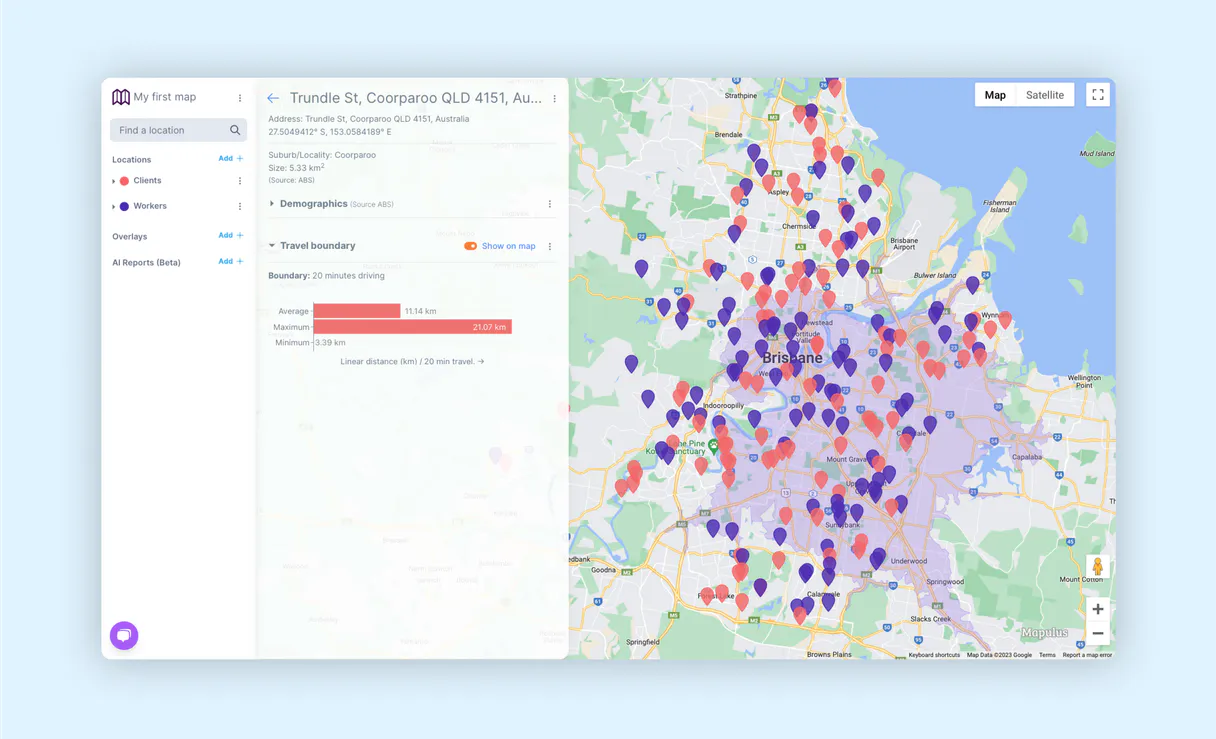
Determine the physical catchment area around a point based on specified travel time constraints.
Take any latitude/longitude pair and get back its detailed geographic, statistical, and contextual information.
Assign an H3 hexagonal index to a location for standardized spatial analysis across different tools.
Ask AI about this MCP
Supported MCP Clients
Gemini Waiting for input…
Mapulus MCP Server: 9 Tools for Geospatial Analysis
These nine tools let you define, query, and analyze precise Australian geographic data points, from census metrics to complex travel-time boundaries.
019d75ceenrich location
Takes a latitude and longitude and returns detailed geographic, statistical, and contextual data for that specific spot.
019d75ceget boundary details
Retrieves full details for any specific defined geographical boundary type you pass to it.
019d75ceget demographics
Pulls ABS Census data, giving population counts and income metrics for a specified geographic area.
019d75ceget h3 index
Calculates the H3 hexagonal index for any given location, standardizing its position on a grid.
019d75ceget isochrone
Generates boundaries representing areas reachable within a specific travel time from a starting point.
019d75ceget postcode data
Retrieves all relevant statistical and demographic information for a given Australian postcode.
019d75celist data topics
Lists the specific categories of data available, like 'population' or 'income', that you can query.
019d75cesearch boundaries
Searches across all Australian statistical boundaries (LGA, suburb, postcode) based on a general search term.
019d75cesearch suburbs
Performs a targeted search specifically for Australian suburbs by name or location.
Choose How to Get Started
Build a custom MCP for your own tools, or connect a ready-made integration from our catalog.
Build Your Own
Turn any API into an MCP. Import a spec, define Agent Skills, or deploy with MCPFusion.
- Import from OpenAPI, Swagger, or YAML specs
- Create Agent Skills with progressive disclosure
- Deploy to edge with MCPFusion framework
- Built in DLP, auth, and compliance on every call
- Real time usage dashboard and cost metering
- Publish to catalog or keep private
Make Your AI Do More
Start with Mapulus, then connect any of our 4,700+ other servers whenever your AI needs more. One click, no limits.
- Use this MCP plus 4,700+ others, all in one place
- Add new capabilities to your AI anytime you want
- Every connection is secured and compliant automatically
- Track usage and costs across all your servers
- Works with Claude, ChatGPT, Cursor, and more
- New servers added to the catalog every week
What you can do with this MCP connector
Yo, listen up. Mapulus gives your AI agent deep location intel for Australia. Forget digging through databases; just ask the question and get straight answers.
Searching Boundaries: You need to pinpoint an official boundary? Whether you're looking for a specific suburb, a Local Government Area (LGA), or a postcode, you can search across all Australian statistical boundaries using search_boundaries. Need something more targeted? Use search_suburbs if you know the name of the suburb. If you just need to check the full details of any defined boundary—like what exactly makes up that LGA or postcode—you run get_boundary_details.
Demographics and Stats: Want to know who lives where? You can pull hard census data from ABS using get_demographics, getting population counts, median income figures, and housing metrics for any defined area. For a quick check on a specific postal code, get_postcode_data pulls all the relevant statistical and demographic info you need.
If you aren't sure what kind of stats are available—like if we got 'income' or 'population' data—you can run list_data_topics to see exactly what categories of data we've got.
Spatial Analysis: Need to know the physical area people can reach? You generate isochrones with get_isochrone. This calculates boundaries based on a specific travel time from your starting point. For standardized grid mapping, you calculate an H3 hexagonal index using get_h3_index, which pins down a location's spot for consistent spatial analysis across different tools.
Location Enrichment: Got just a latitude and longitude? Don't sweat it. You pass those coordinates into enrich_location and we spit out detailed geographic, statistical, and contextual data for that exact spot. This function gives you everything—the geography, the stats, the context—all in one shot.
Basically, Mapulus handles all the heavy lifting. You're not writing complex API calls; your agent just talks to us. You pull census-derived population counts and income metrics for any defined area, search official boundaries like postcodes or LGAs by name, generate catchment areas based on travel time constraints, get a standardized H3 index for grid use, and even take raw coordinates and instantly grab comprehensive statistical context for that precise spot.
How Mapulus MCP Works
- 1 Subscribe to the Mapulus server and input your unique API key.
- 2 Your AI client sends a natural language request (e.g., 'What's the population near 2000?').
- 3 The MCP framework translates that into specific tool calls, retrieves the Australian data, and hands you the final answer.
The bottom line is, it turns complex geospatial database queries into simple chat prompts.
Who Is Mapulus MCP For?
This is for the urban planner who needs to justify zoning changes with precise population density metrics, or the data scientist running market sizing models based on accurate postcode boundaries. If your job requires knowing 'how many people live within a 20-minute drive of this address,' you need this.
They use search_boundaries to define LGA limits, then run get_demographics to see if the population density meets zoning requirements.
Needs to know the market scope. They'll use enrich_location on a property address and then check surrounding postcodes with get_postcode_data for comparable stats.
Requires precise service areas. They run get_isochrone to map out all addresses reachable from a depot within an hour's drive.
What Changes When You Connect
- Stop manually cross-referencing spreadsheets. By invoking
get_demographics, you pull hard ABS Census numbers (population, income) directly into your conversation, making reporting instant. - You don't need to know the exact boundary type—just ask. The
search_boundariestool finds results across LGAs, suburbs, and postcodes so you never miss a data set. - Need service areas? Running
get_isochronecalculates real travel-time catchment zones around a point, which is far more accurate than simple straight-line distance calculations. - Forget guessing what metrics are available. Use
list_data_topicsfirst to see exactly what data points (like 'employment' or 'housing') the server can pull for any given boundary. - Pinpoint exact locations with
enrich_location. Instead of just getting a street name, you get the full statistical context—the population density and LFA codes for that specific lat/lon.
Real-World Use Cases
Identifying Service Area Gaps
A logistics manager needs to prove their new depot location covers a whole region. They use get_isochrone based on the required drive time, then run search_boundaries against that resulting area to confirm they cover enough high-value postcodes.
Market Sizing for New Housing Projects
A developer wants to know if a suburb is viable. They start by running get_postcode_data for the target code, then use search_suburbs to verify the local LGA boundaries, and finally check get_demographics for current median income.
Standardizing Data Inputs
A data scientist is compiling a multi-source dataset. They use get_h3_index on every single coordinate point to normalize the data into a consistent, gridded format before analysis. This makes joining disparate datasets reliable.
Verifying Geographic Scope
A government researcher needs to confirm all relevant administrative areas for a policy report. They use list_data_topics first to scope the data, then run search_boundaries multiple times (e.g., once for 'LGA' and once for 'suburb') to capture every necessary layer.
The Tradeoffs
Vague searches
Asking the agent simply, 'Tell me about Sydney.' The system will fail because it doesn't know if you mean the suburb, the LGA, or just general facts.
→
You must specify the type of boundary. Try search_boundaries with a query like: 'Find all demographic data for suburbs matching Sydney.'
Mixing up distance and travel time
Asking for a '10-kilometer radius around point X.' This is wrong because it calculates straight-line distance, ignoring roads.
→
You need to use get_isochrone. This tool calculates boundaries based on travel time, which accounts for actual road networks and traffic patterns.
Ignoring data sources
Trying to pull population counts without specifying the area's official boundary code or postcode.
→
Always define your scope first. Use get_postcode_data or search_boundaries to get a valid identifier, then pass that ID into get_demographics.
When It Fits, When It Doesn't
Use this server if you need hard, quantifiable geographic data specific to Australia—things like official LGA boundaries, census-derived income levels, or travel-time catchment areas. This is for deep analysis where accuracy matters.
Don't use it if you just want general information (e.g., 'What’s the best restaurant near me?'). For that, a standard search tool works fine. Also, if your goal is simply to count points on a map without needing associated demographics or boundaries, basic mapping APIs might suffice.
However, if your analysis requires linking census data (get_demographics) with specific physical limits (search_boundaries), this server's combination of tools is necessary. If you only need coordinates normalized for general processing, get_h3_index is the tool to use.
Independent Platform Disclaimer: Vinkius is an independent platform and is not affiliated with, endorsed by, sponsored by, verified by, or otherwise authorized by Mapulus. All third-party trademarks, logos, and brand names are the property of their respective owners. Their use on this website is strictly for informational purposes to identify service compatibility and interoperability.
VINKIUS INFRASTRUCTURE
Cloud Hosted
Managed infra
V8 Isolated
Sandboxed per request
Zero-Trust Proxy
No stored credentials
DLP Enforced
Policy on every call
GDPR Compliant
EU data residency
Token Compression
~60% cost reduction
Works with Claude, ChatGPT, Cursor, and more
The Model Context Protocol standardizes how applications expose capabilities to LLMs. Instead of operating in isolation, your AI gains direct access to external platforms, live data, and real-world actions through secure, standardized connections.
This server provides 9 capabilities that interface natively with Claude, ChatGPT, Cursor, and any MCP client. No middleware. No custom integration required.
Available Capabilities
Finding accurate Australian boundaries shouldn't require reading a manual.
Today, if you’re doing geo-analysis, you spend half your time figuring out which data set you need. Do I query the LFA code? The Suburb name? The Postcode area? You end up cross-referencing multiple official sources just to define the scope of your analysis.
With Mapulus, you talk to your agent and ask for 'The demographics in the Sydney area.' It handles the complexity. It runs `search_boundaries` across all relevant types, pulls the correct IDs, and then executes `get_demographics`. You get the answer, not a list of required inputs.
Mapulus MCP Server: Get precise metrics from Mapulus
Before this server, calculating a realistic service area was guesswork. People used simple circle radius tools (Euclidean distance), which gave you an inaccurate, straight-line zone that ignored roads or local council lines.
Now, calling `get_isochrone` gives you the actual boundary based on travel time—the kind of precision needed for logistics or planning. The result is reliable, measurable field data, period.
Common Questions About Mapulus MCP
How do I get census data using Mapulus? +
You use get_demographics. You just need to tell the server which boundary you're interested in—like a postcode or an LGA—and it pulls population and income stats for that exact area.
What is the difference between search_boundaries and search_suburbs? +
search_boundaries handles all types of official areas (LGA, suburb, postcode). search_suburbs limits your search only to Australian suburbs. Use the general tool unless you know you only need a suburb.
Can I calculate service zones with Mapulus? +
Yes, use the get_isochrone tool. This runs an analysis that creates boundaries based on real travel time from a starting point, which is better than any simple radius calculation.
Does enrich_location give me enough data? +
It gives you detailed geographic context for specific coordinates (lat/lon). For deeper stats like population counts, pair it with get_demographics and pass the resulting boundary ID to that tool.
How do I check what data topics are available before using the `list_data_topics` tool? +
You start by calling list_data_topics. This function immediately shows all the domains you can query, such as 'population' or 'housing'. It’s a quick way to understand the entire dataset scope without needing specific geographic coordinates first.
What happens if I run `enrich_location` with invalid latitude/longitude inputs? +
The tool returns an explicit error status code and details showing where your input failed. You must validate that the latitude and longitude are within expected ranges before attempting to enrich a location.
Does running `get_isochrone` multiple times in quick succession count against rate limits? +
Yes, all API calls are subject to Vinkius' defined usage rates. If you need many isochrones, consider batching your requests or checking the provided dashboard for current quotas to avoid throttling.
Can `get_postcode_data` pull generalized demographic insights, or is it code-specific? +
It pulls specific, detailed records tied directly to the Australian postcode you provide. You can't use this tool for general searches; you must input an exact postcode number.
How do I find my Mapulus API Key? +
Log in to Mapulus, go to Profile > API Keys, and you can generate your key there.
What regions are covered by Mapulus? +
Mapulus specializes in Australian geographic and statistical data (ABS Census boundaries).
Is my API Key secure? +
Absolutely. Your token is encrypted at rest and injected securely at runtime.
Use it with your favorite AI tools
Connect this server to Cursor, Claude, VS Code, and more.
More in this category

JSONCargo Maritime
Track global vessels — audit voyages and ports via AI.

HowLongToBeat
Universal game completion data — get gameplay hours for any video game via AI.

Unbounce
Build high-converting landing pages with AI-powered optimization that tests headlines, copies, and layouts automatically.
You might also like

Tatango
Run high-volume SMS and MMS campaigns for enterprise marketing with compliance tools that keep you TCPA-safe at scale.

ContentStack (Management)
Grant your AI agent read-write capabilities using ContentStack CMA. Update, publish, and manage contents, schemas, and environments from chat.

Descript
Equip your AI agent with direct access to Descript — manage projects, export transcripts, and retrieve media assets without opening the video editor.