
Meme Generator MCP. Build viral images instantly from text prompts.
 Gemini
 Works with every AI agent you already use
…and any MCP-compatible client









Just plug in your AI agents and start using Vinkius.
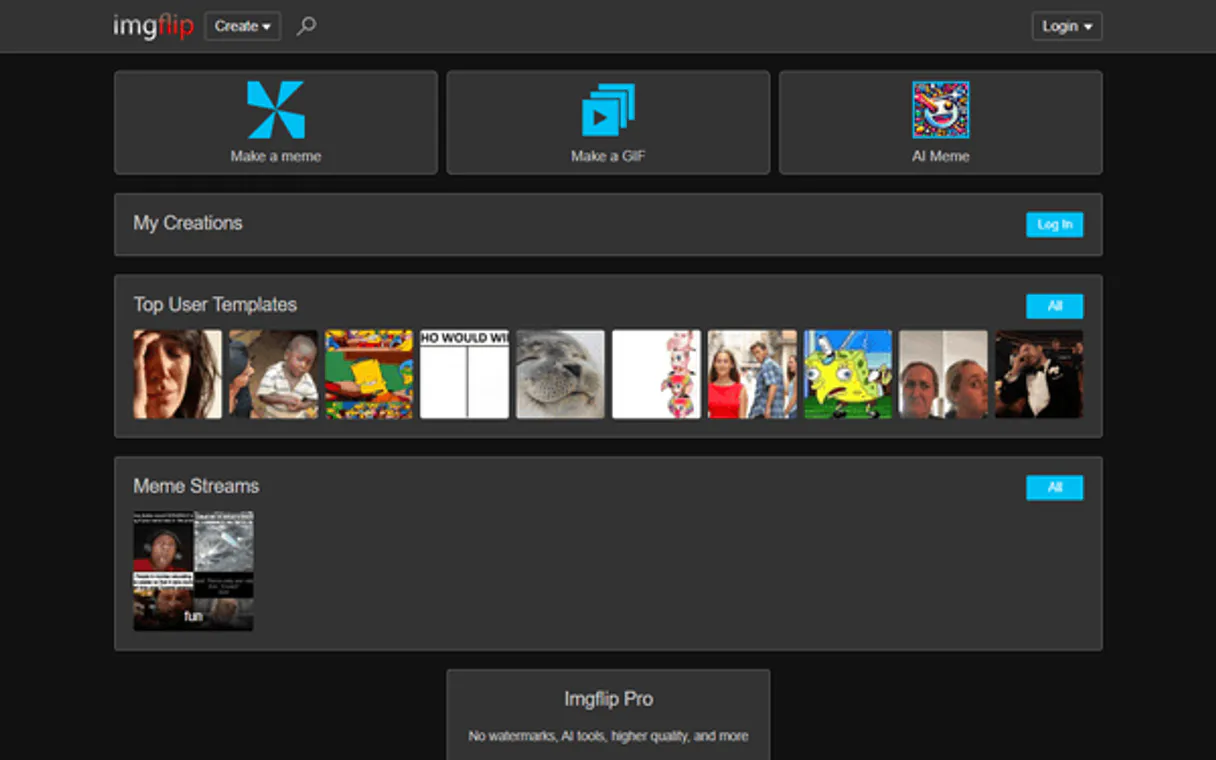
Meme Generator MCP Server: Generate custom memes instantly using popular templates from Imgflip's database. Your agent lists top-trending meme formats and builds entirely new images by combining your chosen template ID with specific captions for the top and bottom sections.
This tool is built to make creating viral, shareable visual content simple, allowing your AI client to act as a creative architect right in your workflow.
What your AI agents can do
Create meme
Generates a finished meme image when provided with a template ID and text for the top and bottom captions.
List meme templates
Retrieves a list of currently popular meme templates, including their IDs and previews.
Your agent lists the most popular meme formats available in Imgflip's database.
You create a new meme by specifying an existing template ID and providing text for the top and bottom captions.
The server sends direct, usable links to all generated images.
You can explore different templates through the agent to find the right visual for any concept or joke.
Ask AI about this MCP
Supported MCP Clients
Gemini Waiting for input…
Meme Generator: 2 Tools for Content Creation
These two tools let you discover trending meme formats and then generate finished, shareable memes with captions using a simple conversation prompt.
019d8457create meme
Generates a finished meme image when provided with a template ID and text for the top and bottom captions.
019d8457list meme templates
Retrieves a list of currently popular meme templates, including their IDs and previews.
Choose How to Get Started
Build a custom MCP for your own tools, or connect a ready-made integration from our catalog.
Build Your Own
Turn any API into an MCP. Import a spec, define Agent Skills, or deploy with MCPFusion.
- Import from OpenAPI, Swagger, or YAML specs
- Create Agent Skills with progressive disclosure
- Deploy to edge with MCPFusion framework
- Built in DLP, auth, and compliance on every call
- Real time usage dashboard and cost metering
- Publish to catalog or keep private
Make Your AI Do More
Start with Meme Generator, then connect any of our 4,700+ other servers whenever your AI needs more. One click, no limits.
- Use this MCP plus 4,700+ others, all in one place
- Add new capabilities to your AI anytime you want
- Every connection is secured and compliant automatically
- Track usage and costs across all your servers
- Works with Claude, ChatGPT, Cursor, and more
- New servers added to the catalog every week
What you can do with this MCP connector
Listen up. If you're trying to make viral content without spending hours in a dozen different editor programs, you need this. This is the Meme Generator MCP Server. It hooks your AI client—your agent—directly into Imgflip’s whole database of meme templates, letting you build custom jokes instantly right within your workflow.
You don't gotta deal with clunky web interfaces; your agent handles it all.
How does it work? It’s simple: Your agent talks to the server, which spits out finished images and direct links. This whole thing lets you treat your AI client like a dedicated creative team member who knows every popular meme format on the planet.
When you wanna see what's hot right now, you use list_meme_templates. That tool pulls a straight-up list of all the most popular, trending meme formats available in their database. You get back template IDs and previews—you can sift through them to figure out which visual works best for whatever joke or concept you’re working on.
It's how you identify the perfect format before you even write a word.
Once you spot the right vibe, say Template ID 12345 is gonna kill it, then you hit create_meme. This is where the magic happens. You feed your agent three things: that specific template ID, the text you want for the top caption, and the text for the bottom caption. The server takes those inputs and generates a finished meme image.
The process is designed to be seamless—your client doesn't have to jump between apps or manually upload anything. It just sends the parameters, waits for the result, and gets back the finished product. You can test out different joke concepts by swapping out text captions and running the create_meme tool again with the same template ID; it’s instant iteration.
And here's the kicker: when your agent is done building a meme, the server sends you direct, usable URLs for every single image created. You don't get a file to download and then have to upload somewhere else—you just get the shareable link right back in your chat window. That makes sharing it on social media or sending it over Slack super quick.
Whether you need a template that screams 'relatable failure,' or you wanna go with something more niche, running list_meme_templates lets you explore thousands of options until you find the perfect visual anchor for your idea. Then, you use those IDs and specific text inputs—the top caption and the bottom caption—in create_meme.
The server builds it out for ya, giving you a finished meme image and that direct link you need to share right away. It's literally everything you need in one place.
How Meme Generator MCP Works
- 1 Subscribe to this server and enter your Imgflip credentials.
- 2 Tell your AI client what you want—for example, 'Show me trending templates' or 'Make a meme using template ID 12345 with X on top and Y on bottom.'
- 3 The MCP agent runs the appropriate tool (
list_meme_templatesorcreate_meme) and returns the resulting list of IDs or the final image URL.
The bottom line is: you talk to your agent, it talks to Imgflip's API, and you get a finished meme or a list of template options back in seconds.
Who Is Meme Generator MCP For?
Anyone who needs visual content fast—especially social media managers and content creators. If you spend time searching for the perfect reaction image or need to quickly batch-create campaign visuals, this is for you. It cuts out the tedious manual steps of template hunting and editing.
Needs to rapidly generate 10–20 pieces of engaging content for a week's worth of posts, testing different popular meme formats against current trends.
Writes an article or script and needs accompanying visual jokes. They use the agent to source appropriate memes before writing the final draft.
Runs quick A/B tests on ad creative, using the Meme Generator MCP Server to generate multiple variations of a key message across different viral templates.
What Changes When You Connect
- Rapid Content Cycles: Stop manually finding templates. Use
list_meme_templatesto see the top 100 formats, letting you pick proven winners for your next social media push. - Zero-Friction Creation: Need a meme right now? Give your agent a template ID and two lines of text. The
create_memetool handles everything else, spitting out a ready-to-share URL immediately. - Consistency Across Campaigns: You can use the same templates or different ones for A/B testing marketing messages without ever leaving your chat window. Just change the IDs and captions in
create_meme. - Visual Ideation: Don't know what to make a meme about? First, run
list_meme_templates. Then, review the previews to find a format that fits your joke or topic before writing a single word. - True Workflow Integration: The agent acts as the middleman. You don't have to copy-paste IDs into a separate web tool; you just tell your client, and it runs
create_memefor you.
Real-World Use Cases
Need an ad visual fast?
A marketer needs 5 variations of a message ('Our product is great') for a quick paid campaign. Instead of manually opening Imgflip five times, they ask their agent to first run list_meme_templates to pick three solid formats. Then, the agent runs create_meme five times in sequence, generating all 15 unique images and providing the URLs.
Reacting to a breaking news story
A team needs to post a witty commentary on an event. They use their agent to run list_meme_templates until they find a perfect reaction format, like 'Distracted Boyfriend'. Once found, the agent runs create_meme, slotting in the specific top and bottom captions instantly.
Brainstorming internal comms content
An HR manager wants to make an announcement less dry. They ask their agent for meme ideas. The agent uses list_meme_templates to show the best formats, and they use the selected IDs in create_meme to generate a few drafts for team review.
Quickly updating old content
A creator has an old post that needs a fresh visual punch. They check the trends using list_meme_templates. If they find a better, more relevant template, they use its ID in create_meme to re-render the meme with minimal effort.
The Tradeoffs
Trying to describe the image manually
Telling the agent: 'Make a funny picture of someone looking surprised because they saw a puppy.' This is too vague and doesn't reference existing templates.
→
Instead, tell your agent: 'Use the template ID for the shocked face meme (e.g., 61579) and caption it with 'Puppy!' on bottom and 'Wait, what?' on top.' This uses create_meme correctly.
Forgetting to list templates first
Running create_meme but forgetting the specific template ID. The tool fails because it doesn't know which image format you want to use.
→
Always start by running list_meme_templates. This gives you a pool of IDs and previews, guaranteeing that your subsequent call to create_meme uses a valid format.
Asking for multiple image types
Requesting both an Instagram Story graphic and a Twitter card in one go. The server is specialized for the meme format.
→
Focus on the core task: generating a single, high-quality meme asset. Use create_meme to generate the image and then handle platform resizing or formatting outside of your agent.
When It Fits, When It Doesn't
Use this server if your primary bottleneck is translating text jokes into visually engaging, trending images. You need a tool that handles both discovery (list_meme_templates) and execution (create_meme). Don't use it if you require complex image manipulation (e.g., drawing arrows, adding custom filters) or if the meme content needs to be generated from scratch without using a known template. For pure graphic design work, you need an entirely different asset creation tool; this server is strictly for pop-culture meme generation.
Independent Platform Disclaimer: Vinkius is an independent platform and is not affiliated with, endorsed by, sponsored by, verified by, or otherwise authorized by Imgflip. All third-party trademarks, logos, and brand names are the property of their respective owners. Their use on this website is strictly for informational purposes to identify service compatibility and interoperability.
VINKIUS INFRASTRUCTURE
Cloud Hosted
Managed infra
V8 Isolated
Sandboxed per request
Zero-Trust Proxy
No stored credentials
DLP Enforced
Policy on every call
GDPR Compliant
EU data residency
Token Compression
~60% cost reduction
Works with Claude, ChatGPT, Cursor, and more
The Model Context Protocol standardizes how applications expose capabilities to LLMs. Instead of operating in isolation, your AI gains direct access to external platforms, live data, and real-world actions through secure, standardized connections.
This server provides 2 capabilities that interface natively with Claude, ChatGPT, Cursor, and any MCP client. No middleware. No custom integration required.
Available Capabilities
Finding the right viral format shouldn't take 20 minutes of Googling and clicking through galleries.
Right now, if you want to create a good social media post, you start by searching for templates. You click Imgflip, scroll through thousands of options, maybe open five different tabs just to compare which format works best with your joke. Then, when you finally find one, you have to remember its ID and copy it into another editor.
With the Meme Generator MCP Server, that whole process collapses. Your agent runs `list_meme_templates` and gives you a clean list of 100 trending options right in your chat window. You pick the template ID you like, and you're ready to create.
Meme Generator MCP Server: Generate memes with simple conversations.
Before this server, generating a meme was a three-step chore: 1. Find the template ID online. 2. Copy the top text and bottom text into another editor. 3. Paste everything together and download. It was slow, messy, and prone to copy/paste errors.
Now, you just tell your agent what you want—'Make a meme using this template with X on top and Y on bottom.' The server runs `create_meme` and hands you the finished asset and direct URL in one go. It’s that simple.
Common Questions About Meme Generator MCP
How do I start using the Meme Generator MCP Server with my captions? +
You must use the create_meme tool. First, you need a template ID. You can get this by running list_meme_templates, which shows current trending IDs and previews.
What if I don't know what templates are popular right now? +
Run the list_meme_templates tool. This lists the top 100 popular meme formats, letting you see what's trending without guessing or searching.
Can the Meme Generator MCP Server handle text that is very long? +
The create_meme tool expects specific captions for the top and bottom. Keep your input concise; overly long text might get clipped by the template's design limitations.
Does the Meme Generator MCP Server require any special software setup? +
No, you just subscribe to the server on Vinkius Marketplace and connect it to your preferred AI client (like Claude or Cursor). The agent handles the API calls for you.
How does the Meme Generator MCP Server handle authentication credentials? +
The server requires you to provide your Imgflip Username and Password upon subscription. Vinkius handles these credentials securely, transmitting them only when your AI client invokes a tool like create_meme. You never have to manually input them into your chat window.
Is there a rate limit for using the list_meme_templates tool? +
Yes, because this server connects directly to an external API, we recommend pacing your requests. If you hit a rate limit, your AI client will receive a specific error code telling you when you can try again. Implement a short wait or retry mechanism in your agent workflow.
If I run into an issue using the create_meme tool, what are common errors? +
Most errors involve either an invalid template ID or missing captions. The system returns clear error messages detailing the problem, such as 'Invalid Template ID' or 'Missing Caption Text.' Always verify your inputs before running the command.
When I use create_meme, how do I retrieve the actual sharable meme link? +
The create_meme tool automatically returns a direct URL to the generated image in its output. Your AI agent simply reads this specific URL and provides it to you for instant sharing across platforms.
Do I need an account to create memes? +
Yes, you need a free Imgflip account. Once created, provide your username and password to the server to authorize meme generation.
How do I find the ID for a specific meme template? +
Use the get_meme_templates tool. It will return a list of the top 100 trending templates, each with its unique numerical ID and a preview URL.
Can I leave the captions blank? +
Yes, both topText and bottomText are optional in the create_meme tool. If left blank, the generated meme will only show the original template image.
Use it with your favorite AI tools
Connect this server to Cursor, Claude, VS Code, and more.
More in this category

Goodreads
The world's largest site for readers and book recommendations — search books and audit reviews via AI.

GamerPower
Track live game giveaways, free loot, and beta keys via AI agents with GamerPower.
Clustdoc
Manage client onboarding and workflows via Clustdoc — track dossiers, monitor applications, and automate invitations directly from any AI agent.
You might also like

Birdeye
Grow your local business reputation with review management, customer surveys, and listings that drive more foot traffic.
ClinicalTrials.gov
Search the world's largest registry of clinical research studies — covering diseases, drugs, and experimental therapies across all phases.
Render Alternative
Automate your PaaS infrastructure via Render — list your services, deploy code, check logs, and scale resources directly from any AI agent.