
OfficeRnD Hybrid MCP. Schedule desks, rooms, and resources instantly.
 Gemini
 Works with every AI agent you already use
…and any MCP-compatible client









Just plug in your AI agents and start using Vinkius.
OfficeRnD Hybrid MCP Server manages your entire physical office ecosystem through AI agents. Use it to check desk and room availability, book resources instantly, view team directories, and track upcoming company events.
It connects your AI client directly to real-time space utilization data.
What your AI agents can do
Cancel booking
Removes an existing booking from the office resource system.
Create booking
Schedules a new reservation for a desk, room, or other asset.
Get booking
Retrieves the details of one specific booking using its ID.
The agent can reserve specific desks, meeting rooms, or other equipment for a date and time, or delete an existing reservation.
You list all available items—desks, conference rooms, etc.—and filter them by location or capacity.
The agent pulls up your own booking history and upcoming appointments from the system.
You retrieve a list of all physical locations, floors, or designated workspaces within the company.
The agent pulls organizational structures by listing teams or retrieving specific employee profiles.
Ask AI about this MCP
Supported MCP Clients
Gemini Waiting for input…
OfficeRnD Hybrid: 10 Tools for Resource Management
Use these tools to programmatically interact with every aspect of your physical office space, from booking individual desks to listing entire company teams.
019d75e3cancel booking
Removes an existing booking from the office resource system.
019d75e3create booking
Schedules a new reservation for a desk, room, or other asset.
019d75e3get booking
Retrieves the details of one specific booking using its ID.
019d75e3get my profile
Fetches the profile and identity information for the currently logged-in user.
019d75e3list bookings
Retrieves a list of all bookings associated with the current organization or user.
019d75e3list employees
Gets an overview of every employee registered in the company directory.
019d75e3list events
Pulls a list of upcoming community or corporate events happening on campus.
019d75e3list locations
Provides a full list and description of all physical office locations managed by the system.
019d75e3list resources
Lists every type of available resource, including desks, rooms, equipment, etc., along with their current status.
019d75e3list teams
Retrieves the names and members of established organizational teams.
Choose How to Get Started
Build a custom MCP for your own tools, or connect a ready-made integration from our catalog.
Build Your Own
Turn any API into an MCP. Import a spec, define Agent Skills, or deploy with MCPFusion.
- Import from OpenAPI, Swagger, or YAML specs
- Create Agent Skills with progressive disclosure
- Deploy to edge with MCPFusion framework
- Built in DLP, auth, and compliance on every call
- Real time usage dashboard and cost metering
- Publish to catalog or keep private
Make Your AI Do More
Start with OfficeRnD Hybrid, then connect any of our 4,700+ other servers whenever your AI needs more. One click, no limits.
- Use this MCP plus 4,700+ others, all in one place
- Add new capabilities to your AI anytime you want
- Every connection is secured and compliant automatically
- Track usage and costs across all your servers
- Works with Claude, ChatGPT, Cursor, and more
- New servers added to the catalog every week
What you can do with this MCP connector
Listen up. The OfficeRnD Hybrid MCP Server gives your AI agent direct access to everything running in a physical office building's management system. It’s not just a booking calendar; it handles the whole ecosystem, letting you coordinate space and people instantly through natural language.
When you use this server, your AI client doesn't send confusing API calls—it uses standard MCP commands that know how to talk to the office resource system. You tell it what you need in plain English, and the agent figures out which tool to run and what parameters to use.
It means you never have to jump between a booking app, an HR directory, and a facilities management dashboard.
Booking Resources: Getting Your Space Sorted
Need a desk or a room? The server lets you manage every reservation type. You can tell the agent to create_booking for any asset—whether it's a specific conference room, an equipment resource, or just a hot-desk space—and set the date and time in one go. If plans change, you don't have to manually find that confirmation number; simply ask the agent to cancel it using cancel_booking.
You can also pull up your own history by running list_bookings for all reservations tied to your account, or if you just need details on one specific reservation, the agent uses get_booking with the ID.
Mapping the Whole Place: Knowing Where Everything Is
You're always worried about whether that big conference room is free, or if there’s actually enough seating in the breakout area. The server addresses that head-on. You can use list_resources to get an inventory of every single item—desks, whiteboards, projectors, meeting rooms—and check its current status across the whole campus.
To understand the physical layout, you run list_locations, which gives you a full rundown of all buildings, floors, and specific workspaces managed by the system. Want to filter it down? You can list available resources and filter them immediately by location or required capacity.
People and Teams: The Directory Deep Dive
Coordination is half the battle in an office setting, so this server gives you the full employee picture. You'll find that the agent uses list_employees to pull up a directory listing of every person registered in the company. If you need to know who reports to whom or what teams exist, running list_teams provides the organizational structure and lists members for those groups.
For your own info, simply asking about yourself triggers get_my_profile, pulling all your personal details right into your chat thread.
Beyond people, it tracks company life. You can use list_events to see a list of upcoming corporate or community events happening on campus. If you need an overview of everyone's current commitments, the agent pulls up any bookings for the whole organization using list_bookings, and if you just want to know what’s going on today, it gives you that snapshot.
Putting It All Together: The Workflow Advantage
This isn't about running ten separate commands. This is about complex, multi-step tasks in one go. You can ask the agent something like: 'I need a space for eight people next Tuesday afternoon.' The server figures out three things: first, it checks list_resources to see which rooms fit eight people; second, it confirms availability using get_booking and list_bookings; and third, if everything clears up, it executes the create_booking.
You're managing complex hybrid work logistics just by talking to your agent. It keeps you from having to switch between booking software, HR portals, and facility maps—it brings all that data into one conversation.
How OfficeRnD Hybrid MCP Works
- 1 Subscribe to the OfficeRnD Hybrid server on Vinkius Marketplace.
- 2 Provide your API credentials: Client ID, Client Secret, and Organization Slug.
- 3 Ask your AI client (Claude, Cursor, etc.) to perform an action, like 'Book a desk for me tomorrow morning.' The agent then calls the correct tool.
The bottom line is that your AI agent talks directly to OfficeRnD, handling complex scheduling logic without you ever leaving your chat window.
Who Is OfficeRnD Hybrid MCP For?
Facilities Managers and Executive Assistants who spend their days juggling spreadsheets, calendar invites, and manual booking requests. If you're the person fielding questions like 'Is Room C free next Tuesday?', this cuts out all the friction.
Uses it to check resource availability across multiple floors before advising a department on where to host an event.
Runs reports using list_resources and list_locations to identify underutilized space or physical assets that need maintenance.
Uses it to book a complex series of resources—a room, two desks, and catering setup—in one go for an executive meeting.
What Changes When You Connect
- Manage bookings without context switching. You can use
create_bookingorcancel_bookingdirectly in the chat. The AI handles all the required parameters (date, time, resource ID), so you never need to open the booking calendar manually. - Know where everything is. Forget searching through multiple tabs. Use
list_resourcesto see every desk and room available across all locations. You get a single, consolidated view of your entire physical footprint. - Coordinate team-wide moves instantly. Instead of emailing department heads, ask the agent to run
list_teams. It pulls out the membership list for any group, helping you plan large gatherings or departmental shifts efficiently. - Get immediate schedule visibility. Run
list_bookingsto see who has reserved what and when. This is critical for knowing which resources are actually free right now, preventing double-booking errors. - Keep track of company happenings. Use
list_eventsto pull up the full calendar of community activities or major corporate milestones, keeping everyone in the loop without checking a separate intranet page.
Real-World Use Cases
Finding space for an impromptu meeting
A team needs a quick huddle room. Instead of emailing facilities, they prompt their agent: 'Show me available rooms today.' The agent uses list_resources to get all open rooms and then suggests the best fit using get_booking details.
Planning an offsite department gathering
The Ops Coordinator needs to know who's attending. They ask the agent to run list_teams for 'Marketing'. The agent returns the member list, and the coordinator can then use that roster to coordinate seating charts.
Checking a colleague's schedule
A user needs to know if a key person is in the office. They ask their agent to check get_my_profile for the employee or run list_bookings on that specific day to confirm availability.
Cleaning up old reservations
An event was canceled last minute, but a booking remains. The user simply tells their agent: 'Cancel the meeting room reservation for tomorrow.' The agent executes cancel_booking immediately.
The Tradeoffs
Assuming data consistency
The user runs list_employees and sees 50 people. They then try to tell the agent to book a desk for one of them, forgetting the booking requires a specific resource ID.
→
Always confirm availability first. Before running create_booking, prompt the agent with 'What resources are available?' The tool list_resources gives you the IDs needed before attempting a reservation.
Ignoring existing reservations
The user manually plans an event and tries to schedule it without checking if the room is already booked through another system.
→
Always run list_bookings for the target date. This checks all current records, ensuring you don't try to reserve a slot that's already taken.
Using vague commands
Asking the agent generally: 'Can I book something?' The system doesn't know if you mean a desk, a room, or equipment.
→
Be specific. Tell your agent: 'Use list_resources to check for available desks on the 3rd floor.' Specificity makes the tool call accurate.
When It Fits, When It Doesn't
Use this server if your pain point involves coordinating physical space or people within an established corporate structure (desks, rooms, teams). You need a single source of truth for where people are and what is available.
Don't use it if you only need to manage abstract digital assets (like Jira tickets) or if your company doesn't have centralized booking logic. If your problem is purely scheduling emails, just use a standard calendar tool. This server focuses on the physical reality of the office.
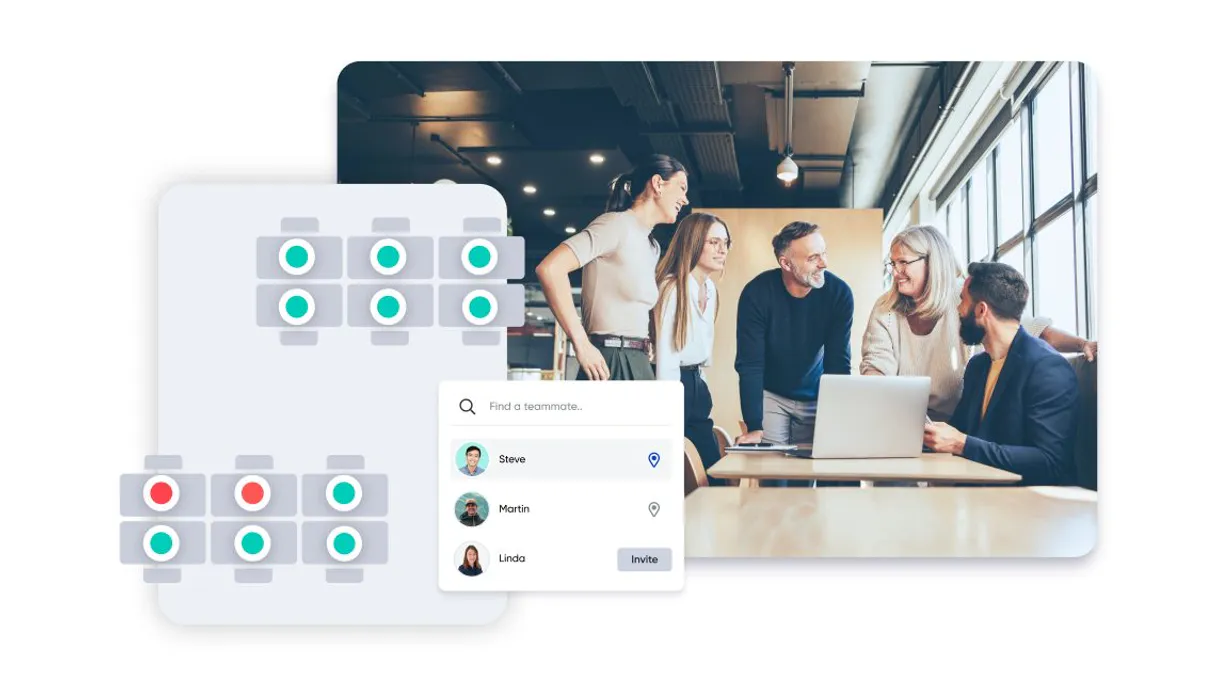
Independent Platform Disclaimer: Vinkius is an independent platform and is not affiliated with, endorsed by, sponsored by, verified by, or otherwise authorized by OfficeRnD Hybrid. All third-party trademarks, logos, and brand names are the property of their respective owners. Their use on this website is strictly for informational purposes to identify service compatibility and interoperability.
VINKIUS INFRASTRUCTURE
Cloud Hosted
Managed infra
V8 Isolated
Sandboxed per request
Zero-Trust Proxy
No stored credentials
DLP Enforced
Policy on every call
GDPR Compliant
EU data residency
Token Compression
~60% cost reduction
Works with Claude, ChatGPT, Cursor, and more
The Model Context Protocol standardizes how applications expose capabilities to LLMs. Instead of operating in isolation, your AI gains direct access to external platforms, live data, and real-world actions through secure, standardized connections.
This server provides 10 capabilities that interface natively with Claude, ChatGPT, Cursor, and any MCP client. No middleware. No custom integration required.
Available Capabilities
Figuring out who sat where shouldn't take three separate tabs and half an hour.
Right now, planning a single meeting means juggling: 1) Checking the calendar for room availability. 2) Opening the desk booking spreadsheet to see open spots. 3) Sending follow-up emails to confirm attendees' attendance. This manual process is slow and constantly breaks down when someone misses an email.
With this MCP server, you tell your agent: 'Plan a meeting for five people next Thursday.' The agent handles it all—it checks the `list_resources` data for available rooms *and* enough desks, then suggests a time window. It's one prompt; it’s done.
OfficeRnD Hybrid MCP Server: Resource Coordination
Before this, updating resource status meant multiple people logging into the system and manually changing records. If a desk was suddenly occupied or removed, it required an admin to run through several steps just to keep the data accurate.
Now, every action flows through the agent. When you call `create_booking` or `cancel_booking`, that change is immediate and verifiable across all tools. The system always knows the current state of your office space.
Common Questions About OfficeRnD Hybrid MCP
How do I check if a meeting room is available using list_resources? +
You prompt your agent to run list_resources and filter by 'meeting room' type. The output details the resource ID, capacity, and current booking status so you can pick an open one.
Can I use create_booking to book a desk for me? +
Yes. You run create_booking and provide the necessary parameters: resource type (desk), location, and time slot. The agent handles the reservation confirmation.
How do I see who works in my department using list_employees? +
Run list_employees. You can then ask the agent to filter that list by your specific team or department name for a quick headcount.
What is the difference between list_bookings and get_booking? +
list_bookings gives you an overview of multiple reservations (e.g., 'Show me everything next week'). get_booking requires one specific ID to give you all the detailed info on just that single booking.
What does using `get_my_profile` return? +
It returns your current user credentials. You'll get basic details like your full name, job title, and contact information linked to the OfficeRnD account.
If I use `cancel_booking`, what happens if the booking ID is invalid? +
The system will return an error code indicating that no active booking matches the provided ID. You must pass a unique, existing reservation identifier to cancel it.
How does `list_teams` help me coordinate space? +
It lists all organizational teams established in OfficeRnD. Use this tool first to get the official team ID before searching for specific employees within those groups.
What is the scope of locations when I run `list_locations`? +
This command shows every registered office or campus associated with your organization. It defines the geographical boundaries and available sites for any scheduling action.
Where do I find my API credentials? +
Log in to the OfficeRnD Admin Portal, go to Settings > Developer Tools, and create a new application to get your Client ID and Secret.
What is the Organization Slug? +
The slug is the unique identifier for your organization in OfficeRnD, found in Settings > My Account.
Can I book a resource for someone else? +
The current tools perform actions on behalf of the authenticated application/user. Advanced delegation depends on your API permissions.
Use it with your favorite AI tools
Connect this server to Cursor, Claude, VS Code, and more.
More in this category
Flock
Manage team collaboration via Flock — send rich messages with FlockML, handle public channels and private groups, and search rosters directly from any AI agent.

Text Diff Engine
Exact character-by-character string comparison. Stop relying on LLM summaries and get absolute text diffs for code and contracts.

Dubsado
Run your creative business with proposal templates, contract signing, invoicing, and client scheduling in one seamless flow.
You might also like

NOAA Marine — Tides, Currents & Coastal Data
US coastal oceanographic data: real-time water levels (tides), tide predictions, ocean currents, water temperature, coastal meteorological conditions, and multi-decade sea level rise trends from NOAA CO-OPS stations.

U.S. Treasury Exchange Rates — Official Foreign Currency Data
Access the U.S. Treasury's official exchange rates for over 170 foreign currencies. Used by the government for financial reporting. Retrieve current rates or query historical exchange rates by country.

Traefik Proxy
Monitor and manage your Traefik Proxy infrastructure — inspect routers, services, and middlewares directly from your AI agent.