
Procore MCP. Get a full picture of site progress from one chat window.
 Gemini
 Works with every AI agent you already use
…and any MCP-compatible client









Just plug in your AI agents and start using Vinkius.
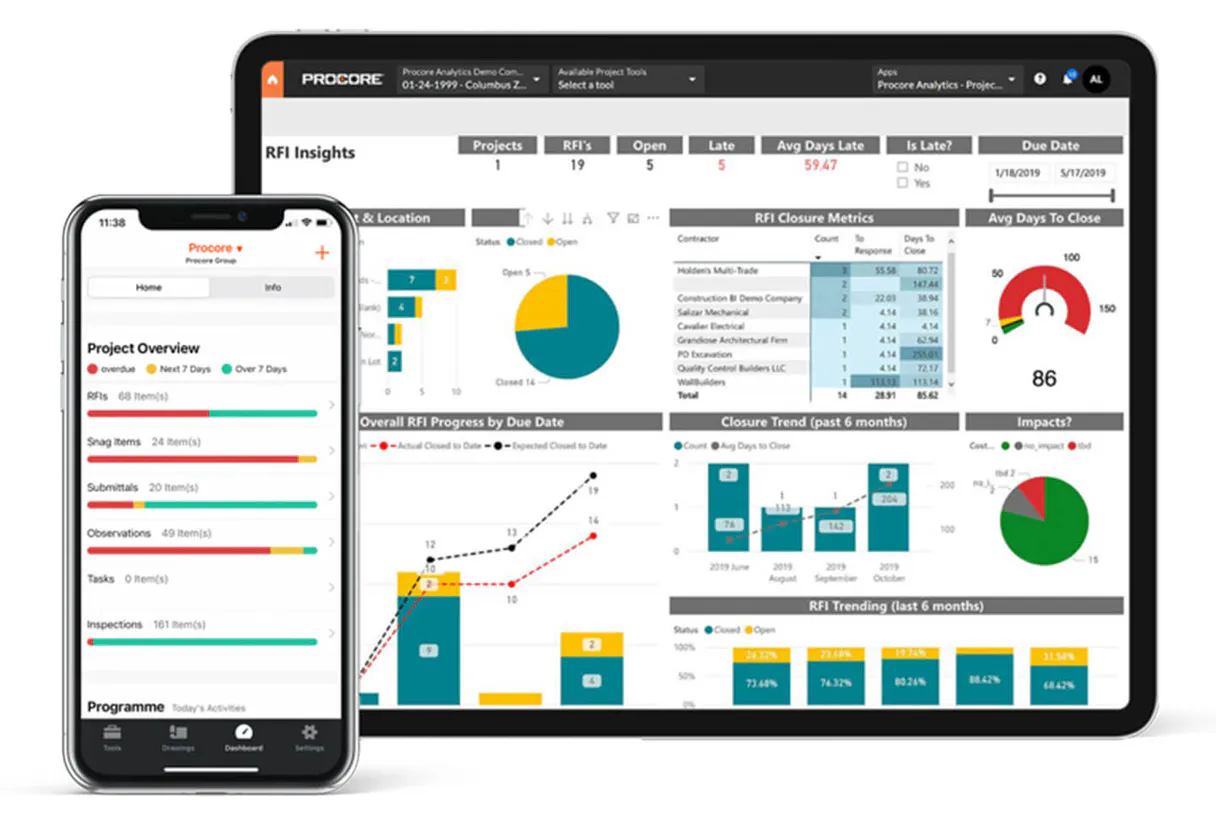
Procore MCP Server lets your AI agent manage an entire construction project through conversation. You track Requests for Information (RFIs), submittals, daily logs, punch lists, and drawings without logging into multiple portals.
Get instant status updates on site operations, budget summaries, or safety observations by simply asking your AI client.
What your AI agents can do
Get project
Retrieves core details for a specific construction job, including its budget, schedule timeline, and team members.
List daily logs
Lists historical daily construction logs, detailing weather, workforce counts, equipment used, and noted delays.
List drawings
Retrieves a list of project blueprints and elevations, noting the discipline, set, revision number, and approval status.
Retrieve core details for an entire construction job site, including its budget, schedule timeline, and assigned team.
List Requests for Information (RFIs) or material submittals. The agent shows the status, who owns it, and when the due date is.
Pull records of field quality checks or safety issues, including photos and necessary fixes recorded at the jobsite.
Get a list of every construction project you have set up in Procore right now.
See what's left to do before final sign-off. The agent lists specific deficiencies with locations, due dates, and assignees.
Browse all blueprints and elevations for a job site while keeping track of which revision is approved.
Ask AI about this MCP
Supported MCP Clients
Gemini Waiting for input…
Procore MCP Server: 8 Tools for Construction Management
Use these eight tools through your AI client to monitor project budgets, track logs, manage drawings, and check status across every facet of the build.
019d75faget project
Retrieves core details for a specific construction job, including its budget, schedule timeline, and team members.
019d75falist daily logs
Lists historical daily construction logs, detailing weather, workforce counts, equipment used, and noted delays.
019d75falist drawings
Retrieves a list of project blueprints and elevations, noting the discipline, set, revision number, and approval status.
019d75falist observations
Lists all recorded field safety or quality observations, including priority level, photos, assignee, and current status.
019d75falist projects
Gives a list of every active construction project managed under your Procore account.
019d75falist punch items
Lists all outstanding deficiencies on the punch list, showing the description, location, assignee, due date, and current status.
019d75falist rfis
Retrieves a list of Requests for Information (RFIs) for a specific project, including the subject, assignment owner, due date, and response history.
019d75falist submittals
Lists all material submittal documents, showing their title, required spec section, status, and who is responsible for approval.
Choose How to Get Started
Build a custom MCP for your own tools, or connect a ready-made integration from our catalog.
Build Your Own
Turn any API into an MCP. Import a spec, define Agent Skills, or deploy with MCPFusion.
- Import from OpenAPI, Swagger, or YAML specs
- Create Agent Skills with progressive disclosure
- Deploy to edge with MCPFusion framework
- Built in DLP, auth, and compliance on every call
- Real time usage dashboard and cost metering
- Publish to catalog or keep private
Make Your AI Do More
Start with Procore, then connect any of our 4,700+ other servers whenever your AI needs more. One click, no limits.
- Use this MCP plus 4,700+ others, all in one place
- Add new capabilities to your AI anytime you want
- Every connection is secured and compliant automatically
- Track usage and costs across all your servers
- Works with Claude, ChatGPT, Cursor, and more
- New servers added to the catalog every week
What you can do with this MCP connector
You'll use this Procore MCP Server to manage an entire construction project straight through conversation with your AI client. You don't gotta log into a dozen portals just to track what's happening on site or check budget numbers. It lets you get instant status updates and pull raw data from core Procore records.
Project Overview & Scope Management
It gives you the rundown on every active job under your account, pulling up a complete list of projects right away. For any specific construction job, you can ask it for all the foundational details: the current budget allocation, the full project schedule timeline, and who's assigned to the team.
You'll find core information like the project address and key personnel immediately.
Documentation & Submittals Tracking
Tracking paperwork is a huge headache; this server fixes that. When you need to track Requests for Information (RFIs), it gathers a list by subject, showing who owns the assignment, what the due date is, and even pulling up the entire response history so you know exactly where things stand.
If materials are involved, you can get a full inventory of all material submittal documents. For each one, it tells you the title, which required spec section it relates to, its current status, and who's responsible for giving final approval.
Site Status & Quality Control
It keeps tabs on everything that needs fixing before sign-off. You can pull up a list of all outstanding deficiencies from the punch list; this shows you the description of the problem, exactly where it is located, who’s assigned to fix it, its due date, and its current status.
For safety or quality issues found in the field, you'll see every recorded observation. It lists these observations by priority level, includes photos taken at the jobsite, tells you who was assigned the issue, and what its current status is.
Historical Reporting & Site Activity
It maintains a clear audit trail of site activity. You can list all historical daily construction logs, getting details on weather conditions, how many workers were on site, what equipment got used that day, or any delays that occurred. When you need technical blueprints, it retrieves the project drawings and elevations.
It lists every available drawing set, noting its discipline (like structural or mechanical), the specific set number, the revision number, and whether it's marked as approved.
Putting It Together
This setup means you don't gotta jump between spreadsheets or Procore tabs to get a complete picture of site operations. You can check project scope details, review all active documentation like RFIs and submittals, pull up field quality checks from observations, monitor the punch list for final fixes, access daily operational logs, and browse approved blueprints—all by talking to your agent.
How Procore MCP Works
- 1 Subscribe to the server, then provide your Procore Client ID, Secret, and Company ID from the developer portal.
- 2 Connect this MCP Server to your preferred AI client (Claude, Cursor, etc.).
- 3 Start chatting with your agent. You can now ask questions like 'What's the status of RFIs for Skyline Tower?' or 'Show me all pending punch list items.'
The bottom line is you talk to your AI client and it handles the complex API calls across project data, logs, drawings, and more.
Who Is Procore MCP For?
This tool is for anyone who spends too much time clicking through different dashboards just to get a single status update. It targets Project Managers, Superintendents, and Quality/Safety Directors—the people whose job means knowing where the critical information lives across dozens of documents and site reports.
You use this to get a quick status summary on multiple projects. You ask for all active projects using list_projects, then drill down into RFIs or budgets via get_project without opening the Procore site.
You need to review field progress across multiple jobs quickly. You use list_daily_logs and list_punch_items in one chat session to get a comprehensive view of what happened yesterday and what needs fixing today.
You pull observation reports using list_observations. You track corrective actions across the entire portfolio, making sure safety issues don't slip through the cracks just because they were logged on a different day or project.
What Changes When You Connect
- Saves time tracking overdue items. Instead of checking spreadsheets, asking your agent to run
list_rfisimmediately flags every RFI that's past due, along with who is blocking the job. - Closes out projects faster. Running
list_punch_itemsgives you a single, actionable checklist. You see exact deficiencies by location and know exactly who owns fixing it before final inspection. - Know your site's full scope instantly. Use
get_projectto get the budget summary, schedule status, and team roster for any project without leaving the chat window. - Audit quality and safety effortlessly. Running
list_observationslets you pull all field reports into a conversation. You can track corrective actions across months or years just by asking. - Never lose a blueprint again. The
list_drawingstool keeps track of revisions. If the team needs an elevation, your agent tells you which drawing revision is currently approved for use.
Real-World Use Cases
The Project Kickoff Status Check
It's day one on a new site. You need to know the scope and status immediately. Instead of opening five different tabs, you ask your agent: 'Give me the project overview for Skyline Tower.' The agent uses get_project to provide the budget summary, timeline, and team contacts all at once.
Tracking Material Approvals
The electrical subs are waiting on a fixture approval. You ask: 'What's status of submittals for fixtures?' The agent runs list_submittals and immediately tells you if the spec section is approved, who needs to sign off next, and when they said it would be done.
The Site Walkthrough Audit
You walk through a completed area. You need to verify that all minor fixes are done. You ask the agent: 'Show me open punch items for this zone.' The agent runs list_punch_items and lists every outstanding item, letting you check them off right in your conversation.
The Daily Progress Review
You're catching up on a week away from site. You ask: 'What happened last Tuesday?' The agent uses list_daily_logs to give you the weather, how many workers showed up, and if there were any noted equipment delays.
The Tradeoffs
Mixing logs with issues
A field worker notes a quality issue during a daily log entry but forgets to file it as an observation or RFI. It gets lost in the general text.
→
Don't rely on general text fields. If something is critical, force the AI agent to check both list_observations and list_punch_items. This ensures that issues are tracked using official, structured records.
Forgetting who owns what
A submittal needs approval from two departments (MEP and Structural), but you aren't sure which one is blocking the process.
→
Use list_submittals to check the status. The tool shows both the required spec section and the specific approver, so you know exactly who to chase.
Over-relying on email chains
Searching through months of emails and shared drives for a single revision drawing or RFI response date. It's slow and messy.
→
Ask the agent to use list_drawings or list_rfis. The tool pulls the official status, including revision tracking and documented history, instantly.
When It Fits, When It Doesn't
Use this server if you need a single source of truth for cross-project data. Specifically, it’s perfect when your question requires combining information from different categories—for example, 'Show me all RFIs related to the HVAC system that were flagged in last month's daily logs.' If you only need one piece of isolated info (like checking today's weather), a simple API call might suffice. But if you are synthesizing status across multiple domains (budget, safety, documentation), this MCP Server is required. Don't use it just to check the calendar; use it when you need structured data pulled from list_punch_items, list_rfis, and get_project all at once.
Independent Platform Disclaimer: Vinkius is an independent platform and is not affiliated with, endorsed by, sponsored by, verified by, or otherwise authorized by Procore. All third-party trademarks, logos, and brand names are the property of their respective owners. Their use on this website is strictly for informational purposes to identify service compatibility and interoperability.
VINKIUS INFRASTRUCTURE
Cloud Hosted
Managed infra
V8 Isolated
Sandboxed per request
Zero-Trust Proxy
No stored credentials
DLP Enforced
Policy on every call
GDPR Compliant
EU data residency
Token Compression
~60% cost reduction
Works with Claude, ChatGPT, Cursor, and more
The Model Context Protocol standardizes how applications expose capabilities to LLMs. Instead of operating in isolation, your AI gains direct access to external platforms, live data, and real-world actions through secure, standardized connections.
This server provides 8 capabilities that interface natively with Claude, ChatGPT, Cursor, and any MCP client. No middleware. No custom integration required.
Available Capabilities
Finding project status shouldn't require jumping between five tabs.
Right now, if you need to know the status of a job—say, which projects are active and what their budget looks like—you open the Procore dashboard. Then you check the RFI tab. Next, you pull up the drawings folder just to check revisions. You're clicking through four or five different sections, copy-pasting IDs, and trying to mentally stitch together who owns what.
With this MCP Server, that whole sequence of clicks disappears. You just ask your agent: 'What are the budget summaries for all active sites?' The system handles the calls across `list_projects` and `get_project`, giving you a clean, structured list right in your chat window.
Procore MCP Server helps manage project details & documentation
Manually tracking change requests is brutal. You have to remember if the issue was logged as a general site observation, or if it needed to be formalized into an RFI before you could track the response history.
Now, you just ask your agent about project issues. It checks `list_observations` for field notes and cross-references that data with `list_rfis`. You get one answer that tells you not only what's wrong but which formal process is needed to fix it.
Common Questions About Procore MCP
How does list_daily_logs help me find a delay note? +
The list_daily_logs tool pulls historical records including specific notes on delays. You can ask for logs from a certain date range and the agent will surface any mentions of delays or equipment issues recorded that day.
I need to check drawings revisions, which tool do I use? Is it list_drawings? +
Yes, you use list_drawings. This tool specifically lists all blueprints and elevations associated with the project. It shows the discipline, set name, revision number, and approval status for each drawing.
Can I get a list of punch items for multiple projects using list_punch_items? +
The list_punch_items tool allows you to query open deficiencies. You can specify criteria (like 'all units' or 'common areas') and it returns all outstanding items, including the location, assignee, and due date.
How do I check material approvals for a project? Should I use list_submittals? +
Yes, list_submittals is correct. It lists all materials submitted for approval. The tool shows the title of the item and its status, letting you know if it's approved or still pending review.
How do I track RFI assignments or due dates using list_rfis? +
You get a clear view of accountability. The tool lists the subject, status, assignee, and due date for every RFI. This lets you immediately see who owns a task and if it's past its deadline without manual checks.
If I need to check safety reports by priority level, what do I use? Is it list_observations? +
Yes, list_observations handles that. It pulls the observation type, assignee, and critically, the priority level. This helps Quality Managers immediately focus on high-priority items needing attention.
Can I use list_projects to get a quick summary of project budgets? +
It includes budget information for every active site. You'll get the budget, schedule status, and team details all in one list view. This is great for managers who need a fast financial overview across multiple sites.
What credentials do I need to connect my AI client to this server? +
You must provide your Procore Client ID, Client Secret, and Company ID. These keys are located on the developers.procore.com site. Getting these credentials is required before your agent can access any data.
Can my AI give me a full project status including open RFIs, pending submittals, and punch items? +
Yes! Ask 'Give me a full status for project 2847.' It calls list_rfis, list_submittals, and list_punch_items to compile a consolidated briefing: 4 open RFIs (2 overdue), 7 pending submittals, and 12 punch items. A field-ready summary in seconds.
How can I review what happened on my jobsite yesterday? +
Ask 'Show me yesterday's daily log for project 2847.' The list_daily_logs tool returns weather, workforce headcount by trade, equipment on site, work completed, delays, and superintendent notes. Your complete jobsite briefing without a single phone call.
Is this integration read-only? +
Yes, entirely read-only. All 8 tools list and retrieve data — none can create, modify, or delete project records. Your OAuth credentials control which projects are accessible, matching your Company Admin permissions.
Use it with your favorite AI tools
Connect this server to Cursor, Claude, VS Code, and more.
More in this category
Clearstory
Manage construction change orders and T&M tags via Clearstory — track projects, monitor CORs, and manage project rates directly from any AI agent.

AccuLynx
Business management for roofing contractors — manage leads, jobs, and financial data via AI.

Exact Online Bouw
Manage Dutch construction accounting with project budgets, cost tracking, and financial reporting built for the building industry.
You might also like

Zendesk Sell
Manage sales leads, contacts, and deals via the Zendesk Sell (Base CRM) API.

Poplar
Automate programmatic direct mail via Poplar — trigger mailers, standardize addresses, and manage audiences directly from any AI agent.

TaxJar
Connect your AI to TaxJar. Calculate sales tax dynamically, validate active nexus regions, and assess order tax liability natively from the terminal.