
Product Hunt MCP. See what's trending in tech without leaving your chat.
 Gemini
 Works with every AI agent you already use
…and any MCP-compatible client









Just plug in your AI agents and start using Vinkius.
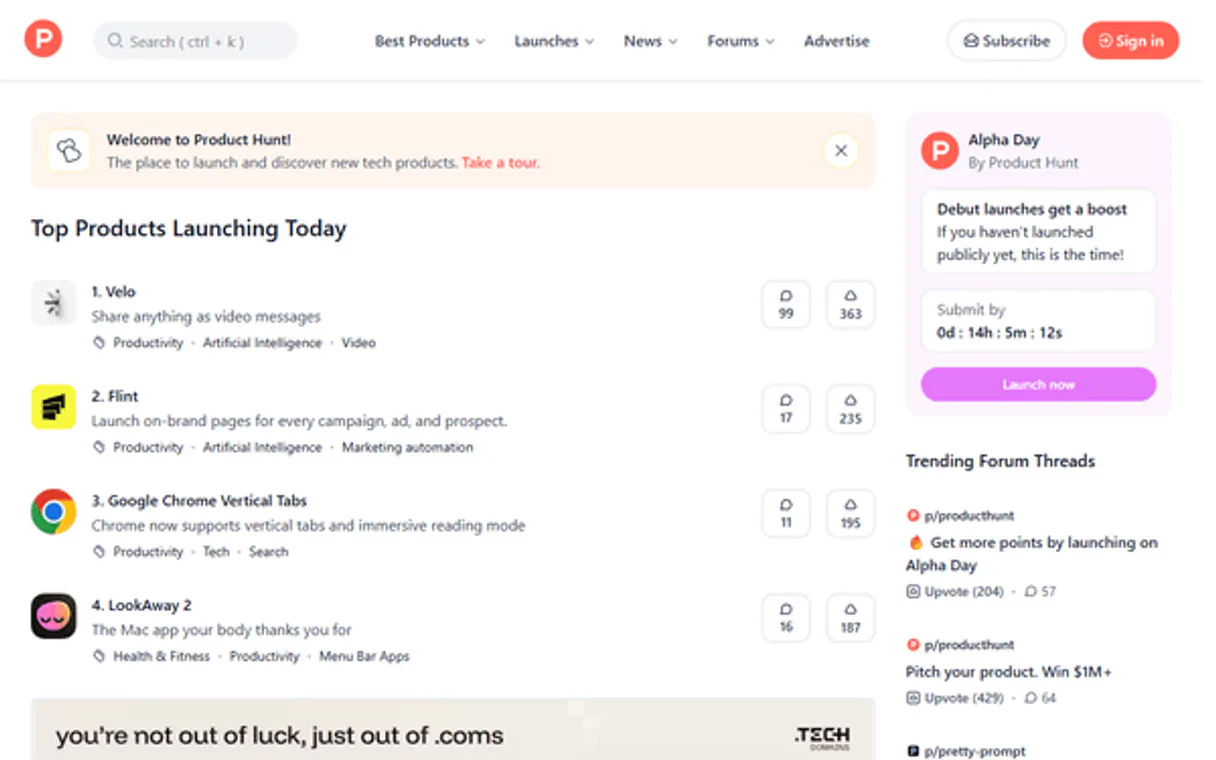
Product Hunt pulls up top tech trends daily. It lets your AI agent search for specific tools, pull the current leaderboard of hot startups, or deep dive into a product’s full history using its ID.
What your AI agents can do
Daily leaderboard
Fetches the current top-voted products, giving you taglines and URLs for today's trending tech.
Product details
Pulls the full product description, review scores, upvote count, and maker list for any given Product Hunt ID.
Search products
Searches Product Hunt by keyword or category to find tools related to a specific topic (e.g., 'productivity').
Pulls a list of the most upvoted and trending products from Product Hunt for the current day.
Searches the entire Product Hunt database using keywords, product names, or general categories (e.g., 'AI', 'dev tools').
Gets comprehensive data on a specific tool—including descriptions, review scores, upvotes, and maker profiles—using its unique ID.
Ask AI about this MCP
Supported MCP Clients
Gemini Waiting for input…
Product Hunt MCP Server: 3 Tools for Product Discovery
Use these tools to find trending products, search specific tech categories, and pull full metrics on any tool from the Product Hunt database.
019d75fadaily leaderboard
Fetches the current top-voted products, giving you taglines and URLs for today's trending tech.
019d75faproduct details
Pulls the full product description, review scores, upvote count, and maker list for any given Product Hunt ID.
019d75fasearch products
Searches Product Hunt by keyword or category to find tools related to a specific topic (e.g., 'productivity').
Choose How to Get Started
Build a custom MCP for your own tools, or connect a ready-made integration from our catalog.
Build Your Own
Turn any API into an MCP. Import a spec, define Agent Skills, or deploy with MCPFusion.
- Import from OpenAPI, Swagger, or YAML specs
- Create Agent Skills with progressive disclosure
- Deploy to edge with MCPFusion framework
- Built in DLP, auth, and compliance on every call
- Real time usage dashboard and cost metering
- Publish to catalog or keep private
Make Your AI Do More
Start with Product Hunt, then connect any of our 4,700+ other servers whenever your AI needs more. One click, no limits.
- Use this MCP plus 4,700+ others, all in one place
- Add new capabilities to your AI anytime you want
- Every connection is secured and compliant automatically
- Track usage and costs across all your servers
- Works with Claude, ChatGPT, Cursor, and more
- New servers added to the catalog every week
What you can do with this MCP connector
Product Hunt MCP Server
Your AI agent can tap directly into the core Product Hunt database using this server. You don't have to copy and paste links or manually check websites; your agent pulls all the market insights right where you are working.
Daily Leaderboard Tracking
When you need a quick pulse on what’s trending, use daily_leaderboard. This tool fetches the current top-voted products for the day. You'll get a list of the most hyped tech startups, complete with their taglines and direct URLs. It's perfect for keeping tabs on which new tools are catching attention right now.
If you need to know what’s hot in the dev space or who just snagged some viral traction, this function tells you immediately.
Searching by Keyword or Category
If you're hunting for something specific—say, a tool for advanced video editing or anything related to 'AI infrastructure'—you use search_products. You can search the whole Product Hunt database using keywords, full product names, or broad categories. For instance, if your team is focused on productivity tools, simply tell your agent to look up that category, and it returns all relevant results.
This function lets you drill down into huge swaths of tech without needing to browse pages manually. It's how you find the niche players outside the daily spotlight.
Retrieving Full Product Details
When you spot a tool you think is worth digging deeper, use product_details. You give it a unique Product Hunt ID, and this tool pulls every piece of comprehensive data available on that specific product. It's not just the description; it’s the full package. You get the complete product description itself, along with hard metrics like the total upvote count, the current review scores, and a list of the people who made it (the maker profile).
Knowing these details lets you assess credibility quickly. For example, if a tool has a high number of votes but low reviews, your agent shows you that mismatch immediately. It's all about getting the granular data—you see exactly how many users are backing it and what they're saying in the comments.
This server gives your AI client three distinct ways to analyze tech launches: checking today’s hype with the daily_leaderboard, scoping out a category using search_products, or doing deep-dive forensics on any single tool with product_details. You get market data streams and product histories, all without leaving your workspace.
How Product Hunt MCP Works
- 1 Subscribe to the server and enter your Product Hunt Developer Token.
- 2 Ask your AI client to run a specific tool (e.g., 'Check the daily leaderboard').
- 3 The agent calls the appropriate
daily_leaderboard,search_products, orproduct_detailsfunction, returning structured data.
The bottom line is you tell your AI client what kind of product information you need; it handles calling the Product Hunt API for you.
Who Is Product Hunt MCP For?
Founders and indie hackers who track niche competition. VCs needing instant, validated data on trending startups. Developers who constantly hunt for new open-source libraries or design inspiration.
Uses daily_leaderboard every morning to see what competitors are launching and tracks specific niches by running targeted searches.
Runs broad searches using search_products for high-potential categories (like 'Web3' or 'AI') and uses product_details to get quick investment briefs on promising tools.
Checks the leaderboard or searches for new open-source projects and pulls detailed specs using product_details before integrating a tool into their own stack.
What Changes When You Connect
- Track real-time trends with
daily_leaderboard. You instantly see the top products, their upvote counts, and taglines—perfect for competitive analysis. - Scope out new ideas fast. Use
search_productsto filter by category (like 'AI') or keyword, giving you a focused list of potential tools in minutes. - Get deep specs with
product_details. Instead of just seeing the title, you pull full descriptions, review scores, and maker names for instant vetting. - Stop juggling tabs. Your agent handles running multiple commands—first checking the leaderboard, then searching, and finally pulling details on a winner.
- The data is always fresh. You're getting insights directly from Product Hunt’s live database through your AI client.
Real-World Use Cases
Monitoring Niche Competition
A founder needs to know what the competition is launching this week. They ask their agent to run daily_leaderboard and then use product_details on the top three results. The agent returns a comparison brief, including upvotes and descriptions, so the founder knows exactly where to focus development.
Finding New Open-Source Code
A developer needs a new utility for their side project. They use search_products filtering by 'developer tools'. The agent returns ten results; the developer then asks the agent to run product_details on the top result to check its license and maker history.
VC Due Diligence Quick Check
A VC analyst has heard about a new sector (e.g., 'decentralized identity'). They use search_products with that keyword. The agent pulls the list, and the analyst can then ask for deep dives on specific candidates using product_details, getting instant metrics on traction.
Summarizing Tech Trends
A designer wants a report on top trends right now. They prompt their agent to run daily_leaderboard and ask the agent to summarize the themes, including the taglines and upvote counts for the top five products.
The Tradeoffs
Treating it like a simple search engine.
Asking your agent to just 'find AI tools.' This only gives surface results and doesn't provide context or depth on the actual product viability.
→
First, run search_products for 'AI'. Then, select a few promising results and use product_details on each one. That combination provides both breadth and required depth.
Forgetting to specify the product ID.
Attempting to run product_details without an ID will fail or return generic data, because that tool needs a precise target to pull metrics from.
→
Always get the required Product Hunt ID first—either from the results of daily_leaderboard or search_products—before passing it into product_details.
Assuming all data is available everywhere.
Expecting a simple keyword search to give you review scores. The basic search tool only handles keywords; detailed metrics require the dedicated product_details function call.
→
Use search_products for initial discovery, but always follow up with product_details if you need concrete numbers like review scores or full descriptions.
When It Fits, When It Doesn't
Use this server if your job requires continuous monitoring of the tech market. Specifically, use it when you need to compare trending products (using daily_leaderboard) with specific deep-dive metrics (using product_details). Don't use it if you just want general industry news or a list of articles; that’s for standard web search tools. If your goal is merely broad brainstorming without any need for upvote counts, review scores, or official URLs, then the complexity of this server might be overkill. But if tracking traction and competitive metrics matters, this set of tools is what you need.
Independent Platform Disclaimer: Vinkius is an independent platform and is not affiliated with, endorsed by, sponsored by, verified by, or otherwise authorized by Product Hunt. All third-party trademarks, logos, and brand names are the property of their respective owners. Their use on this website is strictly for informational purposes to identify service compatibility and interoperability.
VINKIUS INFRASTRUCTURE
Cloud Hosted
Managed infra
V8 Isolated
Sandboxed per request
Zero-Trust Proxy
No stored credentials
DLP Enforced
Policy on every call
GDPR Compliant
EU data residency
Token Compression
~60% cost reduction
Works with Claude, ChatGPT, Cursor, and more
The Model Context Protocol standardizes how applications expose capabilities to LLMs. Instead of operating in isolation, your AI gains direct access to external platforms, live data, and real-world actions through secure, standardized connections.
This server provides 3 capabilities that interface natively with Claude, ChatGPT, Cursor, and any MCP client. No middleware. No custom integration required.
Available Capabilities
Keeping track of who's launching what shouldn't feel like a full-time job.
Right now? You check Product Hunt every morning. You scroll through the leaderboard, copy a product name you like, open three separate tabs to read its description, then switch over to another tab to find out who built it and what its review score is. By the time you've gathered five data points on five different tools, you're deep in click fatigue.
With this MCP server, that manual process vanishes. You just ask your agent: 'What are the top tech launches today?' It runs `daily_leaderboard` and pulls all the taglines and URLs for the top products instantly. You get a clean, actionable list without touching ten tabs.
Product Hunt MCP Server: Get full product specs in one prompt.
Previously, if you found a cool tool via search, you'd have to click through the dedicated page just to find out its detailed description or who the original maker was. You’d leave your workflow and lose context while doing it.
Now, your agent handles that handoff. After running `search_products` for a category, you can ask for details on a specific result. The server runs `product_details`, giving you the full description, review score, and maker list—all in one seamless response.
Common Questions About Product Hunt MCP
How do I get started? +
Subscribe, enter your API credentials (your Developer Token from the Product Hunt API Dashboard), and you're ready. No code, no setup, no webhooks — just connect and start exploring daily startup launches through your AI agent.
Can my AI agent create a summary brief of the top 3 startups launched today? +
Yes. Ask your agent to fetch the daily leaderboard and pull the details of the top 3 items. It will return the product names, descriptions, upvote counts, maker names, and direct URLs — generating a complete morning brief on the tech ecosystem without opening a single browser tab.
What happens when I need to find the best AI tools launched recently? +
Just tell your AI agent. It uses the search tool to query "AI" directly against the Product Hunt database, surfacing highly-rated matches with their taglines and upvotes instantly. You skip the doom-scrolling and go straight to evaluating the exact tools you are looking for.
Is this suitable for VC scouting workflows and competitive analysis? +
Absolutely. Because your agent can pull deeply nested product details (including maker names, review scores, and direct website links) for any product ID, you get a comprehensive pulse on fresh competitors or investment opportunities immediately. Perfect for scouting teams building automated deal-flow monitors.
If I need to pull product data using `product_details`, how should my AI agent handle token expiration? +
The system will throw an authentication error directly. You simply update your Product Hunt Developer Token in the Vinkius dashboard settings, and your agent can reconnect immediately without coding changes.
When I run `search_products`, are there any rate limits on how many keywords my agent can query? +
Yes, API call volume is limited by Product Hunt. We recommend batching related searches or checking your usage dashboard for real-time quota status before running large data pulls.
What steps must I take to get detailed product information after using `daily_leaderboard`? +
You need a Product ID from the leaderboard results. Your agent then passes that specific ID into the product_details tool; this structured handoff is what retrieves the full description and review scores.
Does the data retrieved via `product_details` include information about the product's open-source status? +
Yes, the detailed output includes maker profiles and links. You can use this data to verify if a project is open source or list its associated development team members.
Use it with your favorite AI tools
Connect this server to Cursor, Claude, VS Code, and more.
More in this category
X (Twitter)
Automate social intelligence workflows via X (Twitter) — search recent tweets, retrieve user profiles, and analyze tweet engagement directly from any AI agent.

Orbit
Manage community relationships via Orbit — list members, track activities, and add notes directly from any AI agent.

Medium
Publish and manage content on Medium — create posts and manage publications directly from any AI agent.
You might also like

EnterpriseAlumni
Equip your AI agent to manage alumni networks, track engagement, and monitor member profiles via the EnterpriseAlumni API.
DeepSource
Automate code quality monitoring via DeepSource — analyze issues, vulnerabilities, metrics, and report cards directly from any AI agent.

Kontent.ai (Enterprise Headless CMS)
Manage enterprise content via Kontent.ai — create items, publish language variants, and audit content types.