
PunkAPI MCP. Filter BrewDog Beers by Style, ABV, or Pairing
 Gemini
 Works with every AI agent you already use
…and any MCP-compatible client









Just plug in your AI agents and start using Vinkius.
PunkAPI lets you search BrewDog's entire catalog of craft beers. Find brews by style, ABV range, hop variety, bitterness level, or even what they pair well with.
Whether you need a light session beer for brunch or a bitter IPA for dinner, this server gives your AI client all the filtering tools it needs to narrow down thousands of options fast.
What your AI agents can do
Get all beers
Search the entire catalog using a combination of filters like name, ABV limits, IBU range, malts, and food pairings.
Get beer by id
Retrieves full details—ingredients, brewing tips, and pairing suggestions—for one specific beer ID.
Get beers by abv
Filters the catalog to find beers within a specified alcohol by volume range (e.g., low ABV or high ABV).
You ask the agent for a pairing (e.g., 'What beer goes with beef?'), and it runs tools to return matching brews.
The client narrows down options using ABV ranges, allowing you to find anything from low-alcohol session beers to high-proof stouts.
You can limit the search results to only feature specific hop types like 'Citra' or 'Mosaic'.
The agent uses IBU ranges to separate mild, balanced, and super-bitter beers instantly.
You ask for something new, and the server pulls one or more random brews from the catalog for you to check out.
Ask AI about this MCP
Supported MCP Clients
Gemini Waiting for input…
PunkAPI MCP Server: 8 Tools for Beer Catalog Search
Use these eight tools to search the BrewDog beer catalog using filters based on ingredients, flavor profiles, alcohol content, or food pairings.
019d8472get all beers
Search the entire catalog using a combination of filters like name, ABV limits, IBU range, malts, and food pairings.
019d8472get beer by id
Retrieves full details—ingredients, brewing tips, and pairing suggestions—for one specific beer ID.
019d8472get beers by abv
Filters the catalog to find beers within a specified alcohol by volume range (e.g., low ABV or high ABV).
019d8472get beers by food
Finds and lists matching brews based on common food pairings like cheese, dessert, or spicy dishes.
019d8472get beers by hops
Narrows the search to only include beers that feature specific hop varieties (like Citra or Mosaic).
019d8472get beers by ibu
Filters results based on bitterness units, letting you find everything from mild to very bitter brews.
019d8472get beers by style
Searches the catalog by specific beer style names, such as IPA, Stout, or Lager.
019d8472get random beer
Pulls a random selection of beers from the entire catalog for discovery purposes.
Choose How to Get Started
Build a custom MCP for your own tools, or connect a ready-made integration from our catalog.
Build Your Own
Turn any API into an MCP. Import a spec, define Agent Skills, or deploy with MCPFusion.
- Import from OpenAPI, Swagger, or YAML specs
- Create Agent Skills with progressive disclosure
- Deploy to edge with MCPFusion framework
- Built in DLP, auth, and compliance on every call
- Real time usage dashboard and cost metering
- Publish to catalog or keep private
Make Your AI Do More
Start with PunkAPI, then connect any of our 4,700+ other servers whenever your AI needs more. One click, no limits.
- Use this MCP plus 4,700+ others, all in one place
- Add new capabilities to your AI anytime you want
- Every connection is secured and compliant automatically
- Track usage and costs across all your servers
- Works with Claude, ChatGPT, Cursor, and more
- New servers added to the catalog every week
What you can do with this MCP connector
This server gives your AI client total access to BrewDog's entire beer catalog, so you don't have to dig through thousands of pages yourself. You just talk to it naturally and let the agent do the heavy lifting.
You wanna find a specific brew? You can use get_all_beers to search everything at once. Just drop in filters like names, how much booze it has (ABV), the bitterness level (IBU), what malts are involved, or even what food pairings it works with—it handles all that cross-referencing for you.
If you're narrowing down the options by a single characteristic, you've got several angles. Need something strong? You can use get_beers_by_abv to filter the whole list right down to the ABV range you want, whether it’s a low-alcohol session drinker or a high-proof beast.
Sometimes you know what flavor profile you like, but not the name. The agent lets you focus on hops; using get_beers_by_hops, you'll only see beers featuring specific hop varieties, like Citra or Mosaic. Or maybe bitterness is your thing; use get_beers_by_ibu to separate everything mild from super-bitter bombs instantly.
If you know the style—say, you're craving a Stout or an IPA—you can run that through get_beers_by_style. It filters out everything else. You also gotta consider what you’re eating with it; ask for pairings, and get_beers_by_food pulls matching brews based on food like cheese, dessert, or spicy dishes.
Sometimes, you just don't know what you want to drink. No big deal. Use get_random_beer, and the server spits out a selection of random brews for you to check out—it’s great for discovery. And when you find one that looks promising, use its specific ID with get_beer_by_id. That tool gives you the deep dive: it pulls all the full specs on that single beer, including ingredient lists, brewing tips, and more pairing suggestions.
You've got everything here—from a simple random pull to filtering down thousands of options using combination searches. You just tell your agent what you need, and it gets the right data back.
How PunkAPI MCP Works
- 1 Subscribe to the PunkAPI server. No API key is needed—you're good to go.
- 2 Tell your AI client what you need (e.g., 'Find a beer for chicken that is low ABV').
- 3 The agent runs multiple tools (
get_beers_by_food, thenget_beers_by_abv) and spits out the exact matching beers.
The bottom line is, you use your natural language prompt, and the server does all the complex filtering work in the background.
Who Is PunkAPI MCP For?
This is for anyone who deals with beer data but hates manual lookups. If you're a restaurant menu designer trying to nail perfect pairings, or a developer building a specialized brewery app, this saves hours of research. It's the anti-spreadsheet solution.
Needs to write blog posts about pairing beer with specific foods; uses get_beers_by_food and get_all_beers to build articles.
Must match every dish on the menu to a perfect beer. Uses get_beers_by_food constantly, cross-referencing results with get_all_beers filters for style or ABV.
Builds internal tools that allow staff to filter the current inventory by specific technical specs like IBU range (get_beers_by_ibu) or hop variety (get_beers_by_hops).
What Changes When You Connect
- Stop guessing what pairs well. Use
get_beers_by_foodto instantly see 15+ beers that match a specific dish like 'cheese' or 'pork', eliminating menu guesswork. - Filter out the bad stuff. Instead of sifting through hundreds, use
get_beers_by_abvto immediately narrow results to only those session beers under 4% ABV. - Drill down into specifics. If you know it's a Citra hop beer, run
get_beers_by_hops. This gives you precision filtering that generic searches miss. - Handle complex queries in one shot. The
get_all_beerstool lets your agent combine filters—for example, finding an 'IPA style' and with a 'Citra hop' and above 5% ABV. - Never get bored looking at beer data again. Use
get_random_beerwhen you need quick, fun suggestions without having to define parameters.
Real-World Use Cases
Menu Night Prep
A restaurant manager needs a pairing for their new spicy taco platter. Instead of checking three different databases, they ask the agent: 'Find beers that pair with spicy food.' The agent runs get_beers_by_food and immediately returns 10 options suitable for the menu.
Inventory Audit
A brewery developer needs to know if they have any super-strong stouts. They ask: 'Show me all beers over 8% ABV that are also in the Stout style.' The agent combines get_beers_by_abv and get_beers_by_style, giving an accurate, filtered list.
Researching Hops
A craft beer writer needs to write about the versatility of Mosaic hops. They ask: 'Find all beers that use Mosaic.' The agent runs get_beers_by_hops, providing a list and linking to detailed ingredient profiles via get_beer_by_id.
The Quick Recommendation
A user just finished dinner and wants a suggestion. They ask: 'Give me a beer.' The agent runs get_random_beer, giving them an instant, fun discovery without needing any filters or input.
The Tradeoffs
Over-filtering with general search
Trying to ask the AI client a vague question like 'Give me good beers.' This forces the agent to run get_all_beers without enough constraints, returning too much data and confusing the user.
→
Be specific. If you want beer for cheese, use get_beers_by_food. If you only care about bitterness, call get_beers_by_ibu. Always start with the most restrictive filter.
Assuming a single tool handles everything
Asking for 'a strong beer that pairs with dessert' and expecting one tool to handle both ABV and food pairing. The agent will struggle or fail.
→
Recognize the two separate constraints. You must use a combination: first, filter by get_beers_by_food (dessert), then narrow the resulting list using get_beers_by_abv (high ABV).
Ignoring style names
Only searching by IBU units, missing out on specific stylistic suggestions. You might find a bitter beer, but not know if it's an IPA or a Porter.
→
Always cross-reference your results with get_beers_by_style to get the full context of what you found.
When It Fits, When It Doesn't
Use this server when your task requires deep, filtered catalog data and specific technical criteria (like IBU or ABV). This is the place for structured brewery research. Don't use it if: 1) You just need a general list of popular beers (use get_random_beer instead); or 2) Your goal is simple message sending or scheduling (those require different messaging tools).
Use this if you need to compare results from two specific filters, like finding 'Stout' (get_beers_by_style) that are also rated for 'chocolate' pairing (get_beers_by_food). If your task is only about reading a single beer's ingredients and history, just use get_beer_by_id to keep the agent call clean.
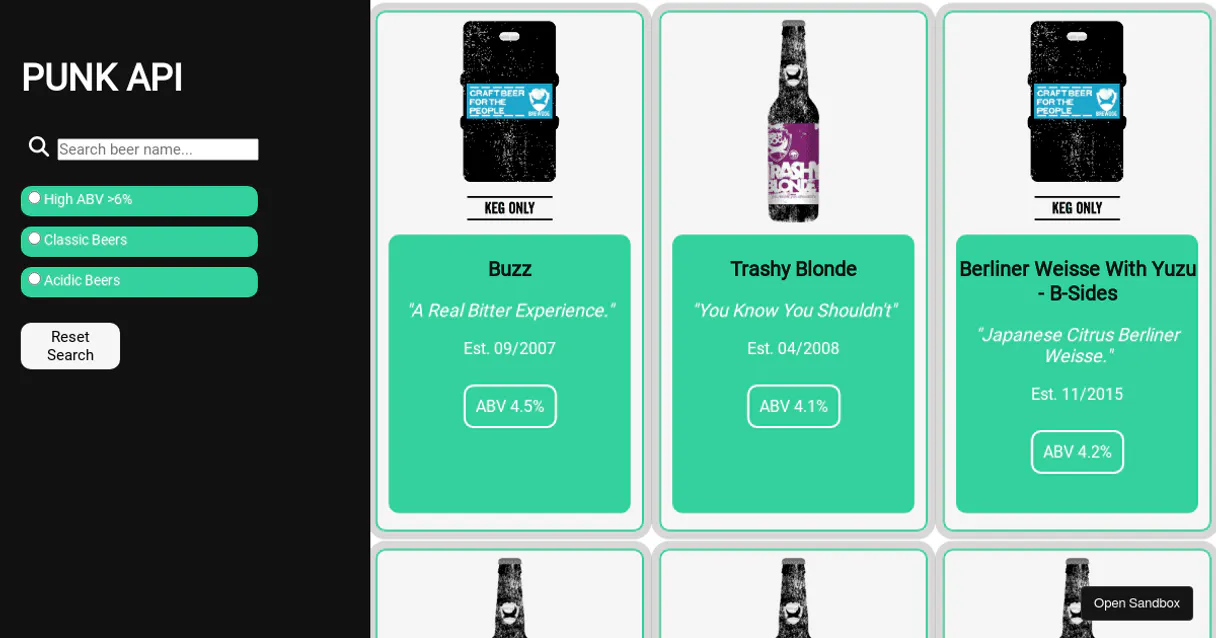
Independent Platform Disclaimer: Vinkius is an independent platform and is not affiliated with, endorsed by, sponsored by, verified by, or otherwise authorized by PunkAPI. All third-party trademarks, logos, and brand names are the property of their respective owners. Their use on this website is strictly for informational purposes to identify service compatibility and interoperability.
VINKIUS INFRASTRUCTURE
Cloud Hosted
Managed infra
V8 Isolated
Sandboxed per request
Zero-Trust Proxy
No stored credentials
DLP Enforced
Policy on every call
GDPR Compliant
EU data residency
Token Compression
~60% cost reduction
Works with Claude, ChatGPT, Cursor, and more
The Model Context Protocol standardizes how applications expose capabilities to LLMs. Instead of operating in isolation, your AI gains direct access to external platforms, live data, and real-world actions through secure, standardized connections.
This server provides 8 capabilities that interface natively with Claude, ChatGPT, Cursor, and any MCP client. No middleware. No custom integration required.
Available Capabilities
Trying to find the right beer for dinner shouldn't require 4 tabs and a spreadsheet.
Right now, if you run a menu audit, you have to cross-reference everything: Check the main catalog by dish type. Then open another tab to see what beers are available in that style. Next, check a third source just for ABV limits. It's copy-pasting and manual comparison hell.
With PunkAPI, your agent handles the whole stack. You ask it about 'a beer for spicy food.' It automatically runs `get_beers_by_food` against all criteria—style, IBU, and pairing suggestions—and hands you a curated list ready to print.
PunkAPI: Get detailed brewing specs with get_beer_by_id
If you find a beer name in the catalog, the manual steps are always: Click on it. Scroll down past the description to find the ingredients list. Then copy the ABV and IBU units into your report. It's slow.
Now, with `get_beer_by_id`, you just feed the ID to the agent. It returns *all* specs—ingredients, brewing tips, full pairing suggestions—in one clean data block. That’s it.
Common Questions About PunkAPI MCP
How do I use get_beers_by_abv? Should I combine it with other filters? +
You can absolutely combine them. For example, you can ask for 'a low ABV IPA.' The agent will run get_beers_by_style (IPA) and then filter those results using get_beers_by_abv to meet both criteria.
What is the easiest way to find a beer for cheese? +
Just call get_beers_by_food('cheese'). This tool specifically targets common pairings and returns all matching beers with their suggestions, making it fast and simple.
Can I use get_all_beers if I don't know the name? +
Yes. get_all_beers is powerful because you can filter by multiple parameters—like a specific malt type and an ABV range—even if you don't have a beer name.
Do I need to use get_random_beer if I just want suggestions? +
No, but it depends on the vibe. If you want quick discovery and don't care about criteria, get_random_beer is perfect. If you have constraints (like 'must be IPA'), stick to targeted filters.
How do I get full ingredient details for one beer using get_beer_by_id? +
It returns a complete profile, including malts, hops, yeast, and brewing tips. This is better than searching generally because it focuses specifically on the single item's entire technical data sheet.
When should I use pagination parameters with get_all_beers? +
You must use the page and per_page arguments when results exceed a few dozen. This prevents connection timeouts and allows you to pull massive catalog data in manageable, reliable chunks.
Can I combine get_beers_by_hops with other filters, like finding a specific style? +
Yes. You can use the hop variety filter as one layer and feed that output into another tool (like get_beers_by_style) for refinement. Layered filtering gives you much more precise results.
What is the difference between low IBU and medium IBU when using get_beers_by_ibu? +
Low IBU (<20) means a mild, subtle flavor profile, while Medium IBU (20-40) gives a balanced bitterness. These specific ranges help you nail down the exact level of bitterness you want.
Do I need an API key? +
No! PunkAPI is completely free and open. No authentication required. Just subscribe and start searching beers.
What does ABV and IBU mean? +
ABV (Alcohol By Volume) measures alcohol content percentage. IBU (International Bitterness Units) measures bitterness: 60 = very bitter.
Use it with your favorite AI tools
Connect this server to Cursor, Claude, VS Code, and more.
More in this category

Zoho CRM (Full)
Manage leads, contacts, accounts, deals, and notes — complete Zoho CRM access through natural conversation.

Tingg Insights
Analyze mobile payment and fintech data across African markets with insights that reveal transaction trends and user behavior.

AccuWeather
Enterprise-grade weather intelligence — current conditions, forecasts, alarms, and activity indices via AI.
You might also like
The Odds API
Universal sports betting intelligence — get real-time odds, scores, and sports data via AI.

UK Postbox
Manage your virtual mailbox via UK Postbox u2014 scan letters, forward mail, send correspondence, and track parcels from your AI agent.
MoEngage
Engage mobile app users with personalized push notifications, in-app messages, and AI-optimized customer journeys across channels.