
QWeather MCP. Get real-time environmental data, no manual dashboards needed.
 Gemini
 Works with every AI agent you already use
…and any MCP-compatible client









Just plug in your AI agents and start using Vinkius.
QWeather / 和风天气 connects your AI agent to China's leading professional weather data service. It retrieves real-time air quality (AQI, PM2.5), 15-day forecasts, severe weather warnings, and specialized life indices.
Use it to check current conditions or plan operations based on accurate environmental metrics for any location.
What your AI agents can do
Get air now
Retrieves the current air quality index (AQI) and pollutant levels for a given location.
Get indices
Fetches specialized daily life indices, such as UV radiation or clothing advice, for a location.
Get moon astronomy
Calculates the moonrise and moonset times for a specific geographic area.
The agent retrieves immediate weather data, including temperature and humidity, for a specified location.
You check the current air quality level, monitoring specific pollutants like PM2.5 and PM10 to determine if outdoor activity is safe.
The agent pulls weather predictions for different timelines: 3 days (get_weather_3d), up to 7 days (get_weather_7d), or a full 24 hours.
You get precise times for sunrise, sunset, moonrise, and moonset for planning purposes.
The agent finds the required location ID using a simple keyword search before running any other environmental query.
Ask AI about this MCP
Supported MCP Clients
Gemini Waiting for input…
QWeather / 和风天气 MCP Server: 10 Tools for Environmental Data
Use these tools to pull air quality readings, multi-day weather forecasts, location IDs, and specialized indices into your AI workflow.
019d8473get air now
Retrieves the current air quality index (AQI) and pollutant levels for a given location.
019d8473get indices
Fetches specialized daily life indices, such as UV radiation or clothing advice, for a location.
019d8473get moon astronomy
Calculates the moonrise and moonset times for a specific geographic area.
019d8473get sun astronomy
Determines the precise sunrise and sunset times for a given location.
019d8473get warning
Checks if there are any active severe weather warnings issued for an area.
019d8473get weather 24h
Provides a detailed weather forecast spanning the next 24 hours.
019d8473get weather 3d
Returns a concise three-day weather outlook for the specified location.
019d8473get weather 7d
Generates an extended, detailed weather forecast covering up to seven days.
019d8473get weather now
Gets the most current, real-time weather observations for a given location.
019d8473lookup location
Searches by keyword to find and return the specific Location ID required for all other environmental queries.
Choose How to Get Started
Build a custom MCP for your own tools, or connect a ready-made integration from our catalog.
Build Your Own
Turn any API into an MCP. Import a spec, define Agent Skills, or deploy with MCPFusion.
- Import from OpenAPI, Swagger, or YAML specs
- Create Agent Skills with progressive disclosure
- Deploy to edge with MCPFusion framework
- Built in DLP, auth, and compliance on every call
- Real time usage dashboard and cost metering
- Publish to catalog or keep private
Make Your AI Do More
Start with QWeather / 和风天气, then connect any of our 4,700+ other servers whenever your AI needs more. One click, no limits.
- Use this MCP plus 4,700+ others, all in one place
- Add new capabilities to your AI anytime you want
- Every connection is secured and compliant automatically
- Track usage and costs across all your servers
- Works with Claude, ChatGPT, Cursor, and more
- New servers added to the catalog every week
What you can do with this MCP connector
Need weather intel? This connects your AI client directly to China's leading professional weather data service, giving your agent access to serious environmental metrics. You don't need a technical dashboard or a bunch of different APIs; you just ask your agent, and it handles the heavy lifting.
First thing’s first: If you wanna run any kind of check—whether it’s air quality or a 7-day forecast—your agent needs to know exactly where you are. You use the lookup_location tool with simple keywords; that searches the system and spits out the required Location ID. Once you've got that ID, everything else just works.
Current Conditions & Air Quality Audits
When you need to know what’s happening right now, your agent gets it. It pulls immediate weather observations using get_weather_now, telling you the current temperature and humidity for a precise spot. But checking if the air is safe outside is just as critical. You check the real-time air quality index (AQI) and specific pollutants like PM2.5 and PM10 with get_air_now.
This tells you straight up whether outdoor activity is gonna be safe or if you need to stay indoors.
For specialized planning, your agent hits the get_indices tool. This fetches daily life indices—think UV radiation levels, advice on what kind of clothes you should wear that day, or even suitability scores for certain activities like car washing. It’s a quick snapshot of environmental risk beyond just temperature.
Multi-Day Forecasting and Planning
The agent handles all your timeline needs. If you're planning something big, it pulls the full picture: You can check a detailed weather forecast spanning the next 24 hours using get_weather_24h. For medium-term plans, you get a concise three-day outlook with get_weather_3d, but if you’re looking ahead—say, planning for an entire work week or a trip—you request the extended forecast.
The tool get_weather_7d returns detailed weather predictions covering up to seven days out.
Safety Alerts and Celestial Timing
Safety is paramount. To keep everything running smoothly, you check for active severe weather warnings using get_warning. This tells your agent immediately if the area has any issued safety alerts, so you're never caught off guard by a sudden storm or hazard.
For scheduling tasks that depend on natural light, your agent manages celestial timing. You get precise times for when the sun pops up and when it dips down using get_sun_astronomy. If you need to plan around the moon—for anything from photography to navigation—it calculates both the exact moonrise and moonset times with get_moon_astronomy.
Bottom line: You don't have to jump between five different weather sites. Your agent uses this connection to take complex environmental data—from air pollutant levels to 7-day rain chances—and gives you a single, accurate source of truth whenever you need it.
How QWeather MCP Works
- 1 First, call
lookup_locationwith a geographic name to get the target area's specific Location ID. - 2 Second, pass that ID and your desired timeframe (e.g., 'current' or '7-day forecast') to the relevant tool like
get_weather_noworget_weather_7d. - 3 Your agent processes the raw data from QWeather and presents a synthesized answer tailored for the original prompt.
The bottom line is: you query your AI client once, and it handles the multi-step lookup process across multiple specialized environmental tools.
Who Is QWeather MCP For?
This server is for Ops Managers who get stuck clicking through 10 different weather dashboards. It's for HSE Professionals who need to quickly audit air quality and safety warnings during an incident. If you're a Developer building field service apps, this lets you integrate reliable environmental data without running your own API key management.
Checks if a multi-day outdoor event is safe by combining get_weather_7d with get_warning and factoring in local air quality.
Runs an immediate audit of PM2.5 levels using get_air_now to determine if a site is safe for workers after a smoke incident.
Needs the location ID first, running lookup_location, before calculating optimal work times based on sun/moon angles using get_sun_astronomy.
Integrates reliable environmental metrics into a service layer, calling multiple tools like get_weather_now and get_indices programmatically.
What Changes When You Connect
- Immediate safety checks. Instead of visiting three different sites to check weather, AQI, and warnings, your agent runs
get_air_nowandget_warningsimultaneously, giving you a single pass/fail assessment for operations. - Long-term planning accuracy. For events requiring weeks of prep, use
lookup_locationfirst, then callget_weather_7d. This ensures the forecast is anchored to the correct location ID from day one. - Contextual insights. Don't just get temperature; run
get_indicesalongsideget_weather_nowto understand if you need a specific type of gear or if car washing is even recommended for that day’s weather. - Full coverage, single query. The agent handles the flow: it finds the location ID (
lookup_location), checks current conditions (get_weather_now), and then can pull historical context usingget_sun_astronomy—all in one conversational turn. - Deep forecasting options. Need to plan for a week? Use
get_weather_7d. Only need tonight's details? Stick withget_weather_24h. The toolset gives you the right level of detail without overwhelming your query.
Real-World Use Cases
Pre-Trip Safety Audit
A project manager needs to know if a remote construction site is safe for next week. They ask their agent, and the system combines lookup_location (to find the ID), then runs get_air_now and get_warning. The result tells them immediately if air quality or severe warnings block the work.
Event Scheduling Optimization
A festival organizer needs to schedule activities. They prompt the agent, which uses get_sun_astronomy and get_weather_3d. The system replies with suggested activity times that avoid peak rain chances while maximizing daylight hours.
Daily Logistics Check
A logistics coordinator asks for today's status. The agent runs get_weather_now and checks the specialized indices via get_indices. It reports not only the temperature but also if high UV radiation means extra sun protection is needed.
Historical Comparison
A risk analyst wants to compare last month's conditions to today. They use the agent, which runs lookup_location and then pulls both current data (get_air_now) and historical sunset times via get_sun_astronomy.
The Tradeoffs
Assuming the AI knows where you are.
You ask, 'What's the forecast?' without giving a location. The agent fails because it doesn't have context for any tool call.
→
Always start by using lookup_location with the city name first. This gives your AI client the specific Location ID needed to make all subsequent calls (e.g., get_weather_now).
Asking for 'the forecast' vaguely.
You prompt, 'Give me weather info.' The agent doesn't know if you mean 3 days, 7 days, or just today. It provides incomplete data.
→
Be explicit about the timeline. Use get_weather_3d for a quick look ahead, or get_weather_7d when planning week-long operations.
Mixing up current and future state.
You ask 'What's the weather?' but really mean 'What will the air quality be tomorrow?'. You get a real-time report that doesn't answer your question.
→
If you need tomorrow’s data, use get_air_now for today's reading. For future predictions, rely on the forecast tools like get_weather_24h or get_weather_7d.
When It Fits, When It Doesn't
Use this server if your task involves synthesizing environmental data across multiple dimensions (e.g., combining air quality with temperature and warnings). You need the agent to run a chain of calls: lookup_location -> [check current state] -> [check long-term forecast]. Don't use it if you just need one piece of info; for example, if all you need is the sun’s time, running get_sun_astronomy is enough. But if you need to know if that sunset will be safe due to high wind warnings, you must chain get_warning and get_sun_astronomy. The key decision point: are you reporting a single metric (e.g., AQI), or are you building an operational assessment? Build the assessment; use this server.
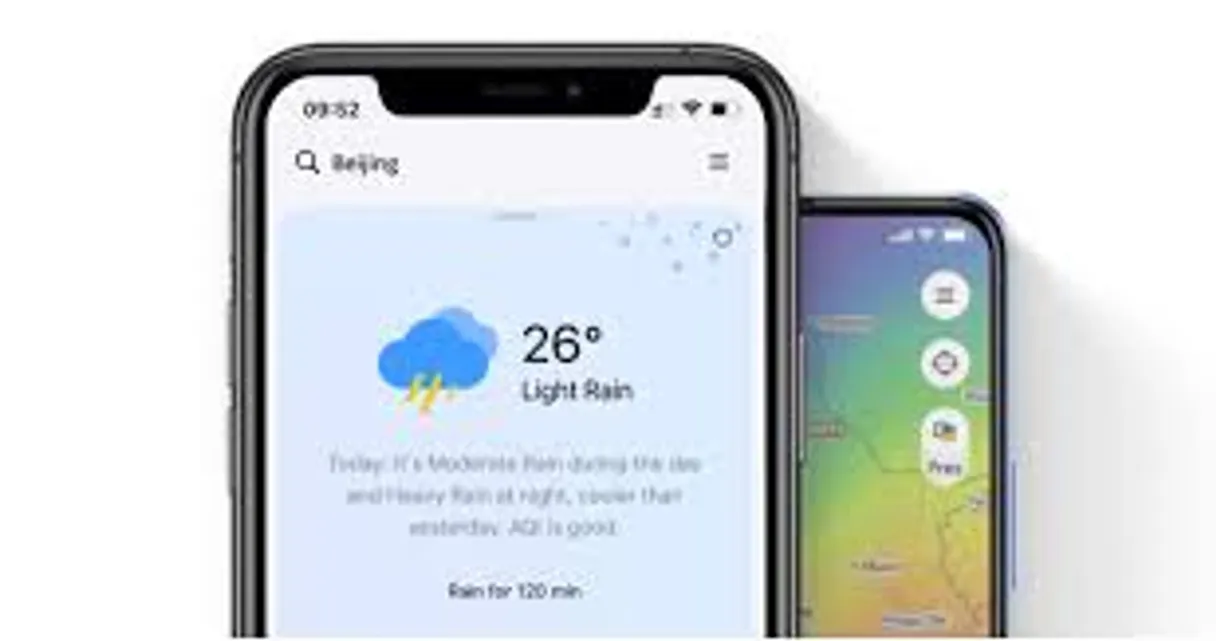
Independent Platform Disclaimer: Vinkius is an independent platform and is not affiliated with, endorsed by, sponsored by, verified by, or otherwise authorized by QWeather / 和风天气. All third-party trademarks, logos, and brand names are the property of their respective owners. Their use on this website is strictly for informational purposes to identify service compatibility and interoperability.
VINKIUS INFRASTRUCTURE
Cloud Hosted
Managed infra
V8 Isolated
Sandboxed per request
Zero-Trust Proxy
No stored credentials
DLP Enforced
Policy on every call
GDPR Compliant
EU data residency
Token Compression
~60% cost reduction
Works with Claude, ChatGPT, Cursor, and more
The Model Context Protocol standardizes how applications expose capabilities to LLMs. Instead of operating in isolation, your AI gains direct access to external platforms, live data, and real-world actions through secure, standardized connections.
This server provides 10 capabilities that interface natively with Claude, ChatGPT, Cursor, and any MCP client. No middleware. No custom integration required.
Available Capabilities
Checking environmental conditions used to require opening five different tabs.
Before QWeather, if you needed a full picture of site safety, you had to visit a weather site for the forecast, another one for AQI readings, and maybe a third just for severe warnings. You'd spend ten minutes copying location names and pasting them into three different dashboards—all before you even got an answer.
Now, your agent handles it. You tell it: 'Check Beijing for current safety.' The system runs `get_air_now`, checks `get_weather_now` simultaneously, and then synthesizes the risk level in plain English. It's one prompt; you get a single, unified report.
QWeather MCP Server: Get data depth that goes beyond simple temperature readings.
It’s not just about the current temp. You can ask it to check if high UV radiation (`get_indices`) will make a specific part of your day difficult, or if the moonrise time (`get_moon_astronomy`) conflicts with planned outdoor work hours.
The difference is depth. Instead of just knowing 'it's sunny,' you know *when* it’s sunny, *how* intense the sun is, and *if* there are any alerts that could spoil your plans.
Common Questions About QWeather MCP
How do I find the location ID for a new site using get_air_now? +
You must call lookup_location first. This finds the specific Location ID needed, which you then pass to get_air_now. Without the correct ID, any environmental tool will fail.
Is there a difference between get_weather_24h and get_weather_now? +
Yes. get_weather_now gives you what's happening right this minute. Use get_weather_24h when you need to see the predicted trend and changes over the course of a full day.
Which tool should I use for planning a multi-week outdoor event? +
You need get_weather_7d. This gives the most comprehensive look ahead. If you only check today, your plan is incomplete. Use get_weather_7d to build a robust timeline.
How do I get sunrise and sunset times? Do I use get_sun_astronomy? +
Yes, you call get_sun_astronomy. This tool specifically provides the precise timing data needed for scheduling. It's separate from general weather forecasts.
What format must my QWeather API Key be in when I start using lookup_location? +
You must pass your API key as an environment variable or directly within the request header. Ensure the key you provide matches the plan scope (dev, free, standard) you activated on Vinkius.
What are the rate limits for calling get_air_now? +
Rate limits depend entirely on your subscription tier. Free users have a set cap, while higher-paid plans offer much greater throughput. Always check the Vinkius documentation for current quota details.
If I use get_weather_now and receive an error code, what does it usually mean? +
An API error typically means you've provided invalid input—this is often a missing coordinate or a bad location ID. The specific error message tells your AI client exactly which parameter needs correction.
How can I use get_indices to plan for different types of outdoor activities? +
This tool provides specialized metrics like UV radiation and clothing suitability. Querying these specific indices gives your agent highly targeted advice, moving beyond general weather descriptions.
How do I find my QWeather API Key? +
Log in to the QWeather Developer Console, create a project, and your API Key will be displayed in the project settings. Ensure you select the correct key type (Web API).
What is the difference between dev and commercial plans? +
The 'dev' plan uses devapi.qweather.com and has limited data frequency and locations. Commercial plans (standard/premium) use api.qweather.com and provide higher resolution data and broader global coverage. Set your qweather_plan in the credentials to use the correct endpoint.
Can I query weather by coordinates? +
Yes! You can pass coordinates in the format longitude,latitude (e.g., '116.41,39.92') to any tool that accepts a location parameter.
Use it with your favorite AI tools
Connect this server to Cursor, Claude, VS Code, and more.
More in this category

Jinshuju / 金数据
Powerful online form and data collection platform — manage forms, entries, and webhooks via AI.

GitScrum Sprints
Plan and track sprints via GitScrum — manage sprint cycles, monitor KPIs, review burndown charts, and organize user stories and epics from any AI agent.

YouCanBook.me
Automate scheduling workflows via YouCanBook.me — manage booking pages, appointments, and availability directly from any AI agent.
You might also like

Spendesk
Empower your AI with real-time spend management. Track budgets, audit invoices, and review expense claims directly from your IDE.
Convertio
Enable your AI agent to convert images, documents, audio, and video files across hundreds of formats using the Convertio API.
Canva
Empower your AI agents to manage Canva designs, upload branding assets, and trigger automatic exports directly from your chat.