
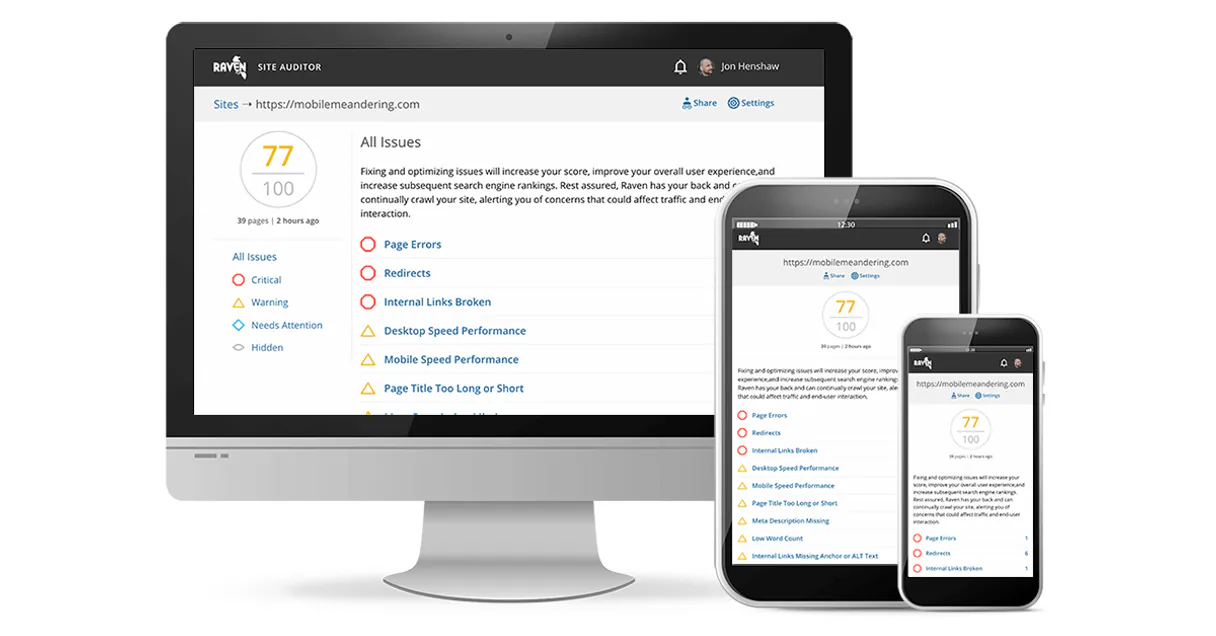
Raven Tools MCP for AI. Track rankings and audit site health instantly.
 Gemini
 Works with every AI agent you already use
…and any MCP-compatible client









How this MCP server connects to your AI agent
Raven Tools connects your AI agent to professional SEO data. It lets you track keyword rankings, audit website health, and manage backlink metrics without leaving your chat interface.
You get full control over search engine optimization reporting straight from natural conversation.
What AI agents can do with Raven Tools Automation
Add competitor
Adds a new competitor domain to your managed list.
Add keyword
Adds a keyword that needs to be tracked for ranking purposes.
Check raventools status
Verifies the active connection and API connectivity status of your Raven Tools account.
Retrieves the current search engine ranking position for specific keywords and projects.
Provides a complete, programmatic list of all managed keywords within your account.
Queries the latest website audit results to identify health scores and technical issues.
Accesses a directory of backlinks and domain metrics to assess external authority.
Adds, lists, or manages competitor domains for comparative analysis.
Retrieves core information about specific client projects and monitored domains.
Ask an AI about this
Waiting for input…
What AI agents can do with Raven Tools MCP Server: 12 SEO Tools
Use these twelve tools—from checking keyword ranks to auditing site health and listing competitors—to manage complex SEO data flows via conversation.
Make your AI actually useful.
Add this MCP to Claude, Cursor, or Windsurf and your AI stops guessing. It gets real tools to look things up, take action, and handle the stuff you keep doing by hand.
Start using Raven Tools on VinkiusAdd Competitor
Adds a new competitor domain to your managed list.
Add Keyword
Adds a keyword that needs to be tracked for ranking purposes.
Check Raventools Status
Verifies the active connection and API connectivity status of your Raven Tools...
Get Links
Retrieves a list of backlinks associated with a specified domain.
Get Project
Gets core information and status details for a specific client project or domain.
Get Rank All
Retrieves the ranking data for all tracked keywords in an entire portfolio or project.
Get Rank
Fetches the current search engine ranking position for one keyword within a project.
Get Site Audit
Pulls the latest technical audit report and site health score for a domain.
List Competitors
Lists all currently tracked competitor domains in your account.
List Keywords
Retrieves the complete list of keywords managed within a specific project scope.
List Projects
Lists all active client projects and their associated domains in your account.
Remove Keyword
Deletes a keyword from tracking, stopping its monitoring.
Security and governance baked right in.
Pick your AI client below to get set up. Just create a Vinkius account, subscribe, and you're instantly up and running. We handle the entire backend infrastructure, delivering out-of-the-box support for HTTPS Streamable, SSE, and OAuth2—zero messy routing required.
Claude AI
Open Claude Settings
Go to claude.ai, click your profile icon, then navigate to Customize → Connectors.
Add Custom Connector
Click the "+" button and select Add custom connector. Paste your Vinkius endpoint URL:
https://edge.vinkius.com/[YOUR_TOKEN_HERE]/mcp
Replace [YOUR_TOKEN_HERE] with your token
from cloud.vinkius.com. For OAuth-protected servers, expand
Advanced settings to add credentials.
Start a conversation
Open a new chat. The Raven Tools integration is available immediately — no restart needed.
Choose How to Get Started
Build a custom MCP for your own tools, or connect a ready-made integration from our catalog.
Build Your Own
Turn any API into an MCP. Import a spec, define Agent Skills, or deploy with MCPFusion.
- Import from OpenAPI, Swagger, or YAML specs
- Create Agent Skills with progressive disclosure
- Deploy to edge with MCPFusion framework
- Built in DLP, auth, and compliance on every call
- Real time usage dashboard and cost metering
- Publish to catalog or keep private
Make Your AI Do More
Start with Raven Tools, then connect any of our 5,100+ other servers whenever your AI needs more. One click, no limits.
- Use this MCP plus 5,100+ others, all in one place
- Add new capabilities to your AI anytime you want
- Every connection is secured and compliant automatically
- Track usage and costs across all your servers
- Works with Claude, ChatGPT, Cursor, and more
- New servers added to the catalog every week
Independent Platform Disclaimer: Vinkius is an independent platform and is not affiliated with, endorsed by, sponsored by, verified by, or otherwise authorized by Raven Tools. All third-party trademarks, logos, and brand names are the property of their respective owners. Their use on this website is strictly for informational purposes to identify service compatibility and interoperability.
VINKIUS INFRASTRUCTURE
Cloud Hosted
Managed infra
V8 Isolated
Sandboxed per request
Zero-Trust Proxy
No stored credentials
DLP Enforced
Policy on every call
GDPR Compliant
EU data residency
Token Compression
~60% cost reduction
Built on the Model Context Protocol (MCP) for Claude, ChatGPT, Cursor, and more
The Model Context Protocol standardizes how applications expose capabilities to LLMs. Instead of operating in isolation, your AI gains direct access to external platforms, live data, and real-world actions through secure, standardized connections.
This connection provides 12 powerful capabilities that interface natively with Claude, ChatGPT, Cursor, and other compatible AI platforms. No middleware. No custom integration required.
SEO reporting shouldn't mean jumping between five different dashboards., Solved with Vinkius AI Gateway
Right now, tracking a client’s health is a mess. You open the rank checker, grab a CSV for keywords; then you switch to the audit tool to find technical errors—and finally, you have to pull backlink data from yet another platform just to put it all in one presentation.
With this MCP server, that process vanishes. Tell your agent to check the site's health using `get_site_audit`, then follow up with a single prompt to run `list_keywords` and fetch current rankings. You get all the data points you need without ever opening another tab.
Raven Tools MCP Server: Get full SEO control.
Manual processes force you to treat every piece of data—a keyword, a competitor, an audit score—as isolated. This creates friction, slows down decision-making, and multiplies the chance of copy/paste errors.
The server connects all these discrete actions into one flow. You tell it what's wrong (e.g., 'Client X lost rank on Keyword Y'), and it runs `get_rank`, checks the site audit with `get_site_audit`, and flags potential competitors using `list_competitors`. That’s how you move from diagnosis to action.
What your AI can actually do with this
Raven Tools connects your AI agent straight into professional SEO data, letting you manage everything from keyword rankings to site audits without leaving your chat interface. You get full control over search engine optimization reporting just by talking to your agent.
When you're getting set up for a client, you start with project visibility. Your agent can use the list_projects tool to show you every active client account and their associated domains in your system. Once you know which projects are running, you can pull core details and status reports using the get_project tool, giving you an immediate overview of what's going on with that specific client’s domain.
To manage what needs tracking, you first handle the keywords and competitors. You use list_keywords to get a complete list of every single keyword already managed within a project scope. If you need to track a new term, run the add_keyword tool; this adds the necessary keyword for ranking monitoring.
When a keyword's tracking is done, simply call remove_keyword to delete it from active monitoring.
For competitive analysis, you handle domains and keywords in batches. You can use list_competitors to see all the competitor domains currently tracked against your client. Need to add a new rival? The add_competitor tool lets you manually input a new domain into your managed list for comparison. If you ever need to see which competitors you're tracking, list_competitors gives you that roster.
When it comes time to check performance, the ranking tools do the heavy lifting. You can get the current search engine rank for one specific keyword in a project using get_rank. But if you wanna see the full picture—the rankings for every single tracked term across an entire client portfolio—you use get_rank_all.
This provides bulk data on all your key metrics. To keep things running, you should check the system connection status by calling check_raventools_status, which verifies both your account's active connection and API connectivity.
For site health and authority, you have two main mechanisms. You can run a full technical audit report on any domain using get_site_audit. This pulls the latest site health score and points out technical issues that need fixing. To gauge external authority, your agent runs the get_links tool, which retrieves a comprehensive list of backlinks associated with a specific domain.
These tools let you manage entire SEO workflows: You can get project status via get_project, monitor rankings using both get_rank and get_rank_all, maintain site health by running get_site_audit, assess authority through backlink retrieval with get_links, and keep track of who's competing by adding or listing domains using add_competitor and list_competitors.
You'll never have to export a CSV again; your AI client handles all the data pulling directly in conversation.
019dd147-c162-719d-ae70-0e95f32961e3 
Here's how it actually works
The bottom line is you talk to your agent, and the agent runs the necessary SEO tool calls for you.
1. Subscribe to the Raven Tools server.
2. Grab your API Key from your Raven Tools dashboard (Settings > API).
3. Use your AI client to issue natural language commands, letting it run tools like get_rank or list_keywords.
Who is this actually for?
SEO specialists who get tired of jumping between dashboards. Marketing agencies that need client data in their current workflow without leaving it. Developers building custom reporting tools that need high-fidelity, real-time SEO metrics.
Uses the agent to instantly pull ranking summaries and monitor site health by just asking a question.
Verifies specific client project metadata and tracks overall SEO progress without switching between different platforms.
Integrates Raven Tools data into custom dashboards or reporting tools using simple, structured AI queries.
What Changes When You Connect
See instant rank updates. Use get_rank to pull the exact SERP position for any keyword in seconds, eliminating manual checks of spreadsheet data.
Audit entire sites at once. The get_site_audit tool pulls technical performance metrics and health scores immediately, letting you see exactly what needs fixing.
Manage keywords programmatically. Instead of manually adding rows, use add_keyword or list_keywords to keep your keyword database perfectly updated via conversation.
Track authority over time. The get_links tool gives you a clear view of backlinks and domain metrics, helping you monitor external visibility trends.
Scope out the competition easily. Use add_competitor or list_competitors to build a full competitive profile for any client project in one flow.
See it in action
Checking for recent rank drops
A specialist notices a client's rankings dipped. They ask their agent, "Show me any keywords with significant rank drops this week." The agent runs operational monitoring and uses get_rank_all to find the three affected terms instantly.
Onboarding a new client project
An agency manager starts tracking a brand-new domain. They first use list_projects to confirm it's set up, then run add_competitor and list_keywords to build out the initial keyword portfolio.
Deep dive into site health
A developer needs a quick technical assessment for a staging environment. They prompt the agent to run get_site_audit, receiving a detailed report on broken links and performance metrics without opening any separate web tools.
Building out a keyword portfolio
A team needs to expand coverage for an existing client. They use list_keywords to see the current list, then run add_keyword repeatedly with new terms and immediately track them using get_rank.
The honest tradeoffs
Using basic spreadsheets
Manually exporting keyword sheets or having to copy-paste rank drops into a master Excel file takes hours, and data often gets mismatched.
Let your AI agent handle the data flow. Use get_rank for individual checks, then use get_rank_all to pull everything in one go. The agent keeps it clean.
Relying on separate tools
Checking site health first, then opening a competitor tool, and finally running a backlink check means three different logins and three different reports.
Keep everything in one chat. Start by using get_site_audit, then follow up with list_competitors and get_links. The agent stitches the data together for you.
Ignoring project scope
Trying to check a ranking without telling the AI which client domain it belongs to, leading to ambiguous or blank results.
Always start by using list_projects to confirm your target domain. Then, use specific tools like get_rank and pass the correct project ID every time.
When It Fits, When It Doesn't
Use this if you need a single conversational interface for high-volume SEO data tasks—specifically when you need to cycle through auditing, ranking checks, and competitor comparisons without leaving your primary workspace. It's perfect for the agency manager or specialist who needs fast, actionable insights across multiple clients.
Don't use it if your goal is deep, raw API development; while developers can integrate this data into custom dashboards, you still need to write the core logic. Also, don't rely on it for fundamental SEO research—it provides metrics, but you still have to interpret them. If all you need is a single metric (like just checking one backlink), sometimes a specialized, standalone tool might be faster, but if you need context (e.g., 'Show me the links and tell me the site audit score'), this server wins.
Questions you might have
How do I check rankings for multiple keywords in Raven Tools? +
Use the get_rank_all tool. This allows you to fetch ranking data for an entire group of keywords or a whole portfolio at once, rather than running individual calls.
Can I use add_competitor and list_competitors together? +
Yes. You can first run list_competitors to see what's tracked. Then, if you find a new rival, simply use add_competitor to bring them into the system for tracking.
What is the difference between getting site audit and get_project? +
The get_site_audit tool provides technical performance metrics (like health score or broken links). The get_project tool gives high-level, overall metadata about the entire client relationship.
Does Raven Tools help me remove old keywords? +
Yes. If a keyword is no longer relevant for tracking, use the remove_keyword tool to clean up your portfolio and stop wasting API calls on outdated data.
How do I verify my API connection before running complex reports using `check_raventools_status`? +
It immediately confirms your account's connectivity. Running this tool first verifies that the MCP client can talk to the Raven Tools service, preventing failed queries and saving you time later.
If I have many domains, how do I see all my active projects using `list_projects`? +
It returns a complete list of every project ID in your account. You then pass these IDs to tools like get_site_audit or get_rank to ensure you cover all portfolios without manual data entry.
Are there rate limits if I run many queries, such as multiple calls to `get_links`? +
Yes, the API enforces standard usage rates. If your agent hits a limit, it receives a specific error code that tells you exactly how long to wait before retrying the query.
Can I use `get_rank` to analyze ranking changes over time? +
You must provide a date range when calling this tool. This lets your AI client compare current rankings against historical data points, helping you identify true performance trends.
How do I find my Raven Tools API Key? +
Log in to your account, navigate to Settings > API, and copy your unique Access Token from the credentials section.
Can I check keyword rankings via AI? +
Yes! The list_raven_keywords tool allows your agent to retrieve high-fidelity position metadata for all tracked search terms.
How do I list my active projects? +
Use the list_raven_projects tool to retrieve your complete high-fidelity directory along with the unique identifiers for all managed SEO campaigns.
We've already built the connector for Raven Tools. Just plug in your AI agents and start using Vinkius.
No hosting. No infrastructure. No complex setup.
All 12 tools are live and waiting.
You're up and running in seconds.
Gemini Vinkius gives your AI agents access to the full catalog of app connectors, all fully managed, secure, and enterprise-ready. One subscription, every tool you need.
Built, hosted, and secured by Vinkius. You just connect and go.