
RocketLaunch.Live MCP. Search global rocket launches by criteria or mission.
 Gemini
 Works with every AI agent you already use
…and any MCP-compatible client









Just plug in your AI agents and start using Vinkius.
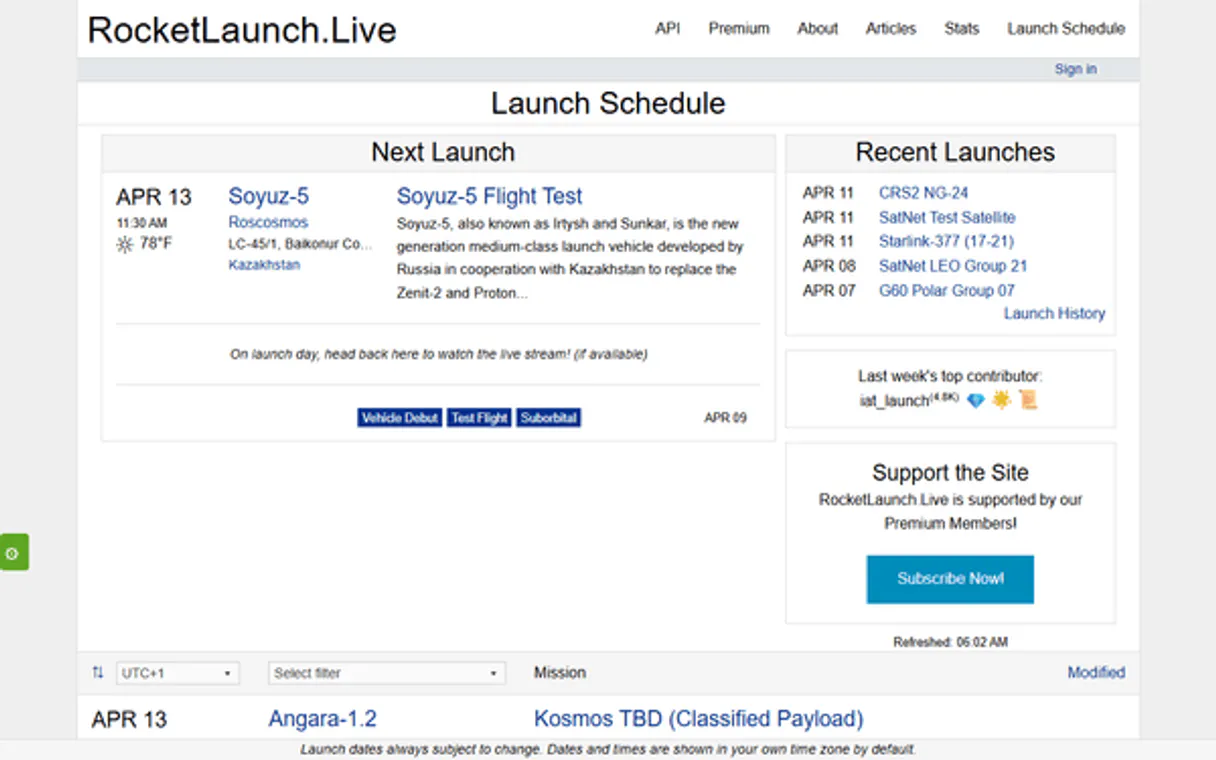
RocketLaunch.Live connects your AI agent to a live database tracking global space launches. It lets you search for upcoming missions, specific rockets (vehicles), launch providers (companies), and historical records by date, location, or payload type.
Need details on the Starlink constellation? You can find it here.
What your AI agents can do
Get companies
Returns names, countries, logos, and active status for launch providers and manufacturers. You can filter by name or country code.
Get launch
Provides all details on a specific launch ID, including the vehicle used, provider, location, mission objective, status, and webcast links.
Get locations
Searches for global launch locations by returning names, country codes, and associated facilities.
Find historical or upcoming missions by combining criteria like date range, location, provider, vehicle type, or mission tag.
Get complete information on a single launch event, including its current status and webcast links.
Browse lists of companies (providers), vehicles (rockets), missions (payloads), or specific physical locations worldwide.
Pull the next five upcoming rocket launches immediately, complete with vehicle and provider names.
Identify specific physical launch pads (like LC-39A) and link them to relevant locations and flights.
Ask AI about this MCP
Supported MCP Clients
Gemini Waiting for input…
RocketLaunch.Live: 9 Tools for Space Data Management
Use these nine tools to query the full lifecycle of a rocket launch—from manufacturer details to specific mission objectives.
019d8479get companies
Returns names, countries, logos, and active status for launch providers and manufacturers. You can filter by name or country code.
019d8479get launch
Provides all details on a specific launch ID, including the vehicle used, provider, location, mission objective, status, and webcast links.
019d8479get locations
Searches for global launch locations by returning names, country codes, and associated facilities.
019d8479get missions
Retrieves mission details, including the name, description, and primary objectives of payloads sent to space. You can search by mission type.
019d8479get next launches
Pulls a list of the next five scheduled rocket launches, showing vehicle, provider, and target date.
019d8479get pads
Finds specific launch pads by returning their names, associated locations, maps, and supporting launch facilities.
019d8479get tags
Provides filter tags and IDs (like 'crew' or 'satellite') that you can use to narrow down search results for launches.
019d8479get vehicles
Searches for launch rockets, returning names, descriptions, family types, and the manufacturers responsible for them.
019d8479search launches
Conducts a broad search across all launches using text queries or filtering by location, provider, vehicle, tag, and date range. Returns detailed launch summaries.
Choose How to Get Started
Build a custom MCP for your own tools, or connect a ready-made integration from our catalog.
Build Your Own
Turn any API into an MCP. Import a spec, define Agent Skills, or deploy with MCPFusion.
- Import from OpenAPI, Swagger, or YAML specs
- Create Agent Skills with progressive disclosure
- Deploy to edge with MCPFusion framework
- Built in DLP, auth, and compliance on every call
- Real time usage dashboard and cost metering
- Publish to catalog or keep private
Make Your AI Do More
Start with RocketLaunch.Live, then connect any of our 4,700+ other servers whenever your AI needs more. One click, no limits.
- Use this MCP plus 4,700+ others, all in one place
- Add new capabilities to your AI anytime you want
- Every connection is secured and compliant automatically
- Track usage and costs across all your servers
- Works with Claude, ChatGPT, Cursor, and more
- New servers added to the catalog every week
What you can do with this MCP connector
This server connects your AI agent straight into a live database tracking global space launches. You're checking missions—from finding out which company built a rocket to getting the real-time status and webcast links for a specific flight. It handles every angle of the launch lifecycle.
When you connect your client, you get access to nine tools that let you query everything: providers, vehicles, physical sites worldwide, scheduled flights, and deep historical records.
To start tracking launches, use search_launches. This is your main tool. You can run a broad search across all available data by typing in text queries or by filtering the results using specific criteria like date ranges, launch locations, provider names, vehicle types, or mission tags. It spits out detailed summaries for every match.
If you just need to know what’s happening soon, hit get_next_launches. This pulls up the next five scheduled rocket launches immediately, giving you the vehicle name, the provider company, and the target date for all of 'em.
Need to dig into a specific event? Use get_launch with a launch ID. That gives you the deep dive: it tells you exactly what vehicle was used, who provided it, where the launch happened, the mission's objective, its current status, and links for webcasts. If you already know the general area, use search_launches or look up specific pads with get_pads; this tool finds particular launch pads by returning their names, associated locations, maps, and all supporting facilities.
For the big picture—mapping out who's doing what—you got a few lookup tools. You can check on providers using get_companies. This returns the name, country code, logo, and active status for any launch service provider or manufacturer; you can narrow that down by searching the company name or its country code.
Want to know about the rocket itself? Use get_vehicles. This searches all launch rockets and gives you their names, descriptions, family types, and who manufactured 'em. You're looking at tech specs here.
If you gotta track down a specific payload, use get_missions. It retrieves full mission details—the name, description, and primary objectives of whatever they sent into space. You can even filter these searches by the type of mission.
To scope out where things happen, two tools help: get_locations finds global launch areas using names, country codes, and associated facilities. For pinpointing a specific facility on that map, you use get_pads, which returns the name, location, maps, and supporting infrastructure for individual pads.
Don't forget the filters. You can narrow down your searches—whether it's looking for crewed flights or just satellites—using get_tags. This provides specific filter tags and IDs that you tack onto your search queries to tighten up the results. Lastly, if you need general metadata, use get_utils (wait, no wait—it’s get_launch) which handles the remaining details like mission objectives across all recorded launches.
How RocketLaunch.Live MCP Works
- 1 Connect your AI client to the RocketLaunch.Live MCP Server.
- 2 Tell your agent exactly what you need (e.g., 'Find all Starship launches at Boca Chica in 2024').
- 3 The agent runs
search_launchesor specialized tools likeget_vehiclesand returns a structured list of data points.
The bottom line is that you can ask natural language questions about space travel, and the server translates those questions into precise API calls to pull verifiable, real-time launch data.
Who Is RocketLaunch.Live MCP For?
Journalists covering aerospace, defense contractors tracking competitor launches, or academic researchers analyzing industry trends. You're the person who has a stack of disparate reports and needs one single source of truth to cross-reference launch data quickly.
Uses get_vehicles and search_launches to track which rocket families are being tested in specific regions, verifying performance metrics.
Runs get_companies combined with date filters on search_launches to monitor the activity and market share of rival space providers.
Uses get_next_launches and get_missions to gather quick, verifiable facts for breaking news stories about upcoming payloads or objectives.
What Changes When You Connect
- Stop guessing which tool to use.
search_launcheslets you combine filters—like 'SpaceX' + 'Starship' + 'this month'—in one call, getting a focused result set immediately. - Don't waste time cross-referencing spreadsheets. Use
get_launchwith a specific ID to pull all known metadata instantly: status, webcast links, and full mission details. - Get the immediate picture of what’s coming up without subscribing to paid feeds.
get_next_launchesgives you the next five flights right out of the box. - Need to check who's in the industry? Run
get_companiesfirst. It provides a clean list of all providers, allowing you to then filter those companies when usingsearch_launches. - Filter by payload type instead of just date. Use
get_tagsto pull specific categories (e.g., 'ISS' or 'commercial') and apply that tag directly in your search queries.
Real-World Use Cases
Tracking a Competitor's Activity
A defense analyst needs to know everything about Rocket Corp’s last three launches. They run get_companies to confirm the provider ID, then use search_launches with that provider and a date range of 3 months. Finally, they pull specific details for each mission using get_launch. Problem solved in minutes.
Verifying Payload Objectives
A journalist writes about the Artemis program but needs to confirm which payload is going on the next flight. They first run get_missions to see available objectives, then check search_launches results for that mission tag to verify the date and vehicle.
Mapping Launch Infrastructure
An infrastructure planner needs a complete map of all potential launch sites. They use get_locations to list countries, then follow up with get_pads to identify specific pads (like SLC-40) and check which companies operate there.
Building an Overview Report
A student needs a report on the top three rocket vehicles. They run get_vehicles to list options, then use those vehicle names in search_launches combined with 'last year' to build their comparison data.
The Tradeoffs
Searching everything at once.
Asking the agent: 'Tell me about all rockets, companies, and missions worldwide.' This prompt is too vague. The agent doesn't know which specific data point you want, leading to massive, unusable lists.
→
Be highly specific. Use get_vehicles first to narrow down the rocket type (e.g., 'Falcon 9'). Then use that output in a targeted search_launches call with a date filter.
Confusing location and pad data.
Asking: 'What is the launch site for Starship?' This mixes general geography (get_locations) with specific hardware details, causing confusion between national zones and actual pads.
→
First, use get_locations to narrow down the country. Then, follow up by using get_pads to get the exact pad name (e.g., IFT-7) associated with that location.
Assuming all data is in one place.
Trying to ask for a complete launch report without specifying a date or ID. The server can't guess which event you mean, and the query fails or returns too much noise.
→
Always anchor your request. Use get_next_launches for immediate data, or provide a specific date range when calling search_launches.
When It Fits, When It Doesn't
Use this server if you need structured, verifiable facts about space launches and the entities involved (providers, rockets, missions). You're tracking history, comparing models, or reporting on industry activity. Don't use it if your goal is general knowledge—like 'What is orbital mechanics?' Use a general search engine for that. If you only want to know what rocket companies exist, run get_companies. If you need the technical specs of one specific model, call get_vehicles directly. Never try to skip these foundational calls; they define the scope of your query.
Independent Platform Disclaimer: Vinkius is an independent platform and is not affiliated with, endorsed by, sponsored by, verified by, or otherwise authorized by RocketLaunch.Live. All third-party trademarks, logos, and brand names are the property of their respective owners. Their use on this website is strictly for informational purposes to identify service compatibility and interoperability.
VINKIUS INFRASTRUCTURE
Cloud Hosted
Managed infra
V8 Isolated
Sandboxed per request
Zero-Trust Proxy
No stored credentials
DLP Enforced
Policy on every call
GDPR Compliant
EU data residency
Token Compression
~60% cost reduction
Works with Claude, ChatGPT, Cursor, and more
The Model Context Protocol standardizes how applications expose capabilities to LLMs. Instead of operating in isolation, your AI gains direct access to external platforms, live data, and real-world actions through secure, standardized connections.
This server provides 9 capabilities that interface natively with Claude, ChatGPT, Cursor, and any MCP client. No middleware. No custom integration required.
Available Capabilities
Tracking global launches used to mean cross-referencing multiple industry sites and databases.
Before this server, gathering a full report—say, tracking all Starlink missions in Europe over six months—was an absolute pain. You'd have to visit the provider's site for vehicle details, then check NASA's archives for mission objectives, and finally manually compile dates from various news reports. It was slow, inaccurate, and always required copy-pasting dozens of disparate links.
Now, you ask your agent one question: 'Show me all Starlink missions in Europe last year.' Your AI client runs `search_launches` using the correct filters, pulling data points for vehicle info, provider details, and mission tags into a single, clean report. You just get the answer.
RocketLaunch.Live MCP Server: Get verified launch records instantly.
Manually looking up the status of a specific flight required knowing its unique ID and then checking multiple pages for live updates, sometimes finding outdated links or incomplete mission summaries. This manual process was slow and highly prone to human error when dealing with rapidly changing space schedules.
With this server, you provide an ID via `get_launch`. The system instantly returns the complete record: vehicle details, current status, and official webcast links—all in one clean data packet. It's immediate.
Common Questions About RocketLaunch.Live MCP
How do I find all companies involved in space launches? +
Run get_companies. This tool returns a list of every launch provider and manufacturer, letting you filter by name or country code to narrow your focus.
What is the best way to search for upcoming rockets? +
Use get_next_launches for the fastest overview of the next five flights. If you need more than those, use search_launches and specify a future date range.
Do I need an API key to get launch details using get_launch? +
No. Basic access is available without an API key. However, full-scale historical or high-volume querying may require a premium key for the most detailed results.
How do I check what rockets are used by NASA and SpaceX? +
First, run get_companies to confirm their IDs. Then, use those names in search_launches or pass them as filters when calling get_vehicles for a list of associated models.
What is the difference between get_locations and get_pads? +
get_locations gives you the general country/area (e.g., 'Florida'). get_pads gives you the specific, physical launch hardware on that site (e.g., LC-39A).
How do I use the `search_launches` tool to filter by date range, location, or specific mission tags? +
You pass filtering parameters directly into the search query. The tool supports combining free text with filters for location, provider, vehicle, and tag. This lets you narrow down millions of data points quickly.
If I use `get_launch` and the requested launch ID is invalid or incomplete, what kind of error do I receive? +
The tool will return a structured error message indicating failure to find the specified Launch ID. Always check the API response status code first; if it's not 200, assume data retrieval failed.
What specific details does `get_companies` provide about launch providers beyond just their name? +
The function returns names, country codes, logos, and the provider's active status. You get a full profile for any company listed in the database.
Do I need an API key? +
No! Basic access works without authentication for the next 5 upcoming launches. For full search access and unlimited queries, a premium API key is available from rocketlaunch.live.
How far in advance are launches listed? +
Launches are typically listed weeks or months in advance based on official schedules from providers. Dates may change due to weather, technical issues or scheduling conflicts.
Can I filter launches by specific rockets? +
Yes! Use get_vehicles to find vehicle IDs, then use search_launches with the vehicle_id parameter to filter by specific rockets like Falcon 9, Starship or Atlas V.
Use it with your favorite AI tools
Connect this server to Cursor, Claude, VS Code, and more.
More in this category
TomTom Parking Availability
Search parking spots — audit locations and availability via AI.

OFX Bank Statement Parser
Turn archaic OFX/QFX bank exports into clean JSON transactions safely and local. Let your AI act as your personal accountant without uploading sensitive financial data.

Figshare
Manage research data and scholarly outputs via Figshare — list public articles, manage private uploads, and organize collections directly from your AI agent.
You might also like

Vagaro
Manage appointments, clients, staff, services, and retail for your Vagaro-powered salon, spa, or fitness business through natural conversation.

Mustache Template Engine
Render logic-less Mustache templates with JSON data — the universal spec implemented in 40+ languages. Same template works in JS, Python, Go, Ruby, Rust, and Java.

Discord Webhook Notifier
This MCP does exactly one thing: it sends messages to your Discord channels. That's its only function, and nothing else. Zero friction, incredible for giving your AI agents a voice.