
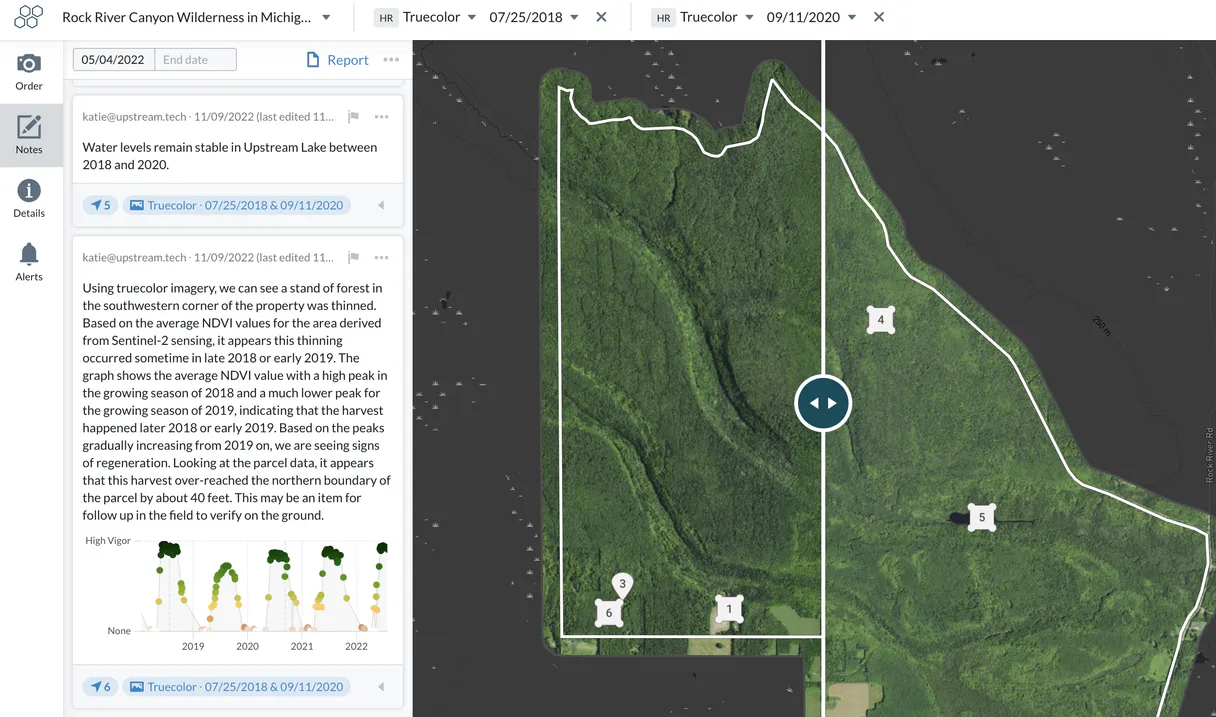
Upstream Lens MCP Server with 8 Tools Ready for AI Agents
 GDPR Free for Subscribers
Monitor upstream oil and gas operations with production data analytics, well performance tracking, and field reporting tools. Unlock 8 tools ready out of the box. Connect this App Connector to instantly empower AI agents like Claude Code, Cursor, or any MCP-compatible client with advanced capabilities.
Ask AI about this App Connector
Vinkius delivers Streamable HTTP and SSE to any MCP client
* Every MCP server runs on Vinkius-managed infrastructure inside AWS - a purpose-built runtime with per-request V8 isolates, Ed25519 signed audit chains, and sub-40ms cold starts optimized for native MCP execution. See our infrastructure
What is the Upstream Lens MCP Server?
The Upstream Lens MCP Server gives AI agents like Claude, ChatGPT, and Cursor direct access to Upstream Lens via 8 tools. Monitor upstream oil and gas operations with production data analytics, well performance tracking, and field reporting tools. Powered by the Vinkius - no API keys, no infrastructure, connect in under 2 minutes.
Built-in capabilities (8)
Tools for your AI Agents to operate Upstream Lens
Ask your AI agent "List all active environmental projects in my Lens account." and get the answer without opening a single dashboard. With 8 tools connected to real Upstream Lens data, your agents reason over live information, cross-reference it with other MCP servers, and deliver insights you would spend hours assembling manually.
Works with Claude, ChatGPT, Cursor, and any MCP-compatible client. Powered by the Vinkius - your credentials never touch the AI model, every request is auditable. Connect in under two minutes.
Why teams choose Vinkius
One subscription gives you access to thousands of MCP servers - and you can deploy your own to the Vinkius Edge. Your AI agents only access the data you authorize, with DLP that blocks sensitive information from ever reaching the model, kill switch for instant shutdown, and up to 60% token savings. Enterprise-grade infrastructure and security, zero maintenance.
Build your own MCP Server with our secure development framework →The Upstream Lens App Connector works with every AI agent you already use
…and any MCP-compatible client









Use all 8 Upstream Lens tools with your AI agents right now
Empower your AI agents to connect to Upstream Lens and securely perform advanced actions on Vinkius infrastructure. Beyond a simple connection, you gain an advanced AI Gateway that provides complete visibility into agent activity, ensuring maximum governance and optimized token usage.
Check Lens API health
Get organization metadata
Get details for a specific property feature
List all portfolios
Can be filtered by update date. List observations and notes for a project
List detailed project observations
List all environmental projects
) for a specific property. List available imagery layers for a property
What the Upstream Lens MCP Server unlocks
Connect your Upstream Tech Lens account to any AI agent and simplify how you monitor conservation projects, analyze satellite imagery, and track environmental changes through natural conversation.
What you can do
- Project & Portfolio Oversight — List all environmental projects and portfolios to manage your conservation assets.
- Imagery Analysis — Query available satellite imagery layers (Sentinel, Landsat, etc.) for specific property features.
- Geospatial Insights — Fetch detailed metadata and field observations for properties to track ground-truth data.
- Environmental Monitoring — List project notes and observations to keep a record of changes over time.
- Organization Management — Retrieve Lens organization profiles and verify account configurations.
- Operational Status — Check API health and connectivity to ensure your monitoring engine is always active.
How it works
1. Subscribe to this server
2. Enter your Upstream Tech Lens API Key (found in your account dashboard)
3. Start monitoring your environmental assets from Claude, Cursor, or any MCP client
Who is this for?
- Conservation Managers — quickly retrieve field notes and check satellite imagery availability via simple AI queries.
- Environmental Analysts — monitor changes in property features and verify geospatial metadata directly from the workspace.
- Sustainability Teams — track project observations and maintain an organized portfolio of environmental monitoring sites.
Frequently asked questions about the Upstream Lens MCP Server
Can I see if new satellite images are available for my project?
Yes! Use the list_property_imagery tool and provide the Property ID. Your agent will retrieve all available imagery layers (Sentinel, Landsat, etc.) with their respective capture dates.
How do I retrieve field notes for a specific conservation project?
Run the list_project_notes query with your Project ID. You can also provide an optional timestamp to filter only notes updated after a specific date.
Is it possible to see the geospatial metadata for a property feature?
Absolutely. Use the get_property_details tool with the Feature ID to retrieve detailed geospatial data and metadata for any monitored property.
More in this category
Open-Meteo Air Quality
4 toolsMonitor the air your users breathe: PM2.5, PM10, ozone, pollen counts, and official AQI indexes (European & US) — real-time pollutant intelligence for health-conscious AI agents.

Doofinder
10 toolsEmpower e-commerce search via Doofinder — perform keyword and filtered searches, get predictive suggestions, and audit search analytics directly from any AI agent.

Binance
8 toolsGet real-time cryptocurrency prices, order books, candlesticks and trades from Binance exchange.
You might also like
Cashboard
8 toolsManage time tracking, invoicing, and projects via Cashboard — track expenses, send estimates, and monitor client billing directly from any AI agent.
Messari
10 toolsCrypto market intelligence via Messari — track assets, metrics, and blockchain news.
Fluxiom
9 toolsManage digital assets, organize with tags, and oversee collections via AI agents with Fluxiom DAM.